1. Bubuka
Hatur nuhun pikeun meuliasing the Max Power MPD437 Ultra PRO M2 Portable Bluetooth Speaker. This speaker is designed to provide high-quality audio in various environments, featuring water resistance and dust-proof capabilities for outdoor use. Please read this manual carefully before using the product to ensure proper operation and to maximize its lifespan.
Émbaran Kasalametan
- Ulah ngalaan speaker ka suhu ekstrim atawa sinar panonpoé langsung pikeun période nambahan.
- Hindarkeun lungsur atanapi nahan panyatur kana tabrakan anu kuat.
- Ulah nyobian ngabongkar atanapi ngarobih speaker. Ieu bakal ngabatalkeun garansi.
- Jauhkeun spéker tina alat médis.
- Paké ngan kabel ngecas disadiakeun.
2. Eusi Paket
Pastikeun sadaya item aya dina bungkusan:
- Max Power MPD437 Ultra PRO M2 Portable Bluetooth Speaker
- Kabel Daya
- Kabel AUX
- Manual pangguna (dokumén ieu)
3. Produk Langkungview
Familiarize yourself with the components of your Max Power MPD437 Ultra PRO M2 speaker.
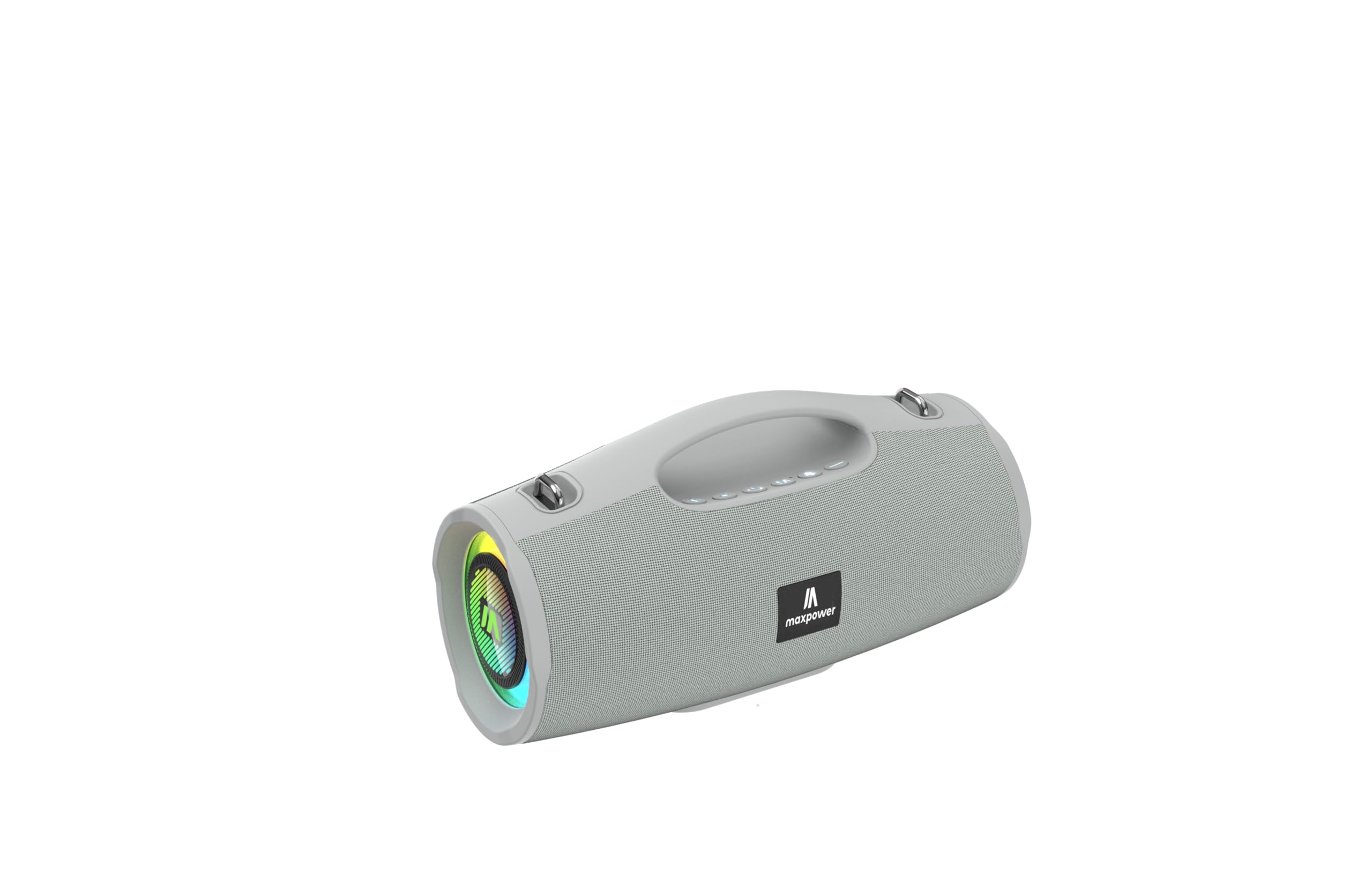
This image displays the Max Power MPD437 Ultra PRO M2 speaker. It features a robust grey casing, an integrated carrying handle at the top, and a series of control buttons. One end of the speaker is equipped with an LED light ring, indicating its operational status and adding visual effects.
Komponén konci:
- Gagang Panyangga Terpadu: Pikeun portability gampang.
- Tombol kontrol: For power, volume, playback, and mode selection.
- Speaker grille: Protects the speaker drivers.
- Cincin Lampu LED: Provides visual effects and indicates status.
- Port ngecas: Pikeun nyambungkeun kabel kakuatan.
- Input AUX: Pikeun sambungan audio kabel.
4. Setélan
4.1 Ngecas Speaker
- Connect the provided Power Cable to the charging port on the speaker.
- Plug the other end of the Power Cable into a suitable power source.
- Indikator LED bakal némbongkeun status ngecas. Ngecas pinuh peryogi waktos sakitar 3 jam.
- Disconnect the charging cable once fully charged.
4.2 Nyapasangkeun Bluetooth
- Pencét terus tahan tombol Daya pikeun ngahurungkeun speaker. Speaker bakal asup kana modeu pasangan Bluetooth, anu dituduhkeun ku lampu LED anu kedip-kedip.
- Dina alat anjeun (smartphone, tablet, laptop), aktipkeun Bluetooth sareng milarian alat anu sayogi.
- Select "MPD437 Ultra PRO M2" from the list of devices.
- Sakali dipasangkeun, speaker bakal ngaluarkeun sora konfirmasi, sareng lampu LED bakal eureun kedip-kedip.
- Spéker bakal otomatis nyobian nyambung deui ka alat anu dipasangkeun terakhir nalika diaktipkeun.
4.3 Sambungan AUX
- Connect one end of the provided AUX Cable to the AUX input port on the speaker.
- Connect the other end of the AUX Cable to the audio output jack of your device.
- Spéker bakal otomatis pindah ka modeu AUX.
5. Parentah Operasi
5.1 Daya Hurung/Pareuman
- Daya Hurung: Pencét terus tahan tombol Daya salami 2-3 detik.
- Pareum listrik: Pencét terus tahan tombol Daya salami 2-3 detik.
5.2 Volume Control
- Ningkatkeun Jilid: Pencét tombol '+'.
- Turunkeun Jilid: Pencét tombol '-'.
5.3 Playback Control (Bluetooth/AUX Mode)
- Puter / Reureuh: Pencét tombol Puter / Reureuh.
- Lagu salajengna: Pencét jeung tahan tombol '+'.
- Lagu Sateuacanna: Pencét jeung tahan tombol '-'.
5.4 Pamilihan Mode
Press the 'M' (Mode) button to switch between Bluetooth, AUX, and FM Radio modes.
5.5 Operasi Radio FM
- Pindah ka modeu Radio FM nganggo tombol 'M'.
- Pencét tombol Puter/Pause pikeun otomatis nyeken sareng nyimpen stasiun FM anu sayogi.
- Anggo tombol '+' sareng '-' pikeun nganapigasi antara stasiun anu disimpen.
5.6 Modeu Lampu LED
The speaker features vibrant LED lights. Press the dedicated LED button (if available, or a long press on a specific button) to cycle through different light modes or turn them off.
6. Pangropéa
6.1 beberesih
- Ngusap spéker ku hipu, damp lawon.
- Ulah make cleaners abrasive, alkohol, atawa pangleyur kimiawi.
- Pastikeun sadaya palabuhan garing sateuacan ngecas atanapi nyambungkeun kabel.
6.2 Panyimpenan
- Simpen speaker di tempat anu tiis sareng garing, jauh tina sinar panonpoé langsung.
- Upami nyimpen kanggo waktos anu panjang, ngeusi batre sakitar 50% unggal sababaraha bulan pikeun ngajaga kasehatan batre.
7. Cara ngungkulan
| Masalah | Mungkin Cukang lantaranana | Solusi |
|---|---|---|
| Speaker teu hurung. | Batré béak. | Cas speaker nganggo kabel daya anu disayogikeun. |
| Teu aya sora ti panyatur. | Volume is too low or muted. Device not paired correctly. AUX cable not fully inserted. | Increase volume on both speaker and connected device. Re-pair Bluetooth. Ensure AUX cable is securely connected. |
| Teu bisa masangkeun via Bluetooth. | Spiker teu aya dina modeu pasangan. Bluetooth alat pareum. Spiker jauh teuing ti alat. | Ensure speaker is in pairing mode (flashing LED). Turn on Bluetooth on your device. Move speaker closer to your device (within 35 feet). |
| panarimaan radio FM goréng. | Sinyal lemah di lokasi ayeuna. | Pindahkeun spiker ka lokasi anu nampi sinyal anu langkung saé. |
8. Spésifikasi
| Ngaran modél | Ultra Pro M2 |
| Nomer Modél Item | MPD437 |
| merek | Daya Max |
| Tipe Speaker | Speaker Speaker |
| Téhnologi konektipitas | Bluetooth, bantu |
| Téknologi Komunikasi Nirkabel | Bluetooth |
| Rentang Bluetooth | 35 suku |
| Fitur husus | Dustproof, FM Radio, LED Light, Water Resistant |
| Tingkat Résistansi Cai | Tahan cai |
| Sumber Daya | Batré Powered |
| Kapasitas batré | 3000 Miliamp Jam-jaman |
| Waktu Ngecas | 3 Jam |
| Mode Kaluaran Audio | Stereo |
| Rasio Signal-to-Noise | 85 dB |
| Métode kontrol | Toél |
| Dimensi produk | 4.5 "D x 5" W x 9.9" H |
| Item Beurat | 2.65 pon |
| Komponén Kaasup | AUX Cable, Power Cable |
| UPC | 785571466584 |
| GTIN | 785571466584 |
9. Garansi jeung Rojongan
9.1 Garansi kawates
The Max Power MPD437 Ultra PRO M2 Portable Bluetooth Speaker comes with a limited warranty. Please refer to the warranty card included in your package or contact Max Power customer support for detailed warranty terms and conditions.
9.2 Rojongan Palanggan
For technical assistance, troubleshooting, or warranty inquiries, please contact Max Power customer support. Contact information can typically be found on the product packaging or the official Max Power websitus.


