
1. Bubuka
Thank you for choosing the Sharkoon AK6 RGB ATX PC Case. This manual provides essential information for the proper installation, operation, and maintenance of your new PC case. Please read this guide thoroughly before beginning the assembly process to ensure optimal performance and longevity of your components.
2. Émbaran Kasalametan
- Always disconnect the power supply from the wall outlet before installing or removing any components inside the PC case.
- Handle tempered glass panels with care. They are fragile and can break if dropped or subjected to impact.
- Ulah nepi ka wadahna kakeunaan suhu anu ekstrim, kalembaban, atanapi sinar panonpoé langsung.
- Simpen bagian-bagian leutik sareng sekrup jauh tina jangkauan barudak.
- Ensure proper grounding to prevent electrostatic discharge (ESD) damage to sensitive electronic components.
3. Eusi Paket
Punten parios yén sadaya barang aya dina pakét anjeun:
- Sharkoon AK6 RGB ATX PC Case
- Accessory box (containing screws, cable ties, and other small parts)
- Manual pangguna (dokumén ieu)
4. Produk Langkungview
The Sharkoon AK6 RGB ATX PC Case is designed with a modern glass aesthetic, featuring seamless integration of tempered glass on the front and side panels. It includes four pre-installed 120mm addressable RGB PWM fans for optimal airflow and visual appeal. The case supports a wide range of components, including BTF motherboards, and offers ample space for high-performance hardware.

Figure 4.1: Front interior view of the Sharkoon AK6 RGB PC case, showcasing the pre-installed addressable RGB fans and the spacious main chamber.

Gambar 4.2: Angled view of the Sharkoon AK6 RGB PC case, highlighting the tempered glass side panel and the top mesh for ventilation.

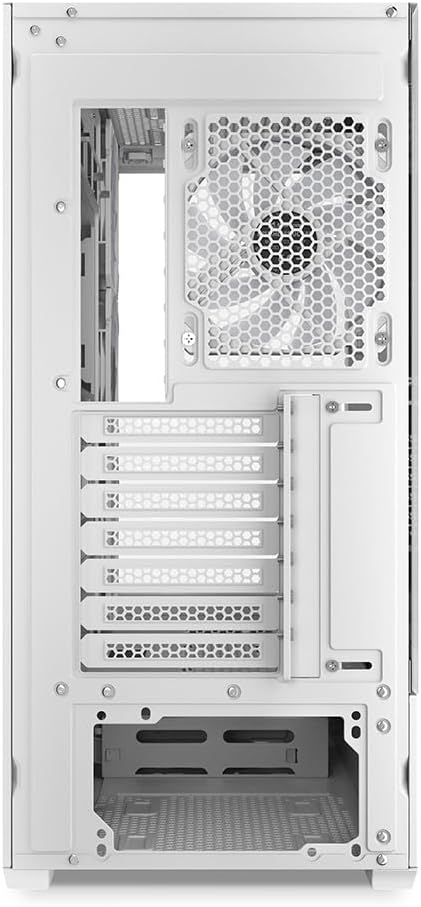
Gambar 4.3: Tukangeun view of the Sharkoon AK6 RGB PC case, showing the I/O shield cutout, rear exhaust fan mount, and expansion slots.
Hareup I / O Panel
The front I/O panel is located on the side of the case and includes:
- Tombol Daya
- Tombol Reset
- 2 x USB Ports (Type-A)
- 1 x USB Tipe-C Port
- Audio Jacks (TRRS)
5. Setup jeung Instalasi
Follow these steps to install your components into the Sharkoon AK6 RGB PC Case.
5.1 Nyiapkeun Pasualan
- Tempatkeun wadahna dina permukaan anu datar sareng stabil.
- Carefully remove the tempered glass side panel by unscrewing the thumb screws at the rear and gently pulling the panel away.
- Remove the rear metal side panel by unscrewing the thumb screws.
5.2 Pamasangan motherboard
The AK6 RGB supports Mini-ITX, Micro-ATX, ATX, and BTF motherboards.
- Install the I/O shield into the cutout at the rear of the case (if not pre-installed on your motherboard).
- Align your motherboard with the standoffs inside the case. Ensure all standoffs match the motherboard's mounting holes.
- Ngamankeun motherboard jeung screws luyu ti kotak aksésori.
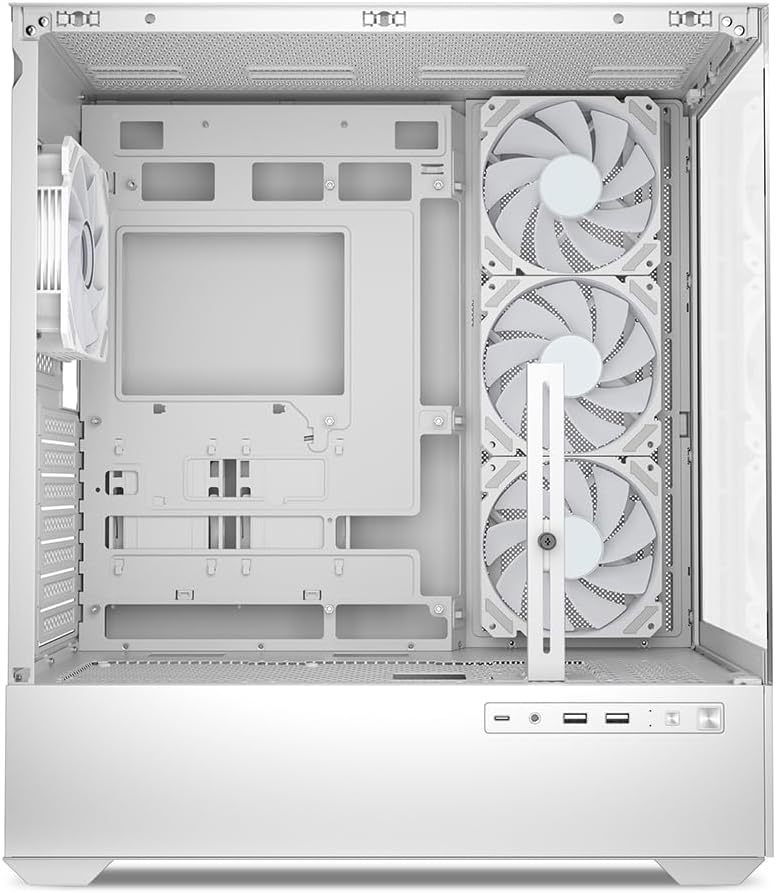
Gambar 5.1: Interior view of the Sharkoon AK6 RGB PC case, illustrating the motherboard tray, cable management cutouts, and front fan mounting points.
5.3 Pamasangan catu daya
The case features a bottom-mount power supply design.
- Slide the power supply unit (PSU) into the dedicated compartment at the bottom rear of the case.
- Align the PSU with the screw holes at the rear of the case.
- Secure the PSU with the provided screws.
5.4 Pamasangan Alat Panyimpenan
The AK6 RGB supports up to two 3.5" HDDs or four 2.5" SSDs.
- For 3.5" HDDs: Locate the drive cages beneath the PSU shroud. Slide the HDD into a drive tray and secure it with screws.
- For 2.5" SSDs: SSDs can be mounted on the dedicated brackets behind the motherboard tray or on the 3.5" drive trays using adapter screws.
angka 5.2: interior pungkur view of the Sharkoon AK6 RGB PC case, detailing the drive cages for 3.5-inch HDDs and 2.5-inch SSDs, and the power supply shroud area.
5.5 Pamasangan Kartu Grafis sareng Kartu Ékspansi
- Cabut panutup slot ékspansi anu diperyogikeun di bagian tukang wadahna.
- Selapkeun kartu grafis atanapi kartu ékspansi anu sanés kana slot PCIe anu cocog dina motherboard anjeun.
- Secure the cards with screws. The case includes a rubberized graphics card support for larger cards.
5.6 CPU Cooler and Radiator Installation
The case supports CPU coolers up to 17 cm in height and allows for extensive liquid cooling setups.
- Pasang cooler CPU anjeun nurutkeun parentah produsén na.
- For liquid cooling, the case can accommodate a 360mm radiator at the top and an additional 280mm radiator.
5.7 Manajemén kabel
Mangpaatkeun guntingan manajemen kabel sareng titik pangiket di tukangeun baki motherboard pikeun ngarahkeun sareng ngamankeun kabel. Ieu ningkatkeun aliran hawa sareng estetika.
6. Parentah Operasi
6.1 Powering On
After all components are installed and cables are connected, replace the side panels. Connect the power cable to your PSU and a wall outlet, then press the power button on the front I/O panel to start your system.
6.2 RGB Fan Control
The AK6 RGB comes with four pre-installed addressable RGB PWM fans. These fans are connected to an RGB controller which also provides connections for up to four LED elements and four PWM fans. The RGB lighting can typically be controlled via your motherboard's RGB software (if compatible) or through a dedicated button on the case (if present and connected).
6.3 Optimalisasi Aliran Udara
The case is designed for ideal airflow, with three inverted fans drawing air from the side into the case. The top and rear fan mounts allow for additional exhaust fans. Ensure proper fan orientation for optimal cooling performance.

Gambar 6.1: Kelample of a fully assembled system within the Sharkoon AK6 RGB PC case, featuring various components and active RGB lighting.
7. Pangropéa
Pangropéa rutin ngabantosan mastikeun umur panjang sareng kinerja komponén PC anjeun.
- Saringan debu: Periodically clean the removable dust filters (e.g., on the top and bottom) to maintain optimal airflow and prevent dust buildup inside the case. Use compressed air or a soft brush.
- Panel kaca: Clean tempered glass panels with a soft, lint-free cloth and a glass cleaner. Avoid abrasive materials that could scratch the surface.
- Beberesih interior: Anggo hawa anu dikomprés pikeun miceun lebu tina komponén internal sareng kipas. Pastikeun sistem dipareuman sareng dicabut tina colokan listrik sateuacan dibersihkeun.
8. Cara ngungkulan
If you encounter issues with your PC case, refer to the following common troubleshooting steps:
- Henteu aya kakuatan: Ensure the power supply is properly connected to the wall outlet and the motherboard. Check all internal power cables (24-pin ATX, 8-pin CPU, PCIe power).
- Fans Teu Spinning/RGB Teu Gawé: Verify that all fan and RGB cables are correctly connected to the motherboard or the included RGB controller. Check your motherboard's BIOS/UEFI settings or RGB software for fan speed and lighting control.
- Port I/O Hareup Teu Fungsi: Confirm that the front panel connectors (USB, audio, power/reset switches) are correctly plugged into the corresponding headers on your motherboard.
- Overheating: Ensure all fans are spinning correctly and oriented for proper airflow. Clean dust filters and internal components. Verify CPU cooler installation.
For further assistance, please contact Sharkoon support.
9. Spésifikasi
| Fitur | Spésifikasi |
|---|---|
| merek | Sharkoon |
| Ngaran modél | AK6 RGB |
| Nomer modél | C-AK6W |
| Jenis Kasus | ATX munara |
| Warna | Bodas |
| Bahan | Kaca Tempered |
| Motherboard kasaluyuan | Mini ITX, Micro ATX, ATX, BTF |
| Power Supply ningkatna Tipe | Gunung handap |
| Métode Cooling | Hawa |
| Kipas anu tos dipasang | 4 x 120mm Addressable RGB PWM Fans |
| Max CPU Cooler Jangkungna | 17 cm |
| Panjangna Kartu Grafik Max | 41 cm (with rubberized support) |
| Max Panjang PSU | 23.5 cm |
| Rojongan Radiator | Top: up to 360mm, Additional: up to 280mm |
| Drive Bays | HDD 2 x 3.5" atanapi SSD 4 x 2.5" |
| Port I / O payun | 2 x USB Type-A, 1 x USB Type-C, Audio (TRRS) |
| Item Beurat | 6.1 kg |
| Fitur husus | RGB Lighting, Unique Glass Appearance, BTF Motherboard Support |
10. Garansi
Sharkoon products are manufactured to high quality standards. For detailed warranty information, please refer to the warranty card included with your product or visit the official Sharkoon websitus. Garansi biasana nyertakeun cacad dina bahan sareng pagawean dina panggunaan normal.
11. Rojongan
If you require technical assistance or have questions regarding your Sharkoon AK6 RGB ATX PC Case, please visit the official Sharkoon website for support resources, FAQs, and contact information. You may also find updated drivers or software for the RGB controller there.
Websitus: www.sharkoon.com