1. Bubuka
Thank you for choosing the iKF Solo Pro Wireless Bluetooth Headphones. This manual provides essential information for setting up, operating, and maintaining your headphones to ensure optimal performance and longevity. Please read this manual thoroughly before use and retain it for future reference.
2. Émbaran Kasalametan
- Ulah ngalaan headphone ka suhu ekstrim, kalembaban, atawa zat korosif.
- Hindarkeun leupaskeun atanapi nahan headphone kana dampak anu kuat.
- Ulah ngabongkar atanapi nyobian ngalereskeun headphone sorangan. Ieu tiasa ngabatalkeun garansi sareng nyababkeun karusakan.
- Bersihkeun headphone ku kaén anu lembut sareng garing. Ulah make cleaners cair.
- Ngadangukeun sora dina volume anu luhur teuing lila bisa ngabalukarkeun karusakan pangrungu. Atur volume ka tingkat anu aman.
- Jauhkeun tina jangkauan barudak.
3. Eusi Paket
Pastikeun yén sadaya item aya dina bungkusan:
- iKF Solo Pro Wireless Bluetooth Headphones
- Kabel Ngecas USB-C
- Kabel Audio 3.5mm
- Manual pangguna (dokumén ieu)
4. Produk Langkungview
Familiarize yourself with the components and controls of your iKF Solo Pro headphones.

Hiji sudut hareup view of the iKF Solo Pro wireless headphones in BlackRed, showcasing earcups jeung headband.
Kontrol sareng palabuhan:
- Tombol Daya: Pencét jeung tahan pikeun mareuman/nonaktipkeun.
- Volume Kaluhur/Tombol Lagu Salajengna: Pencét pondok pikeun polumeu ka luhur, pencét panjang kanggo lagu salajengna.
- Volume Turun/Tombol Lagu Saméméhna: Pencét pondok pikeun volume handap, pencét lila pikeun lagu saméméhna.
- Tombol Multi-fungsi (MFB): Maénkeun/pareumkeun, ngajawab/ngaréngsékeun telepon, aktipkeun asisten sora.
- ANC/Transparent Mode Button: Toggle between Active Noise Cancellation, Transparent Mode, and Normal Mode.
- Port ngecas USB-C: Pikeun ngecas headphone.
- 3.5mm Audio Jack: Pikeun sambungan kabel.
- Indikator LED: Mintonkeun kakuatan, papasangan, sareng status ngecas.
5. Setélan
5.1 Ngecas Headphone
Sateuacan dianggo anu munggaran, eusian pinuh headphone anjeun.
- Sambungkeun kabel ngecas USB-C ka port USB-C dina headphone.
- Sambungkeun tungtung kabel anu sanés ka adaptor kakuatan USB (teu kalebet) atanapi port USB komputer.
- Indikator LED bakal nembongkeun status ngecas (misalna beureum keur ngecas, biru keur dicas pinuh).
- Ngeusi batre pinuh biasana nyandak kirang langkung 2 jam.
5.2 Nyapasangkeun Bluetooth
Pikeun nyambungkeun headphone anjeun ka alat:
- Pastikeun headphone dicas sareng dipareuman.
- Pencét jeung tahan tombol Daya nepi ka indikator LED hurung biru jeung beureum silih ganti, nuduhkeun mode papasangan.
- Dina alat anjeun (smartphone, tablet, laptop), aktipkeun Bluetooth sareng milarian alat anyar.
- Select "iKF Solo Pro" from the list of available devices.
- Sakali nyambung, indikator LED bakal kedip-kedip biru laun atanapi tetep biru polos.
5.3 iKF-APP Installation and Customization
Enhance your listening experience by downloading the iKF-APP.
- Scan the QR code in the quick start guide or search for "iKF" in your device's app store.
- Install the iKF-APP and open it.
- Ensure your headphones are paired via Bluetooth to your device. The app should automatically detect them.
- Within the app, you can adjust noise cancellation levels, EQ settings, sound modes (Pop, Rock, Classical), monitor battery, and customize button functions.
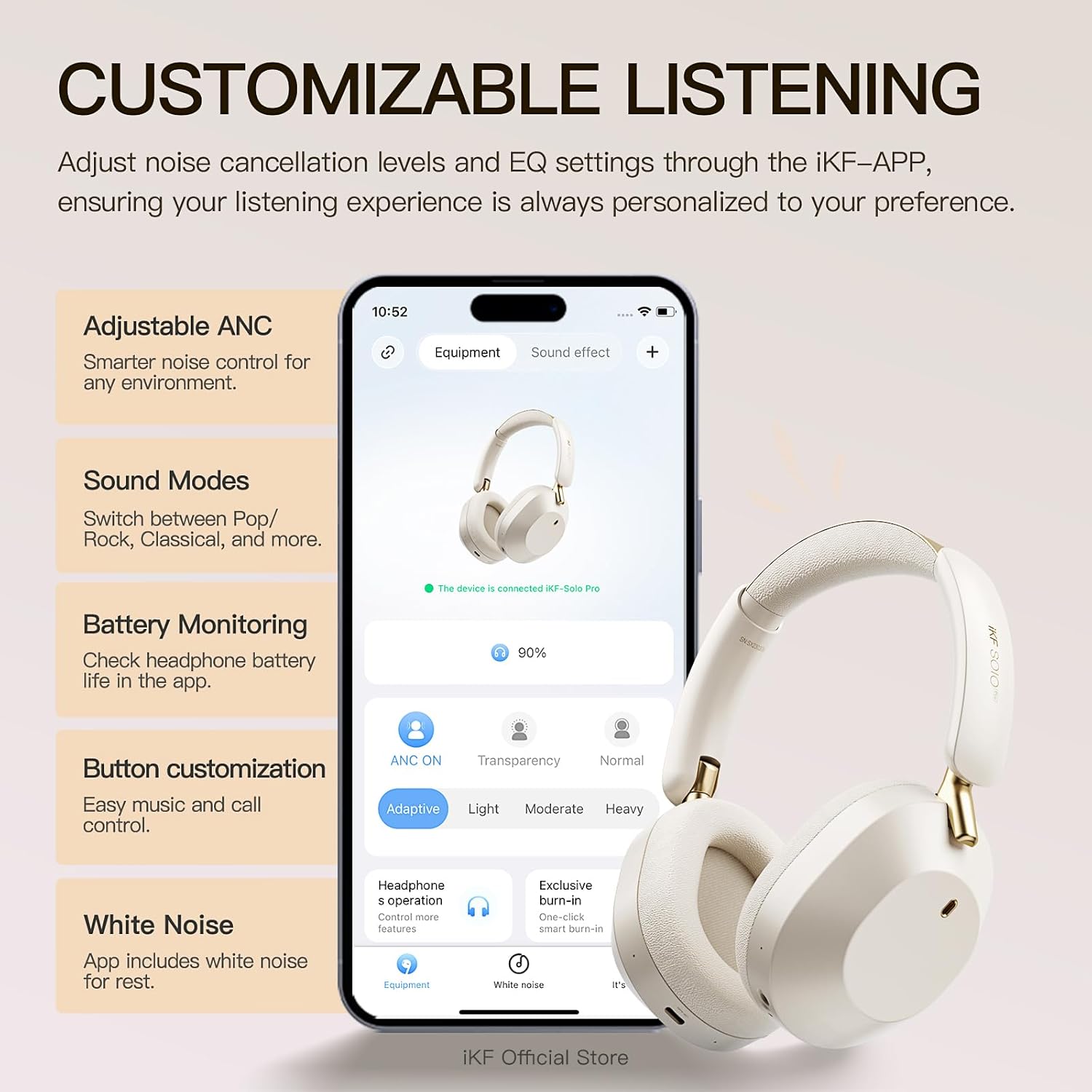
A visual showing the iKF Solo Pro headphones alongside a smartphone displaying the iKF-APP interface, illustrating options for adjusting ANC levels, sound modes, and button customization.
5.4 Konéksi Multititik
The iKF Solo Pro supports simultaneous connection to two devices.
- Masangkeun headphone sareng alat kahiji sakumaha dijelaskeun dina bagian 5.2.
- Nonaktipkeun Bluetooth dina alat munggaran.
- Put the headphones back into pairing mode and pair them with the second device.
- Aktipkeun deui Bluetooth dina alat munggaran. Headphone kedah otomatis nyambung ka kadua alat eta.
- Audio will switch between devices based on which one is actively playing content or receiving a call.

A composite image detailing the comfort fit with soft earcups, the Type-C port for wired connection, and the capability for simultaneous connection to two devices.
6. Parentah Operasi
6.1 Daya Hurung/Pareuman
- Daya Hurung: Pencét jeung tahan tombol Daya salila kurang leuwih 3 detik nepi ka indikator LED hurung.
- Pareum listrik: Pencét jeung tahan tombol Daya salila kurang leuwih 3 detik nepi ka indikator LED pareum.
6.2 Puterkeun Musik
- Puter / Reureuh: Pencét pondok MFB.
- Volume Up: Pencét pondok tombol Volume Up.
- Volume Turun: Pencét pondok tombol Volume Turun.
- Lagu salajengna: Pencét lila tombol Volume Up.
- Lagu Sateuacanna: Pencét lila tombol Jilid Turun.
6.3 Manajemén Telepon
- Ngajawab / mungkas Telepon: Pencét pondok MFB.
- Nolak Telepon: Pencét lila MFB.
- Aktipkeun Asisten Sora: Pencét dua kali MFB.
6.4 Modeu Control Noise
The iKF Solo Pro features Adaptive Active Noise Cancellation (ANC) and Transparent Mode.

An image illustrating the iKF Solo Pro headphones with a visual representation of 54dB noise reduction, highlighting the Adaptive Noise Cancellation feature.
- Modeu Togél: Short press the ANC/Transparent Mode button to cycle through: Aktif Noise pembatalan (ANC) → Modeu Transparan → Modeu Normal.
- Aktif Noise Cancelling: Reduces external ambient noise for an immersive listening experience.
- Modeu transparan: Allows you to hear your surroundings clearly without removing the headphones, facilitating conversations or awareness of your environment.

A person wearing iKF Solo Pro headphones, with sound waves indicating the transparent mode for easy conversations without removing the headphones.
6.5 Spatial Audio with Head Tracking
Experience immersive audio that adapts to your head movements.
- Spatial Audio provides a three-dimensional sound experience, ideal for movies, games, and music.
- Head tracking technology ensures the sound stage remains fixed relative to your device, creating a more realistic and engaging audio environment.
- This feature is typically enabled and managed through the iKF-APP or your connected device's audio settings.

A graphic depicting the iKF Solo Pro headphones on a head, with concentric circles indicating 360-degree head tracking technology for spatial audio.
6.6 Sambungan kabel
Anjeun tiasa nganggo headphone sareng sambungan kabel sanaos batréna habis.
- Connect one end of the 3.5mm audio cable to the 3.5mm audio jack on the headphones.
- Sambungkeun tungtung nu sejen ka kaluaran audio 3.5mm alat Anjeun.
- Note that some advanced features like ANC or Spatial Audio may be limited or unavailable in wired mode without power.
7. Pangropéa
7.1 beberesih
- Ngusap headphone ku lawon lemes, garing, tanpa lint.
- Ulah make cleaners abrasive, alkohol, atawa pangleyur kimiawi.
- Ulah meunang Uap kana sagala bukaan.
7.2 Panyimpenan
- Simpen headphone dina tempat anu tiis, garing, jauh tina sinar panonpoé langsung sareng suhu anu ekstrim.
- If storing for an extended period, charge the headphones periodically to maintain battery health.
8. Cara ngungkulan
If you encounter issues with your iKF Solo Pro headphones, refer to the following common problems and solutions:
| Masalah | Solusi anu mungkin |
|---|---|
| Headphone teu hurung. | Pastikeun headphone dicas pinuh. Sambungkeun ka sumber listrik teras cobian deui. |
| Teu tiasa dipasangkeun sareng alat. | Ensure headphones are in pairing mode (flashing blue/red). Turn off and on Bluetooth on your device. Forget previous pairings and try again. Ensure headphones are within range. |
| Taya sora atawa volume low. | Check volume levels on both headphones and connected device. Ensure headphones are properly paired. Try another audio source. |
| ANC henteu tiasa dianggo sacara efektif. | Pastikeun modeu ANC diaktipkeun. Atur ukuran headphone pikeun mastikeun segel anu saé di sakitar ceuli anjeun. |
| sambungan intermittent. | Ensure no obstructions between headphones and device. Move closer to the device. Avoid strong electromagnetic interference. |
| Headphone teu ngecas. | Check the USB-C cable and power adapter. Try a different cable or power source. Ensure the charging port is clean. |
Upami masalah tetep saatos nyobian solusi ieu, mangga ngahubungi dukungan palanggan.
9. Spésifikasi
Technical specifications for the iKF Solo Pro Wireless Bluetooth Headphones:
| Fitur | Rincian |
|---|---|
| Ngaran modél | iKF Solo Pro |
| Kontrol bising | Adaptive Active Noise Cancellation (up to 54dB) |
| Téhnologi konektipitas | Bluetooth 5.0, Wired (3.5mm) |
| Tipe Supir Audio | 40mm Silk Diaphragm Dynamic Driver |
| Rentang Frékuénsi | 20 Hz nepi ka 20,000 Hz |
| Impedansi | 16 ohm |
| Kahirupan Batré (ANC Pareum) | Nepi ka 140 jam |
| Kahirupan Batré (ANC Hurung) | Nepi ka 95 jam |
| Waktu Ngecas | Kurang leuwih 2 jam |
| Port ngecas | USB-C |
| Métode kontrol | Kontrol Tombol, Kontrol Toél |
| Alat nu cocog | Android devices, Laptops, Smart Watch, Tablets, iPhone/iPad/Macbook |
| Bahan | Logam, Plastik |
| Item Beurat | 1.6 Pon (kira-kira 0.73 kg) |

An image highlighting the extended battery life of the iKF Solo Pro headphones, indicating 140 hours of playback with ANC off and 95 hours with ANC on.
10. Garansi jeung Rojongan
10.1 Émbaran jaminan
Your iKF Solo Pro headphones are covered by a manufacturer's warranty against defects in materials and workmanship. The specific terms and duration of the warranty may vary by region and retailer. Please refer to the warranty card included with your product or contact your point of purchase for detailed information.
Garansi henteu nutupan karusakan anu disababkeun ku:
- Accident, abuse, misuse, or improper operation.
- Perbaikan atanapi modifikasi anu teu sah.
- Gagal nuturkeun parentah operasi.
- Biasa pakean.
10.2 Rojongan Palanggan
For technical assistance, warranty claims, or general inquiries, please contact iKF customer support through the following channels:
- Websitus: Visit the official iKF websitus pikeun sumber rojongan tur formulir kontak.
- Surélék: Refer to your product packaging or the iKF websitus pikeun alamat surélék dukungan palanggan.
- iKF-APP: The iKF-APP may include a direct support feature.
When contacting support, please have your product model (iKF Solo Pro) and proof of purchase readily available.