
1. Bubuka
Hatur nuhun pikeun meuliasing the Audizio Genua DAB Radio. This manual provides essential information for the safe and efficient operation of your device. Please read it thoroughly before use and retain it for future reference. The Audizio Genua is a versatile DAB+/FM stereo radio featuring Bluetooth connectivity, USB playback, and an alarm function, designed for both home and portable use.
2. Émbaran Kasalametan
- Sumber Daya: Ngan ukur nganggo adaptor kakuatan anu disayogikeun. Pastikeun voltage cocog sarat wewengkon Anjeun.
- Cai sareng Uap: Ulah ngalaan unit ka hujan, beueus, atawa cairan netes/cipratan. Ulah nempatkeun objék dieusian ku cairan, kayaning vases, dina alat.
- Ventilasi: Pastikeun ventilasi nyukupan. Ulah meungpeuk bukaan ventilasi.
- Panas: Jauhkeun unit tina sumber panas sapertos radiator, register panas, kompor, atanapi aparat sanésna (kalebet ampLiifiers) anu ngahasilkeun panas.
- beberesih: Ngabersihan ngan ku kaén garing.
- Palayanan: Entong nyobian ngalayanan produk ieu nyalira. Rujuk sadayana ngalayanan ka tanaga jasa anu mumpuni.
- anteneu: Do not bend or force the antenna.
3. Eusi Paket
Punten parios yén sadaya barang aya sareng dina kaayaan anu saé nalika ngabongkar:
- Audizio Genua DAB Radio
- Kadali jauh
- Adaptor kakuatan
- Quick Start Guide (language not guaranteed)
4. Produk Langkungview
4.1 Kadali Panel hareup jeung tampilan

Gambar 4.1: Hareupeun view of the Audizio Genua DAB Radio.
The front panel features a clear color TFT display, two speaker grilles, and an array of control buttons and a central rotary knob. The display shows station information, track details, time, and menu options. Buttons include Menu, Preset, Scan, Dimmer, Alarm, and playback controls (Play/Pause, Skip). The central knob is used for volume adjustment, tuning, and selection.
4.2 Sambungan Panel Rear
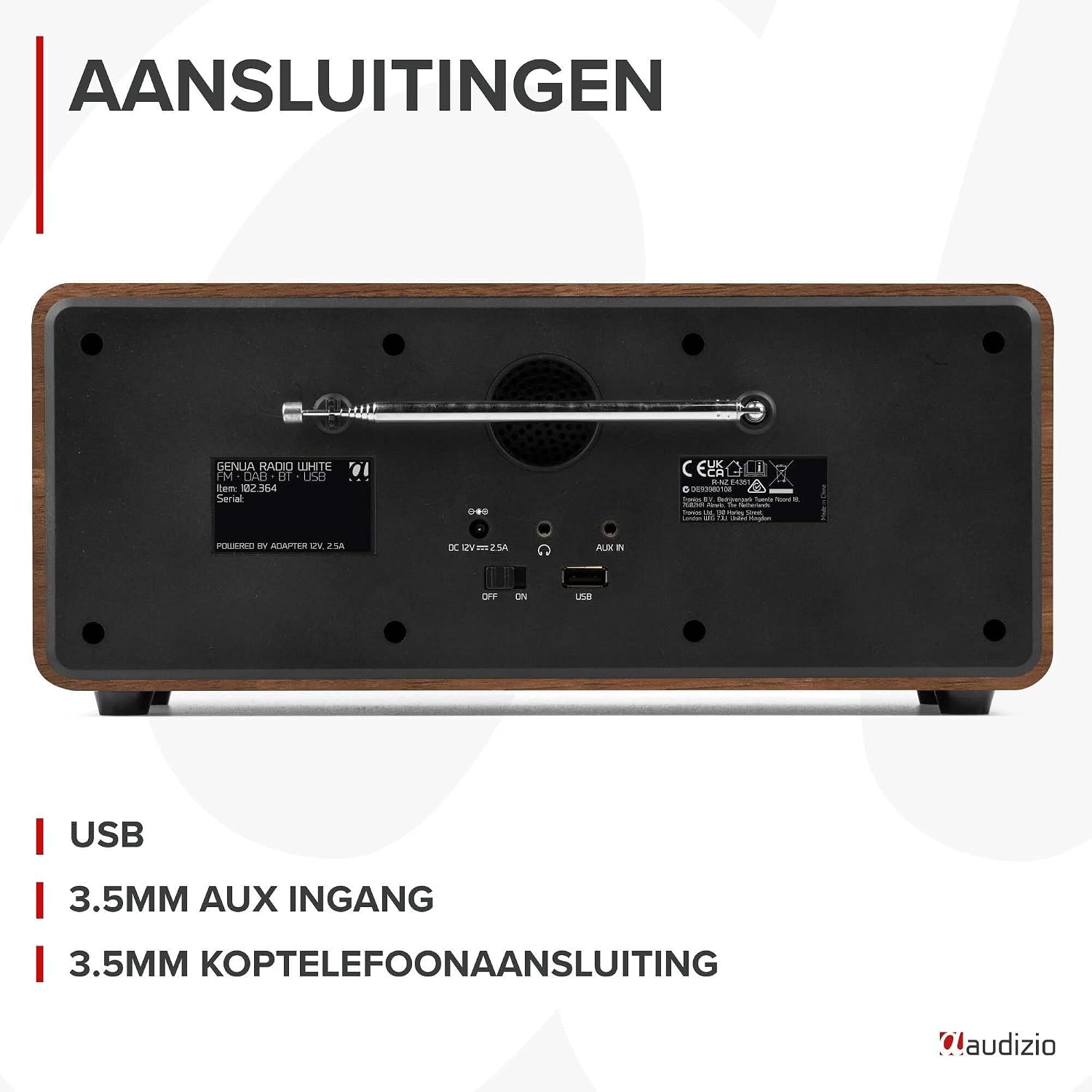
Gambar 4.2: Tukangeun view of the Audizio Genua DAB Radio with connections.
The rear panel includes the telescopic antenna for radio reception, a USB port for media playback, a 3.5mm AUX input for external audio devices, a 3.5mm headphone output, a DC 12V power input, and a main power ON/OFF switch.
4.3 Jauh Jauh

Figure 4.3: Remote control for the Audizio Genua DAB Radio.
The included remote control provides full functionality, allowing you to power on/off, adjust volume, change modes, navigate menus, set alarms, and control playback from a distance.
5. Setélan
5.1 Sambungan Daya
- Connect the power adapter to the DC 12V input on the rear of the radio.
- Colokkeun adaptor kakuatan kana stop kontak témbok nu cocog.
- Flip the main power switch on the rear panel to the 'ON' position.
5.2 Adjustment anteneu
Panjangkeun anteneu teleskopik sapinuhna pikeun panarimaan radio DAB+ sareng FM anu optimal. Saluyukeun posisina pikeun kualitas sinyal anu pangsaéna.
5.3 Initial Setup and Auto Scan
- Upon first power-on, the radio may prompt you to perform an auto-scan for DAB+ stations. Select 'Yes' or press the 'Scan' button.
- The radio will scan for available DAB+ stations and store them. This process may take a few minutes.
- Saatos scan parantos réngsé, radio bakal nyetél ka stasiun munggaran anu sayogi.
6. Parentah Operasi
6.1 Pamilihan Mode
Press the 'Mode' button on the remote control or the 'Menu' button on the unit to cycle through available modes: DAB+, FM, Bluetooth, USB, and AUX In.
6.2 Operasi Radio DAB +
- Select DAB+ mode.
- If no stations are found or you wish to rescan, press the 'Scan' button to perform a full scan.
- Use the 'Tune/Select' knob or the navigation buttons on the remote to browse through the list of available stations.
- Press the 'OK' button (on remote) or push the 'Tune/Select' knob to select a station.
- Nyimpen Presét: To store a favorite station, press and hold the 'Preset' button until the preset menu appears. Use the knob/navigation to select a preset number (1-30) and press 'OK' to confirm.
- Nginget-nginget Préparasi: Briefly press the 'Preset' button, then use the knob/navigation to select the desired preset and press 'OK'.
6.3 Operasi Radio FM
- Pilih modeu FM.
- Scan Otomatis: Press the 'Scan' button to automatically scan for and store available FM stations.
- Tuning Manual: Use the 'Tune/Select' knob to manually tune to a specific frequency.
- Nyimpen Presét: Similar to DAB+ mode, press and hold 'Preset', select a number, and confirm.
- Nginget-nginget Préparasi: Briefly press 'Preset', select the desired preset, and confirm.
6.4 Konektipitas Bluetooth
- Pilih modeu Bluetooth. Layar bakal némbongkeun "Pairing" atanapi "Wanting for connection".
- Dina telepon pinter anjeun atanapi alat Bluetooth anu sanés, aktipkeun Bluetooth teras milarian alat anu sayogi.
- Select "Audizio Genua" from the list of devices.
- Once paired, the radio will confirm the connection, and you can start playing audio from your device.
6.5 Playback USB
- Selapkeun USB flash drive nu ngandung MP3 files into the USB port on the rear panel.
- Select USB mode. The radio will automatically detect the USB drive and begin playing the first compatible audio file.
- Use the playback control buttons (Play/Pause, Skip Forward/Backward) on the unit or remote to manage your music.
6.6 Input AUX
- Connect an external audio device (e.g., MP3 player, smartphone) to the 3.5mm AUX IN port on the rear panel using an audio cable (not included).
- Pilih mode AUX.
- Kontrol playback sareng volume tina alat éksternal anjeun.
6.7 Alarm sareng Timer Sare
- Setélan Alarm: Press the 'Alarm' button on the unit or remote. Follow the on-screen prompts to set Alarm 1 and Alarm 2, including time, source (DAB/FM/Buzzer), and volume.
- Fungsi Tungkul Nalika alarem disada, pencét tombol naon waé (iwal Power) pikeun ngaktipkeun snooze. Alarm bakal disada deui saatos interval anu disetel.
- Timer Saré: Press the 'Sleep' button on the remote to set a sleep timer (e.g., 15, 30, 60 minutes). The radio will automatically turn off after the selected time.
6.8 tampilan Dimmer
Press the 'Dimmer' button on the unit or remote to adjust the brightness of the display. This is useful for different lighting conditions or for use in a bedroom.
7. Pangropéa
- beberesih: Anggo lawon anu lemes sareng garing pikeun ngabersihkeun bagian luar radio. Entong nganggo pembersih abrasif, lilin, atanapi pangleyur.
- anteneu: Nanganan anteneu teleskopik kalayan ati-ati pikeun nyegah karuksakan.
- Panyimpenan: If storing the radio for an extended period, disconnect it from the power supply.
8. Cara ngungkulan
| Masalah | Mungkin Cukang lantaranana | Solusi |
|---|---|---|
| Taya kakuatan | Power adapter not connected; Main power switch off | Ensure power adapter is securely connected and plugged in; Turn main power switch to 'ON' |
| Resepsi radio goréng (DAB+/FM) | Antenna not extended; Weak signal area; Interference | Fully extend and adjust the telescopic antenna; Try repositioning the radio; Move away from other electronic devices |
| Bluetooth teu dipasangkeun | Radio not in Bluetooth mode; Device not discoverable; Already paired with another device | Select Bluetooth mode on the radio; Ensure Bluetooth is enabled on your device and it's in pairing mode; Disconnect from other Bluetooth devices |
| playback USB teu jalan | Drive USB teu dipasang kalawan bener; Teu cocog file format; USB drive corrupted | Ensure USB drive is fully inserted; Check if files are in MP3 format; Try a different USB drive |
| Taya sora | Volume teuing leutik; Bisu diaktipkeun; Sumber anu dipilih salah | Increase volume; Check if mute is active; Ensure correct input source (DAB/FM/BT/USB/AUX) is selected |
9. Spésifikasi

Figure 9.1: Audizio Genua DAB Radio dimensions.
- merek: Audizio
- Jumlah modél: Genua
- warna: Bodas
- Fitur husus: Bluetooth Connectivity, DAB+ Radio
- Téknologi konektipitas: Aux, Bluetooth, USB
- Ukuran produk (L x W x H): 13.5 x 31 x 13.3 cm
- Téknologi Tuner: DAB+
- Gaya: Modern
- Sumber Daya: Kabel Listrik
- Band Radio Dirojong: FM, DAB+
- Alat anu cocog: Smartphone, Tablet, Laptop, MP3 Player, Headphones, Speaker
- Voltage: 220 volt
- Max Speaker Output Power: 50 Watt
- Jumlah Batré: 1 Non-standard battery (Type of battery required)
- Jenis layar: TFT
- Beurat barang: 2.25 kg
10. Garansi jeung Rojongan
This product is covered by a standard manufacturer's warranty. For detailed warranty terms and conditions, please refer to the documentation provided at the time of purchase or contact your retailer. For technical support or service inquiries, please contact the Audizio customer support team through their official websitus atanapi tempat pameseran anjeun.