1. Bubuka
Hatur nuhun pikeun meuliasing the MISTRAL Horizon Twilight MHV7123DR-TL 7-inch DC High Velocity Fan. This manual provides essential information for the safe operation, installation, and maintenance of your fan. Please read it thoroughly before use and retain it for future reference.

Gambar 1.1: Hareupeun view of the MISTRAL Horizon Twilight MHV7123DR-TL fan, showcasing its compact design and the fan head with the Mistral logo. A remote control is visible to the right of the fan.
2. Parentah Kasalametan
Pikeun ngurangan résiko seuneu, shock listrik, atawa tatu, salawasna turutan pancegahan kaamanan dasar ieu:
- Pastikeun catu daya voltage cocog sareng labél rating dina kipas.
- Ulah ngoperasikeun kipas upami kabel atanapi colokanna rusak. Upami rusak, hubungi petugas servis anu mumpuni.
- Jauhkeun ramo sareng barang-barang sanésna tina bilah kipas sareng bagian anu obah salami dioperasikeun.
- Ulah make kipas dina baseuh atawa damp lokasi, kayaning kamar mandi atawa wewengkon laundry.
- Cabut kipas tina stop kontak sateuacan beberesih atanapi ngalakukeun pangropéa naon waé.
- Alat ieu henteu dimaksudkeun pikeun dianggo ku jalma (kalebet murangkalih) anu ngirangan kamampuan fisik, indrawi atanapi mental, atanapi kirang pangalaman sareng pangaweruh, kecuali aranjeunna dipasihan pangawasan atanapi petunjuk ngeunaan panggunaan alat ku jalma anu tanggung jawab kana kasalametanana.
- Barudak kedah diawaskeun pikeun mastikeun yén aranjeunna henteu maén sareng alatna.
3. Eusi Paket
Pastikeun yén sadaya item aya dina bungkusan:
- MISTRAL Horizon Twilight MHV7123DR-TL Fan Unit
- Kadali jauh
- Manual pangguna (dokumén ieu)
4. Produk Langkungview
Familiarize yourself with the components of your fan:
4.1 Fan Unit
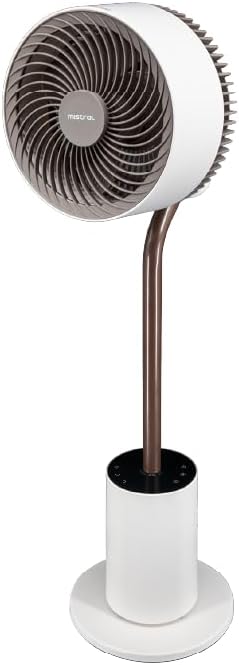
Gambar 4.1: Detil hareup view of the fan, highlighting the fan head, stand, and control base. This image provides a clear perspective of the fan's overall structure.
- Hulu Kipas: Contains the fan blades and motor.
- Front Guard: Protective cover for the fan blades.
- Rear Guard: Back cover of the fan head, housing the atmosphere light.
- Nangtung: Connects the fan head to the base.
- Control Base: Houses the control panel and power input.
- Kabel listrik: Pikeun nyambungkeun kana stop kontak listrik.
4.2 Jauh Jauh
The remote control allows convenient operation of all fan functions from a distance. (Refer to Image 1.1 for a visual of the remote control.)
- Tombol Daya: Ngahurungkeun/mareuman kipas.
- Tombol Speed: Adjusts fan speed (1-12 speeds + Booster).
- Tombol Mode: Cycles through Normal, Natural, Sleeping, and ECO modes.
- Tombol Osilasi: Activates/deactivates 3D oscillation (horizontal and vertical).
- Tombol Timer: Nyetél pangatur waktu operasi (dugi ka 12 jam).
- Tombol Lampu: Controls the atmosphere light (On/Off, brightness adjustment).
- Indicating Lights Off Button: Turns off the control panel's indicator lights.
5. Setélan
The MISTRAL Horizon Twilight fan typically comes pre-assembled. Follow these steps for initial setup:
- Ngabongkar bungkusan: Cabut kipas sareng sadaya asesoris tina bungkusna kalayan ati-ati.
- panempatan: Place the fan on a stable, flat surface. Ensure there is adequate space around the fan for proper air circulation and oscillation.
- Sambungan Daya: Selapkeun colokan listrik kana stop kontak listrik anu cocog.
- Batré Remote Control: Open the battery compartment on the remote control and insert the required batteries (not included, typically AAA). Ensure correct polarity.
6. Parentah Operasi
Operate your fan using either the control panel on the base or the remote control.
6.1 Daya Hurung/Pareuman
- Pencét éta Kakuatan button on the control panel or remote control to turn the fan On or Off.
6.2 Kontrol Laju
- Pencét éta Laju button to cycle through 12 fan speed settings.
- A Booster Speed setting is also available for maximum airflow.
6.3 Modeu
Pencét éta Modus tombol pikeun milih tina modeu operasi ieu:
- Modeu Normal: Nyadiakeun aliran hawa konstan dina laju nu dipilih.
- Mode alam: Simulates angin alam ku varying speed kipas intermittently.
- Modeu bobo: Beroperasi dina laju anu langkung handap, langkung tenang, laun-laun turunasing over time for comfortable sleep.
- Mode Eco: Adjusts fan speed automatically based on ambient temperature to optimize energy consumption.
6.4 3D Oscillation
The fan features 3D oscillation for wider air distribution.
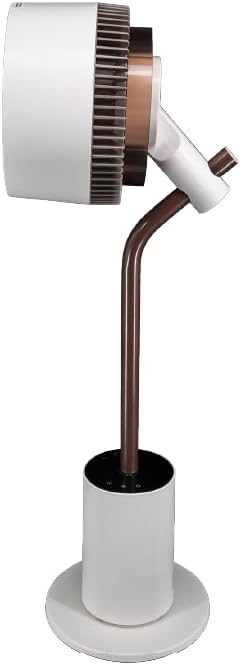
Gambar 6.4: Samping view of the fan, illustrating its ability to tilt vertically, which is part of its 3D oscillation feature. The fan head is angled upwards.
- Pencét éta Osilasi button to activate or deactivate the oscillation function.
- Osilasi horizontal: Left and Right movement at 30°, 60°, 90°, or 120° angles.
- Osilasi nangtung: Up and Down movement at 50° or 90° angles.
- The fan can oscillate both horizontally and vertically simultaneously for 3D airflow.
6.5 Fungsi Timer
- Pencét éta Timer button to set the fan to automatically turn off after a specified period.
- The timer can be set for up to 12 hours. Each press typically increases the timer by 1 hour.
6.6 Ambu diffuser
The fan includes an aroma diffuser feature for a pleasant environment.
- Locate the aroma diffuser compartment (usually at the back of the fan head or base).
- Open the compartment and add a few drops of your preferred essential oil onto the provided pad (if applicable).
- Close the compartment. The fan's airflow will gently diffuse the aroma.
6.7 Inner Mood Lighting
The fan features an atmosphere light on the back of the rear guard.

Gambar 6.7: The MISTRAL fan with its inner mood lighting activated, casting a warm glow from behind the fan head. This demonstrates the adjustable atmosphere light feature.
- Pencét éta Caang button on the remote control to turn the mood light On/Off.
- Pencét éta Caang button repeatedly to cycle through 3 adjustable brightness levels.
6.8 Indicating Lights Off Function
- Pencét éta Indicating Lights Off button on the remote control to turn off the control panel's indicator lights, which can be useful in dark environments like a bedroom.
7. Pangropéa
Beberesih sareng perawatan anu rutin bakal mastikeun kinerja anu optimal sareng manjangkeun umur kipas anjeun.
- Ngabersihan Luar: Ngusap permukaan luar kipas kalayan lemes, damp lawon. Ulah make cleaners abrasive atawa pangleyur.
- Ngabersihkeun Bilah Kipas: Unplug the fan before attempting to clean the blades. If accessible, gently wipe the blades with a soft cloth to remove dust. Do not immerse the fan in water.
- Aroma Diffuser Pad: If using an aroma diffuser, regularly clean or replace the aroma pad to prevent residue buildup.
- Panyimpenan: Upami teu dianggo salami lami, cabut kipasna, bersihan, teras simpen di tempat anu tiis sareng garing, langkung saé dina bungkus aslina.
8. Cara ngungkulan
Upami anjeun mendakan masalah sareng kipas anjeun, tingali masalah sareng solusi umum ieu:
| Masalah | Mungkin Cukang lantaranana | Solusi |
|---|---|---|
| Kipas angin teu hurung. | No power supply; Power button not pressed; Remote control batteries depleted. | Check power cord connection and wall outlet; Press the Power button; Replace remote control batteries. |
| Aliran hawa lemah. | Low speed setting; Fan blades are dirty. | Increase fan speed; Clean fan blades (refer to Maintenance section). |
| Kipas nyieun sora anu teu biasa. | Obstruction near blades; Fan not on a stable surface. | Unplug and check for obstructions; Place fan on a flat, stable surface. |
| Kadali jauh teu jalan. | Batteries depleted or incorrectly inserted; Obstruction between remote and fan. | Replace batteries, ensuring correct polarity; Ensure clear line of sight to the fan's receiver. |
9. Spésifikasi
| Fitur | Rincian |
|---|---|
| Modél | MHV7123DR-TL |
| Tipe kipas | 7-inch DC High Velocity Fan |
| Tipe Motor | Brushless DC Motor |
| Laju | 12 Speeds + Booster Speed |
| Modeu | Normal, Natural, Sleeping, ECO |
| Osilasi | 3D Oscillation (Left/Right: 30°, 60°, 90°, 120°; Up/Down: 50°, 90°) |
| Timer | 12 Jam |
| Fitur husus | Aroma Diffuser, Inner Mood Lighting (3 adjustable brightness), Indicating Lights Off Function, Remote Control |
| Sumber Daya | Kabel Listrik |
| Dimensi produk | 25D x 25W x 90H séntiméter |
| Faktor Bentuk | Stand / Floor Fan |
10. Garansi jeung Rojongan
MISTRAL products are manufactured to high-quality standards. For warranty information, please refer to the warranty card included with your purchase or visit the official MISTRAL website. For technical support or service inquiries, please contact MISTRAL customer service.
Punten tahan bukti pameseran anjeun pikeun klaim garansi.


