1. Bubuka
Welcome to the Kanto REN 200W Powered Speaker System. This manual provides essential information for setting up, operating, maintaining, and troubleshooting your new speakers. Please read these instructions carefully to ensure optimal performance and longevity of your product.

Hareupeun view of the Kanto REN 200W Powered Speakers in Matte White, showcasing desain minimalis maranéhanana.
2. Produk Langkungview jeung Fitur
The Kanto REN is a high-performance powered speaker system designed to deliver clear and dynamic audio. It features a 1-inch silk dome tweeter and a 5.25-inch aluminum concave cone woofer, powered by a 200W peak (100W RMS) Class D amplifier. The system offers a frequency response of 50 Hz to 22 kHz.
Fitur konci:
- HDMI ARC with CEC: Enables seamless integration with your TV, allowing for automatic power-on and control with your TV remote.
- True Stereo Sound: Nyayogikeun sora anu legatage and precise audio imaging.
- Vocal Boost and Night Mode: DSP-controlled sound modes to enhance dialogue clarity and soften loud effects for late-night listening.
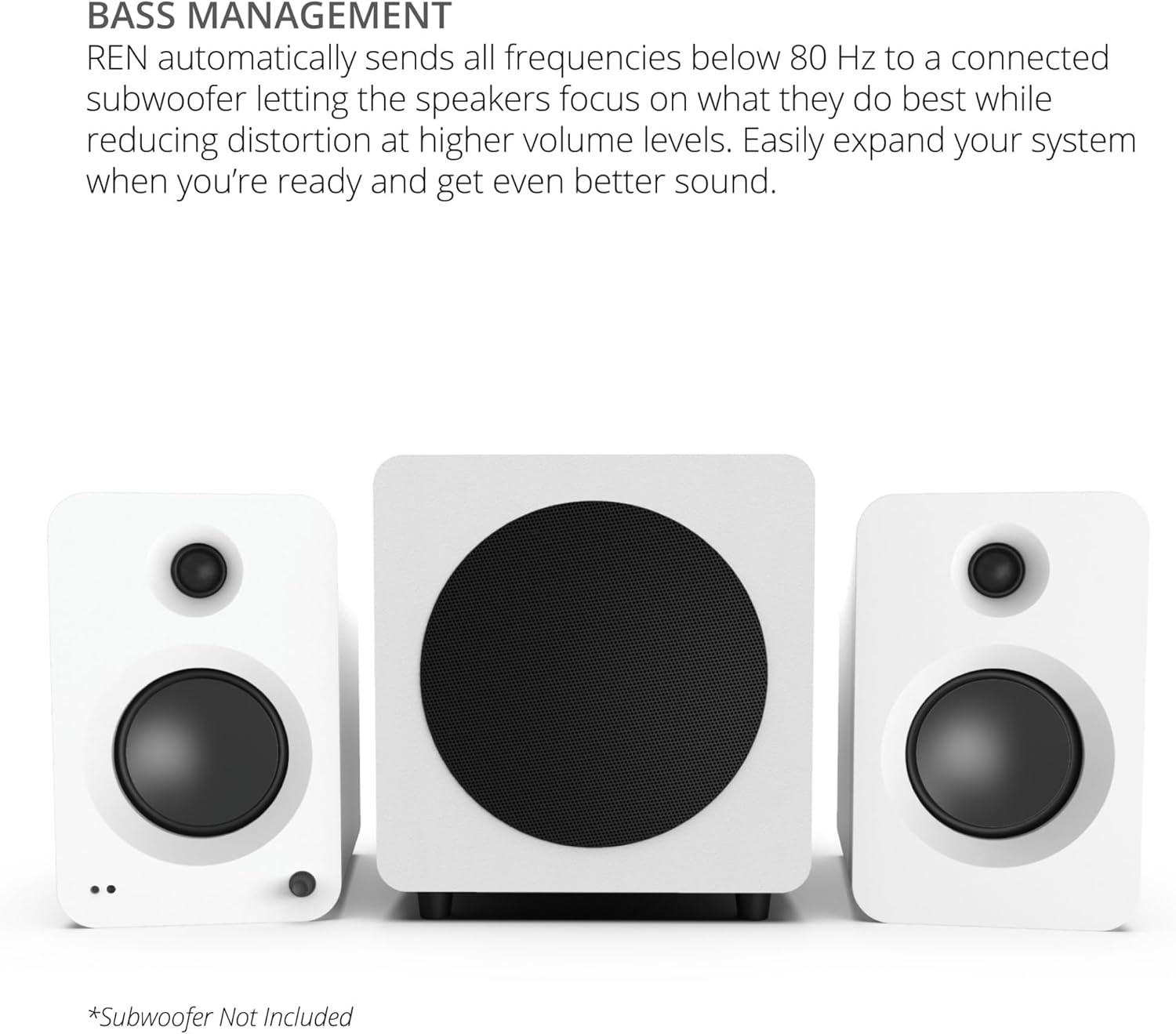
- Manajemén Bass: Automatic 80 Hz high/low pass filter when a subwoofer is connected, optimizing sound distribution.
- Konektipitas serbaguna: Includes HDMI ARC, USB-C, Bluetooth 5.3, RCA, Optical (TOSLINK), and 3.5mm AUX inputs.
- Port Muatan USB: Conveniently power network streamers or smart home devices.
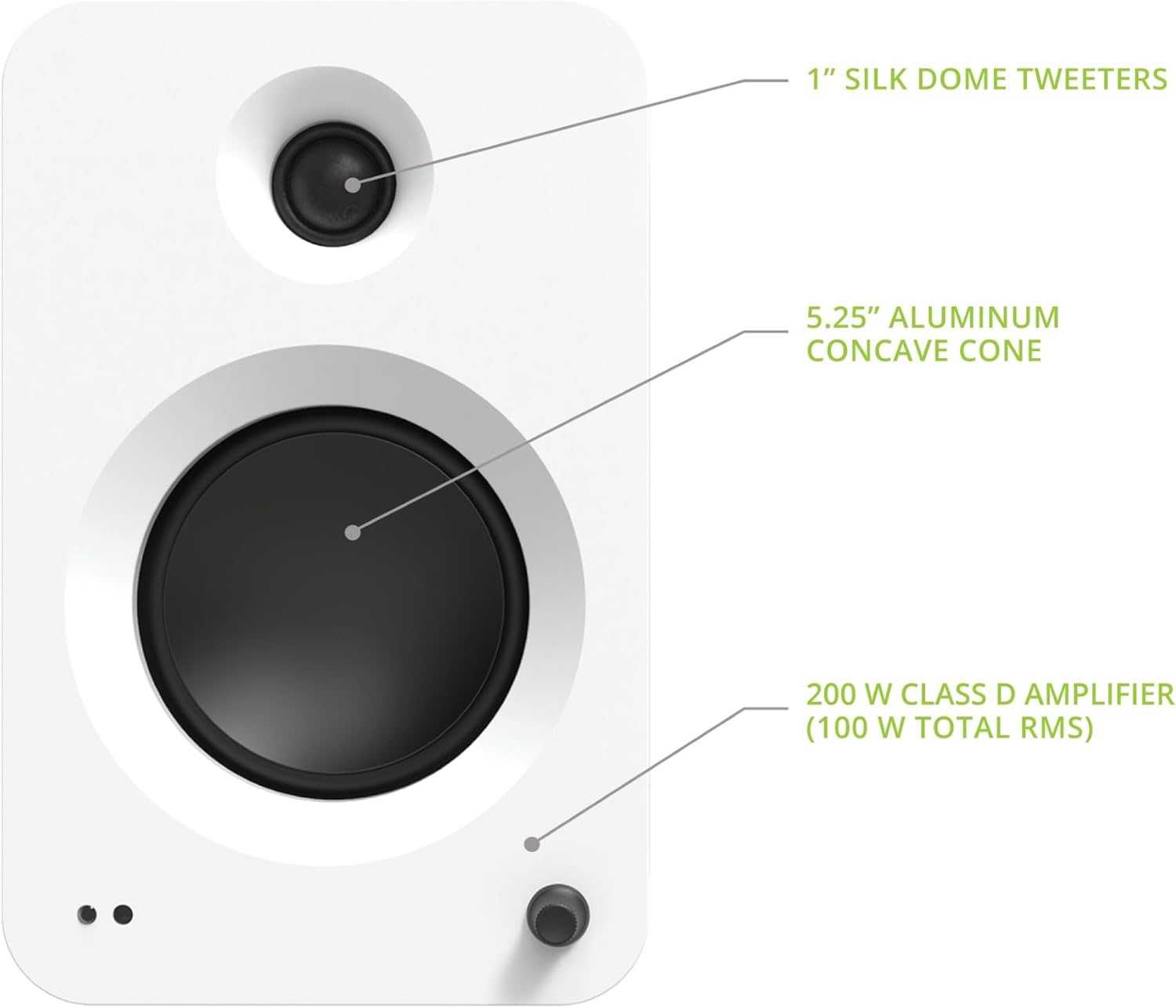
Close-up of the Kanto REN active speaker's front, highlighting the 1-inch silk dome tweeter, 5.25-inch aluminum concave cone woofer, and the integrated volume/input control knob.
3. Naon dina Box
Upon unpacking your Kanto REN speaker system, please ensure all the following components are present:
- Kanto REN Powered Speakers (Active and Passive)
- Kadali jauh
- Kawat Speaker
- Kabel listrik
- Magnetic Grilles
- 8 Adhesive Rubber Feet
- Gancang Mimitian Guide
Visual representation of the Kanto REN speaker system's included accessories.
4. Setélan
4.1 Nempatkeun Speaker
For optimal stereo imaging, place the speakers equidistant from your listening position and spaced appropriately apart. Ensure the active speaker (with controls and inputs) is connected to a power outlet and the passive speaker is connected to the active speaker.

Example of Kanto REN speakers positioned on stands in a living room for an immersive audio experience.
4.2 Nyambungkeun Speaker
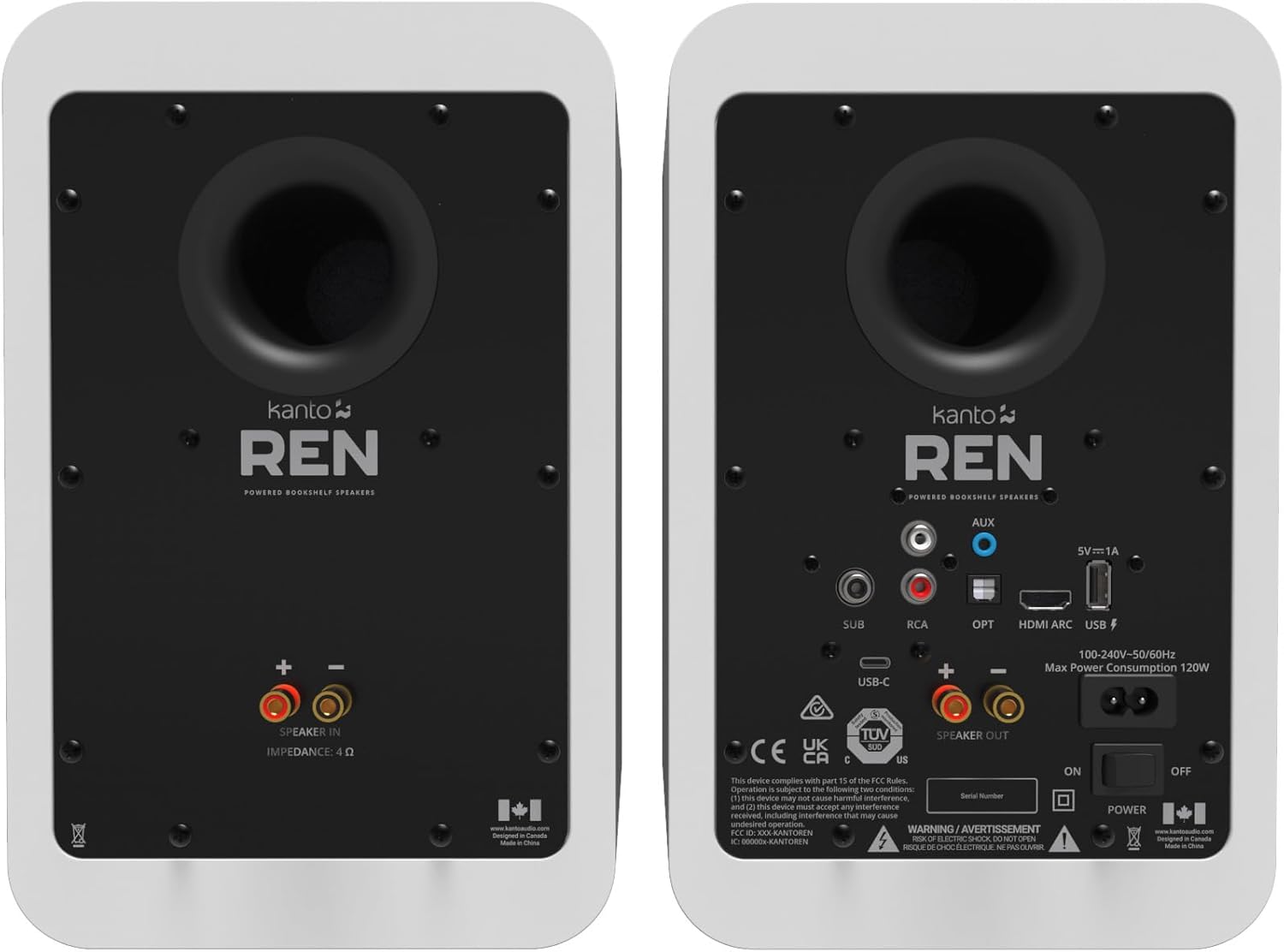
- Connect the included speaker wire from the Juru Bicara OUT terminals on the active speaker to the SPEAKER DI terminals on the passive speaker. Ensure correct polarity (red to red, black to black).
- Connect the power cord to the active speaker and then to a wall outlet.
- Flip the power switch on the rear of the active speaker to the ON position. The LED indicator on the front will illuminate.
4.3 Sambungan Input
The Kanto REN offers multiple input options. Choose the appropriate connection for your audio source:
- HDMI ARC: For connecting to a TV with an HDMI ARC port.
- USB-C: For connecting to computers or other USB-C audio sources.
- Bluetooth 5.3: Pikeun sambungan nirkabel ka smartphone, tablet, sareng alat Bluetooth anu sanés.
- RCA: For analog audio sources like turntables (with a pre-amp) or CD players.
- Optik (TOSLINK): For digital audio sources like TVs, gaming consoles, or media players.
- 3.5mm AUX: For connecting portable devices with a headphone jack.
Diwincik view of the Kanto REN active speaker's rear panel, showing all available input and output connections.
5. Parentah Operasi
5.1 Daya Hurung / Pareum sareng Kontrol Volume
- To power on or off, press the Kakuatan button on the remote control or the volume knob on the active speaker.
- Saluyukeun polumeu nganggo Jilid +/- buttons on the remote or by rotating the volume knob.
5.2 Pamilihan Input
Select your desired audio source using the dedicated input buttons on the remote control (AUX, RCA, HDMI, Bluetooth, USB, OPT) or by pressing the volume knob on the active speaker to cycle through inputs.
5.3 Nyapasangkeun Bluetooth
- Select the Bluetooth input on the speakers. The front LED will flash blue.
- On your device, enable Bluetooth and search for "Kanto REN".
- Select "Kanto REN" to pair. The LED will turn solid blue once connected.
- To reset Bluetooth pairing, press and hold the Reset Bluetooth tombol dina remote.
5.4 HDMI ARC Functionality
When connected to a TV's HDMI ARC port, the Kanto REN speakers can automatically power on/off with the TV and be controlled by the TV's remote for volume adjustments. Ensure HDMI CEC is enabled in your TV's audio settings.
5.5 Sound Modes (Vocal Boost & Night Mode)
The Kanto REN features DSP-controlled sound modes:
- Modeu wengi: Reduces dynamic range, softening loud sound effects for comfortable late-night viewdina tanpa ngaganggu batur.
- Ngaronjatkeun Vokal: Enhances dialogue clarity, making speech easier to understand.
To activate these modes, press the Modeu sora button on the remote control. Press once for Night Mode, and a second time for Vocal Boost. A third press will return to normal audio mode.
5.6 Manajemén Bass
If a subwoofer is connected to the SUB output, the Kanto REN automatically applies an 80 Hz high/low pass filter. This sends frequencies below 80 Hz to the subwoofer and allows the main speakers to focus on mid-range and high frequencies, reducing distortion and improving overall sound quality.

Kanto REN speakers integrated with a subwoofer for enhanced bass performance.
5.7 Fungsi Remote Control
The included remote control provides full command over your Kanto REN speakers:

Detailed layout of the Kanto REN remote control with all button functions labeled.
- Tombol Daya: Standby On/Off.
- Modeu sora: Cycles through Normal, Night Mode, and Vocal Boost.
- Bass Control (+/-): Saluyukeun tingkat bass.
- Treble Control (+/-): Nyaluyukeun tingkat treble.
- Kontrol Volume (+/-): Nyaluyukeun volume sakabéhna.
- Bass Reset: Resets bass to default.
- Treble Reset: Resets treble to default.
- Jempé: Ngajempékeun / nganonaktipkeun audio.
- Input Select Buttons (AUX, RCA, HDMI, Bluetooth, USB, OPT): Directly select audio source.
- LED Brightness Adjust: Adjusts the brightness of the front LED indicator.
- Sub Mute: Mutes/unmutes the connected subwoofer.
- Reset Bluetooth: Resets Bluetooth pairing.
- Playback Controls (Previous, Play/Pause, Next): Ngontrol pamuteran média dina modeu Bluetooth.
6. Pangropéa
To maintain the appearance and performance of your Kanto REN speakers, follow these guidelines:
- beberesih: Use a soft, dry cloth to wipe the speaker cabinets. Avoid abrasive cleaners, waxes, or solvents.
- Grilles: The magnetic grilles can be removed for cleaning or if you prefer the aesthetic without them. Handle gently to avoid damage.
- panempatan: Ulah neundeun spiker dina sinar panonpoé langsung, caket sumber panas, atanapi di daérah anu kalembabanna luhur. Pastikeun ventilasi anu cekap di sakitar spiker.
- Sambungan: Pariksa périodik sadaya sambungan kabel pikeun mastikeun aranjeunna aman.
7. Cara ngungkulan
If you encounter issues with your Kanto REN speakers, refer to the following common problems and solutions:
7.1 Teu Aya Daya / Teu Aya Sora
- Pastikeun kabel daya disambungkeun pageuh kana speaker sareng stop kontak témbok anu tiasa dianggo.
- Verify the power switch on the rear of the active speaker is in the ON posisi.
- Check that the volume is not set to minimum or muted.
- Confirm the correct input source is selected.
- Ensure the speaker wire connecting the active and passive speakers is correctly and securely attached.
7.2 Masalah Sambungan Bluetooth
- Ensure the speakers are in Bluetooth pairing mode (flashing blue LED).
- Make sure Bluetooth is enabled on your source device and it is within range.
- Try resetting the Bluetooth connection on both the speakers (using the remote) and your source device.
- If previously paired, try forgetting "Kanto REN" on your device and re-pairing.
7.3 HDMI ARC Problems
- Ensure your TV's HDMI ARC port is used and that HDMI CEC (Consumer Electronics Control) is enabled in your TV's audio settings. The specific name for CEC may vary by TV brand (e.g., Anynet+, Bravia Sync, SimpLink).
- Try disconnecting and reconnecting the HDMI cable.
- Restart both the TV and the speakers.
- Confirm the TV's audio output is set to HDMI ARC or external speakers.
7.4 Sound Mode Behavior (Vocal Boost / Night Mode)
The order of sound modes when pressing the Modeu sora button on the remote is: Normal > Night Mode > Vocal Boost > Normal. If you experience unexpected behavior, ensure you are pressing the button sequentially to reach the desired mode. Note that Vocal Boost may reduce subwoofer output as it focuses on vocal frequencies.
7.5 Subwoofer Integration
For optimal bass performance, especially in larger rooms or for specific content, connecting an external powered subwoofer is recommended. The Kanto REN automatically manages the crossover at 80 Hz when a subwoofer is detected, ensuring balanced sound.
8. Spésifikasi
| Fitur | Spésifikasi |
|---|---|
| Ngaran modél | RENMW |
| Tipe Speaker | Sistem Speaker anu Powered |
| Tweeter | 1" Silk Dome |
| Woofer | 5.25" Aluminum Concave Cone |
| Daya Puncak | 200W (100 Watts Total RMS) |
| Réspon Frékuénsi | 50 Hz - 22 kHz |
| Luhur / Low Pass Filter | 80 Hz (automatic with subwoofer) |
| Bahan Kabinet | Acoustic grade MDF |
| Dianjurkeun Mangpaat | jero rohangan |
| Alat nu cocog | Desktop, Laptop, Smartphone, Tablet, Televisi |
| Konfigurasi Saluran Sakuliling Sora | 2.0 |
| Warna | Matte Bodas |
| Ukuran produk (D x W x H) | 8.5 "D x 7" W x 10.9" H |
| Item Beurat | 19.8 pon |
| Métode kontrol | Jauh |
| Téknologi Komunikasi Nirkabel | Bluetooth 5.3 |
| Sumber Daya | AC |
| UPC | 800152721781 |
| Produsén | Kanto |
| Téhnologi konektipitas | Bluetooth |
| Mode Kaluaran Audio | Sakuriling |
| Tipe Pamasangan | Speaker |
| Bahan | Kai |
9. Garansi jeung Rojongan
The Kanto REN 200W Powered Speaker System comes with a 2-taun jaminan produsén. For warranty claims, technical support, or any questions not covered in this manual, please contact Kanto customer support directly. Refer to the official Kanto websitus pikeun inpo kontak paling up-to-date.


