Bubuka
The Solid State Logic SSL 2 MKII is a high-performance 2x2 USB audio interface designed for producers, podcasters, musicians, and content creators. It features professional-grade components, including two SSL-designed microphone preamps, 32-bit/192 kHz AD/DA converters, and the unique Legacy 4K analogue enhancement mode, inspired by classic SSL 4000 series consoles. This manual provides comprehensive instructions for setting up, operating, and maintaining your SSL 2 MKII interface.

Gambar 1: Hareup angled view of the SSL 2 MKII USB Audio Interface.
Fitur konci
- Two SSL-Designed Microphone Preamps: Pra-kualitas luhuramps with excellent gain range and low noise performance.
- Ningkatkeun Analog 4K Warisan: Adds a touch of classic SSL 4000 series console character with harmonic distortion and high-frequency boost.
- Professional-Grade AD/DA Converters: Operates at up to 32-bit/192 kHz for pristine audio capture and playback.
- Dual Headphone Outputs: Independent headphone outputs for flexible monitoring.
- Kontrol Campuran Monitor: Allows for zero-latency monitoring of input signals.
- MIDI I/O: 5-pin DIN MIDI input and output for connecting MIDI devices.
- Beus Powered: Conveniently powered directly from your computer via USB.
- Comprehensive Software Bundle: Includes a suite of production software to get you started.
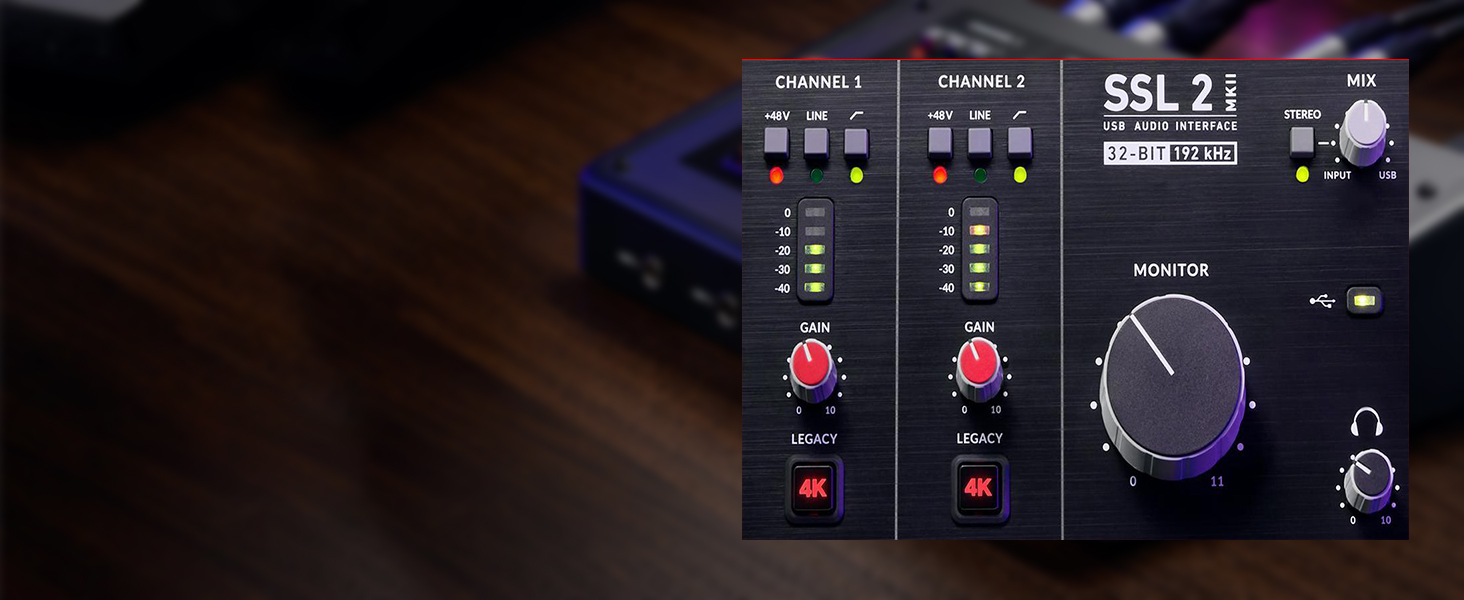
Figure 2: Detail of the SSL 2 MKII's top panel, highlighting the 32-bit 192 kHz conversion capability.

Figure 3: The Legacy 4K analogue enhancement buttons on each input channel.
Guide Setup
Sarat Sistim
- Operating System: Windows 10 (64-bit) or higher, macOS 10.15 (Catalina) or higher.
- Available USB 2.0 port or higher.
- Internet connection for driver download and software registration.
Pamasangan supir
Before connecting your SSL 2 MKII, it is recommended to download and install the latest drivers from the Solid State Logic official websitus. Ieu mastikeun kinerja sareng kompatibilitas anu optimal sareng sistem operasi anjeun.
- Visit the Solid State Logic support page for the SSL 2 MKII.
- Download the appropriate driver for your operating system (Windows or macOS).
- Turutan pitunjuk dina layar pikeun ngarengsekeun pamasangan supir.
- Balikan deui komputer upami dipenta.
Nyambungkeun Interface
- Pastikeun komputer anjeun dihurungkeun.
- Connect the SSL 2 MKII to an available USB port on your computer using the supplied USB cable. The interface is bus-powered, so no external power supply is needed.
- Once connected, the power indicator on the interface will illuminate.
- Connect your studio monitors to the 1/4" balanced outputs on the rear panel.
- Connect your headphones to one of the 1/4" headphone outputs on the front panel.

Figure 4: Rear panel connections of the SSL 2 MKII, including USB, outputs, and inputs.

Figure 5: Front panel connections of the SSL 2 MKII, including instrument inputs and headphone outputs.
Parentah Operasi
Input Channels (1 & 2)
Each input channel features a combination XLR/TRS jack, allowing you to connect microphones, line-level instruments, or high-impedance instruments (guitars, basses).
- + 48V Phantom Power: Press the +48V button to supply phantom power for condenser microphones. Ensure this is off when connecting dynamic microphones or line-level sources.
- Line/Hi-Z Switch: Select 'Line' for line-level sources (keyboards, preamps) or 'Hi-Z' for direct instrument connection (guitars, basses).
- Gain Knob: Adjusts the input gain for the connected microphone or instrument. Set this to achieve a healthy signal level without clipping (indicated by the red peak LED).
- Legacy 4K Button: Activates the 4K analogue enhancement circuit for that channel, adding a subtle harmonic richness and high-frequency lift.
Ngawaskeun
- Tombol Monitor: Controls the overall output level to your studio monitors.
- Headphone Level Knobs: Each headphone output has an independent level control.
- Monitor Mix Knob: Blends the direct input signal (INPUT) with the playback signal from your computer (USB). This allows for zero-latency monitoring during recording. Turn towards 'INPUT' to hear more of your live input, and towards 'USB' to hear more of your computer's playback.
- Stereo/Mono Switch: For the Monitor Mix, select 'Stereo' for stereo sources or 'Mono' for mono sources to ensure proper monitoring.

Figure 6: Top panel layout of the SSL 2 MKII, displaying all input and monitoring controls.
Recording Workflow
- Connect your microphone or instrument to an input channel.
- Open your Digital Audio Workstation (DAW) software.
- Select the SSL 2 MKII as your audio input and output device in your DAW's preferences.
- Create a new audio track in your DAW and select the corresponding input channel (e.g., Input 1 for Channel 1).
- Panangan lagu kanggo ngarékam.
- Adjust the Gain knob on the SSL 2 MKII until the input level meters in your DAW show a healthy signal, typically peaking around -6dB to -3dB, avoiding the red clip indicator.
- Use the Monitor Mix knob to balance your live input with any existing tracks from your DAW.
- Press record in your DAW to begin capturing audio.

Figure 7: A musician using the SSL 2 MKII to record bass guitar.

Figure 8: A musician recording vocals and acoustic guitar using the SSL 2 MKII in a home studio environment.
Pangropéa
- beberesih: Anggo kaén anu garing sareng lemes pikeun ngabersihan bagian luar unit. Hindarkeun pembersih abrasive atanapi pangleyur.
- Panyimpenan: Simpen antarmuka di tempat anu tiis sareng garing, jauh tina sinar panonpoé langsung sareng suhu anu ekstrim.
- Manajemén Kabel: Pastikeun kabel henteu bengkok atanapi tegang teuing pikeun nyegah karusakan kana konektor sareng port.
- Pembaruan firmware: Periodically check the Solid State Logic websitus pikeun apdet firmware pikeun mastikeun kinerja optimal sarta aksés ka fitur anyar.
Pamérésan masalah
| Masalah | Mungkin Cukang lantaranana | Solusi |
|---|---|---|
| No power/interface not recognized by computer. | USB cable not properly connected; faulty USB port; driver issue. | Ensure USB cable is securely connected. Try a different USB port or cable. Reinstall drivers. Try a different computer if possible. |
| No sound from monitors/headphones. | Monitor/headphone volume too low; incorrect output selected in DAW/OS; cables not connected. | Increase Monitor/Headphone volume. Verify SSL 2 MKII is selected as output device in your computer's sound settings and DAW. Check all audio cables. |
| Input signal too low or distorted. | Gain knob set incorrectly; incorrect input type selected (Line/Hi-Z); phantom power not engaged for condenser mics. | Adjust the Gain knob. Ensure Line/Hi-Z switch is set correctly for your instrument. Activate +48V for condenser microphones. |
| Latency during recording. | High buffer size in DAW; software monitoring enabled. | Reduce buffer size in your DAW's audio settings. Use the Monitor Mix knob on the SSL 2 MKII for zero-latency direct monitoring instead of software monitoring. |
spésifikasi
| Fitur | Rincian |
|---|---|
| Nomer modél | 729706X2 |
| Konektipitas | USB 2.0 (Type-C connector) |
| I/O Channels | 2 Input / 2 Output |
| Praamps | 2 x SSL-dirancang mikropon preamps |
| Kakuatan Phantom | + 48V (switchable per channel) |
| Konverter A/DD/A | Nepi ka 32-bit / 192 kHz |
| Kaluaran headphone | 2 x 1/4" TRS (independent level control) |
| Kaluaran Utama | 2 x 1/4" TRS Balanced |
| MIDI I / O | 5-pin DIN In/Out |
| Kakuatan | USB Bus Powered |
| Ukuran (L x W x H) | 10.63 x 7.87 x 4.33 inci |
| Beurat | 2.25 pon |
| Sistem Operasi cocog | Windows, macOS |
Garansi sareng Rojongan
Solid State Logic products are manufactured to high standards and undergo rigorous quality control. For information regarding warranty coverage, technical support, driver updates, and product registration, please visit the official Solid State Logic websitus atanapi ngahubungan rojongan customer maranéhanana langsung. Simpen bukti pameseran anjeun pikeun klaim garansi.
Resmi Websitus: www.solidstatelogic.com