
HJH173
User Manual: Richmat Remote Control HJH55B Replacement
Model: HJH55B (Replaces HJH173)
Produk Leuwihview
This document provides instructions for the HJH55B replacement remote control, designed for use with Richmat adjustable bed bases that originally used the HJH173 remote. This replacement remote is an OEM equivalent, featuring the same button layout and functionality as the original.

Image: The HJH55B remote is a direct OEM replacement, identical in appearance and function to the original HJH173 remote.
Setup sareng Instalasi
1. Pamasangan batré
The HJH55B remote control requires two AAA 1.5V batteries (not included). Follow these steps to install them:
- Panggihan kompartemen batré dina tonggong kadali jauh.
- Geser panutup batré ka handap pikeun mukakeunana.
- Selapkeun dua batré AAA, mastikeun terminal positif (+) jeung négatip (-) align bener jeung indikator di jero kompartemen.
- Geser panutup batré deui kana tempatna nepi ka ngaklik aman.

Gambar: Tukangeun view of the remote control with the battery cover removed, illustrating the correct orientation for AAA battery insertion.
2. Pairing with Adjustable Bed Base
This replacement remote control does not come pre-paired or synced with your adjustable bed base. Pairing is required for the remote to communicate with your bed's control box. The pairing procedure is specific to your adjustable bed base model and is typically performed at the control box itself.
penting: Refer to the original user manual for your adjustable bed base for detailed pairing instructions. Look for sections related to "Remote Control Pairing," "Syncing Remote," or "Connecting New Remote."
If you do not have your bed base's manual, you may be able to find it on the manufacturer's website or by contacting their customer support. Ensure your current remote has the same button layout as the HJH55B to ensure compatibility.
Parentah Operasi
The HJH55B remote control provides intuitive operation of your adjustable bed base. Below is a description of each button's function:
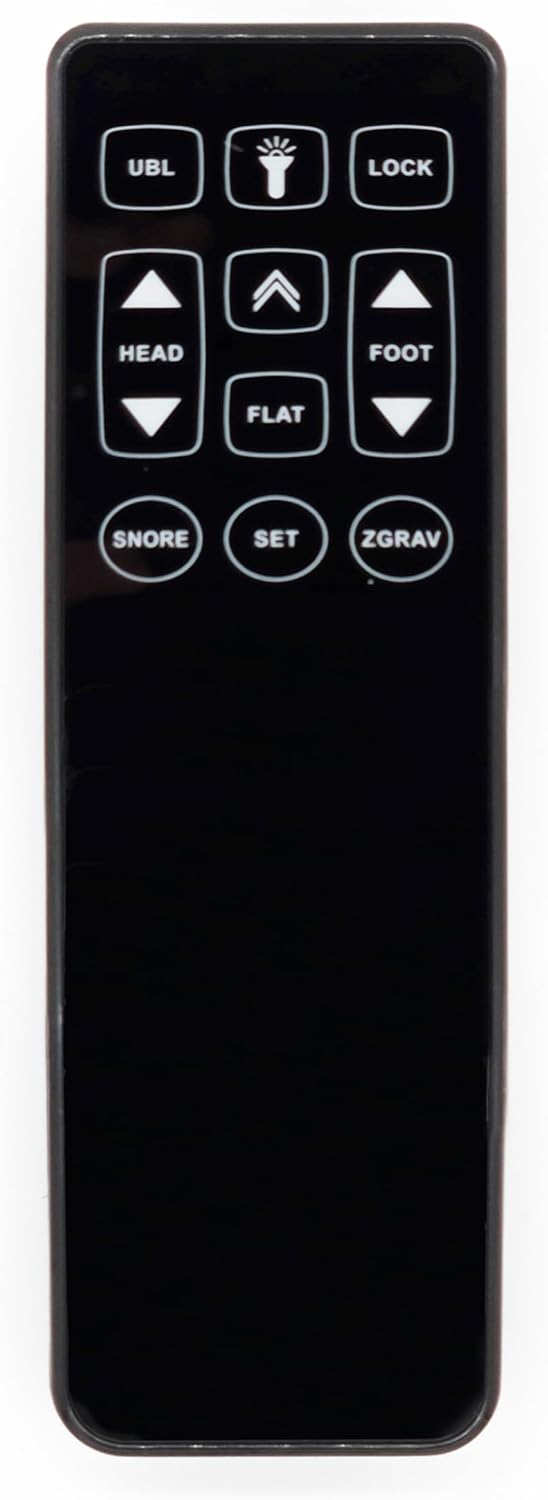
Gambar: Hareupeun view of the HJH55B remote, displaying all functional buttons.
- UBL: Activates or deactivates the under-bed lighting.
- Light Icon (💡): Controls an integrated light feature, often the under-bed light or a small light on the remote itself.
- Konci: Locks the remote control to prevent accidental button presses. Press again to unlock.
- HEAD Up (▲) / Down (▼): Adjusts the head section of the bed upwards or downwards.
- FOOT Up (▲) / Down (▼): Adjusts the foot section of the bed upwards or downwards.
- datar: Mulih ranjang ka posisi sagemblengna datar.
- SNORE: Activates a pre-programmed position designed to alleviate snoring, typically by slightly raising the head.
- SET: Used to program or save custom memory positions. Refer to your bed base manual for specific programming instructions.
- ZGRAV (Zero Gravity): Activates a pre-programmed "zero gravity" position, which elevates the head and foot to promote circulation and reduce pressure on the back.
To operate, simply press and hold the desired button until the bed reaches the desired position. Release the button to stop movement.
Pangropéa
Pangropéa anu leres mastikeun umur panjang sareng kinerja anu optimal tina remote control anjeun.
- beberesih: Ngusap kadali jauh ku lawon lemes, garing. Keur kokotor bandel, rada dampen the cloth with water. Do not use abrasive cleaners, solvents, or immerse the remote in water.
- Ngagantian batré: Replace batteries when the remote's response becomes sluggish or stops working. Always replace both batteries at the same time with new AAA 1.5V batteries. Dispose of old batteries according to local regulations.
- Panyimpenan: Simpen remote dina tempat anu garing, jauh tina sinar panonpoé langsung sareng suhu anu ekstrim.
Pamérésan masalah
| Masalah | Mungkin Cukang lantaranana | Solusi |
|---|---|---|
| Jauh teu ngabales. |
|
|
| Bed moves erratically or not as expected. |
|
|
| Remote does not pair. |
|
|
If troubleshooting steps do not resolve the issue, please contact the seller or the manufacturer of your adjustable bed base for further assistance.
spésifikasi
- model: HJH55B (Replacement for HJH173)
- Pabrikan: Richmat (Original equipment manufacturer)
- warna: Hideung
- Alat anu cocog: Adjustable Bed Base Control Box (specifically those compatible with HJH173 remotes)
- Téknologi konektipitas: Infrabeureum
- Jumlah Kancing: 11 (UBL, Light, Lock, Head Up/Down, Foot Up/Down, Flat, Snore, Set, ZGrav)
- Sumber Daya: 2 x Batré AAA 1.5V (teu kalebet)
- Beurat barang: Approximately 1 pound (including packaging)
Garansi sareng Rojongan
For information regarding the warranty of this replacement remote control, please refer to the terms provided by the seller at the time of purchase. Warranty coverage typically varies by seller.
For technical support or further assistance with your adjustable bed base, it is recommended to contact the manufacturer of your bed base directly or the seller from whom you purchased the remote.
Ask a question about this manual
Ask about setup, troubleshooting, compatibility, parts, safety, or missing instructions. Manuals+ will review the question and use this page’s manual context to help answer it.