Bubuka
This manual provides detailed instructions for the safe and efficient operation of your G Keni CD Cassette Player Radio, Model 9225. Please read this manual thoroughly before using the product and retain it for future reference.

Gambar: Hareupeun view of the G Keni CD Cassette Player Radio, Model 9225, showing the CD compartment, cassette deck, control buttons, and extendable antenna.
Produk Leuwihview
Fitur konci
- Multi-function playback: Supports CD, CD-R, CD-RW, cassette tapes, USB, SD/MMC/TF cards, and AUX input.
- AM/FM Stereo Radio: Features a high-sensitivity tuner with an extendable antenna and a backlit LCD display for clear frequency indication.
- High-Quality Stereo Speakers: Integrated dual speakers provide clear audio output.
- Headphone Jack: A 3.5mm headphone jack allows for private listening.
- Dual Power Options: Operates via AC power cord or 8 D-size batteries (not included) for portable use.
- Compact Design: Lightweight and portable.
- Recording Function: Record FM radio broadcasts directly to a blank cassette tape.

Gambar: Leuwihview of the G Keni portable speaker's multi-functional capabilities, including AM/FM radio, LCD display, AUX, headphone jack, AC/battery power, USB/SD/MMC, top-loading CD, and cassette.
Diménsi

Image: The G Keni CD Cassette Player Radio displayed with its approximate dimensions: 29cm length, 22cm width, and 16.5cm height.
Komponén jeung kontrol
Familiarize yourself with the various parts and controls of your device.

Image: Diagram illustrating the main controls and components of the G Keni CD Cassette Player Radio, including the function switch, band switch, display, and power lamp.
- Switch fungsi: Selects between CD, Radio, Tape, USB/SD, and AUX modes.
- Jilid Kenop: Saluyukeun tingkat kaluaran audio.
- Kenop Tuning: Used to tune into radio stations.
- Layar LCD: Shows current mode, radio frequency, and track information.
- Kompartemen CD: Top-loading tray for CDs.
- Dek kaset: Front-loading slot for cassette tapes.
- Kadali Puteran: Play, Pause, Stop, Fast Forward, Rewind, Skip Track (for CD/USB/SD).
- Saklar Pita AM/FM: Milih antara pita radio AM jeung FM.
- Antena anu tiasa dipanjangkeun: Pikeun ningkatkeun panarimaan radio FM.
- Port USB: Pikeun USB flash drive.
- SD/MMC/TF Card Slot: Pikeun kartu memori.
- Input AUX: 3.5mm jack pikeun alat audio éksternal.
- Jack headphone: 3.5mm jack pikeun déngékeun swasta.
Disetél
Sasayogian tanaga
Unitna tiasa dijalankeun ku listrik AC atanapi batréna.
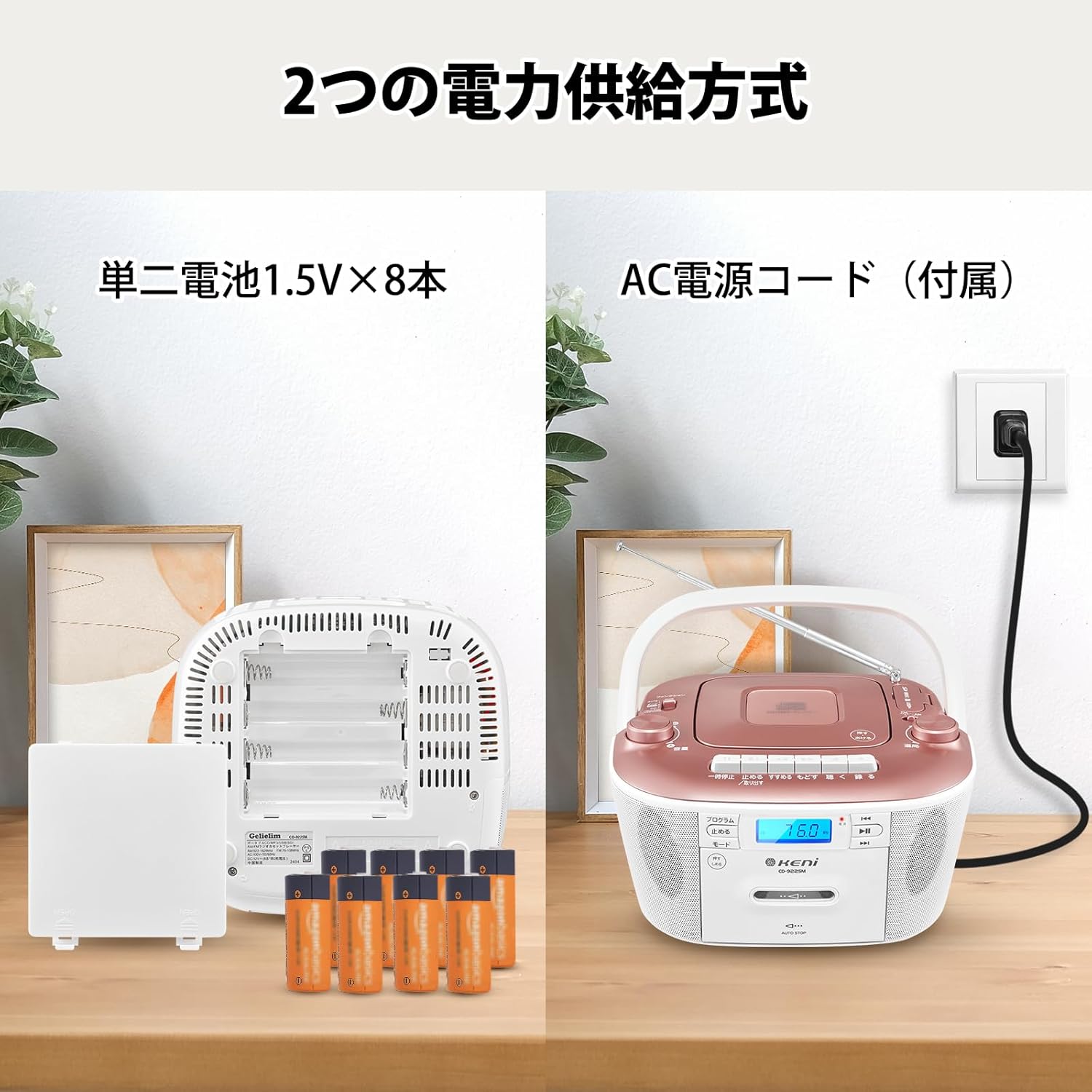
Image: Illustration showing the two power supply methods: AC power cord connection and battery compartment with 8 D-size batteries.
Operasi kakuatan AC:
- Pastikeun unit dipareuman.
- Connect the supplied AC power cord to the AC IN jack on the back of the unit.
- Plug the other end of the power cord into a standard AC wall outlet (AC 100V, 50/60Hz).
Operasi batré:
- Pastikeun unit dipareuman sareng dicabut tina daya AC.
- Buka tutup kompartemen batréna anu aya di handapeun unit.
- Insert 8 D-size (UM-1) batteries (not included) according to the polarity markings (+/-) inside the compartment.
- Tutup panutup kompartemen batré aman.
Catetan: Cabut batré upami unit moal dianggo kanggo waktos anu panjang pikeun nyegah bocor sareng karusakan.
Parentah Operasi
Operasi Radio (AM/FM)
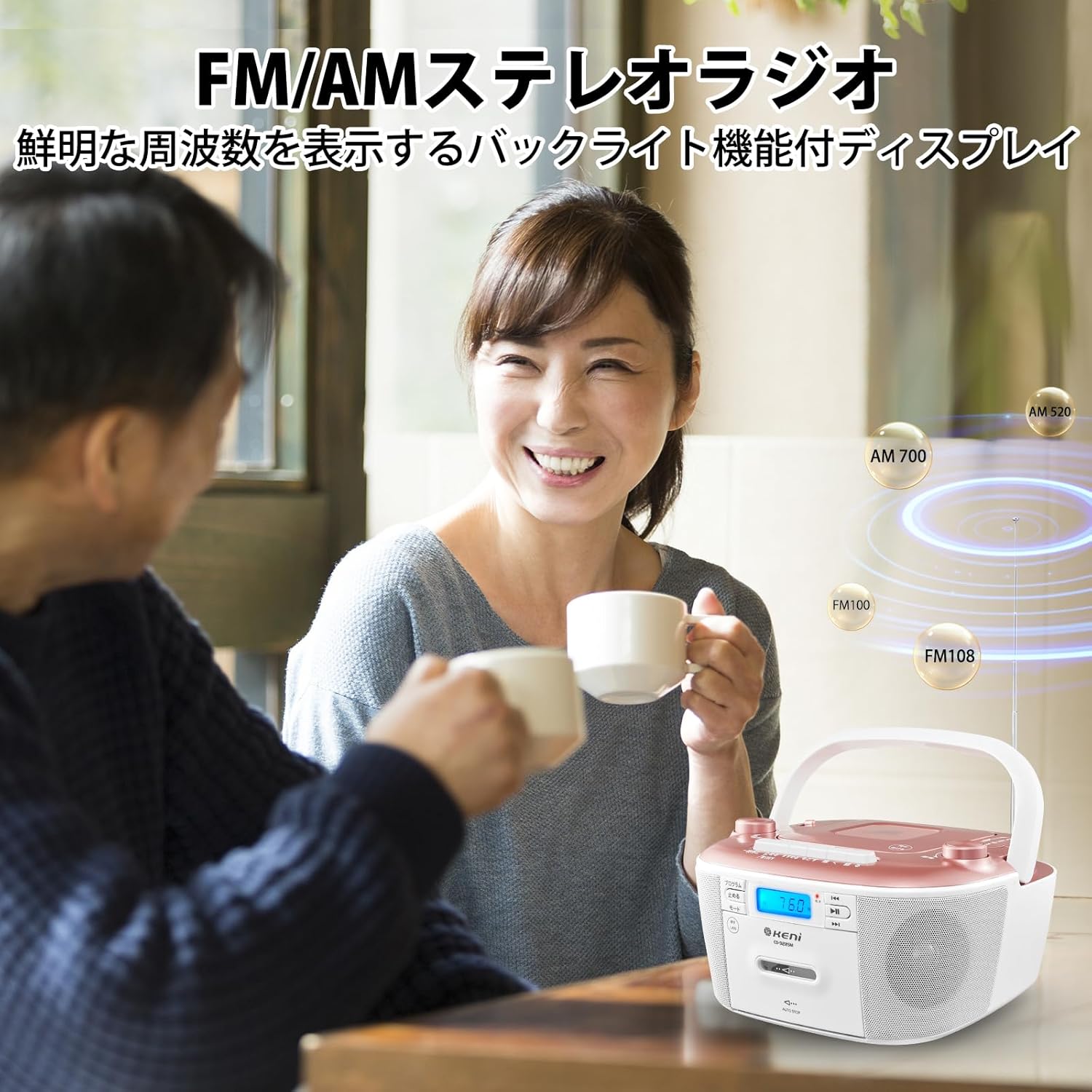
Image: A person enjoying the G Keni CD Cassette Player Radio, highlighting its FM/AM stereo radio capabilities with a backlit display.
- Nyetél Fungsi Pindah to [RADIO]. The power lamp bakal nyaangan.
- Ngagunakeun éta AM/FM Band Switch to select either [FM STEREO] or [AM].
- Extend the telescopic antenna for FM reception. For AM reception, rotate the unit for best signal.
- Hurungkeun Kenop Tuning to select your desired radio station. The frequency will be displayed on the LCD.
- Saluyukeun Jilid Kenop kana tingkat déngékeun anu anjeun pikaresep.
Tip: If reception is poor, adjust the position of the antenna or the unit itself to minimize static.
Puteran CD

Gambar: Deukeut view of the top-loading CD player compartment on the G Keni CD Cassette Player Radio, showing a CD being placed inside.
- Nyetél Fungsi Pindah to [CD].
- Buka panutup kompartemen CD.
- Place a CD (CD, CD-R, CD-RW) onto the spindle with the label side facing up.
- Tutup panutup kompartemen CD.
- Pencét éta Play / Reureuh tombol pikeun ngamimitian playback.
- Ngagunakeun éta Skip Maju / Mundur tombol pikeun nganapigasi antara lagu.
- Pencét éta Eureun tombol pikeun mungkas putereun.
Cassette Tape Playback and Recording

Image: A hand inserting a cassette tape into the front-loading cassette deck of the G Keni CD Cassette Player Radio.
Playback:
- Nyetél Fungsi Pindah to [TAPE].
- Bukakeun panto dek kaset.
- Selapkeun pita kasét kalayan ujung kabuka nyanghareup ka luhur.
- Tutupkeun panto dek kaset.
- Pencét éta Maén tombol pikeun ngamimitian playback.
- Ngagunakeun éta Maju gancang jeung Mundur buttons to quickly navigate the tape.
- Pencét éta Eureun / Ngaluarkeun tombol pikeun ngeureunkeun puteran sareng ngaluarkeun pita éta.
Recording from FM Radio to Cassette:
- Selapkeun pita kaset kosong kana dek kaset.
- Nyetél Fungsi Pindah to [RADIO] and tune to your desired FM station.
- Pencét éta Rékam button (usually red) on the cassette deck. The Play button will also engage.
- Pikeun ngeureunkeun rékaman, pencét éta Eureun / Ngaluarkeun kancing.
Putereun USB/SD/AUX

Gambar: Detil view of the AUX input, headphone jack, USB port, and SD/MMC card slot on the G Keni CD Cassette Player Radio.
USB/SD/MMC/TF Playback:
- Nyetél Fungsi Pindah to [USB/SD].
- Insert a USB flash drive into the USB port or an SD/MMC/TF card into the card slot.
- Unit bakal otomatis ngadeteksi sareng mimiti muterkeun audio anu cocog files (contona, MP3).
- Use the playback controls (Play/Pause, Skip Forward/Backward) to manage your music.
Input AUX:
- Nyetél Fungsi Pindah to [AUX].
- Connect an external audio device (e.g., smartphone, MP3 player) to the 3.5mm AUX IN jack using an audio cable (not included).
- Start playback on your external device. The audio will be routed through the G Keni unit's speakers.
- Adjust the volume using the unit's Jilid Kenop and/or the external device's volume control.
Paké Headphone
For private listening, connect 3.5mm headphones (not included) to the headphone jack. The speakers will automatically mute when headphones are connected.
Pangropéa
- beberesih: Anggo kaén anu garing sareng lemes pikeun ngabersihan bagian luar unit. Ulah make cleaners abrasive atawa pangleyur.
- Perawatan Lénsa CD: If CD playback issues occur, use a commercially available CD lens cleaner.
- Ngabersihan Kepala Kaset: Regularly clean the cassette heads with a cotton swab lightly dampened with isopropyl alcohol to ensure optimal sound quality.
- Panyimpenan: When not in use for extended periods, store the unit in a cool, dry place, away from direct sunlight and extreme temperatures. Remove batteries if storing for a long time.
Pamérésan masalah
| Masalah | Mungkin Cukang lantaranana | Solusi |
|---|---|---|
| Taya kakuatan |
|
|
| Taya sora |
|
|
| panarimaan radio goréng |
|
|
| CD skipping atawa teu diputer |
|
|
| Cassette tape issues |
|
|
spésifikasi
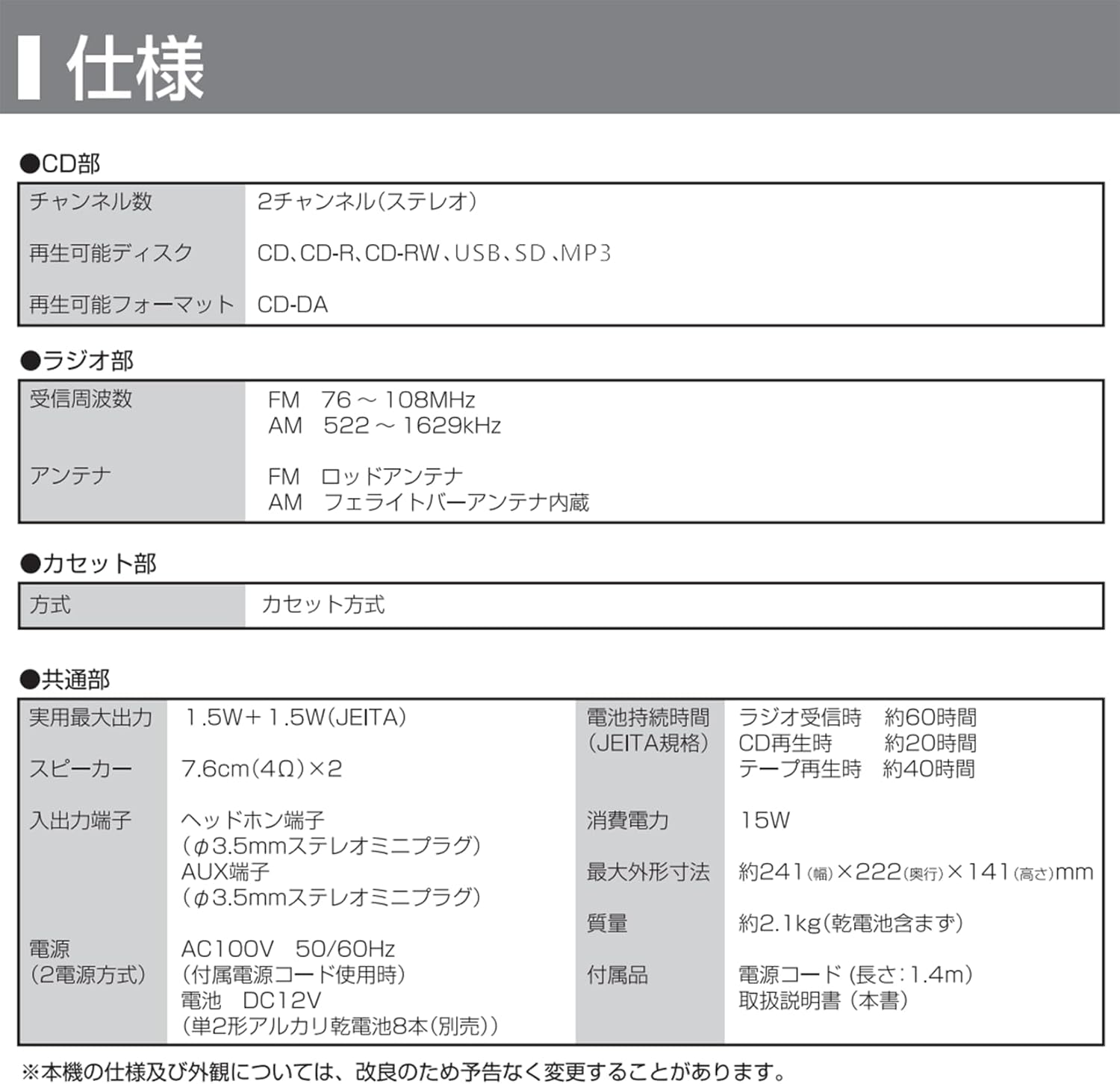
Image: A table detailing the technical specifications of the G Keni CD Cassette Player Radio, including CD, radio, cassette, and general features.
| Fitur | Rincian |
|---|---|
| Nomer modél | 9225 |
| Bagian CD |
|
| Bagian Radio |
|
| Cassette Section | Jenis Kaset |
| Kaluaran Audio |
|
| Terminal Input |
|
| Sasayogian tanaga |
|
| Konsumsi Daya | 15W |
| Umur Batré (Kira-kira.) |
|
| Ukuran (W x D x H) | Kira-kira. 241 x 222 x 141 mm |
| Beurat | Approx. 2.1 kg (excluding dry cell batteries) |
| Kaasup Asesoris | CD Radio Cassette Unit, Instruction Manual, AC Power Adapter |
Catetan: Spésifikasi tiasa robih tanpa aya bewara sateuacanna pikeun perbaikan produk.
Garansi sareng Rojongan
For warranty information and customer support, please refer to the warranty card included with your product or contact the retailer where you purchased the unit. Keep your proof of purchase for warranty claims.
Manufacturer: K&K INTERNATIONAL CO.,LIMITED


