
Brilluxa FJ3373
FanJu FJ3373 Digital Weather Station User Manual
Model: FJ3373 | Brand: Brilluxa
Bubuka
The FanJu FJ3373 Digital Weather Station is a versatile device designed to provide comprehensive weather information and timekeeping functions. It features a wireless sensor for outdoor temperature and humidity, displaying indoor and outdoor conditions, weather forecasts, barometric pressure trends, moon phases, and a digital clock with alarm capabilities. This manual provides detailed instructions for setting up, operating, and maintaining your weather station.

Gambar: The FanJu FJ3373 weather station, highlighting its multifunctionality as a wireless sensor weather clock. It displays indoor and outdoor temperature and humidity, weather forecast, and moon phase.
Émbaran Kasalametan
- Do not expose the main unit or sensor to extreme temperatures, direct sunlight, or moisture.
- Use only the specified power adapter (DC 5V) for the main unit.
- Ensure correct battery polarity when inserting batteries into the outdoor sensor.
- Jauhkeun alat tina médan magnét anu kuat.
- Ulah nyobian ngabongkar atawa ngalereskeun unit sorangan. Kontak personil mumpuni pikeun layanan.
- Buang batré heubeul kalawan tanggung jawab nurutkeun peraturan lokal.
Eusi pakét
Mangga parios eusi pakét pikeun mastikeun yén sadaya barang aya:
- 1 x FanJu FJ3373 Weather Station
- 1 x Sénsor Luar
- 1 x USB Power Cord
- 1 x User Manual (English, German, French, Italian, Spanish)
Catetan: AA batteries are not included and must be purchased separately for the outdoor sensor.
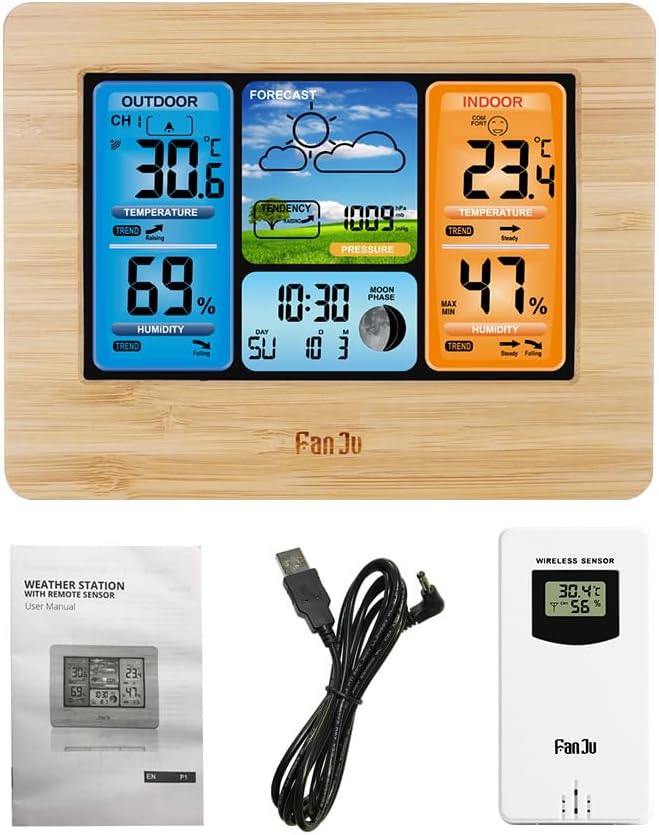
Gambar: The main weather station unit, the wireless outdoor sensor, the USB power cord, and the multi-language user manual, illustrating the complete package contents.
Produk Leuwihview
The FanJu FJ3373 consists of a main display unit and a wireless outdoor sensor. The main unit displays all collected data, while the outdoor sensor transmits external temperature and humidity readings.
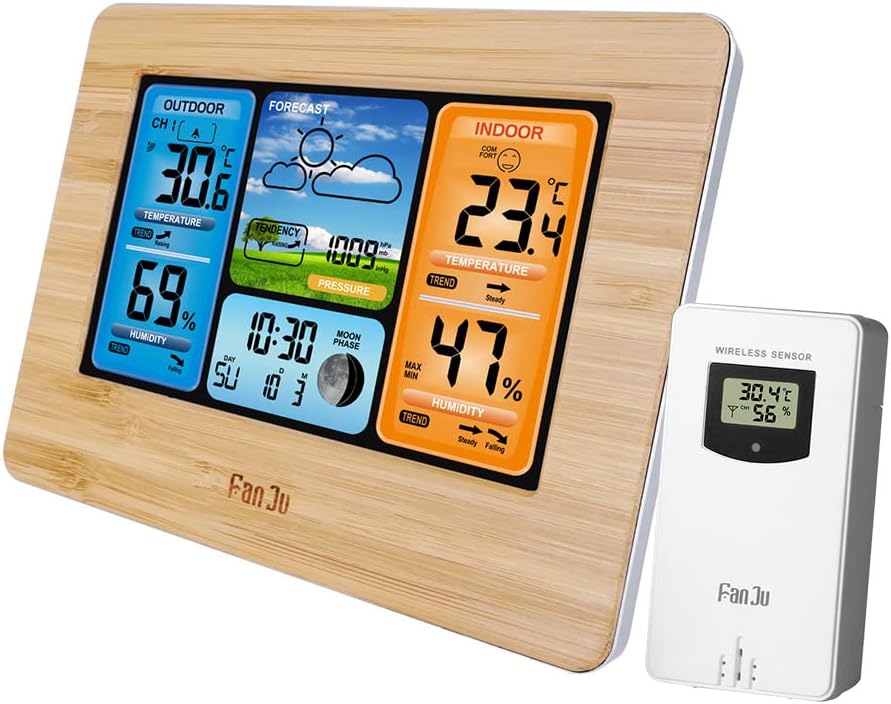
Gambar: The FanJu FJ3373 weather station main unit with its wooden frame and the separate white wireless outdoor sensor, showing both components together.
Main Unit Display Functions

Gambar: A detailed diagram of the FanJu FJ3373 display, labeling key functions such as outdoor temperature, outdoor humidity, weather forecast, air pressure, comfort display, indoor temperature, indoor humidity, date and week indicator, and moon phase.
- Suhu & Kalembaban Luar: Némbongkeun bacaan ayeuna tina sénsor nirkabel.
- Ramalan Cuaca: Icon-based prediction (sunny, cloudy, rainy, etc.).
- Tekanan hawa: Current barometric pressure and trend.
- Témbongkeun kanyamanan: Indicates indoor comfort level based on indoor temperature and humidity (5 levels).
- Suhu jero rohangan & kalembaban: Displays current readings from the main unit's internal sensors.
- Date & Week Indicator: Current date and day of the week (in 7 selectable languages).
- Fase Bulan: Némbongkeun fase bulan ayeuna.
- Waktos: 12/24 hour format option.
- Alarm/Snooze: Programmable alarm with snooze function.
- Lampu tukang: Adjustable display backlight.
Diménsi

Gambar: Technical drawing showing the dimensions of the FanJu FJ3373 weather station, including its width (167mm), height (129mm), and depth (30mm), for both wood and black color variants.
The main unit measures approximately 16.7 x 12.9 x 3 cm (6.6 x 5.1 x 1.2 inches). The outdoor sensor measures approximately 9.6 x 5 x 3.4 cm (3.8 x 2 x 1.3 inches).
Disetél
1. Powering Unit Utama
- Connect the supplied USB power cord to the DC 5V port on the back of the main unit.
- Plug the other end of the USB power cord into a compatible USB power adapter (not included) or a USB port.
- The display will light up, and the unit will enter initial setup mode.
2. Masang Batré dina Sensor Luar Ruangan
- Buka kompartemen batré di tukang sensor luar ruangan.
- Insert 2 x AA batteries (not included) according to the polarity markings (+/-).
- Tutup kompartemen batré anu aman.
- The sensor will automatically start transmitting data.
3. Pairing the Outdoor Sensor
The main unit and outdoor sensor should pair automatically within a few minutes of being powered on. Ensure both units are within range (up to 60 meters in open area) and not obstructed by thick walls or metal objects.
- If the outdoor readings do not appear, press and hold the "CHANNEL" or "SEARCH" button (refer to specific button layout on your unit if available) on the main unit to initiate a manual search for the sensor.
- The outdoor sensor can be placed on a flat surface or mounted on a wall using the integrated hanging hole.

Gambar: An illustration showing the FanJu FJ3373 weather station main unit placed indoors and the wireless outdoor sensor positioned outdoors, demonstrating the wireless connectivity and recommended placement for accurate readings.
4. Initial Settings (Time, Date, Language, Units)
After successful pairing, you may need to set the time, date, and preferred units.
- Press the "MODE" or "SET" button to enter setting mode.
- Use the "UP" and "DOWN" buttons to adjust values.
- Press "MODE" or "SET" again to confirm and move to the next setting.
- Settings typically include:
- Time format (12/24 hour)
- jam
- Menit
- Taun
- bulan
- Poé
- Day of week language (English, German, Italian, French, Spanish, Dutch, Danish)
- Unit suhu (°C/°F)
- Barometric pressure unit (hPa/mb)
- Exit setting mode by pressing the "MODE" or "SET" button repeatedly until the normal display resumes, or wait for automatic timeout.
Parentah Operasi
Ngartos Tampilan
Tingali "Produk Leuwih tiview" section and the "Function Declaration" image for a visual guide to the display elements.
- Temperature & Humidity Trends: Arrows next to temperature and humidity readings indicate rising, steady, or falling trends.
- Tingkat kanyamanan: The indoor comfort icon changes based on indoor temperature and humidity, indicating dry, comfortable, or wet conditions. There are 5 levels of comfort indication.
- Ramalan Cuaca: The forecast icon predicts weather for the next 12-24 hours based on barometric pressure changes.
- Fase Bulan: Némbongkeun fase bulan ayeuna.
Alarm sareng Fungsi Snooze
- Setélan Alarm: Press the "ALARM" button to view alarm time. Press and hold "ALARM" to enter alarm setting mode. Use "UP/DOWN" to adjust hour and minute. Press "ALARM" to confirm.
- Ngaktipkeun/Nonaktipkeun Alarm: Press "ALARM" repeatedly to toggle the alarm ON/OFF. An alarm icon will appear when active.
- Hususkeun: When the alarm sounds, press any button (except "ALARM OFF" if available) to activate snooze. The alarm will sound again after a few minutes (typically 5-10 minutes).
- Ngeureunkeun Alarm: To stop the alarm completely, press the designated "ALARM OFF" button or let it ring for a set duration until it automatically stops.
Temperature/Humidity Alerts
The FJ3373 supports high/low temperature alerts for outdoor readings, including a frost alert.
- Press the "ALERT" button (or similar) to enter alert setting mode.
- Select the desired alert type (e.g., Outdoor High Temp, Outdoor Low Temp, Frost).
- Use "UP/DOWN" to set the alert threshold.
- Activate the alert. An alert icon will appear when active.
- When the temperature reaches the set threshold, an audible alarm will sound, and the corresponding reading will flash.
Pangropéa
beberesih
- Lap unit utama sareng sénsor ku kaén anu lemes,amp lawon.
- Ulah make cleaners abrasive atawa pangleyur.
- Ensure no moisture enters the battery compartment or other openings.
Battery Replacement (Outdoor Sensor)
- When the battery indicator on the main unit shows low battery for the outdoor sensor, replace the batteries promptly.
- Buka kompartemen batré dina sénsor luar.
- Cabut accu heubeul tur buang aranjeunna leres.
- Insert new 2 x AA batteries, observing correct polarity.
- Close the compartment. The sensor will re-establish connection with the main unit.
Pamérésan masalah
| Masalah | Mungkin Cukang lantaranana | Solusi |
|---|---|---|
| Teu aya tampilan dina unit utama | No power or power cord issue. | Ensure USB power cord is securely connected and power adapter is working. Try a different USB port/adapter. |
| Outdoor readings not displayed or inaccurate | Sensor not paired, out of range, low battery, or interference. |
|
| Lepat waktos/tanggal | Not set correctly. | Manually set time and date using the "MODE" or "SET" buttons as described in the "Setup" section. |
| Ramalan cuaca teu akurat | Unit needs time to calibrate, or local conditions differ from barometric pressure trends. | Allow 7-14 days for the unit to learn local barometric pressure patterns for more accurate forecasts. Forecasts are based on pressure changes, not real-time weather. |
spésifikasi
| Fitur | Rincian |
|---|---|
| merek | Brilluxa (Product: FanJu) |
| Modél | FJ3373 (Manufacturer Model No.: Brilluxa7q56kcas4f-8Z) |
| Bahan Utama | ABS |
| Tipe tampilan | LCD Positive Display |
| Rentang Suhu Indoor | -10 ℃ ~ +50 ℃ (14 ℉ ~ 122 ℉) |
| Rentang Suhu Luar | -20 ℃ ~ +60 ℃ (-4 ℉ ~ 140 ℉) |
| Akurasi Suhu | 0.1 ℃ |
| Humidity Range (Indoor & Outdoor) | 20% RH ~ 95% RH |
| Akurasi asor | 1% RH |
| Rentang tekanan Barometric | 600hPa/mb ~ 1100hPa/mb |
| Akurasi Tekanan Barometric | 1hPa/mb |
| Daya Unit Utama | DC 5V via USB power cord |
| Kakuatan Sensor Luar Ruangan | 2 x batré AA (teu kaasup) |
| Frékuénsi nirkabel | 433.92 MHz |
| Rentang transmisi | 60 méter (daérah kabuka) |
| Dimensi Unit Utama | 16.7 x 12.9 x 3 cm (6.6 x 5.1 x 1.2 inci) |
| Diménsi Sensor Luar Ruangan | 9.6 x 5 x 3.4 cm (3.8 x 2 x 1.3 inci) |
| Item Beurat | 460 g (16.2 oz) |
| Beurat pakét | 480 g (16.9 oz) |
| Day of Week Languages | English, German, Italian, French, Spanish, Dutch, Danish |
Garansi sareng Rojongan
Information regarding specific warranty terms and customer support contact details for the Brilluxa FanJu FJ3373 Weather Station is not provided in the product description. Please refer to the documentation included in your product package or contact the seller/manufacturer directly for warranty claims and technical support.
For general inquiries, you may visit the Brilluxa brand page on Amazon: Brilluxa on Amazon
Ask a question about this manual
Ask about setup, troubleshooting, compatibility, parts, safety, or missing instructions. Manuals+ will review the question and use this page’s manual context to help answer it.