
Brilluxa FJ3373 / Brilluxa7q56kcas4f-8Z
Digital Weather Station User Manual
Model: FJ3373 / Brilluxa7q56kcas4f-8Z
Brand: Brilluxa
1. Bubuka
Hatur nuhun pikeun meuliasing the Brilluxa Digital Weather Station. This device is designed to provide accurate indoor and outdoor temperature and humidity readings, along with a weather forecast, moon phase, and standard clock functions. Please read this manual carefully before use to ensure proper operation and longevity of your device.
Fitur konci:
- Multifunction digital weather clock with weather forecast and moon phase.
- Perpetual Calendar up to Year 2099.
- Day of week in 7 user-selectable languages: English, German, Italian, French, Spanish, Netherlands, and Danish.
- Waktos dina format 12/24 jam pilihan.
- Indoor and outdoor temperature and humidity display.
- Barometric pressure tendency display.
- Outdoor high/low temperature and frost alert.
- Indoor comfort level indicator (5 levels).
- Wireless outdoor sensor with 433.92MHz RF transmitting frequency and 60 meters transmission range (open area).
- RF Through the Wall Technology for reliable sensor communication.
Eusi pakét:
Mangga parios eusi pakét pikeun mastikeun yén sadaya barang aya:
- 1 x FanJu FJ3373 Weather Station (Main Unit)
- 1 x Sénsor Luar
- 1 x USB Power Cord
- 1 x User Manual (English, German, French, Italian, Spanish)
Note: AA batteries are not included and must be purchased separately for both the main unit and the outdoor sensor.
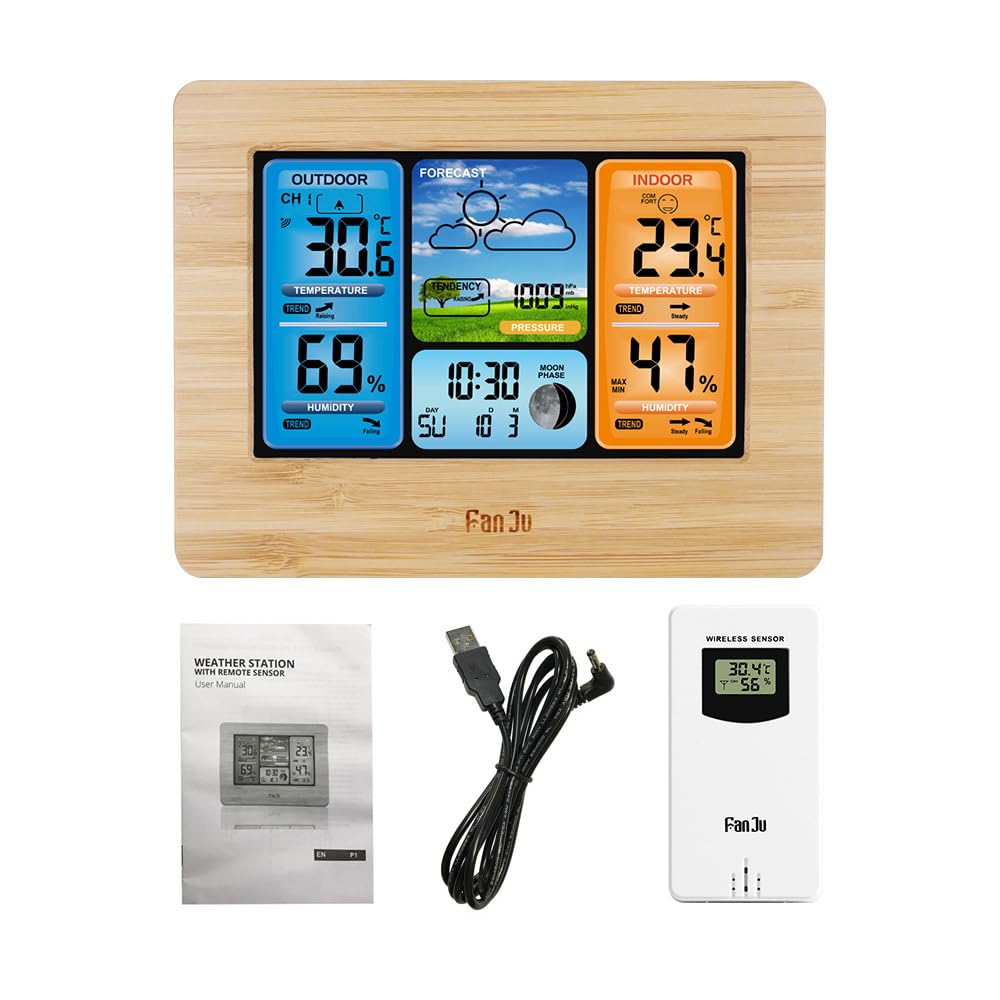
Image: Package contents of the Brilluxa Digital Weather Station. This image displays the main weather station unit, the wireless outdoor sensor, a USB power cable, and the multi-language user manual, illustrating what is included in the box.
2. Setup jeung Instalasi
2.1 Ngahurungkeun Unit Utama
- Battery Installation (Optional/Backup): Open the battery compartment on the back of the main unit. Insert 2 x LR6 AA batteries, observing the correct polarity (+/-).
- USB Power Connection (Recommended): Connect the provided USB power cord to the DC 5V port on the main unit and plug the other end into a compatible USB power adapter (not included) or a USB port. The display will light up.
Note: Using the USB power cord is recommended for continuous backlight and optimal performance. Batteries serve as a backup in case of power outage.
2.2 Ngahurungkeun Sensor Luar Ruangan
- Buka kompartemen batré di tukang sensor luar ruangan.
- Insert 2 x LR6 AA batteries, observing the correct polarity (+/-).
- Tutup kompartemen batré anu aman.
2.3 Panempatan sénsor
For accurate outdoor readings, place the wireless sensor in a sheltered location outdoors, away from direct sunlight and precipitation. Ensure it is within 60 meters (197 feet) of the main unit, avoiding large metal objects or thick walls that may interfere with the RF signal.

Image: The main weather station unit placed indoors, wirelessly connected to the outdoor sensor positioned outside. This illustrates the effective range and placement for optimal signal reception between the two units.
2.4 Automatic Sensor Pairing
Once both the main unit and the outdoor sensor are powered on, the main unit will automatically attempt to connect with the outdoor sensor. The outdoor temperature and humidity readings should appear on the main unit's display within a few minutes. If connection fails, refer to the Troubleshooting section.
3. Parentah Operasi

Image: A detailed diagram of the Brilluxa weather station's display, highlighting and labeling various functions such as outdoor temperature, humidity, weather forecast, air pressure, indoor temperature, comfort display, indoor humidity, date, week indicator, and moon phase.
3.1 Fungsi Tombol
The main unit typically has several buttons on the back or top for setting and adjusting functions. Common buttons include:
- MODE/SET: Used to switch between display modes and enter setting mode.
- UP/+: Used to increase values or navigate menus.
- DOWN/-: Used to decrease values or navigate menus.
- PERHATOSAN: Used to set or check alarms/alerts.
- MEM/MAX/MIN: Tilas view maximum/minimum temperature/humidity records.
- SNOOZE / CAHAYA: Used to activate snooze function for alarm or adjust backlight brightness.
3.2 Nyetel Waktu jeung Kaping
- Pencét jeung tahan tombol MODE/SET tombol pikeun 3 detik pikeun asup ka modeu setelan waktos.
- Angka jam bakal kedip-kedip. Anggo UP/+ or TURUN/- tombol pikeun nyaluyukeun jam.
- Pencét MODE/SET again to confirm and move to the next setting (minute, year, month, day, 12/24 hour format, language for day of week).
- Repeat the adjustment process for each setting.
- Pencét MODE/SET sakali deui pikeun kaluar ti modeu setelan.
3.3 Nyetel Alarm
- Pencét éta MODE/SET button repeatedly until the alarm time is displayed.
- Pencét jeung tahan MODE/SET for 3 seconds. The alarm hour will flash.
- Paké UP/+ or TURUN/- pikeun nyaluyukeun jam alarm.
- Pencét MODE/SET to confirm and move to alarm minute. Adjust as needed.
- Pencét MODE/SET kaluar.
- Pikeun ngaktipkeun/nganonaktipkeun alarm, pencét tombol UP/+ button while the alarm time is displayed. An alarm icon will appear/disappear.
3.4 Prakiraan Cuaca
The weather station analyzes barometric pressure changes to predict weather conditions for the next 12-24 hours. The display will show icons such as Sunny, Partly Cloudy, Cloudy, Rainy, or Snowy. This is a prediction and may not always match current outdoor conditions.
3.5 Suhu jeung Kalembaban Tampilan
- The main unit displays indoor temperature and humidity.
- The outdoor sensor transmits outdoor temperature and humidity to the main unit.
- Pencét éta UP/+ tombol pikeun pindah antara Celsius (°C) jeung Fahrenheit (°F) unit suhu.
3.6 Rékaman MAKSIMUM/MIN
Pencét éta MEM/MAX/MIN tombol pikeun view the maximum and minimum indoor/outdoor temperature and humidity recorded since the last reset. Press again to cycle through MAX, MIN, and current readings. To clear the records, press and hold the MEM/MAX/MIN tombol pikeun 3 detik bari viewing the MAX/MIN values.
3.7 Indikator Tingkat Kanyamanan
The indoor comfort level is indicated by an icon on the display, based on indoor temperature and humidity. There are 5 levels, typically ranging from Dry to Wet, with an optimal "Comfort" level in between.
3.8 Lampu latar
When powered by the USB cable, the backlight is continuously on. Press the SNOOZE / CAHAYA button to adjust backlight brightness levels. When powered by batteries only, the backlight will illuminate briefly when any button is pressed.
4. Pangropéa
- beberesih: Lap unit utama sareng sénsor ku kaén anu lemes,amp lawon. Ulah make cleaners abrasive atawa pangleyur.
- Ngagantian batré: Ganti batré dina unit utama sareng sénsor luar ruangan nalika indikator batré lemah némbongan dina tampilan. Pastikeun polaritasna leres.
- Panyimpenan: Upami nyimpen alat kanggo waktos anu lami, cabut sadaya batréna pikeun nyegah bocor.
5. Cara ngungkulan
| Masalah | Mungkin Cukang lantaranana | Solusi |
|---|---|---|
| Teu aya tampilan dina unit utama. | Batréna paéh atanapi teu dipasang kalayan leres; daya USB teu nyambung atanapi rusak. | Check battery polarity and replace if necessary. Ensure USB power cord is securely connected and power source is active. |
| Outdoor readings not displayed or flashing. | Sensor di luar jangkauan; batré sensor pareum; gangguan; sensor teu dipasangkeun. | Move sensor closer to the main unit. Replace sensor batteries. Relocate away from electronic devices. Re-pair the sensor (usually by removing batteries from both units, then reinserting sensor batteries first, then main unit batteries). |
| Pamacaan suhu/kalembaban anu teu akurat. | Sensor exposed to direct sunlight/rain; poor ventilation; near heat/cold sources. | Relocate sensor to a sheltered, well-ventilated area. Ensure main unit is not near windows, vents, or appliances that affect temperature. |
| Weather forecast is incorrect. | Weather forecast is a prediction based on barometric pressure changes, not real-time. | This is normal. The forecast is for the next 12-24 hours and may not always align with current conditions. Allow time for the unit to learn local pressure patterns. |
6. Spésifikasi
| Fitur | Rincian |
|---|---|
| merek | Brilluxa (FanJu for model FJ3373) |
| Modél | FJ3373 / Brilluxa7q56kcas4f-8Z |
| Bahan Utama | Acrylonitrile Butadiene Styrene (ABS) |
| Tipe Layar | Positives LCD |
| Rentang Suhu Indoor | -10℃ ~ +50℃ (14℉ ~ 122℉) |
| Rentang Suhu Luar | -20℃ ~ +60℃ (-4℉ ~ 140℉) |
| Akurasi Suhu | 0.1 ℃ |
| Range Kelembapan | 20% RH ~ 95% RH |
| Akurasi asor | 1% RH |
| Rentang tekanan Barometric | 600hPa/mb ~ 1100hPa/mb |
| Akurasi Tekanan Barometric | 1hPa/mb |
| Frékuénsi nirkabel | 433.92MHz RF |
| Rentang transmisi | 60 meters (197 feet) in open area |
| Catu Daya (Unit Utama) | 2 x LR6 AA batteries / DC 5V power adapter (USB Power Cord included) |
| Power Supply (Outdoor Sensor) | 2 x aki-aki LR6 AA |
| Weather Station Size | 16.7 * 12.9 * 3 cm (6.6 * 5.1 * 1.2 inch) |
| Outdoor Sensor Size | 9.6 * 5 * 3.4 cm (3.8 * 2 * 1.3 inch) |
| Item Beurat | 460g / 16.2oz |

Image: Detailed dimensions of the Brilluxa weather station main unit (167mm x 129mm x 30mm) and a view of its back panel, showing the battery compartment and stand.
7. Garansi jeung Rojongan
This product comes with a standard manufacturer's warranty. For specific warranty terms and conditions, please refer to the documentation included with your purchase or contact Brilluxa customer support directly.
If you encounter any issues or have questions regarding the operation or maintenance of your Digital Weather Station, please contact Brilluxa customer service for assistance. Contact information can typically be found on the product packaging or the official Brilluxa websitus.
Ask a question about this manual
Ask about setup, troubleshooting, compatibility, parts, safety, or missing instructions. Manuals+ will review the question and use this page’s manual context to help answer it.