
1. Bubuka
This manual provides detailed instructions for the installation, operation, and maintenance of your PAUTIX Smart COB LED Strip Light. Please read this manual thoroughly before use to ensure proper functionality and safety.
The PAUTIX Smart COB LED Strip Light features Chip On Board (COB) technology, providing uniform illumination without visible dark spots. This 32.8ft/10m warm white (2700K) strip light is designed for various indoor applications, offering high brightness and color quality. It supports smart control via Alexa, Google Assistant, and the Banlan X app, along with a physical remote control.
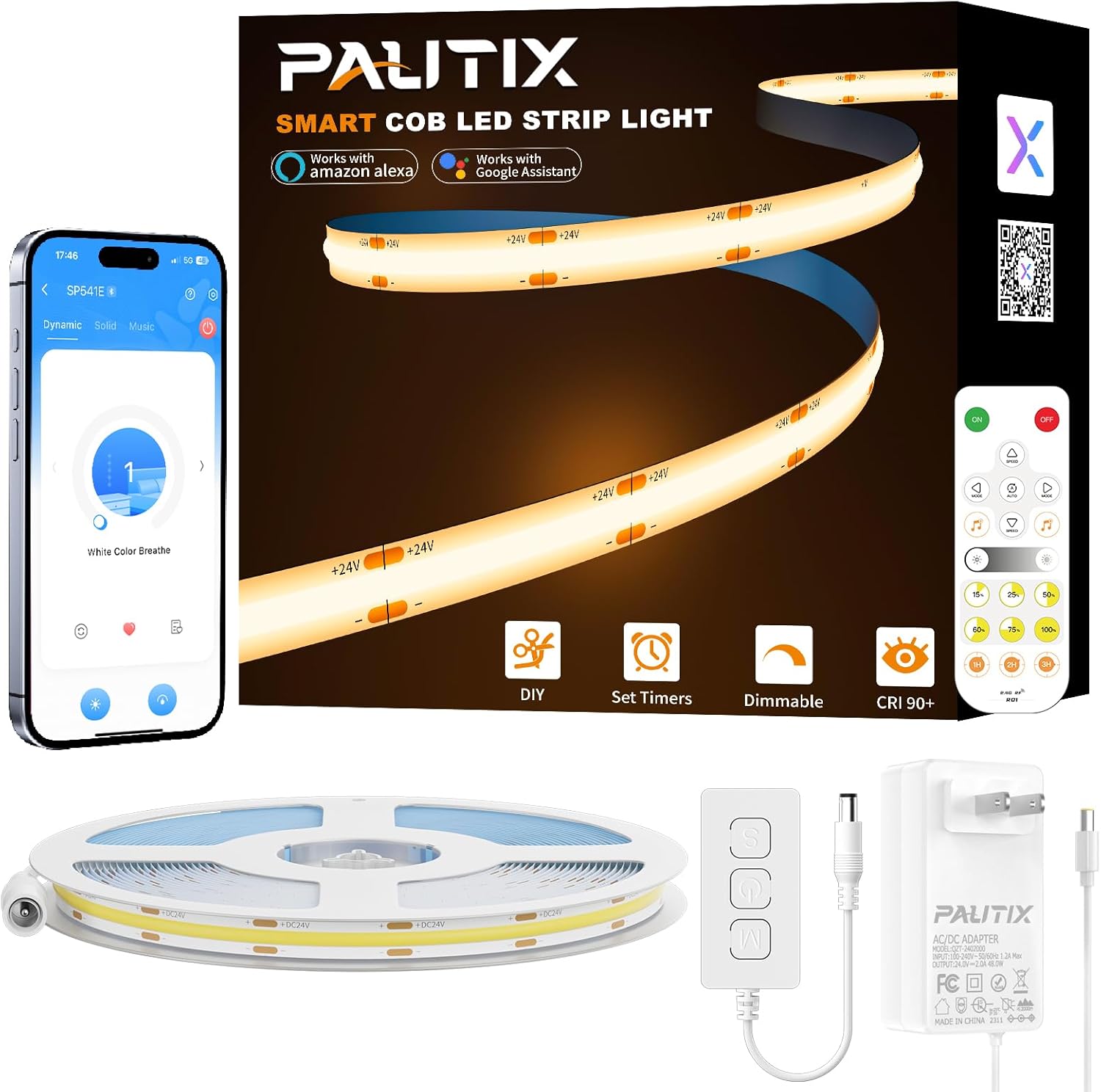
Gambar 1.1: Leuwihview of the PAUTIX Smart COB LED Strip Light kit and its smart control capabilities.
2. Naon dina Box
Pastikeun yén sadaya komponén aya dina bungkusan:
- 1 × 32.8ft/10m COB LED Strip Light
- 1 × RF Remote Control & Controller Kit
- 1 × DC24V 48W Power Supply
- 1 × Black wire to DC female connector
- 1 × Buku Panduan

Image 2.1: Visual representation of the package contents, including the LED strip, controller, remote, and power supply.
3. Fitur Produk
- COB Technology: Features 4800 high-quality LEDs on a Chip On Board (COB) design, ensuring super even lighting performance with no dark spots.
- High Brightness & Color Quality: Provides incredibly bright lighting with a 2700K color temperature and a Color Rendering Index (CRI) of 93+, offering realistic color reproduction.
- Flicker-Free & RG0: Utilizes eye-protecting light source technology to achieve RG0 anti-blue light hazards, minimizing stroboscopic flicker and blue light damage to human eyes.
- Kontrol pinter: Compatible with Alexa, Google Assistant, and the Banlan X app for voice control, app control, and smart home integration.
- Dimmable: Adjustable brightness from 1% to 100% via remote, app, or voice commands.
- Singkronisasi Musik: Synchronize the light effects with your favorite music through the Banlan X app.
- Kontrol Grup: Control multiple PAUTIX light strips simultaneously using the app.
- Fungsi Timer: Set schedules for automatic on/off operation.
- Fungsi mémori: Retains the last used settings (brightness, mode) after power cycles.

Image 3.1: PAUTIX COB LED strips offer a 180-degree beam angle for wider, more uniform brightness compared to traditional SMD strips.

Image 3.2: High CRI 98+ ensures better color reproduction and a more realistic visual experience.
4. Émbaran Kasalametan
This product operates at a safe 24V low voltage, making it safe to touch. It is UL listed and constructed from lead-free materials, ensuring reliability and safety for human health. The double-layer pure copper PCB board enhances conductivity and heat dissipation, contributing to a service life exceeding 65,000 hours.
- Pastikeun catu daya dipegatkeun samemeh dipasang atawa diropéa.
- Do not expose the strip light or power supply to water or high humidity unless explicitly rated for such conditions.
- Avoid bending the strip light sharply at angles less than 90 degrees to prevent damage to the internal circuitry.
- Only use the provided power supply and controller with the LED strip.

Image 4.1: The product is UL Listed, indicating compliance with safety standards.
5. Setup jeung Instalasi
5.1 Instalasi fisik
The COB LED strip lights are flexible and can be bent to fit various shapes. They are cuttable and connectable, allowing for DIY customization.
- Nyiapkeun permukaan: Ensure the installation surface is dry, clean, and smooth for optimal adhesive performance.
- Ukur sareng Potong (Opsional): The strip light can be cut every 50mm (1.97 inches) at the designated cutting marks (metal points). Ensure cuts are made precisely on these marks.
- Connect (Optional): Cut sections can be reconnected using appropriate connectors (sold separately) or by welding.
- Apply the Strip: Peel off the adhesive backing and firmly press the strip light onto the desired surface. The strip is 8mm (0.32 inches) wide, suitable for tight spaces.
- Sambungkeun Kakuatan: Connect the LED strip to the controller, and then connect the controller to the DC24V power supply. Plug the power supply into an electrical outlet.

Image 5.1: Guide for cutting the LED strip at marked intervals and examples of corner installations.
5.2 App Setup (Banlan X)
To unlock smart features, download and set up the Banlan X app. You can find the app by searching "Banlan X" in your app store or by visiting download.ledhue.com/page/scenex/.
- Unduh App: Milarian pikeun "Banlan X" in your app store or scan the QR code provided on the product packaging/user manual to download the app.
- Tambahkeun Alat: Open the Banlan X app. In the upper right corner of the homepage, tap the "+" icon to add a device. Ensure Bluetooth is enabled on your mobile device. The app will search for nearby devices.
- Nyambung: Select the detected "SP541E" device and follow the in-app prompts to connect.

Image 5.2: Visual guide for connecting the LED strip to the Banlan X app.
5.3 Integrasi Asisten Sora (Asisten Alexa/Google)
Integrate your PAUTIX light strip with Alexa or Google Assistant for voice control.
- Pastikeun konektipitas: Verify that your Wi-Fi and cloud services are connected within the Banlan X app.
- Tautan Akun: In the Alexa or Google Assistant app, add "Banlan X" as a skill/service and link your Banlan X account.
- Panggihan Alat: After linking, instruct your voice assistant to discover new devices (e.g., "Alexa, discover devices").
- Setup Alat: Once discovered, set up the device within the Alexa/Google Assistant app, assigning it a name and room if desired.
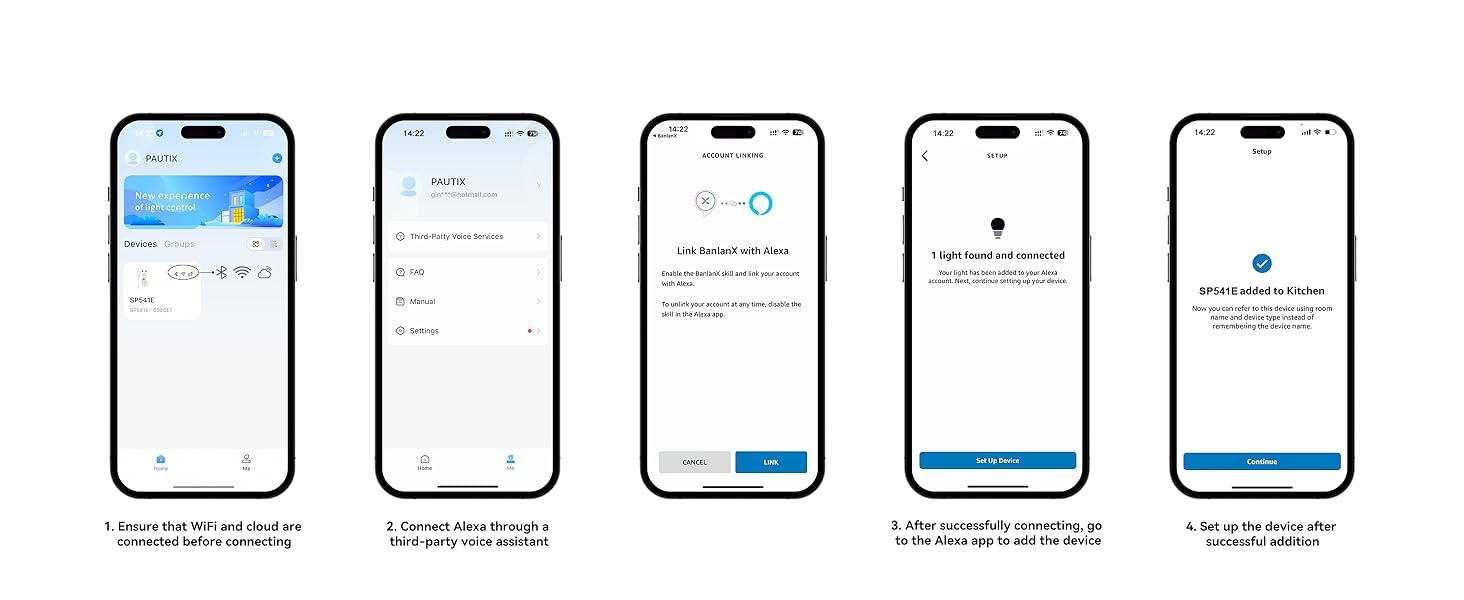
Image 5.3: Guide for connecting the LED strip to Alexa for voice control.
6. Operasi
6.1 Jauh Jauh
The included RF remote control allows for direct control of the light strip. The remote has a range of up to 30 meters in open spaces.
- Tombol ON: Short press to turn on the light. Long press (within 20 seconds of powering on the controller) to bind/unbind the remote control.
- Tombol OFF: Short press to turn off the light. Long press (within 20 seconds of powering on the controller, after turning off the light completely) to clear all paired remote controllers.
- Laju +/-: Adjusts the speed of non-music effects.
- Modeu +/-: Cycles through different lighting effects.
- All Effect Cycle: Cycles through all available effects.
- Music +: Activates music sync mode.
- Caang +/-: Saluyukeun kacaangan lampu.
- Brightness Value: Quick selection for 15%, 25%, 50%, 60%, 75%, 100% brightness.
- Waktuna: Sets a timer for 1, 2, or 3 hours delay-off.

Image 6.1: Detailed layout and function descriptions of the remote control.
6.2 App Control (Banlan X)
The Banlan X app provides comprehensive control over your light strip from anywhere.
- Penyesuaian Caang: Saluyukeun kacaangan ti 1% ka 100%.
- Modeu dinamis: Select from various pre-set dynamic lighting effects.
- Singkronisasi Musik: Synchronize the lights with your favorite music.
- Fungsi Timer: Set schedules for the light to turn on or off automatically.
- Kontrol Grup: Control multiple PAUTIX light strips simultaneously.

Image 6.2: The Banlan X app allows control of the light strip from any location.
6.3 Kontrol sora
Once integrated with Alexa or Google Assistant, you can use voice commands to control your light strip.
- "Alexa/Google, turn on/off [Light Name]."
- "Alexa/Google, set [Light Name] to 60% brightness."
- "Alexa/Google, change [Light Name] to warm white."

Gambar 6.3: Example of voice control using Alexa to adjust light brightness.
6.4 Kontrol Grup
The Banlan X app allows you to group multiple PAUTIX COB LED strip lights and control them simultaneously. This is useful for lighting larger areas or multiple rooms with synchronized effects.
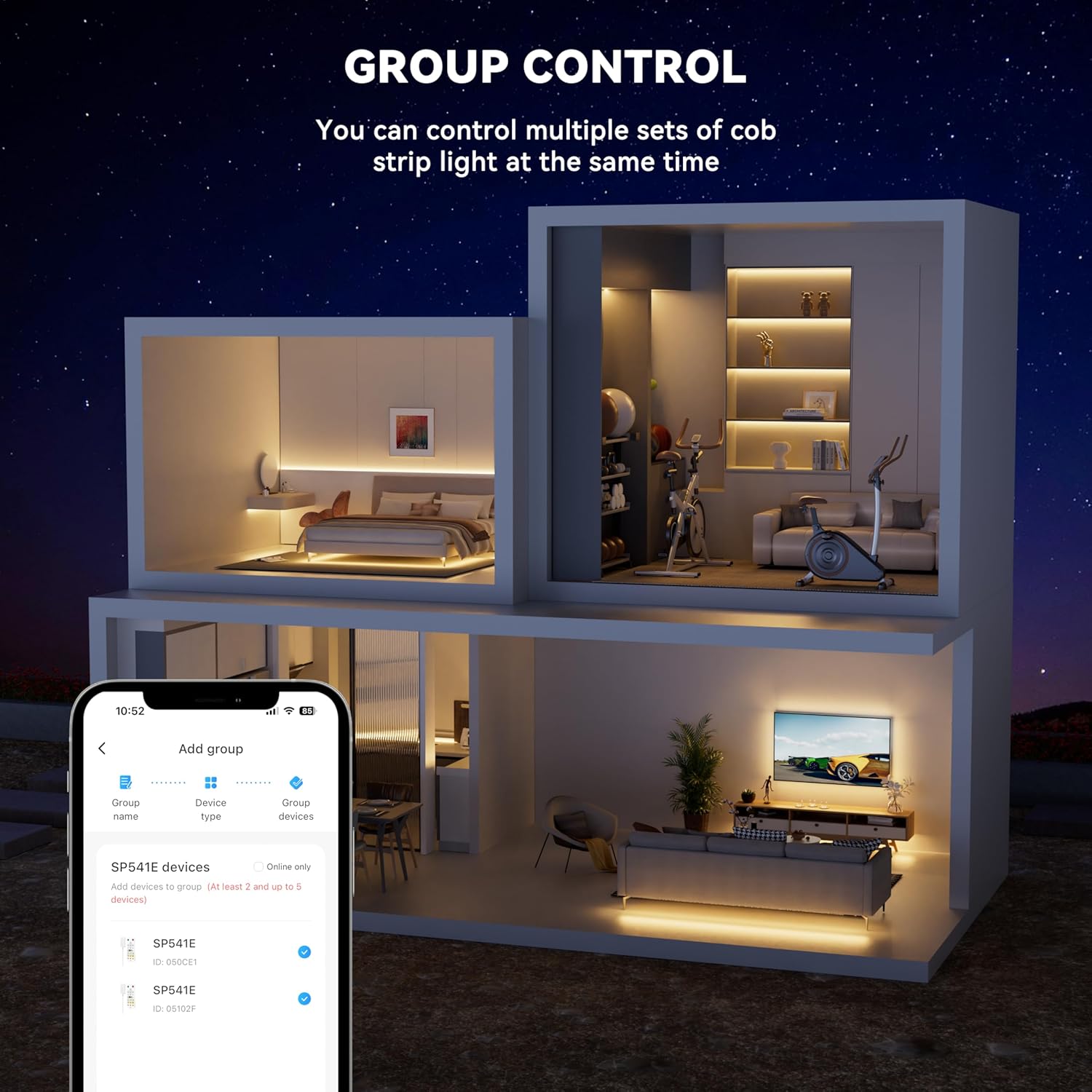
Image 6.4: Group control allows managing multiple light strips from a single interface.
6.5 Fungsi Timer
Set specific times for your light strip to turn on or off using the Banlan X app. This feature is ideal for automating your lighting schedule.

Image 6.5: The app's time function allows scheduling light operation.
6.6 Fungsi Mémori
The light strip retains its last settings (brightness, mode) when powered off and on again, eliminating the need to reconfigure your preferences.

Image 6.6: The memory function ensures settings are preserved after power cycles.
7. Pangropéa
To ensure the longevity and optimal performance of your PAUTIX Smart COB LED Strip Light, follow these simple maintenance guidelines:
- beberesih: Gently wipe the surface of the LED strip with a soft, dry cloth to remove dust. Do not use abrasive cleaners or solvents. Ensure the power is off before cleaning.
- Pariksa napel: Periodically check the adhesive backing to ensure the strip remains securely attached. Reapply or reinforce if necessary.
- Pariksa sambungan: Ensure all connections (strip to controller, controller to power supply) are secure and free from damage.
- Panyimpenan: If storing the strip light for an extended period, ensure it is clean, dry, and coiled loosely to prevent damage.
8. Cara ngungkulan
| Masalah | Mungkin Cukang lantaranana | Solusi |
|---|---|---|
| Strip lampu teu hurung. |
|
|
| Uneven light or dark spots. |
|
|
| Kadali jauh teu jalan. |
|
|
| Cannot connect to Banlan X app or voice assistant. |
|
|
9. Spésifikasi
| Fitur | Rincian |
|---|---|
| merek | PAUTIX |
| Nomer modél | R-SWW480W24-COB-10M-2700K-SP541E |
| Tipe Lampu | COB LED Jalur Lampu |
| Panjangna | 32.8 ft / 10 m |
| Suhu Warna | 2700K (Bodas haneut) |
| Jumlah LEDs | 4800 |
| Voltage | 24 Volt (DC) |
| Wattage | 44 watt |
| Fluks Luminous | 8000 Lumén |
| Fitur husus | Adjustable, Dimmable, Remote Controlled, Timer, Voice Control (Alexa/Google Assistant) |
| CRI (Indéks Rendering Warna) | 93+ |
| Jangka waktu hirup | > 65,000 jam |
| Lebar Strip | 8mm (0.32 inci) |
| Cuttable Unit | Every 50mm (1.97 inches) |
10. Garansi jeung Rojongan
PAUTIX provides professional installation guidance and customer support. If you encounter any issues with your product, please contact PAUTIX customer service. They aim to provide a reply within 24 hours.
For further assistance or to report a problem, please refer to the contact information provided with your purchase or visit the official PAUTIX websitus.