1. Bubuka
Thank you for choosing the KAISER KXB-3008 8-inch Studio Speaker. This manual provides essential information for the safe and efficient operation of your new portable speaker. Please read this manual thoroughly before use and retain it for future reference.
2. Produk Langkungview
2.1 Fitur konci
- Bluetooth Connectivity: Seamlessly connect your devices wirelessly.
- LED Lights: Enhance your audio experience with dynamic LED lighting.
- Karaoke Function: Enjoy singing along with built-in karaoke features.
- Voice Effects: Experiment with various voice effects for entertainment.
- Rechargeable Battery: Portable design with a long-lasting rechargeable battery.
- KSR-Link Technology: Connect with another compatible KAISER speaker for enhanced stereo sound.
2.2 Komponén Kaasup
- 1 x KAISER KXB-3008 Speaker
- 1 x Mikropon Kabel
- 1 x Manual Pamaké
- 1 x Kabel Daya

Gambar 1: Hareupeun view of the KAISER KXB-3008 speaker, showcasing its grille and dynamic LED lighting.

Figure 2: The wired microphone provided with the speaker, featuring an on/off switch.
3. Setélan
3.1 Ngecas Awal
Before first use, fully charge the speaker for at least 4 hours. Connect the power cable to the speaker's power input and a suitable power outlet. The charging indicator light will show the charging status.
3.2 Powering on / Pareum
- To turn on the speaker, locate the ON/OFF switch on the control panel and slide it to the "ON" position.
- To turn off the speaker, slide the ON/OFF switch to the "OFF" position.

Figure 3: Top control panel showing the power switch and other function buttons.
4. Operasi
4.1 Sambungan Bluetooth
- Hurungkeun spéker.
- Press the "MODE" button until "BLUE" appears on the display, indicating Bluetooth mode.
- Aktipkeun Bluetooth dina alat Anjeun (smartphone, tablet, jsb).
- Milarian pikeun "KXB-3008" in your device's Bluetooth list and select it to pair.
- Sora konfirmasi bakal nunjukkeun papasangan anu suksés.
4.2 KSR-Link Technology (True Wireless Stereo)
KSR-Link allows you to connect two KAISER KXB-3008 speakers wirelessly for a stereo sound experience.
- Ensure both KXB-3008 speakers are powered on and in Bluetooth mode.
- On one speaker (this will be the master speaker), press and hold the "MODE" button for a few seconds until you hear a pairing tone.
- Dua speaker bakal otomatis nyambung.
- Once connected, pair your device to the master speaker via Bluetooth as described in section 4.1.
4.3 Using USB/Micro SD
Insert a USB flash drive or Micro SD card into the respective port on the control panel. The speaker will automatically switch to USB/SD mode and begin playing compatible audio files (contona, MP3).
4.4 Radio FM
Press the "MODE" button to switch to FM radio mode. Use the playback control buttons (previous/next track) to scan for stations. The display will show the current frequency.
4.5 Fungsi Karaoke
Connect the wired microphone to the "MIC" input. Adjust the microphone volume and echo effects using the dedicated knobs on the control panel. Play your music and sing along.
Video 1: Demonstration of a Kaiser 8-inch speaker, highlighting its features and controls. Note: This video features a similar 8-inch Kaiser speaker model.
5. Kontrol jeung sambungan
5.1 Control Panel Leuwihview
The top panel of the speaker features various buttons and knobs for controlling playback, volume, and other functions.
Gambar 4: Detil view of the top control panel, including volume, mode, playback, and bass controls.
- VOL (Volume Knob): Nyaluyukeun volume master speaker.
- MIC VOL (Microphone Volume Knob): Saluyukeun volume mikropon nu disambungkeun.
- ECHO (Echo Knob): Nyaluyukeun éfék gema pikeun mikropon.
- BASS (Bass Button): Activates or adjusts the bass boost.
- Tombol MODE: Ngaganti antara modeu input (Bluetooth, Radio FM, USB, Micro SD, AUX).
- Tombol Lampu: Toggles or changes the LED light patterns.
- Kadali Puteran: Maénkeun/Pareuman, Lagu Saméméhna, Lagu Salajengna.
5.2 Input / palabuhan kaluaran
The rear panel of the speaker provides various ports for connectivity.
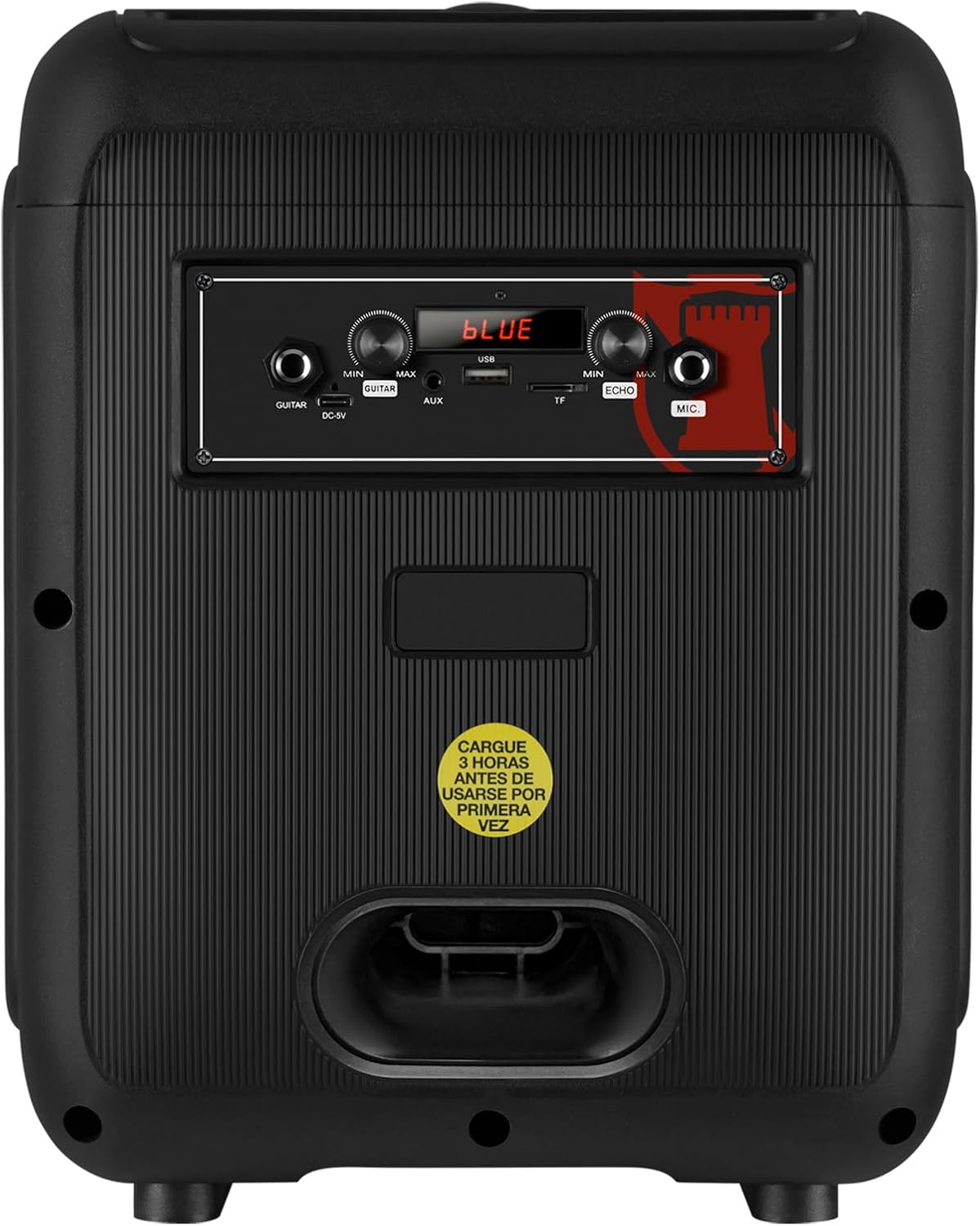
Figure 5: Rear panel showing the AUX, USB, Micro SD, and Microphone input ports, along with the power input.
- Input AUX: Sambungkeun alat audio éksternal nganggo kabel audio 3.5mm.
- Port USB: Insert a USB flash drive for MP3 playback.
- Slot SD Mikro: Insert a Micro SD card for MP3 playback.
- Input MIC: Connect a wired microphone for karaoke or announcements.
- DC-9V Input: Input daya pikeun ngecas speaker.
6. Spésifikasi
| Fitur | Katerangan |
|---|---|
| Ngaran modél | KXB-3008 |
| Tipe Speaker | Speaker Speaker |
| Fitur husus | Lightweight, LED Light, Karaoke Function |
| Dianjurkeun Mangpaat | Gaming Consoles, Laptops, Smartphones, Tablets |
| Alat nu cocog | Smartphone, Tablet, Laptop, Gaming Console |
| Diaméter Subwoofer | 8 inci |
| Warna | Hideung |
| Dimensi produk | 31cm (Depth) x 29cm (Width) x 42cm (Height) |
| Beurat produk | 5 kg |
| Tahan cai | Palsu |
| Métode kontrol | Kadali jauh |
| Téhnologi nirkabel | Bluetooth |
| Sumber Daya | Batré |
| Max Kaluaran Speaker | 30 Watt |
| Rata Kahirupan Batré | 6 Jam |
| Mode Kaluaran Audio | Stereo, Sakuliling |
| Tipe Pamasangan | Pemasangan Lantai, Pemasangan Méja |
7. Pangropéa
- beberesih: Anggo kaén anu garing sareng lemes pikeun ngabersihan bagian luar spéker. Ulah make cleaners abrasive atawa pangleyur.
- Panyimpenan: Simpen spéker dina tempat anu tiis sareng garing jauh tina sinar panonpoé langsung sareng suhu anu ekstrim.
- Perawatan batré: Pikeun manjangkeun umur batre, ulah miceun batre pinuh. Ngeusi batre spéker rutin, sanajan teu dipaké pikeun période nambahan.
- Hindarkeun cai: This speaker is not waterproof. Keep it away from liquids to prevent damage.
8. Cara ngungkulan
| Masalah | Solusi anu mungkin |
|---|---|
| Speaker teu hurung. | Ensure the battery is charged. Connect the power cable and try again. Check the power switch position. |
| Taya sora. | Check the volume level on both the speaker and your connected device. Ensure the correct input mode is selected (Bluetooth, AUX, USB/SD). |
| Papasangan Bluetooth gagal. | Ensure the speaker is in Bluetooth mode. Make sure your device's Bluetooth is enabled and within range. Forget previous pairings on your device and try pairing again. |
| Mikropon teu jalan. | Ensure the microphone is properly connected to the MIC input. Check the microphone's ON/OFF switch and adjust the MIC VOL knob. |
| KSR-Link connection issues. | Ensure both speakers are KXB-3008 models and are in Bluetooth mode. Try re-initiating the KSR-Link pairing process. |
9. Garansi jeung Rojongan
This product comes with a Limited Warranty. Please refer to the warranty card included in the packaging for detailed terms and conditions.
For technical support or customer service, please visit the official Kaiser websitus atanapi ngahubungan dealer lokal Anjeun.


