
Cuifati CUIFATIvpa8mfs61c
Cuifati 2K Body Camera User Manual
Model: CUIFATIvpa8mfs61c | Brand: Cuifati
1. Bubuka
Thank you for choosing the Cuifati 2K Body Camera. This device is designed for reliable video and photo capture in various professional and outdoor environments, including law enforcement, security, and personal use. Featuring 2K video resolution, 56MP dual lenses, and robust IP68 waterproofing, it is built to perform in challenging conditions. This manual will guide you through the features and functions of your new body camera.

Gambar 1.1: Hareupeun view of the Cuifati 2K Body Camera.
2. Eusi Paket
Mangga cék kotak pikeun item di handap ieu:
- 1 x 2K Body Worn Camera
- 1 x Kabel USB (Tipe-C)
- 1 x Manual Pamaké
- 1 x Klip
3. Produk Langkungview
Familiarize yourself with the various parts and controls of your Cuifati 2K Body Camera:
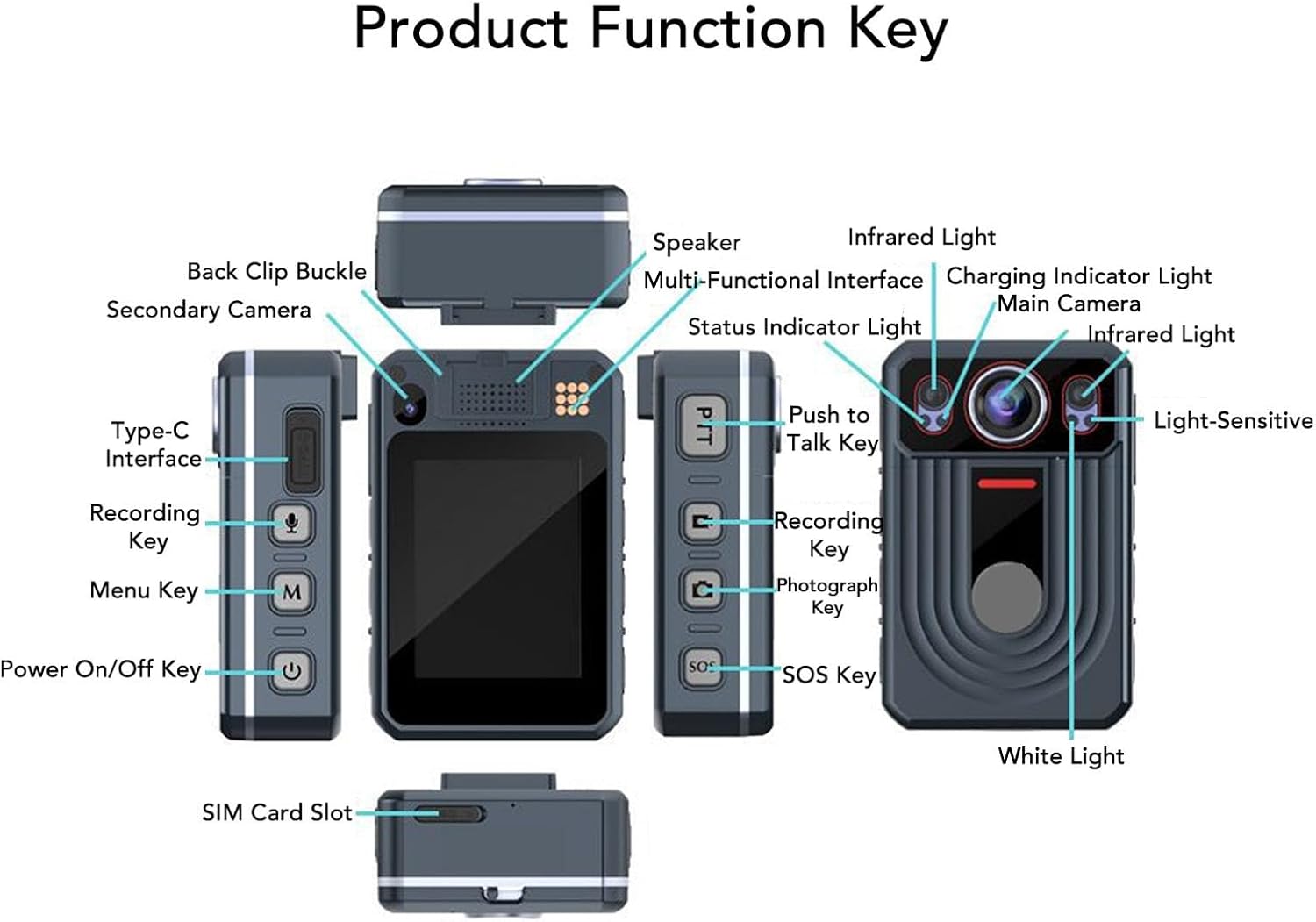
Figure 3.1: Labeled diagram of the Cuifati 2K Body Camera's components and keys.
Komponén konci kalebet:
- Kaméra utama: Primary lens for video and photo capture.
- Secondary Camera: Additional lens for specific functions (e.g., rear recording).
- Cahaya Infrabeureum: Pikeun ngarékam visi peuting.
- Cahaya bodas: Pikeun katerangan.
- Light-Sensitive Sensor: Ngadeteksi cahaya sakuriling pikeun ngaganti modeu otomatis.
- Speaker: For audio playback and alerts.
- Multi-Functional Interface: For various connections.
- Lampu Indikator Ngecas: Némbongkeun status ngecas.
- Lampu Indikator Status: Indicates device status (recording, standby, etc.).
- Antarmuka Tipe-C: Pikeun ngecas sareng mindahkeun data.
- Recording Key: Initiates video or audio recording.
- Konci Menu: Ngaksés setélan sareng pilihan alat.
- Tombol Hurung/Pareuman: Ngahurungkeun atanapi mareuman alat.
- Push to Talk Key (PTT): For intercom functionality.
- Photograph Key: Ngarekam gambar teu obah.
- konci SOS: Activates SOS recording or marks important points.
- Back Clip Buckle: For attaching the camera to clothing or gear.
- Slot Kartu SIM: For network connectivity (if applicable to specific models).
4. Setélan
4.1. Ngecas Alat
Before first use, fully charge the body camera. Connect the provided USB Type-C cable to the camera's Type-C interface and the other end to a compatible USB power adapter (not included) or a computer's USB port. The Charging Indicator Light will show the charging status.
4.2. Panyimpenan Mémori
The camera has a built-in 64GB memory card. It supports an external memory card up to 128GB (not included) for extended storage. Ensure the memory card is properly inserted if you choose to use an external one.
4.3. Powering on / Pareum
Pikeun ngahurungkeun alat, pencét lila the Power On/Off Key. To power off, pencét lila the Power On/Off Key again until the device shuts down.
5. Parentah Operasi
5.1. Ngarekam Pidéo
To start video recording, pencét pondok the Recording Key. The Status Indicator Light will change to indicate recording is in progress. To stop recording, pencét pondok the Recording Key again. The camera also supports pre-recording; pencét lila the Recording Key to activate this feature.
5.2. Ngarekam Audio
To start audio-only recording, pencét pondok the Sound Recording button (often integrated with the Recording Key or a dedicated button). To stop, pencét pondok deui.
5.3. Infrared (Night Vision) Light
The camera features HD Infrared Night Vision. To manually activate the infrared light, pencét lila the Sound Recording button. The camera can also automatically switch to infrared mode in low light conditions.
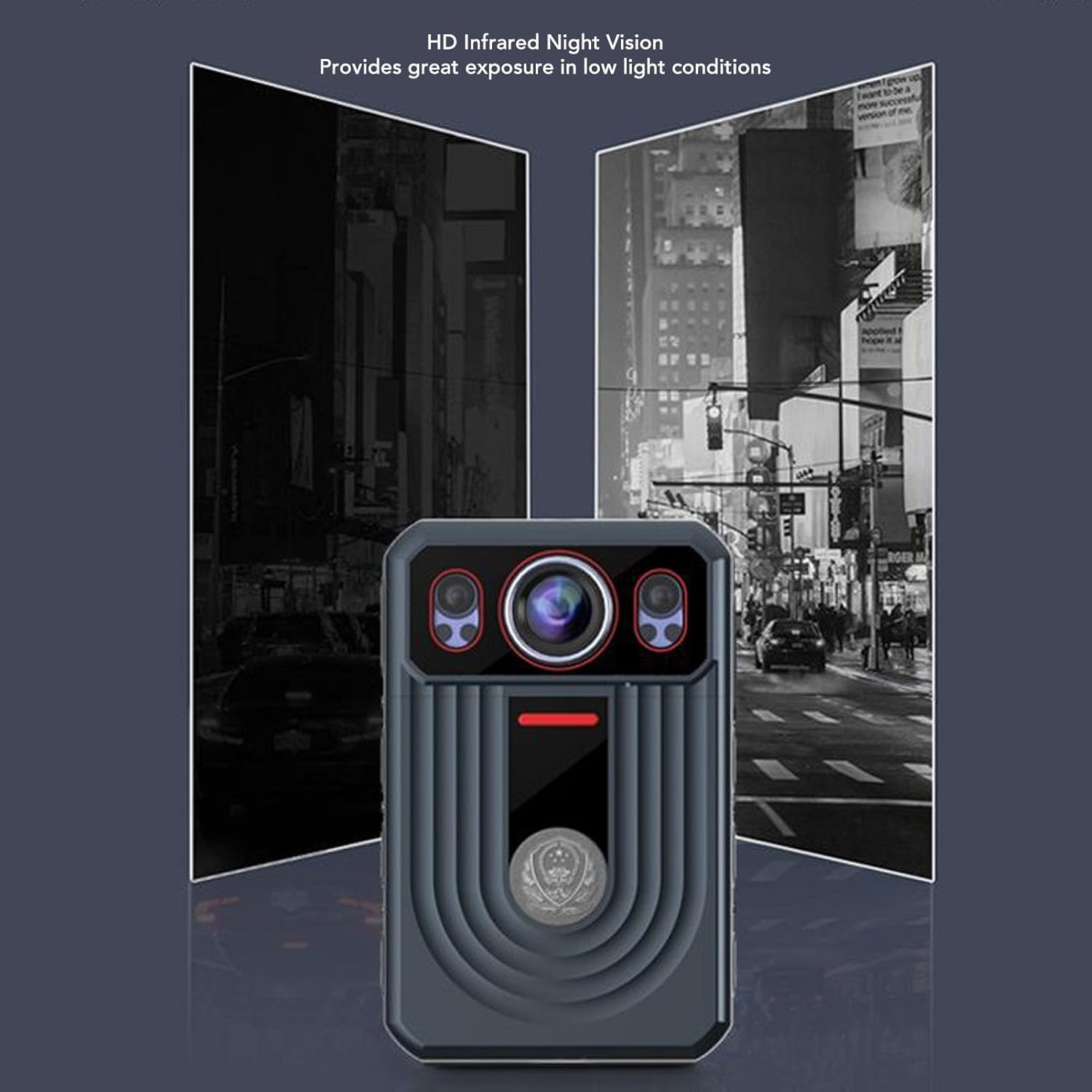
Figure 5.1: Demonstration of HD Infrared Night Vision capability.
5.4. Nyokot Poto
Pikeun moto, pencét pondok the Photograph Key. To switch video resolution settings, pencét lila the Photograph Key.
5.5. Fungsi SOS
The SOS function allows you to mark important points in your video and sound recordings. Pencét pondok the SOS Key to mark a point. To activate SOS recording (which may trigger specific alerts or actions depending on configuration), pencét lila the SOS Key.
5.6. Push to Talk (PTT)
If your device supports Push to Talk functionality, pencét lila the PTT Key to talk. Release the key to listen for a response.
5.7. Menu Napigasi
To return to the previous screen or exit a menu, pencét tunggal the Menu Key. To activate the white light, pencét lila the Menu Key.
6. Fitur konci
- 2K Video & 56MP Photos: Capture high-resolution video and still images with dual lenses, adjustable focus, and true-to-life color reproduction.
- Stabilisasi Gambar Éléktronik (EIS): Ngurangan oyag kaméra pikeun foo smoothertage.
- Layar rampa kapasitif 2.4 inci: Easily playback videos and photos directly on the device.
- Lénsa Sudut Lebar 120 derajat: Provides comprehensive scene coverage.
- Visi Peuting Infrabeureum HD: Automatically switches to infrared mode in low light for clear recording.
- Deteksi gerak: Automatically detects movement for seamless recording.
- Ngarekam loop: Automatically overwrites old videos when memory is full to save space.
- Hirup batré anu panjang: Built-in 3300mAh lithium polymer battery provides up to 9 hours of continuous recording.
- IP68 Waterproof & Durable: Designed to resist rough weather, including storms and snow, and is resistant to falls and explosions.
- Fungsi tambahan: Includes SOS, cluster intercom, remote monitoring, and the ability to record driving routes with location information.

Figure 6.1: Various application scenarios for the Cuifati 2K Body Camera.
7. Pangropéa
7.1. beberesih
Wipe the camera body with a soft, dry cloth. For the lens, use a specialized lens cleaning cloth and solution. Avoid using harsh chemicals or abrasive materials that could damage the device or lens coating.
7.2. Panyimpenan
Store the camera in a cool, dry place away from direct sunlight and extreme temperatures. If storing for an extended period, ensure the battery is partially charged (around 50%) to preserve its lifespan.
7.3. Kaperawatan batré
Pikeun maksimalkeun umur batré, ulah sering ngosongkeun batréna. Cas alat sacara rutin, sanaos henteu dianggo terus-terusan.
8. Cara ngungkulan
If you encounter issues with your Cuifati 2K Body Camera, please refer to the following common problems and solutions:
- Alat teu tiasa dihurungkeun: Pastikeun batréna tos dicas. Sambungkeun kaméra ka sumber listrik teras cobian deui.
- Cannot record video/photo: Check if the memory card is full or properly inserted. Format the memory card if necessary (this will erase all data).
- Poor video/audio quality: Ensure the lens is clean. Check recording settings (resolution, frame rate). For audio, ensure the microphone is not obstructed.
- Alat macet atanapi teu ngaréspon: Try performing a soft reset by holding the Power On/Off Key for an extended period (e.g., 10-15 seconds) until the device restarts.
- Visi wengi henteu jalan: Ensure the infrared light is enabled (either manually or automatically). Check if there's sufficient darkness for automatic activation.
Lamun masalah persists, mangga ngahubungan rojongan customer.
9. Spésifikasi
| Fitur | Spésifikasi |
|---|---|
| merek | Cuifati |
| Ngaran modél | CUIFATIvpa8mfs61c |
| Resolusi Pidéo Pangluhurna | 2K |
| Ukuran tampilan | 2.4 inci |
| Jenis Batré | Batré Litium 3300mAh diwangun-di |
| Panyimpenan internal | 64GB |
| Max. External Storage Support | 128GB (Memory Card Not Included) |
| Peunteun waterproof | IP68 |
| Stabilisasi Gambar | Sumuhun |
| Item Beurat | 13.4 ons (Kira-kira 380g) |
| Ukuran Paket | 6.69 x 4.33 x 2.76 inci |
10. Garansi jeung Rojongan
Your Cuifati 2K Body Camera comes with a standard manufacturer's warranty. Please refer to the warranty card included in your package or visit the official Cuifati websitus pikeun istilah jeung kaayaan jaminan lengkep.
For technical support, troubleshooting assistance, or any inquiries regarding your product, please contact Cuifati customer service. Contact information can typically be found on the product packaging or the official Cuifati websitus.
Ask a question about this manual
Ask about setup, troubleshooting, compatibility, parts, safety, or missing instructions. Manuals+ will review the question and use this page’s manual context to help answer it.