1. Bubuka
The BLACK+DECKER CS1200 Circular Saw is a powerful and versatile tool designed for efficient cutting in wood and wood-based materials. This manual provides essential information for safe operation, proper setup, maintenance, and troubleshooting to ensure optimal performance and user safety.
This circular saw features a robust 1200W motor, a 165mm blade, and offers cutting depths of up to 55mm at 90 degrees and 37mm at 45 degrees. Its ergonomic design and integrated dust extraction port enhance user comfort and maintain a cleaner work environment.
2. Parentah Kasalametan
Always adhere to the following safety guidelines to prevent injury and ensure safe operation of your circular saw:
- Wear Personal Protective Equipment: Always wear safety glasses, hearing protection, and appropriate gloves.
- Ngajaga Wewengkon Gawé Bersih: Wewengkon nu pabalatak atawa poek ngondang kacilakaan.
- Workpiece Aman: Salawasna clamp atawa amankeun benda kerja pikeun nyegah gerakan nalika motong.
- Cabut colokan sateuacan adjustment: Disconnect the saw from the power source before changing blades, making adjustments, or performing maintenance.
- Hindarkeun Awal Kahaja: Ensure the switch is in the off position before plugging in the tool.
- Tetep Leungeun Jelas: Ulah nempatkeun leungeun deukeut wewengkon motong atawa agul puteran.
- Anggo Blade anu leres: Only use blades suitable for the material being cut and rated for the saw's speed.
- Pariksa Karusakan: Inspect the tool and power cord for any damage before each use.
3. komponén Leuwihview
Familiarize yourself with the main parts of your BLACK+DECKER CS1200 Circular Saw:
- sabeulah: The cutting element, typically 165mm in diameter.
- Upper and Lower Blade Guards: Protect the user from the blade. The lower guard retracts during cutting.
- Gagang utama: For gripping and controlling the saw.
- Saklar pemicu: Aktipkeun motor.
- Tuas Pangaluyuan Jero: Allows setting the cutting depth.
- Tuas Pangatur Bevel: Allows setting the cutting angle (bevel).
- Pelat Dasar (Sapatu): Ngarojong ragaji dina workpiece nu.
- Port ékstraksi lebu: For connecting a vacuum cleaner.
- Tombol Konci Spindle: Locks the blade for easy changing.
- Pituduh paralel: For making straight cuts parallel to an edge.
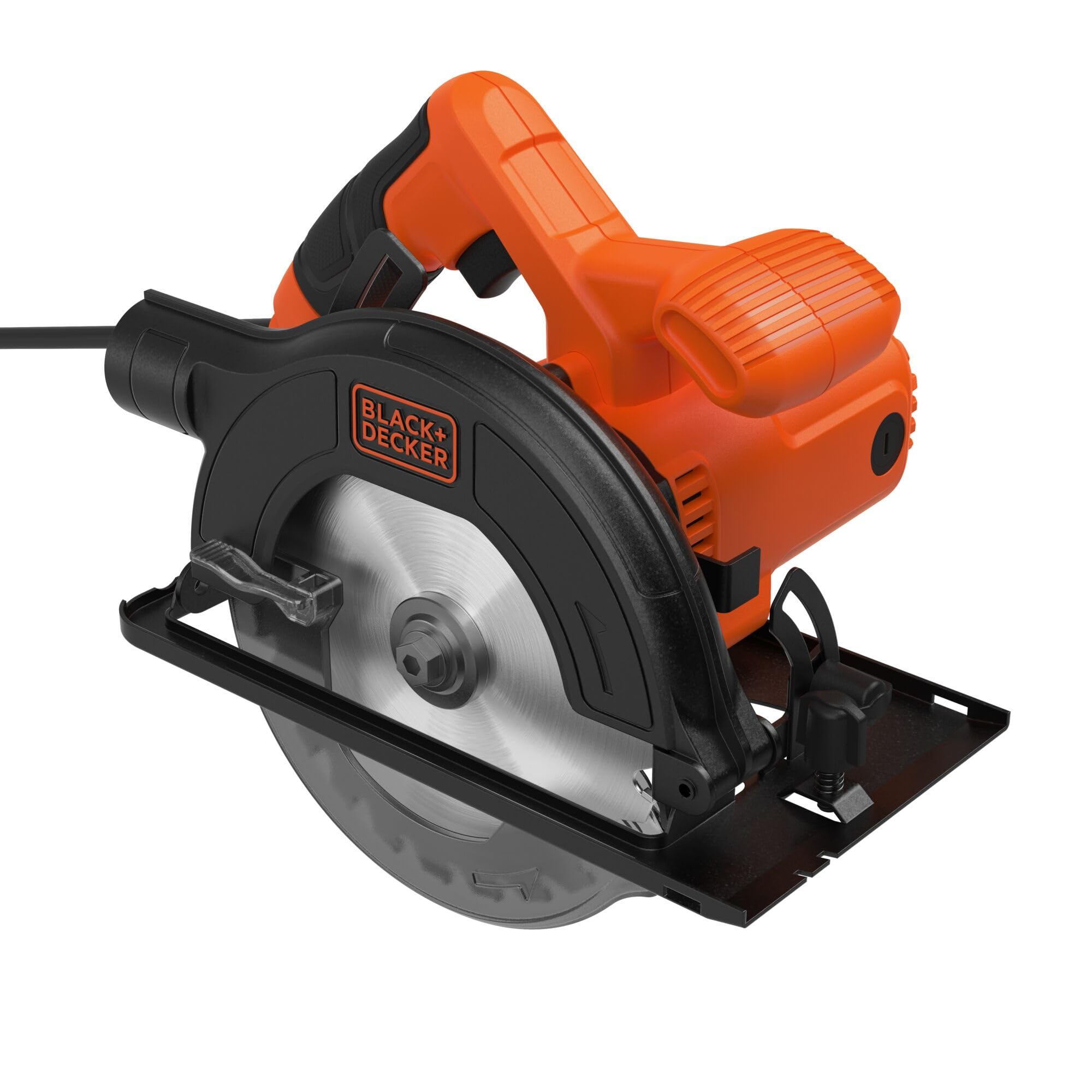
Gambar 1: Sisi view of the BLACK+DECKER CS1200 Circular Saw, highlighting the blade, handle, and guards.

Gambar 2: Hareupeun view of the BLACK+DECKER CS1200 Circular Saw, showing the blade and its protective guard.
4. Setélan
4.1 Instalasi agul jeung Lengser
- Pegatkeun Daya: Always unplug the saw from the power outlet.
- Retract Lower Guard: Lift the lower blade guard lever to expose the blade.
- Ngahurungkeun Konci Spindle: Pencét jeung tahan tombol konci spindle pikeun nyegah agul ti puteran.
- Leupaskeun Mur Punjung: Use the provided wrench to loosen the arbor nut by turning it counter-clockwise.
- Cabut bilah: Carefully remove the outer flange and the old blade.
- Pasang Blade Anyar: Place the new 165mm TCT saw blade onto the arbor, ensuring the teeth are pointing in the direction of rotation indicated by the arrow on the guard.
- Sabeulah Aman: Replace the outer flange and tighten the arbor nut clockwise with the wrench while holding the spindle lock button. Do not overtighten.
4.2 Nyaluyukeun jero motong
To set the desired cutting depth:
- Pegatkeun Daya: Cabut ragaji.
- Loosen Lever: Loosen uas adjustment jero lokasina di sisi ragaji.
- Set Jerona: Raise or lower the base plate until the blade extends approximately 3mm below the workpiece.
- Kencengkeun Tuas: Kencengkeun tuas pangaturan jerona kalayan pageuh.
4.3 Nyaluyukeun Bevel Angle
To make angled cuts (bevel cuts):
- Pegatkeun Daya: Cabut ragaji.
- Loosen Lever: Loosen the bevel adjustment lever, usually located at the front of the saw.
- Atur Sudut: Tilt the base plate to the desired angle (up to 45 degrees) using the angle scale.
- Kencengkeun Tuas: Kencengkeun tuas pangaturan bevel kalayan pageuh.
4.4 ékstraksi lebu
The saw is equipped with a dust extraction port. For a cleaner work area, connect a suitable vacuum cleaner hose to this port. This helps to collect sawdust and maintain visibility of the cutting line.
5. Parentah Operasi
5.1 Ngawitan sareng Ngeureunkeun Gergaji
- Pikeun ngamimitian: Plug the saw into a power outlet. Depress the trigger switch.
- Pikeun eureun: Release the trigger switch. Allow the blade to come to a complete stop before setting the saw down.
5.2 Nyieun cut a
- Nyiapkeun workpiece: Mark your cutting line clearly and secure the workpiece firmly.
- Gergaji Posisi: Place the front of the base plate on the workpiece, ensuring the blade is clear of the material. Align the blade with your cutting line.
- Gergaji Mimitian: Depress the trigger switch and allow the blade to reach full speed before entering the material.
- Mimitian Motong: Slowly and steadily push the saw forward along the cutting line. Maintain a firm grip and keep the base plate flat against the workpiece.
- Potong lengkep: Continue pushing until the cut is complete. Release the trigger switch and wait for the blade to stop before removing the saw.
5.3 Using the Parallel Guide
The parallel guide assists in making straight cuts parallel to an edge of the workpiece.
- Selapkeun Panduan: Slide the parallel guide into the slots on the front of the base plate.
- Saluyukeun Jarak: Adjust the guide to the desired distance from the blade.
- Secure Guide: Tighten the locking screw to hold the guide in place.
- Ngalakukeun Motong: During cutting, keep the guide firmly against the edge of the workpiece.
6. Pangropéa
Pangropéa rutin mastikeun umur panjang sareng operasi anu aman tina gergaji bunder anjeun.
- beberesih: After each use, unplug the saw and use a soft brush or compressed air to clean dust and debris from the motor vents and blade guard area. Do not use water or solvents.
- Inspeksi sabeulah: Regularly inspect the saw blade for sharpness, cracks, or missing teeth. Replace dull or damaged blades immediately.
- Inspeksi kabel: Check the power cord for cuts, fraying, or damage. If damaged, have it repaired by a qualified service technician.
- Lubrication: This tool is designed for maintenance-free operation. No additional lubrication is required.
7. Cara ngungkulan
If you encounter issues with your BLACK+DECKER CS1200 Circular Saw, refer to the following common problems and solutions:
| Masalah | Mungkin Cukang lantaranana | Solusi |
|---|---|---|
| Saw teu ngamimitian | Taya catu daya; switch lepat; ari ruksak | Check power connection; Contact service center; Inspect cord for damage |
| Kualitas potongan goréng (kasar, serpihan) | Dull or incorrect blade; Incorrect cutting depth; Too fast feed rate | Replace blade; Adjust cutting depth; Reduce feed rate |
| Geter kaleuleuwihi | Mata pisau leupas; Mata pisau ruksak; Bantalan usang | Tighten arbor nut; Replace blade; Contact service center |
| Blade binds in material | Workpiece not supported correctly; Incorrect feed rate; Blade not sharp | Ensure proper workpiece support; Adjust feed rate; Replace blade |
If the problem persists after attempting these solutions, please contact BLACK+DECKER customer support or an authorized service center.
8. Spésifikasi
Technical specifications for the BLACK+DECKER CS1200 Circular Saw:
| Fitur | Spésifikasi |
|---|---|
| Nomer modél | CS1200-QS |
| Input kakuatan | 1200 Watt |
| Diaméter sabeulah | 165 mm |
| Max Motong Jerona (90°) | 55 mm |
| Max Motong Jerona (45°) | 37 mm |
| Kamampuh Bevel | 0-45 Gelar |
| Sumber Daya | Kabel Listrik |
| Bahan Sabeulah | Tungsten Carbide |
| Beurat | 4.8 kg |
| Komponén Kaasup | 1 Circular Saw, 1 TCT Saw Blade, 1 Parallel Guide |
9. Garansi jeung Rojongan
Produk BLACK+DECKER diproduksi dumasar kana standar kualitas luhur sareng dijamin tina cacad manufaktur. Pikeun syarat sareng katangtuan garansi khusus, mangga tingali kartu garansi anu kalebet dina produk anjeun atanapi kunjungi situs resmi BLACK+DECKER. websitus.
For technical assistance, spare parts, or service inquiries, please contact BLACK+DECKER customer support. Contact information can typically be found on the official websitus atanapi dina bungkusan produk.


