1. Produk Langkungview
The ProtoArc EM11 NL is an ergonomic vertical mouse designed to provide a more natural and comfortable hand position, reducing wrist strain during extended computer use. It offers versatile connectivity options, including Bluetooth 5.0 and 2.4GHz USB-A, allowing connection to up to three devices simultaneously. Featuring a built-in rechargeable battery and adjustable DPI settings, this mouse is engineered for productivity and user well-being.
2. Naon dina Box
- 1 x Mouse Ergonomis Bluetooth ProtoArc anu tiasa dicas ulang
- 1 x 2.4G USB-A Receiver
- 1 x Type-C Charging Cable (for charging only)
- 1 x Manual Pamaké

3. Fitur Produk
3.1 Ergonomic Vertical Design
The EM11 NL mouse features a unique ergonomic vertical design that positions your hand in a natural handshake posture. This design helps to keep your wrist straight, reducing discomfort and strain often associated with traditional horizontal mice. It promotes a relaxed forearm and wrist position, which can improve productivity and minimize the risk of repetitive strain injuries.


3.2 Konéktivitas Multi-Alat
The mouse supports dual Bluetooth 5.0 and 2.4G USB-A connectivity modes, enabling simultaneous connection to up to three different devices. This allows for seamless switching between a computer, PC, or laptop, enhancing workflow efficiency.

3.3 Batré Rechargeable
Equipped with a built-in 500mAh Li-Ion battery, the EM11 NL mouse can be conveniently recharged using the included Type-C cable. A single charge provides long-lasting battery life, supporting months of use on standby.

3.4 Adjustable DPI & High Performance
The mouse offers 1000/1600/2400 DPI levels, providing higher sensitivity and precise optical tracking. It includes back and forward buttons for easy navigation, though these are not programmable and not compatible with Mac OS systems.

3.5 Quiet Clicking
The left and right mouse buttons feature a silent click design, allowing you to focus on your work without disruptive noise. Note that the middle scroll wheel and the back/forward buttons do not have silent clicks.
4. Setup jeung Instalasi
4.1 Connecting via 2.4G USB-A Receiver
- Locate the 2.4G USB-A receiver stored in the compartment on the bottom of the mouse.
- Plug the USB-A receiver into an available USB-A port on your computer.
- Turn on the mouse using the power switch located on the bottom. The mouse should automatically connect to your computer.
4.2 Nyambungkeun via Bluetooth
- Hurungkeun beurit nganggo saklar daya di handap.
- Press the 'Switch Button' on the bottom of the mouse to select either Bluetooth 1 (B1) or Bluetooth 2 (B2) mode. The corresponding indicator light will flash.
- Dina komputer atanapi alat anjeun, buka setélan Bluetooth teras milarian alat énggal.
- Select 'ProtoArc EM11 NL' from the list of available devices to pair.
- Sakali dipasangkeun, lampu indikator bakal eureun kedip-kedip sarta tetep solid.
5. Parentah Operasi
5.1 Fungsi Tombol
The ProtoArc EM11 NL mouse is equipped with several buttons for intuitive control:
- Tombol kénca: Fungsi klik kénca standar.
- Tombol katuhu: Fungsi klik katuhu standar.
- Gulung kabayang: Pikeun ngagulung nangtung.
- Tombol DPI: Ngaganti setélan DPI (1000/1600/2400).
- Tombol Maju: Navigates ka hareup web panyungsi/aplikasi (henteu cocog sareng Mac OS).
- Tombol Mundur: Navigates ka tukang web panyungsi/aplikasi (henteu cocog sareng Mac OS).
- Tombol switch: Toggles between 2.4G, Bluetooth 1, and Bluetooth 2 connections.
- Saklar kakuatan: Turns the mouse On/Off.

5.2 DPI adjustment
Press the DPI button (located near the scroll wheel) to cycle through the available sensitivity settings: 1000 DPI, 1600 DPI, and 2400 DPI. Select the setting that best suits your preference for cursor speed and precision.
5.3 Ngalihkeun Antara Alat
To switch between connected devices, press the 'Switch Button' on the bottom of the mouse. The indicator light will change to reflect the currently active connection (2.4G, B1, or B2).
6. Ngecas
When the battery is low, the low-battery indicator light on the mouse will illuminate. Connect the included Type-C charging cable to the Type-C port on the front of the mouse and plug the other end into a USB power source (e.g., computer USB port, USB wall adapter). The Type-C cable is for charging only and does not support data transfer.

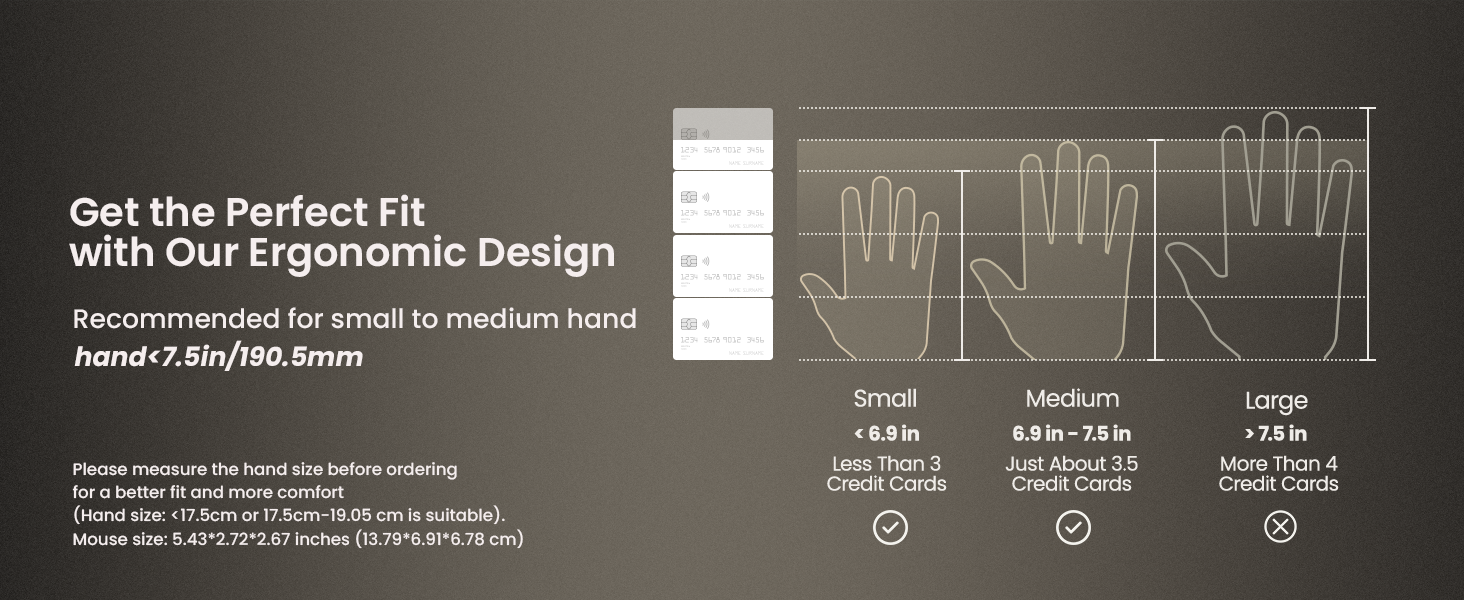
7. Hand Size Guide
The ProtoArc EM11 NL mouse is specifically designed for small to medium-sized hands. For optimal comfort and ergonomic benefits, it is recommended for hand lengths under 7.5 inches (19.05 cm). Please measure your hand size before ordering to ensure a better fit.

8. Spésifikasi
| Fitur | Rincian |
|---|---|
| Dimensi produk | 3.54 x 2.76 x 0.04 inci |
| Item Beurat | 10.2 ons |
| Nomer Modél Item | EM11 NL |
| Batré | 1 Batré Teu Baku (kaasup) |
| Téhnologi konektipitas | 2.4G USB-A Receiver, Bluetooth |
| Fitur husus | Ergonomic Design, Multi-Device, Rechargeable, Vertical Design, Wireless |
| Téhnologi Deteksi Gerakan | Optik |
| Warna | Bodas |
| Produsén | ProtoArc |
9. Cara ngungkulan
If you encounter any issues with your ProtoArc EM11 NL mouse, please try the following steps:
- Masalah sambungan: Ensure the mouse is turned on and fully charged. For 2.4G connection, verify the USB-A receiver is securely plugged into your device. For Bluetooth, ensure Bluetooth is enabled on your device and the mouse is in the correct pairing mode (B1 or B2). Try re-pairing the mouse.
- Ngalambat/Teu Ngarespon: Check for interference from other wireless devices. Ensure the mouse is within the effective range of your device. Try changing the DPI setting.
- Masalah ngecas: Ensure the Type-C cable is properly connected to both the mouse and a working USB power source. Try a different USB port or charging cable.
- Cursor Inaccuracy: Ensure the optical sensor on the bottom of the mouse is clean and free from obstructions. Use the mouse on a suitable surface.
10. Garansi jeung Rojongan
For warranty information and technical support, please refer to the official ProtoArc websitus atanapi ngahubungan layanan palanggan maranéhanana langsung. Simpen resi pameseran anjeun salaku bukti pameseran pikeun klaim garansi.


