Bubuka
This manual provides essential information for the safe and efficient use of your ONN 22-inch Full HD LED Monitor (Model 100140681). Please read these instructions carefully before operating the device and retain them for future reference.
The ONN 22-inch FHD LED Monitor features a frameless design, Full HD (1920 x 1080p) resolution, and a 60Hz refresh rate. It includes Adaptive Sync technology for smoother visuals and offers versatile connectivity options. Its VESA-compatible design allows for flexible mounting solutions.
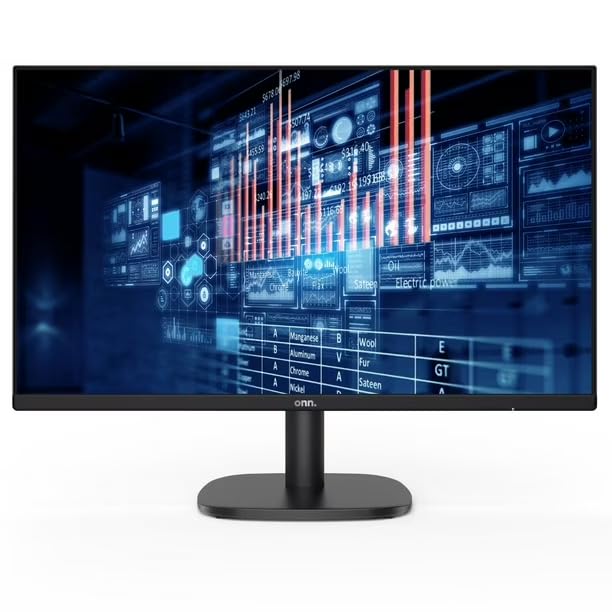
Gambar: Hareupeun view of the ONN 22-inch FHD LED Monitor displaying data graphics.
Eusi pakét
Pastikeun yén sadaya item aya dina bungkusan:
- ONN 22-inch FHD LED Monitor Display
- Stand Monitor (Dasar sareng Beuheung)
- Kabel Daya
- Kabel HDMI
- Manual pangguna (dokumén ieu)
Disetél
1. Ngarakit Stand
- Taliti teundeun monitor ka handap dina permukaan anu lemes sareng bersih pikeun nyegah goresan.
- Pasangkeun beuheung penyangga kana tonggong monitor, saluyukeun titik pemasanganna. Amankeun nganggo sekrup upami disayogikeun.
- Pasangkeun dasar penyangga kana beuheung penyangga, pastikeun éta ngaklik kana tempatna atanapi diamankeun ku sekrup anu disayogikeun.
2. Nyambungkeun ka Komputer
The monitor supports HDMI and VGA connections.
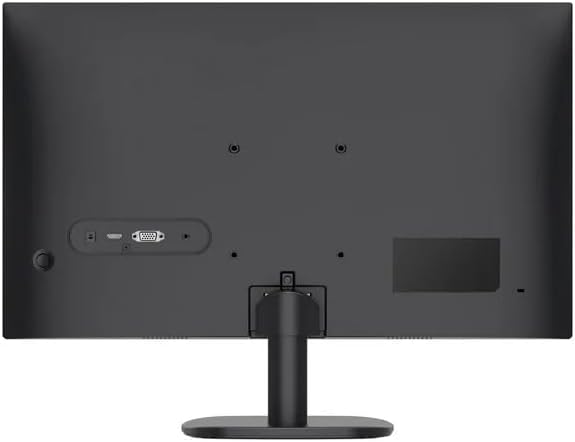
Gambar: Tukangeun view of the ONN monitor, highlighting the input ports including HDMI and VGA.
- Sambungan HDMI: Sambungkeun hiji tungtung kabel HDMI ka port HDMI dina komputer anjeun sareng tungtung anu sanésna ka port HDMI dina monitor.
- Sambungan VGA: Connect one end of the VGA cable to the VGA port on your computer and the other end to the VGA port on the monitor. Secure the screws on the VGA connector.
3. Sambungan Daya
- Connect the power cable to the monitor's power input port.
- Colokkeun tungtung kabel daya anu sanés ka stop kontak listrik anu dibumikeun.
4. Ngahurungkeun
- Press the power button located on the monitor (typically on the bottom right or back).
- The power indicator light will illuminate, and the monitor will display the input source.
Ngoperasikeun
1. Menu dina Layar (OSD).
The OSD menu allows you to adjust various monitor settings. Typically, buttons are located on the bottom right or back of the monitor.
- Tombol Menu: Pencét pikeun muka menu OSD.
- Tombol Napigasi: Use to move through menu options.
- Tombol Pilih/Asupkeun: Pencét pikeun mastikeun pilihan atanapi lebet kana sub-menu.
- Tombol Kaluar: Pencét pikeun kaluar tina ménu OSD.
2. Basic Adjustments
- Caang: Saluyukeun luminance sakabéh layar.
- Kontras: Adjusts the difference between light and dark areas of the image.
- Setélan warna: Robah suhu warna, hue, sareng jenuh.
- Pilih Input: Manually switch between HDMI and VGA input sources.
- Singkronisasi adaptif: Enable or disable Adaptive Sync for compatible graphics cards to reduce screen tearing and stuttering.
Pangropéa
Ngabersihan Monitor
- Salawasna pareumkeun monitor sareng cabut kabel listrik sateuacan beberesih.
- Anggo kaén anu lemes sareng teu aya serat anu hampang dampdisampurnakeun ku cai atanapi pembersih layar anu henteu abrasif.
- Ulah menyemprot cleaner langsung kana layar.
- Ulah make bahan kimia kasar, pangleyur, atawa bahan abrasive.
Perawatan Umum
- Hindarkeun nempatkeun barang beurat dina monitor atanapi kabelna.
- Jauhkeun monitor tina sinar panonpoé langsung, sumber panas, sareng kalembaban anu kaleuleuwihan.
- Pastikeun ventilasi ditangtoskeun sabudeureun monitor.
Pamérésan masalah
Upami anjeun mendakan masalah sareng monitor anjeun, tingal solusi umum ieu:
| Masalah | Mungkin Cukang lantaranana | Solusi |
|---|---|---|
| Taya kakuatan | kabel kakuatan teu disambungkeun; Stop kontak listrik teu jalan | Pastikeun sambungan kabel listrik aman disambungkeun ka monitor jeung stop kontak; Nguji outlet sareng alat sejen. |
| Taya sinyal | kabel video teu disambungkeun; Sumber input salah dipilih | Check HDMI/VGA cable connections; Use OSD menu to select correct input source. |
| Gambar buram atanapi menyimpang | Incorrect resolution; Loose video cable | Set computer's display resolution to 1920 x 1080; Ensure video cable is securely connected. |
| Layar kedip-kedip | Refresh laju mismatch; Masalah kabel | Ensure refresh rate is set to 60Hz; Try a different video cable. |
spésifikasi
| Fitur | Rincian |
|---|---|
| Nomer modél | 100140681 |
| Ukuran tampilan | 22 inci (55.9 cm) |
| Tipe Panel | LED |
| Resolusi | 1920 x 1080 (HD lengkep) |
| Refresh Laju | 60Hz |
| Rasio Aspék | 16:9 |
| Konektipitas | 1x HDMI, 1x VGA |
| VESA Gunung kasaluyuan | 75 x 75 mm |
| Dimensi (kalayan stand) | 53.3 x 20.3 x 38.1 cm (20.98 x 7.99 x 15 inci) |
| Beurat (kalayan stand) | 4.8 kg (10.58 lbs) |
Garansi sareng Rojongan
For technical assistance, warranty claims, or further product information, please refer to the documentation included with your purchase or visit the official ONN websitus. Simpen bukti pameseran anjeun pikeun tujuan jaminan.


