1. Bubuka
This manual provides comprehensive instructions for the ALLIMITY MME-AS3215R-NP remote control. This remote is designed as a direct replacement and is compatible with various Saba TV models, offering full functionality without the need for programming or complex setup.
To ensure compatibility, please verify that your existing remote control or your TV's original remote control drawing matches the images provided in this manual. If you are unsure of your TV's model, it can typically be found on a label located on the back of the television unit.
Model TV anu cocog:
- LHD24CX(V.2), LHD28CX23(V.2), LHD32CX23, LHD40C26, LHD46CX
- S2814R, S2816R, S3214R, S3215R, AS3215R, S3225R, S4014R, SA32S40
- LE22PV15WH, LED40TC2600E, L24CE2A3EB, L32F2A3EB
- LC24HA3, LC32C22IT, LC32HA3
- LD22BCS105, LD22CH12, LD32CHS2300ES, LD40CHS2000ES
- LED28TC2300E, LED32AHC2200E, LED32AHC2200E(T), LED32AHD2000E(T), LED32TC2200E(I), LED40TC2600E(I), LED28AHD2060E(T), LED28TC2200E(V.2)
2. Produk Langkungview
The ALLIMITY MME-AS3215R-NP remote control is designed for ease of use and comfortable handling. It is lightweight and ergonomically shaped, ensuring a secure grip during operation. This remote provides stable performance and an effective transmission distance of up to 10 meters.

Gambar 1: Ti luhur ka handap view of the ALLIMITY remote control, showing all buttons and their labels. The remote is black with white and colored buttons.
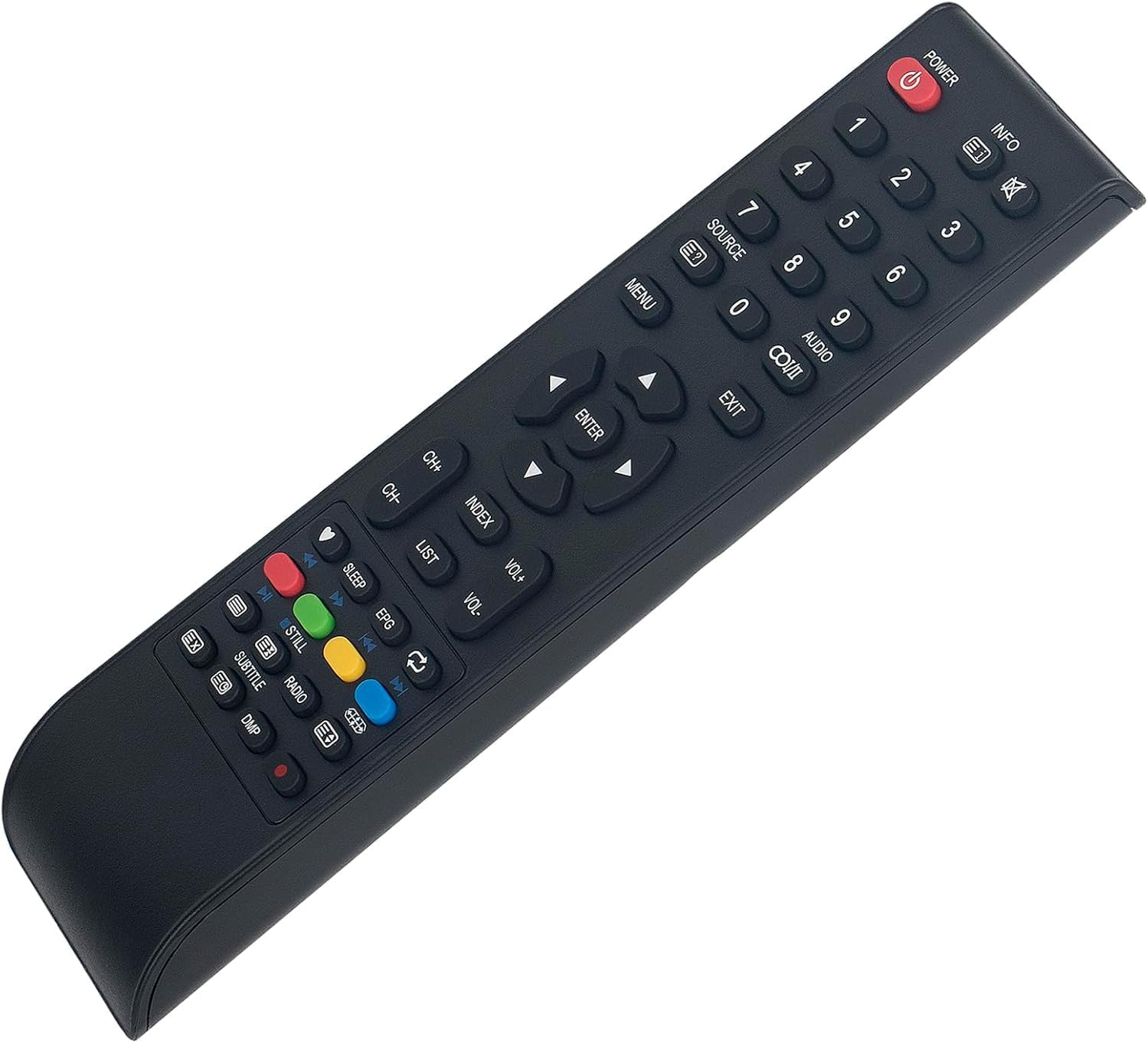
Gambar 2: Angled view of the ALLIMITY remote control, highlighting its ergonomic shape and button layout.
3. Setélan
3.1 Pamasangan batré
Kadali jauh merlukeun dua batré AAA (teu kaasup) pikeun operasi. Turutan léngkah ieu pikeun masang batré:
- Teangan tempat panutup kompartemen batré dina tonggong kadali jauh.
- Pencét tab sareng geser panutup ka handap pikeun muka kompartemen.
- Selapkeun dua batré AAA, mastikeun terminal positif (+) jeung négatip (-) align bener jeung markings jero kompartemen nu.
- Geser panutup kompartemen batré deui kana tempatna nepi ka klik aman.
Catetan: Salawasna gentos dua batré dina waktos anu sami. Ulah nyampur batré lami sareng énggal, atanapi jinis batré anu béda.
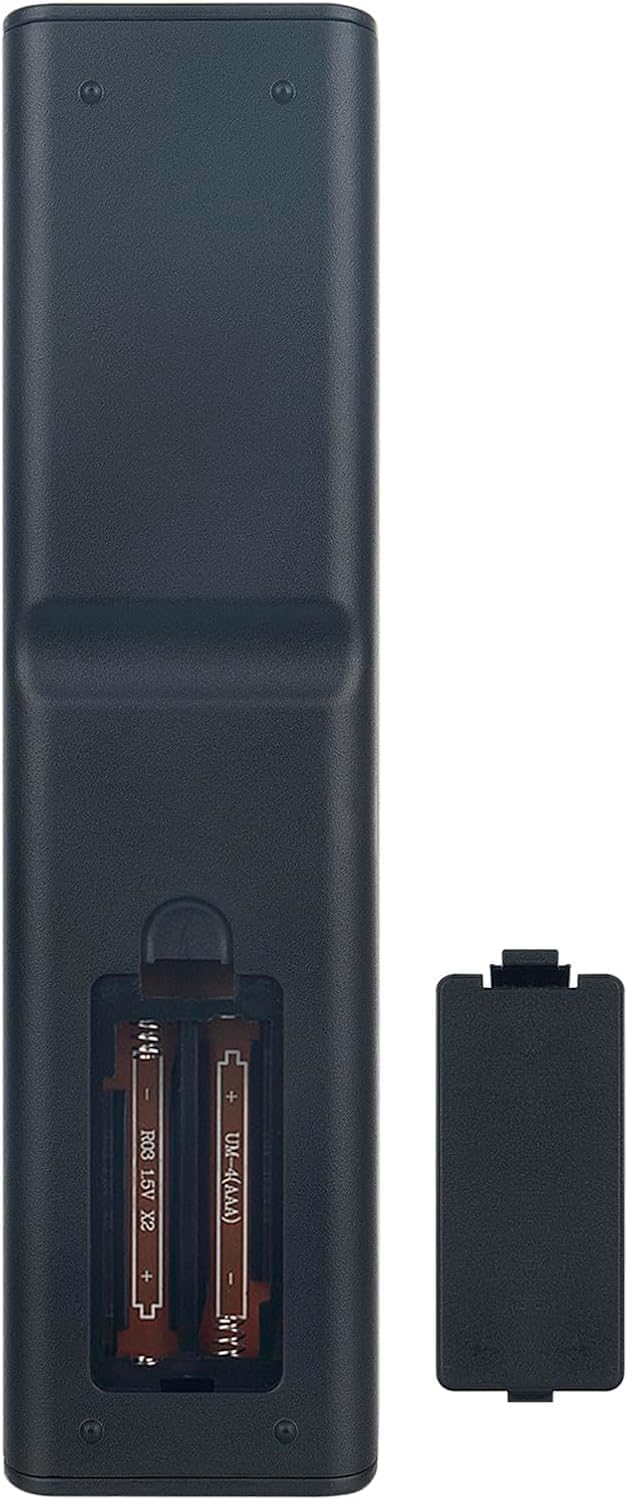
Gambar 3: Tukangeun view of the ALLIMITY remote control with the battery compartment open, showing where to insert two AAA batteries.
3.2 Pamakéan awal
This remote control is designed to work directly with compatible Saba TV models without any programming. Once batteries are installed, point the remote control towards your TV and begin operation.
4. Parentah Operasi
The ALLIMITY remote control features a standard layout for easy navigation and control of your Saba TV. Refer to the image below for button identification and their primary functions.
Gambar 4: Diwincik view of the ALLIMITY remote control, highlighting the function of each button.
- Kakuatan (Ⓘ): Ngahurungkeun atawa mareuman TV.
- INFO: Nampilkeun inpormasi ngeunaan program atanapi input ayeuna.
- Tombol Jumlah (0-9): Milih saluran sacara langsung.
- SUMBER: Siklus ngaliwatan sumber input sadia (HDMI, AV, jsb).
- MENU: Muka ménu utama TV.
- KALUAR: Nutup menu ayeuna atanapi tampilan dina layar.
- Tombol Navigasi (Luhur, Handap, Kénca, Katuhu): Navigates ngaliwatan ménu jeung pilihan.
- Asupkeun: Confirms a selection in menus.
- VOL+ / VOL-: Ngaronjatkeun atawa ngurangan polumeu.
- CH+ / CH-: Ngarobah saluran kaluhur atanapi kahandap.
- INDEX / LIST: Accesses specific TV functions or channel lists.
- Tombol Warna (Beureum, Héjo, Konéng, Biru): Used for specific functions within certain TV menus or interactive services.
- Kontrol Putar Balik (Puter, Pause, Stop, Mundur, Maju Gancang): Controls media playback if supported by the TV.
- SARE: Nyetél timer saré pikeun TV.
- EPG: Ngaksés Panduan Program Éléktronik.
- MASIH: Pauses the current image.
- RADIO: Switches to radio mode if available.
- SUBTITEL: Ngahurungkeun / mareuman subtitle.
- DMP: Likely for Digital Media Player functions.
5. Pangropéa
Perawatan sareng pangropéa anu leres bakal manjangkeun umur remot kontrol anjeun.
- beberesih: Anggo lawon anu lemes sareng garing pikeun ngabersihkeun remot kontrol. Pikeun kokotor anu bandel, radaampBilas lawon ku cai atanapi larutan pembersih anu hampang, teras langsung usap dugi ka garing. Entong nganggo pembersih atanapi pelarut anu abrasif.
- Perawatan batré: Remove batteries if the remote control will not be used for an extended period to prevent leakage. Dispose of used batteries responsibly according to local regulations.
- Panyimpenan: Simpen kadali jauh di tempat anu tiis sareng garing jauh tina sinar panonpoé langsung sareng suhu anu ekstrim.
- Hindarkeun tetes: Jaga jarak jauh tina dampak fisik, sabab tetes tiasa ngaruksak komponén internal.
6. Cara ngungkulan
Upami anjeun ngalaman masalah sareng remote control anjeun, cobian léngkah-léngkah ngungkulan masalah ieu:
| Masalah | Mungkin Cukang lantaranana / Solusi |
|---|---|
| Kadali jauh teu jalan. |
|
| Remote control works intermittently. |
|
| Some buttons are not responding. |
|
7. Spésifikasi
| Fitur | Rincian |
|---|---|
| merek | KAKATAAN |
| Nomer modél | MME-AS3215R-NP |
| Produsén | ALLIMITYMM |
| Dimensi produk | 17 x 5 x 1 cm |
| Item Beurat | 59 gram |
| Téhnologi konektipitas | Infrabeureum (IR) |
| Rentang maksimum | 10 méter |
| Fitur husus | Comfortable design, No programming required |
| Alat nu cocog | Saba TVs (models listed in Introduction) |
8. Garansi jeung Rojongan
Specific warranty information for this product may vary depending on your region and retailer. Please refer to the documentation provided at the time of purchase or contact your retailer for details regarding warranty coverage.
For technical support or further assistance, please contact the ALLIMITY customer service department or your product retailer.


