Bubuka
Thank you for choosing the COUGAR Armor ONE V2 Gold Gaming Chair. This manual provides essential information for the proper setup, operation, and maintenance of your new chair. Please read these instructions carefully before assembly and use to ensure optimal performance and safety.
Émbaran Kasalametan
PERHATOSAN:
- Salawasna turutan parentah perakitan kalawan tepat.
- Do not use the chair in a manner that could cause it to tip over or malfunction.
- Pastikeun yén sadaya komponén dipasang sacara aman sateuacan dianggo.
- Tetep bagian leutik jauh ti barudak salila assembly.
Setup sareng Majelis
The COUGAR Armor ONE V2 Gold Gaming Chair is designed for straightforward assembly. All necessary tools and hardware are typically included. Follow the step-by-step instructions provided in the packaging for a smooth setup process.
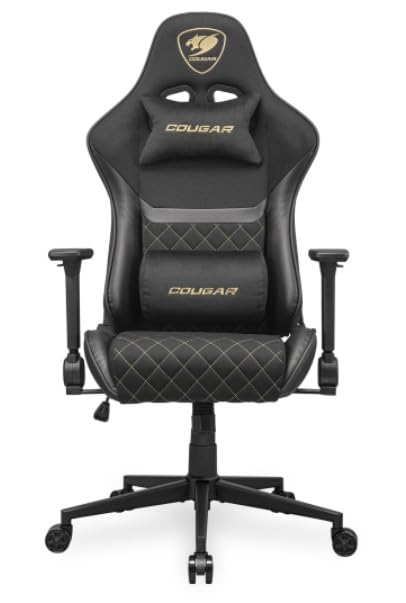
Image: The COUGAR Armor ONE V2 Gold Gaming Chair in its assembled state, featuring black and gold accents with a high-back design, lumbar and neck pillows, and 4D armrests.
For a visual guide on the chair's features and potential assembly tips, please refer to the video below:
Video: Hiji leuwihview of the gaming chair, demonstrating its features and robust design suitable for adults up to 400 lbs. This video may provide visual cues for assembly and feature usage.
Parentah Operasi
Your COUGAR Armor ONE V2 Gold Gaming Chair offers multiple adjustment options for personalized comfort and support.
1. Fungsi Reclining
The chair allows for reclining from 90° to 155°. Locate the recline lever on the side of the chair (typically the right side). Pull the lever up and lean back to adjust the angle. Release the lever to lock the backrest in your desired position. This feature is ideal for switching between an upright working posture and a relaxed reclining position for breaks.

Image: Illustration showing the adjustable design of the chair, highlighting 155° reclining, piston lift height adjustment, and rocking functionality.
2. adjustment jangkungna
Utilize the piston lift mechanism to adjust the chair's height. Pull the lever (usually located under the seat, near the recline lever) upwards while seated to lower the chair, or stand up and pull the lever to raise it. Adjust until your feet are flat on the floor and your arms are at desk height.
3. 4D Folding Armrests
The 4D folding armrests can be adjusted in multiple directions (up/down, forward/backward, left/right, and pivot) to provide optimal support for your arms and wrists. They can also be fully folded back to maximize mobility or allow the chair to fit under desks more easily. Refer to the specific armrest controls for each adjustment.

Gambar: Deukeut view of the 4D folding armrests, demonstrating their adjustability and ability to fold back for increased mobility.
4. Lumbar and Neck Pillows
The chair includes adjustable lumbar and neck pillows for enhanced ergonomic support. The lumbar pillow's securing strap is discreetly hidden within the backrest for a clean aesthetic. Position these pillows to support the natural curve of your spine and neck.

Image: Detail showing the subtle functionality of the lumbar pillow's securing strap, integrated into the chair's backrest.
5. Back Pocket
An integrated back pocket provides convenient storage for essential items, keeping them within easy reach while you are seated.

Image: A close-up of the chair's back pocket, demonstrating its capacity to hold items like a tablet or notebook for extra storage convenience.
Pangropéa
To maintain the longevity and appearance of your COUGAR Armor ONE V2 Gold Gaming Chair, follow these maintenance guidelines:
- beberesih: For woven fabric, gently vacuum to remove dust and debris. For spills, blot immediately with a clean, damp cloth. Use a mild fabric cleaner if necessary, testing on an inconspicuous area first. Avoid harsh chemicals.
- Pigura: périodik pariksa jeung tighten sadayana screws na bolts pikeun mastikeun stabilitas.
- Casters: Clean casters regularly to prevent hair and debris from accumulating, which can hinder smooth movement.
- Hindarkeun sinar panonpoé langsung: Prolonged exposure to direct sunlight can cause fading and material degradation.
Pamérésan masalah
Upami anjeun ngalaman masalah sareng korsi anjeun, tingali tip ngungkulan masalah umum ieu:
- Suara ngik-ngik: Check all bolts and screws for tightness. Apply a small amount of silicone lubricant to moving parts if necessary.
- Kasesahan Nyaluyukeun Jangkungna: Ensure the height adjustment lever is fully engaged. If the gas lift is unresponsive, contact customer support.
- Unstable Chair: Verify that the base and casters are correctly installed and all connections are secure.
- Bagian anu leungit: If any parts are missing upon delivery, contact COUGAR Gaming customer support immediately.
spésifikasi
Key specifications for the COUGAR Armor ONE V2 Gold Gaming Chair (Woven Fabric variant):
| merek | Cougar |
| Ngaran modél | Armor One V2 Gold |
| Nomer Modél Item | CGR-AO2-GLB |
| Bahan | Woven Fabric (Foam Fill) |
| Warna | Hideung / Emas |
| Dimensi produk | 26.3 "D x 26.7" W x 49.6" H |
| Item Beurat | 45.5 pon |
| Gaya Balik | Buka Balik |
| Fitur husus | Arm Rest, Lumbar Pillow, Neck Pillow |
| Ngitung Posisi Reclining | 1 (dugi ka 155°) |
| Bisa Dilipat | Yes (Armrests) |
| Dianjurkeun Mangpaat | Kaulinan |

Image: Detailed diagram illustrating the various dimensions of the COUGAR Armor ONE V2 Gold Gaming Chair in both millimeters and inches.
Garansi sareng Rojongan
For warranty information or customer support, please refer to the documentation included with your product or visit the official COUGAR Gaming websitus. Rencana panyalindungan ogé sayogi pikeun cakupan anu diperpanjang.
- Rencana panyalindungan: 2-Year and 3-Year Protection Plans are available.
- Wangsul: 30-day easy returns are typically offered.
- Palayanan palanggan: Contact COUGAR Gaming for assistance with product issues or inquiries.


