1. Bubuka
This manual provides detailed instructions for the installation, operation, and maintenance of your Hiseeu 2K 3MP PTZ WiFi Security Camera Outdoor. Please read this manual thoroughly before using the product to ensure proper setup and functionality. Keep this manual for future reference.
2. Produk Langkungview
The Hiseeu 2K 3MP PTZ WiFi Security Camera is designed for outdoor surveillance, offering high-resolution video, pan-tilt-zoom capabilities, and advanced features such as color night vision, two-way audio, and motion-activated floodlights. It connects wirelessly via Wi-Fi and requires a plug-in power source.

Image 2.1: Multiple Hiseeu 2K 3MP PTZ WiFi Security Cameras.

Gambar 2.2: Detil view of the Hiseeu camera components.
Fitur konci:
- 3MP (2048x1536) Resolution: Nyadiakeun foo video jelas tur lengkeptage.
- Pan-Tilt-Zoom (PTZ): Horizontal rotation of 0-320° and vertical tilt of 0-90° for wide area coverage.
- Konektipitas WiFi: Wireless network connection for flexible placement.
- Audio Dua Arah: Diwangun-di mikropon jeung spiker pikeun komunikasi.
- Warna Night Vision: Enhanced visibility in low-light conditions with integrated floodlights.
- Motion Detection & Auto Tracking: Automatically detects movement, tracks subjects, and sends alerts.
- IP66 Tahan Cuaca: Dirancang pikeun tahan rupa-rupa kaayaan cuaca luar.
- Lokal & Panyimpenan Awan: Supports Micro SD card (up to 128GB) and optional cloud storage.
3. Eusi Paket
Punten parios eusi bungkusan saatos nampi. Upami aya barang anu leungit atanapi rusak, hubungi pangecér anjeun.
- Hiseeu 2K 3MP PTZ WiFi Security Camera(s)
- Power Adapter(s) (10ft cable)
- Pemasangan Screws sareng Jangkar
- Pakakas Tahan Cai pikeun Kabel Jaringan (upami aya)
- Instruksi Manual
4. Setélan
4.1 Instalasi fisik
Choose a suitable outdoor location for your camera, ensuring it has a clear view of the area you wish to monitor and is within range of your Wi-Fi network. The camera is IP66 weatherproof, suitable for various conditions.
- Mark the drilling positions on the wall or ceiling using the mounting template (if provided).
- Bor liang teras pasang jangkar témbok.
- Secure the camera bracket to the surface using the provided screws.
- Adjust the camera angle as needed after mounting.

Image 4.1: Hiseeu camera mounted outdoors, highlighting its weather resistance.
4.2 Sambungan Daya
Connect the provided power adapter to the camera's power input port and then plug it into a standard electrical outlet. The camera requires a continuous power supply and does not operate on battery power.
4.3 Pamasangan Aplikasi sareng Papasangan
The Hiseeu camera operates with the EseeCloud application.
- Unduh EseeCloud aplikasi ti toko aplikasi smartphone anjeun (ios atanapi Android).
- Ngadaptarkeun akun anyar atanapi log in upami anjeun parantos gaduh.
- Tap the '+' icon in the app to add a new device.
- Follow the on-screen instructions to connect the camera to your 2.4GHz Wi-Fi network. Ensure your phone is connected to the same Wi-Fi network during the initial setup.
- Sakali disambungkeun, anjeun bisa ngaranan kaméra Anjeun tur mimitian hirup viewing.
5. Parentah Operasi
5.1 Hirup View sareng Playback
Open the EseeCloud app and select your camera from the device list to access the live view. From here, you can also access recorded footage stored on the SD card or cloud.
5.2 Kontrol PTZ
Dina hirup view interface, use the on-screen directional controls to pan (horizontal 0-320°) and tilt (vertical 0-90°) the camera lens. You can also use digital zoom by pinching the screen.

Image 5.1: PTZ control interface on the EseeCloud app.
5.3 Audio Dua Arah
Ketok ikon mikropon dina aplikasi langsung view pikeun nyarios ngalangkungan spiker kaméra. Ketok ikon spiker pikeun ngadangukeun audio tina mikropon kaméra.

Image 5.2: Demonstrating two-way audio functionality.
5.4 Deteksi Gerak sareng Siaga
The camera features motion detection and auto-tracking. When motion is detected, the camera can automatically track the subject, record footage, and send push notifications to your smartphone. You can configure sensitivity and alert settings within the EseeCloud app.

Image 5.3: Motion detection and sound alert in action.
5.5 Modeu Visi Peuting
The camera supports full-color night vision, extending visibility up to 65 feet. You can switch between different night vision modes (e.g., infrared, color, smart mode) in the app settings. In smart mode, the floodlight will activate upon motion detection to provide color night vision.

Image 5.4: Full Color Night Vision vs. Infrared Night Vision.
5.6 Ngarekam jeung Panyimpenan
The camera supports local storage via a Micro SD card (up to 128GB, not included). Insert the SD card into the designated slot (refer to Image 2.2). You can also subscribe to cloud storage services through the EseeCloud app for remote backup of your recordings.
6. Pangropéa
- beberesih: Regularly wipe the camera lens with a soft, dry cloth to ensure clear image quality. Do not use harsh chemicals.
- Pembaruan firmware: Check the EseeCloud app periodically for available firmware updates to ensure optimal performance and security.
- Sasayogian tanaga: Ensure the power adapter and cable are free from damage and properly connected.
7. Cara ngungkulan
7.1 Kaméra Offline
- Check if the camera is powered on and the power adapter is working correctly.
- Pastikeun jaringan Wi-Fi anjeun aktip sareng kaméra aya dina jangkauan.
- Pareuman terus hurungkeun deui kaméra ku cara cabut panyambungna sareng pasang deui adaptor daya.
- If the issue persists, try resetting the camera using the reset button (refer to Image 2.2) and re-pairing it with the app.
7.2 Kualitas Gambar Miskin
- Ngabersihan lénsa kaméra.
- Pastikeun teu aya halangan dina widang kaméra view.
- Check your internet connection speed, as a slow connection can affect streaming quality.
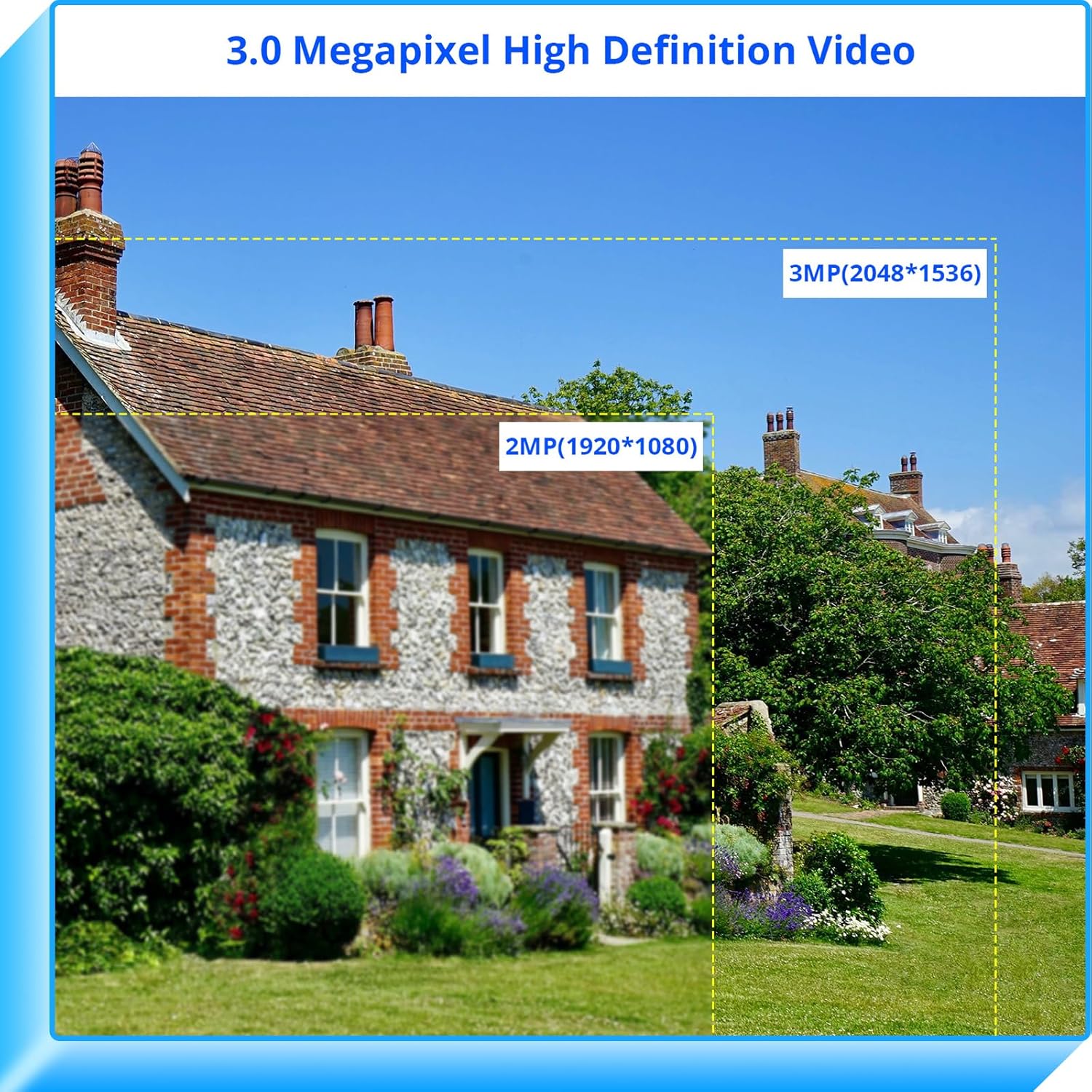
Image 7.1: Resolution comparison (3MP vs 2MP).
7.3 Deteksi Gerakan Teu Jalan
- Verify that motion detection is enabled in the EseeCloud app settings.
- Saluyukeun sensitivitas deteksi gerakan.
- Ensure there are no large objects constantly moving in the detection zone (e.g., tree branches in strong wind) that might trigger false alarms or desensitize the system.
8. Spésifikasi
| Fitur | Spésifikasi |
|---|---|
| merek | Hiseu |
| Resolusi Capture Video | 2K, 3 MP (2048x1536) |
| Protokol konektipitas | Wifi |
| Téknologi Komunikasi Nirkabel | Wifi |
| Tipe Pamasangan | Tembok Gunung |
| Tipe Controller | Android (and iOS) |
| Format Capture Video | MPEG-4 |
| Dianjurkeun Mangpaat Pikeun Produk | Kaamanan outdoor |
| Fitur husus | Night Vision (Color), PTZ, Two-Way Audio, Motion Detection |
| Alat nu cocog | Smartphone |
| Sumber Daya | Plug-in Power Adapter (AC) |
| ASIN | B0D9NS429W |
| Tanggal Kahiji Sadia | 18 Juli 2024 |
9. Garansi jeung Rojongan
Hiseeu products typically come with a limited warranty. For specific warranty details, please refer to the warranty card included with your product or visit the official Hiseeu website. For technical support, troubleshooting assistance, or further inquiries, please contact Hiseeu customer service through their official channels or the EseeCloud app.


