1. Bubuka
This manual provides detailed instructions for the installation, operation, and maintenance of your JOWUA 130W LED Hub. Designed specifically for Tesla Model Y and Reengineered Model 3 Highland (2024+), this hub expands your vehicle's charging capabilities with multiple ports and intelligent power management.

Image 1.1: The JOWUA 130W LED Hub, showcasing its sleek design and integrated cigarette lighter plug.
2. Émbaran Kasalametan
- Ulah ngalaan alat ka cai atawa kaleuleuwihan Uap.
- Hindarkeun suhu anu ekstrim.
- Ulah nyobian ngabongkar atawa ngaropéa alat. Ieu bakal ngabatalkeun jaminan.
- Ensure proper ventilation around the hub during operation.
- Use only with compatible vehicles as specified.
3. Eusi Paket
Pastikeun yén sadaya item aya dina pakét anjeun:
- JOWUA 130W LED Hub
- Integrated Type-C Cable
4. Setup jeung Instalasi
The JOWUA 130W LED Hub is designed for a precise fit within the Tesla Model Y and Reengineered Model 3 Highland (2024+) center console.
- Locate the Power Outlet: Identify the 15V cigarette lighter power outlet inside your Tesla's center console.
- Selapkeun Hub: Carefully align the JOWUA 130W LED Hub with the center console's internal structure. The hub's matte grey texture is designed to blend seamlessly with the original interior.
- Sambungkeun Kakuatan: Plug the integrated cigarette lighter connector from the hub firmly into the vehicle's 15V power outlet.
- Pariksa Fit: Ensure the hub is seated securely and does not obstruct the console lid operation.

Image 4.1: The JOWUA 130W LED Hub seamlessly integrated into the Tesla center console, showing its flush fit and accessible ports.
Gambar 4.2: A close-up view highlighting the hub's precision matching with the vehicle's original interior decor.
5. Parentah Operasi
5.1 Port Leuwihview
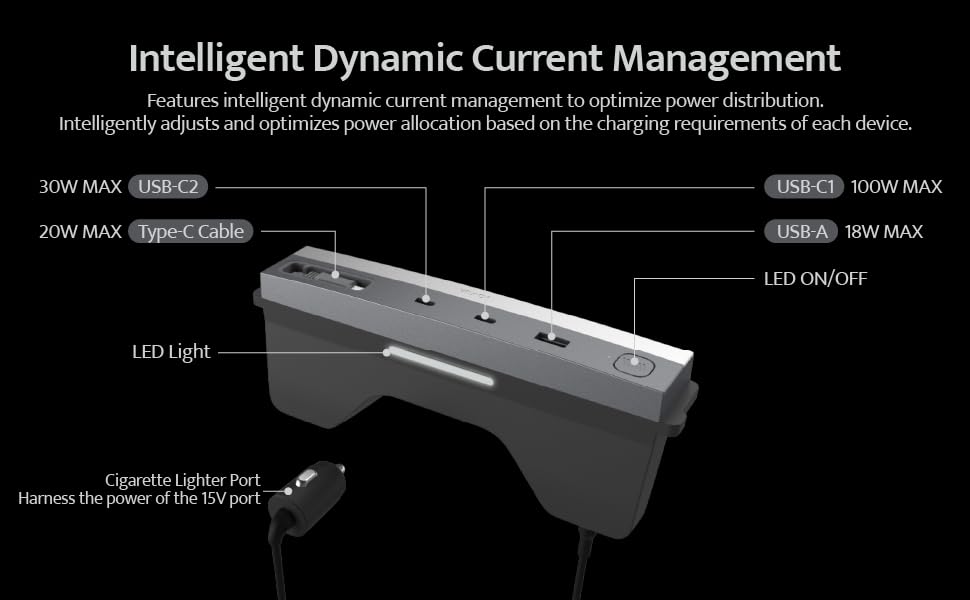
The JOWUA 130W LED Hub features multiple charging ports and an integrated LED light for convenience.
- Port USB-C1: Up to 100W MAX output.
- Port USB-C2: Up to 30W MAX output.
- Port USB-A: Up to 18W MAX output.
- Integrated Type-C Cable: Up to 20W MAX output, retractable for convenience.
- Lampu LED: Provides illumination within the center console.
- Tombol LED ON/OFF: Ngontrol lampu LED anu terintegrasi.
Note: All ports provide power only; data transmission is not supported.

Image 5.1: Detailed diagram showing the various ports, their maximum power outputs, and the LED light controls.
5.2 Dynamic Power Management
The hub utilizes dynamic control chips to intelligently distribute power from the Tesla cigarette lighter to all connected devices. It automatically adjusts and optimizes power allocation based on the charging requirements of each device, ensuring efficient and safe charging.
5.3 Ngecas Sababaraha Alat
The hub supports simultaneous charging of up to four electronic devices. Refer to the power output table below for detailed power distribution scenarios.
| Power Output Table | USB-C1 | USB-C2 | Kabel Tipe-C | USB-A |
|---|---|---|---|---|
| Paké Port tunggal | 100W | |||
| 30W | ||||
| 20W | ||||
| 18W | ||||
| Dual Ports Use | 65W | 30W | ||
| 65W | 20W | |||
| 65W | 18W | |||
| 30W | 20W | |||
| 30W | 18W | |||
| 20W | 18W | |||
| Three Ports Use | 65W | 30W | 20W | |
| 65W | 30W | 18W | ||
| 65W | 20W | 18W | ||
| 30W | 20W | 18W | ||
| Four Ports Use | 65W | 30W | 20W | 18W |
Image 5.2: Table illustrating the power distribution when using single, dual, three, or all four ports simultaneously.

Gambar 5.3: Example of high-speed charging for a laptop and other devices using the hub's various ports.

Image 5.4: Demonstration of the retractable Type-C charging cable, showing its ease of use and neat storage.
6. Pangropéa
- beberesih: Use a soft, dry cloth to wipe the surface of the hub. Do not use liquid cleaners or abrasive materials.
- Pamariksaan Port: Periodically check the charging ports for any dust or debris and clean gently with a dry, non-conductive tool if necessary.
- Perawatan kabel: Ensure the retractable Type-C cable retracts smoothly. Avoid forcing it or pulling it at extreme angles.
7. Cara ngungkulan
- Issue: Devices are not charging.
- Solusi:
- Ensure the hub's cigarette lighter plug is fully inserted into the vehicle's 15V power outlet.
- Check if the vehicle's power outlet is active. Some vehicles require the ignition to be on.
- Verify that the charging cables are securely connected to both the hub and your devices.
- Test with a different device or cable to rule out device/cable issues.
- Ensure the total power draw does not exceed the hub's maximum capacity (130W).
- Issue: The integrated LED light does not turn on/off.
- Solusi:
- Press the LED ON/OFF button firmly.
- Ensure the hub is receiving power from the vehicle.
- Issue: The center console light stays on after installing the hub.
- Solusi: The JOWUA hub is designed to maintain original car lighting. If the console light remains on, ensure the hub is correctly seated and not interfering with the console's light sensor or switch. If the issue persists, contact JOWUA support.
8. Spésifikasi
- merek: JOWUA
- model: 130W LED Hub
- Alat anu cocog: Tesla Model Y, Reengineered Model 3 Highland (2024+)
- Total palabuhan USB: 4 (2x Type-C, 1x USB-A, 1x Integrated Type-C Cable)
- Kaluaran Kakuatan Max: 130W (Jumlah)
- Kaluaran USB-C1: Nepi ka 100W
- Kaluaran USB-C2: Nepi ka 30W
- Kaluaran USB-A: Nepi ka 18W
- Integrated Type-C Cable Output: Nepi ka 20W
- Antarmuka Hardware: USB
- Bahan: palastik
- Beurat barang: 12.3 ons
- Ukuran Paket: 8.46 x 4.33 x 1.57 inci
- ASIN: B0D9JWDLKC
- Titimangsa munggaran sadia: 16 Juli 2024
9. Émbaran jaminan
The JOWUA 130W LED Hub comes with a garansi 1 taun ti tanggal beuli. Garansi ieu nyertakeun cacad manufaktur sareng gangguan dina panggunaan normal. Éta henteu nutupan karusakan anu disababkeun ku nyalahgunakeun, kacilakaan, modifikasi anu teu sah, atanapi pamasangan anu teu leres.
For warranty claims or service, please retain your proof of purchase and contact JOWUA customer support.
10. Rojongan Palanggan
If you have any questions, concerns, or require technical assistance, please visit the official JOWUA website or contact their customer support team. Contact information can typically be found on the product packaging or the JOWUA brand store on Amazon.
JOWUA Brand Store: Visit JOWUA Store on Amazon


