1. Bubuka
The Parsonver Smartwatch Z139 is designed to enhance your daily life with a variety of intelligent functions. This manual provides detailed instructions for setting up, operating, and maintaining your smartwatch to ensure optimal performance and user experience.
Key features include Bluetooth calling, comprehensive health monitoring (heart rate, blood oxygen, sleep), over 100 sports modes, and smart notifications.
2. Ngamimitian: Setup
2.1 Eusi pakét
- Parsonver Smartwatch Z139
- Kabel Ngecas
- Manual pamaké
2.2 Ngecas Smartwatch
Saméméh dipaké munggaran, eusian pinuh smartwatch Anjeun. Sambungkeun kabel ngecas magnét ka kontak ngecas dina tonggong arloji jeung nyolok tungtung USB kana adaptor kakuatan (teu kaasup) atawa port USB komputer.
2.3 Pamasangan Aplikasi sareng Papasangan
To unlock the full potential of your Parsonver Smartwatch, download the companion app on your smartphone. The app is compatible with iOS 9.0/Android 6.0 or above.
- Scan the QR code in the manual or search for "Parsonver" in your phone's app store (Google Play Store for Android, Apple App Store for iOS).
- Pasang sareng buka aplikasina.
- Follow the on-screen instructions in the app to create an account and pair your smartwatch via Bluetooth. Ensure Bluetooth is enabled on your smartphone.
- During pairing, grant necessary permissions for notifications, location, and health data synchronization.

Image: The Parsonver Smartwatch Z139, showcasing its main display with time, date, and step count.
3. Parentah Operasi
3.1 Telepon Bluetooth sareng Bewara Smart
Once connected via Bluetooth, you can manage calls directly from your smartwatch.
- Ngajawab / Nelepon: Use the watch's interface to answer incoming calls or dial numbers. The watch features high-quality speakers and a high-definition microphone for clear communication.
- Bewara: Receive alerts for SMS, WhatsApp, Facebook, emails, and other app notifications directly on your watch. The watch will vibrate to inform you of new messages.
- Asistén Sora: Utilize the integrated voice assistant for hands-free control and information access.
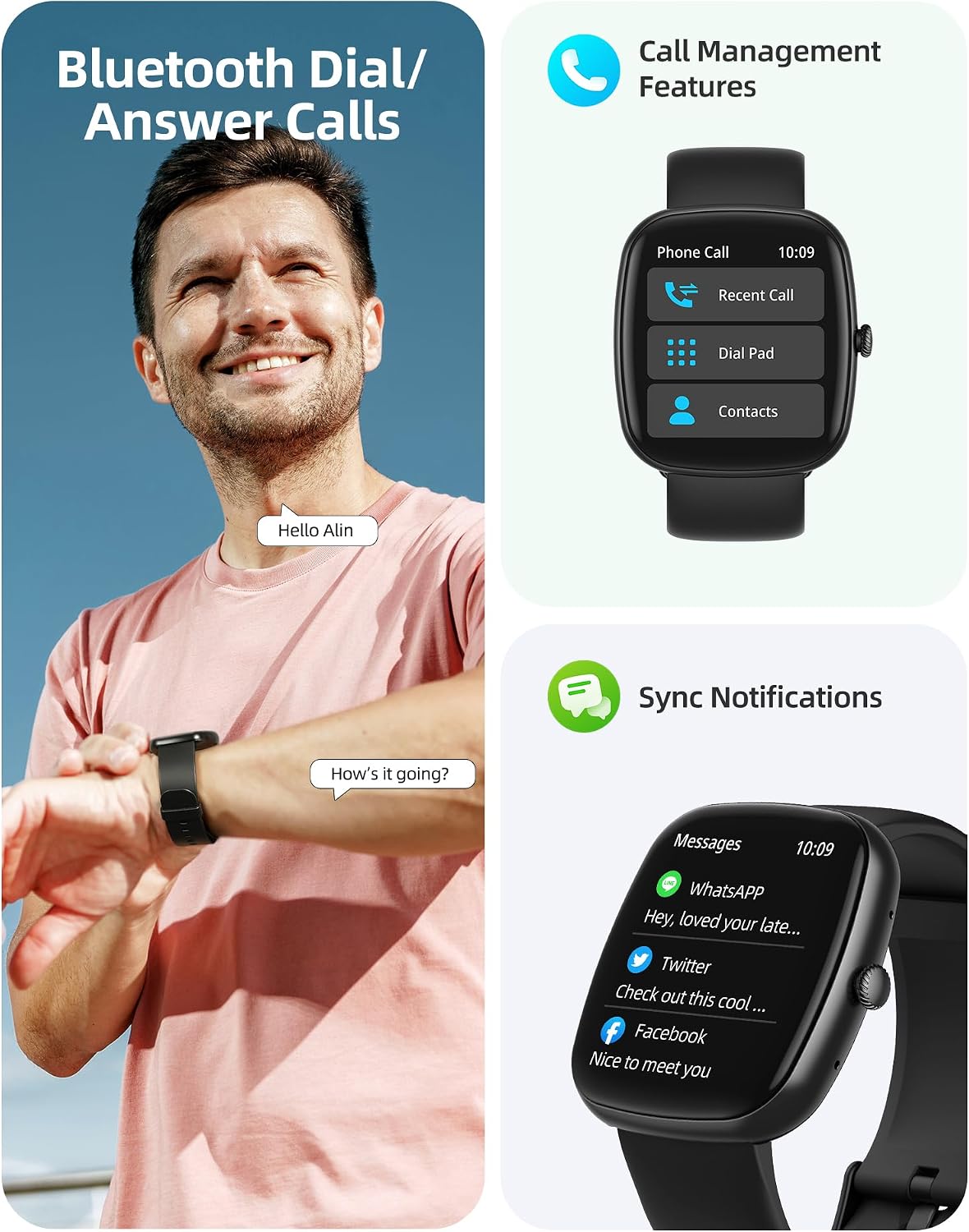
Image: A user interacting with the smartwatch for Bluetooth calls, demonstrating the call management interface.
3.2 Pangimeutan Kaséhatan
The smartwatch features advanced sensors for continuous health tracking.
- Ngawaskeun Laju haté: Measures and records your heart rate throughout the day. The app displays trends and alerts for abnormal readings.
- Ngawaskeun Oksigén Darah (SpO2): Lacak tingkat jenuh oksigén getih anjeun.
- Pangimeutan Saré: Analyzes your sleep patterns, including deep sleep, light sleep, and awake times, to help optimize your sleep habits.
- Pangimeutan Stress: Nyadiakeun wawasan ngeunaan tingkat setrés anjeun.
- Nyukcruk Kaséhatan Awéwé: Records menstrual cycles and ovulation periods.

Image: Visual representation of the smartwatch's health monitoring capabilities, including heart rate, blood oxygen, and pressure readings.
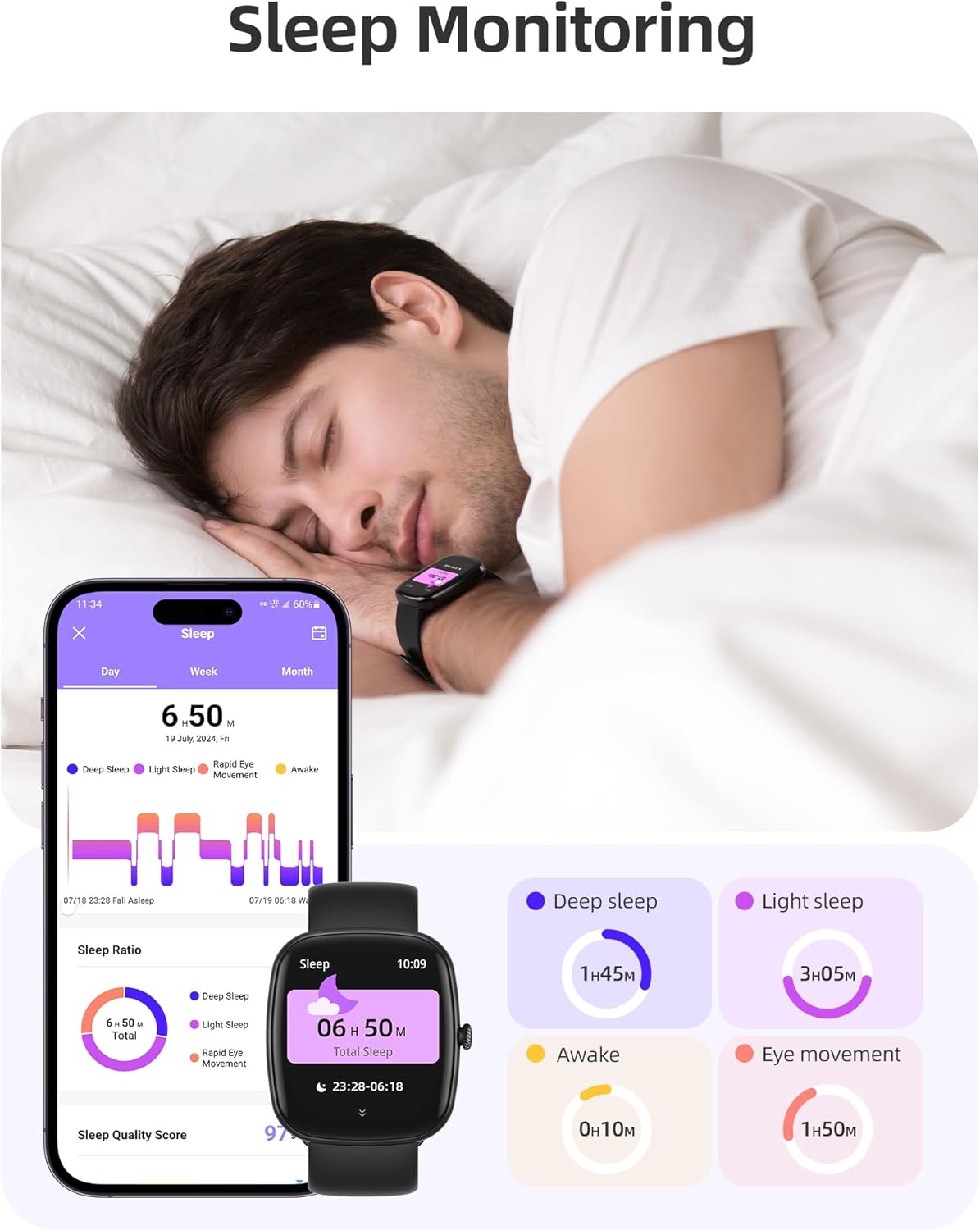
Image: The smartwatch monitoring sleep, with a detailed breakdown of sleep stages displayed on the companion app.
3.3 Modeu Olahraga sarta Tracking Kagiatan
The activity tracker supports over 100 sports modes to monitor your workouts effectively.
- Modeu sadia: Includes yoga, running, jumping, cycling, badminton, football, rowing, and many more.
- Nyukcruk Data: Records steps, distance, calories burned, and real-time heart rate during exercise.
- Skor Kesiapan Sapopoé: Provides a summary of your daily activity and recovery.

Image: The smartwatch tracking a user's activity during a run, displaying key metrics like calories, steps, heart rate, and distance.
3.4 App Experience and BMI Tracking
The companion app offers additional features for health management.
- Weight and BMI Tracking: Manually input your weight in the app to track changes and automatically calculate your Body Mass Index (BMI). View daily, weekly, monthly, and yearly weight trends.
- Kursus Pelatihan: Access integrated training courses from beginner to advanced levels.
- Relaxation Features: Includes white noise, meditation exercises, and relaxation training.

Image: The companion app displaying weight and BMI tracking features, helping users monitor their body composition.
3.5 Customizable Watch raray
Personalize your smartwatch with over 200 different watch face designs available through the app.

Image: A selection of customizable watch faces, demonstrating the variety of styles and information layouts available.
3.6 Fungsi Praktis Séjénna
The smartwatch includes several other useful features:
- Ramalan Cuaca: View 7-day weather forecasts.
- Kontrol Musik: Control music playback directly from your wrist.
- Kontrol kaméra: Kadali jarak jauh kaméra smartphone anjeun.
- Jam alarem: Setel sababaraha alarm.
- Stopwatch & Timer: Waktu anu tepat pikeun sagala rupa kagiatan.
- Panginget Sedentary: Ngajurung anjeun pikeun mindahkeun saatos période teu aktip.
- Latihan pernapasan: Guided exercises to reduce stress.
- Panggihan Telepon: Locate your paired smartphone with a tap on your watch.
- Penyesuaian Caang: Continuously adjustable screen brightness for optimal visibility in any lighting condition.

Gambar: Hiji leuwihview of the various practical functions available on the Parsonver Smartwatch Z139.
4. Pangropéa
Perawatan anu leres mastikeun umur panjang sareng kinerja smartwatch anjeun.
- beberesih: Regularly clean the watch and strap with a soft, dry cloth. Avoid harsh chemicals.
- Tahan cai: The smartwatch has an IP68 water resistance rating, meaning it can withstand hand washing, rain, and splashes. Do not use it for swimming, diving, or in saunas.
- Ngecas: Use only the provided charging cable. Avoid exposing charging contacts to moisture.
- Panyimpenan: Simpen arloji dina tempat anu tiis sareng garing upami henteu dianggo.
5. Cara ngungkulan
If you encounter issues with your smartwatch, try the following steps:
- Lalajo teu hurung: Pastikeun arloji dicas pinuh.
- Teu tiasa dipasangkeun sareng telepon:
- Pastikeun Bluetooth diaktipkeun dina telepon anjeun sareng jam tangan.
- Pastikeun arlojina aya dina jangkauan telepon anjeun.
- Balikan deui arloji sareng telepon anjeun.
- Try unpairing and re-pairing through the app.
- Bewara teu nampi:
- Check app permissions on your phone to ensure notifications are allowed for the Parsonver app.
- Verify that notifications are enabled within the Parsonver app settings.
- Pastikeun jam tangan disambungkeun kalayan leres via Bluetooth.
- Data kaséhatan teu akurat:
- Pastikeun yén arloji dipaké pas dina pigeulang anjeun, henteu ketat teuing atanapi longgar teuing.
- Ngabersihan sénsor dina tonggong arloji.
- Hindarkeun gerakan kaleuleuwihan salami pangukuran.
- Layar teu ngaréspon: Cobi hurungkeun deui jam tanganna. Upami masalahna masih aya, hubungi dukungan palanggan.
6. Spésifikasi
| Fitur | Spésifikasi |
|---|---|
| merek | Parsonver |
| Nomer modél | Z139 |
| Ukuran layar | 1.83 inci |
| Kasaluyuan System Operasi | iOS 9.0/Android 6.0 or above Smartphones |
| Téhnologi konektipitas | Bluetooth |
| Fitur husus | Bluetooth Calls, 100+ Sports Modes, Heart Rate Monitoring, SpO2 Monitoring, Sleep Monitoring, IP68 Water Resistance, Music Control, Camera Control, Weather, Alarm, Timer, Stopwatch, Sedentary Reminder, Breathing Exercises, Find Phone, Brightness Adjustment, Women's Health Tracking |
| Komposisi batré | Litium-polimér |
| Kapasitas batré | 230 mAh |
| Peunteun Résistansi Cai | IP68 (Not for swimming/diving/sauna) |
| Kapasitas Panyimpenan Mémori | 512 MB |
| GPS | Ngaliwatan smartphone |
7. Garansi jeung Rojongan
For warranty information and customer support, please refer to the documentation included with your purchase or visit the official Parsonver website. Typically, products are covered by a manufacturer's warranty against defects in materials and workmanship for a specified period from the date of purchase. Please retain your proof of purchase.
If you experience any issues not covered in this manual, or require further assistance, please contact Parsonver customer service.


