Bubuka
Thank you for choosing the Oakcastle HIFI150 Stereo System. This manual provides essential information for setting up, operating, and maintaining your device. Please read it thoroughly before use and retain it for future reference.
Émbaran Kasalametan
Pikeun mastikeun operasi anu aman sareng nyegah karusakan, punten perhatikeun pancegahan kaamanan ieu:
- Ulah ngalaan unit ka hujan, Uap, atawa suhu ekstrim.
- Ulah muka casing. Rujuk sadayana jasa ka tanaga anu mumpuni.
- Pastikeun ventilasi anu leres di sabudeureun unit. Ulah meungpeuk sagala bukaan ventilasi.
- Paké ngan adaptor kakuatan disadiakeun kalawan unit.
- Keep the unit away from heat sources such as radiators, stoves, or other heat-producing appliances.
- Ngabersihan unit ngan ku lawon garing.
Eusi pakét
Punten parios yén sadaya barang aya dina pakét anjeun:
- Oakcastle HIFI150 Stereo System
- Kadali jauh
- Batré pikeun Remote Control
- Kabel Daya
- Manual pamaké
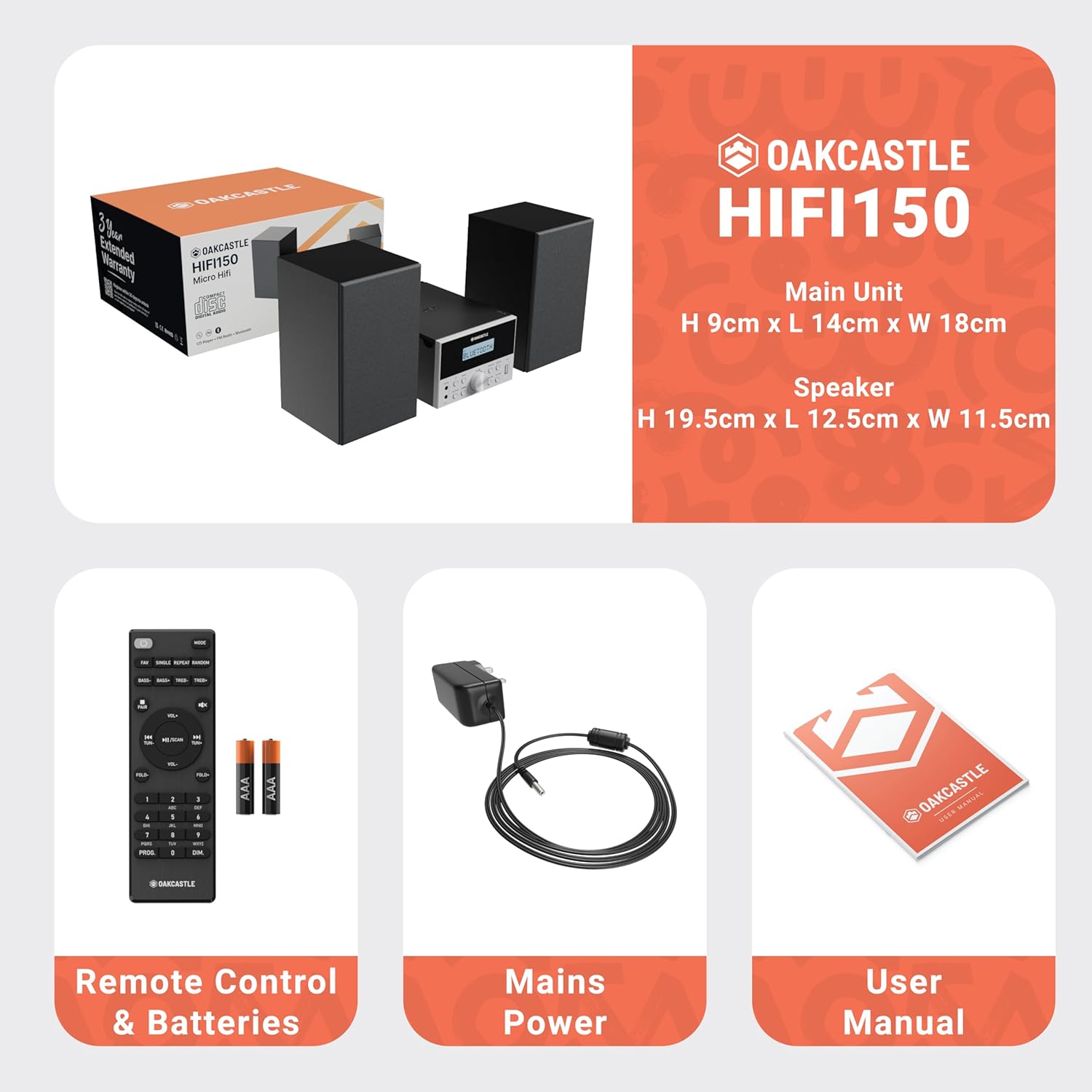
Image: The Oakcastle HIFI150 package contents, showing the main unit, two speakers, remote control with batteries, power adapter, and user manual.
Produk Leuwihview
The Oakcastle HIFI150 features a compact design with intuitive controls and multiple connectivity options.
Kadali Panel hareup jeung tampilan

Image: A close-up of the Oakcastle HIFI150 main unit's front panel, highlighting the digital display, central volume knob, mode selection buttons, and front-facing AUX In and USB ports. The display shows 'BLUETOOTH'.
- tampilan: Némbongkeun modeu ayeuna, informasi lagu, sareng frékuénsi radio.
- Tombol Daya: Ngahurungkeun atanapi mareuman unit.
- Tombol Mode: Cycles through input sources (CD, FM, Bluetooth, AUX, USB).
- Jilid Kenop: Nyetél volume master.
- Tombol Puter/Reureuh: Ngontrol puteran pikeun CD, USB, sareng Bluetooth.
- Tombol Luncat/Setel: Ngatur lagu atanapi nyetel frékuénsi radio.
- AUX Dina Port: Pikeun nyambungkeun alat audio éksternal liwat kabel 3.5mm.
- Port USB: Pikeun muter audio files ti USB drive.
Sambungan Panel Rear
The rear panel includes connections for speakers and power.
Disetél
1. Nyambungkeun Speaker
Connect the included speakers to the speaker terminals on the rear of the main unit. Ensure correct polarity (red to red, black to black) for optimal sound quality.
2. Sambungan Daya
Plug the power cable into the AC inlet on the rear of the main unit, then plug the other end into a standard wall outlet.
Parentah Operasi
Daya Hurung/Pareuman
Pencét éta Kakuatan tombol dina panel hareup atawa kadali jauh pikeun ngahurungkeun atawa mareuman unit.
Pamilihan Mode
Pencét éta Modus button on the front panel or remote control repeatedly to cycle through the available input sources: CD, Radio FM, Bluetooth, AUX, jeung USB.
Operasi Bluetooth
- Pilih Bluetooth mode using the Mode button. The display will show 'BLUETOOTH' and the unit will enter pairing mode.
- Dina smartphone Anjeun atawa alat Bluetooth sejen, aktipkeun Bluetooth tur neangan alat nu sadia.
- Select 'OAKCASTLE HIFI150' from the list. Once connected, the unit will confirm the connection.
- You can now stream audio wirelessly from your device to the HIFI150.
Puteran CD

Image: The Oakcastle HIFI150 with its top-loading CD player mechanism open, revealing a compact disc placed inside. The display shows 'CD'.
- Buka panutup kompartemen CD.
- Place a CD (MP3, CD, WMA, or CD-R format) onto the spindle with the label side facing up.
- Tutup panutup kompartemen CD.
- Pilih CD mode. The unit will read the disc and begin playback automatically.
- Anggo tombol Puter/Pause sareng Luncat pikeun ngontrol putereun.
Operasi Radio FM

Image: The Oakcastle HIFI150 main unit with its telescopic antenna extended, displaying an FM radio frequency on its screen. The unit is placed between two speakers.
- Pilih Radio FM modus.
- Panjangkeun anteneu teleskopik pikeun panarimaan anu langkung saé.
- Scan Otomatis: Press and hold the Play/Pause button to automatically scan and save available FM stations (up to 30 presets).
- Tuning Manual: Use the Skip/Tune buttons to manually adjust the frequency.
- Recall Preset: Use the 'FAV/PROG' button on the remote to cycle through saved stations.
USB Playback
- Lebetkeun USB drive kana port USB dina panel payun.
- Pilih USB mode. The unit will automatically detect and begin playing compatible audio files (MP3, WMA).
- Anggo tombol Puter/Pause sareng Luncat pikeun ngontrol putereun.
Input AUX
- Sambungkeun alat audio éksternal (contona, pamuter MP3, smartphone) ka AUX Di port on the front panel using a 3.5mm audio cable (not included).
- Pilih AUX modus.
- Kontrol puteran tina alat éksternal anjeun anu nyambung.
Volume Control
Puterkeun Jilid Kenop on the front panel or use the VOL +/- tombol dina kadali jauh pikeun nyaluyukeun tingkat sora.
Pamakéan Remote Control
The included remote control provides full functionality for the HIFI150. Ensure batteries are correctly inserted. Point the remote control towards the front panel of the main unit for optimal response.
Pangropéa
beberesih
- Ngusap unit ku kaén anu lembut sareng garing.
- Ulah make cleaners abrasive, lilin, atawa pangleyur sabab bisa ngaruksak finish.
Panyimpenan
Upami unit ieu henteu dianggo salami waktos anu lami, cabut tina stop kontak teras simpen di tempat anu tiis sareng garing.
Pamérésan masalah
If you encounter issues with your HIFI150, please refer to the following common problems and solutions:
| Masalah | Mungkin Cukang lantaranana | Solusi |
|---|---|---|
| Taya kakuatan | kabel kakuatan teu disambungkeun; stop kontak listrik lepat | Pastikeun kabel kakuatan disambungkeun aman; Coba colokan listrik anu béda. |
| Taya sora | Volume too low; Incorrect input mode; Speakers not connected | Naékkeun volume; Pilih modeu input anu leres; Pariksa sambungan spiker. |
| CD teu diputer | CD inserted incorrectly; Disc scratched/dirty; Incorrect format | Reinsert CD correctly; Clean or replace disc; Ensure disc is compatible (MP3, CD, WMA, CD-R). |
| Bluetooth teu nyambung | Bluetooth mode not selected; Device too far; Device already connected to another unit | Select Bluetooth mode; Move device closer; Disconnect from other devices and try again. |
| Panarimaan FM Goréng | Antena teu dipanjangkeun; Sinyal lemah | Fully extend the telescopic antenna; Try repositioning the unit. |
spésifikasi
| Nomer modél | 1000002971 |
| merek | Oakcastle |
| Konektipitas | Bluetooth 5.2, USB, AUX |
| Kaluaran Audio | 20W |
| Média anu Dirojong | CD, MP3, WMA, CD-R, USB |
| Radio | FM Radio with 30 Presets |
| Alat nu cocog | Pamuter MP3, Smartphone, Tablet |
| Bahan Kabinet | Kai |
| Warna | Hideung |
| Ukuran barang (L x W x H) | 13.7 x 17.8 x 9 cm |
| Item Beurat | 2 kg |
Garansi sareng Rojongan
The Oakcastle HIFI150 comes with an extended 3-year warranty. Registration is required to activate the full warranty period. Please refer to the warranty card included in your package or visit the official Oakcastle website for registration details and support information.
For technical assistance or further inquiries, please contact Oakcastle customer support through their official channels.


