
1. Bubuka
This manual provides instructions for the Attoe Wireless Bluetooth Mouse, Model MXY0614. This device features dual-mode connectivity (Bluetooth and 2.4G wireless), a transparent design with RGB backlighting, and a rechargeable battery. Please read this manual carefully before use to ensure proper operation and maintenance.
2. Eusi Paket
Pastikeun yén sadaya item aya dina bungkusan:
- 1 x Attoe Wireless Bluetooth Gaming Mouse
- 1 x Kabel Ngecas (Tipe-C)
- 1 x Manual Instruksi

Gambar 2.1: Eusi pakét
3. Fitur Produk
- Panutup Luhur Magnét: The top cover is secured by strong magnetic adsorption, allowing for easy access to the USB receiver and precise alignment.
- Lampu tukang RGB: Features an RGB water-cooled light band for customizable lighting effects.
- Témbongkeun batré: Four indicator lights show the remaining battery level.
- Bisa dicas deui: Built-in 400mAh lithium polymer battery, charged via Type-C port. Full charge takes approximately 2-3 hours.
- Sambungan Modeu Ganda: Supports both Bluetooth (BT) and 2.4G wireless modes.
- Sare Otomatis: Automatically enters deep sleep mode after 10 minutes of inactivity to conserve power.
- Kasaluyuan lega: Compatible with Windows 2000/XP/win7/win8/win10, Vista 32-bit, IOS, Linux, and Mac OS.
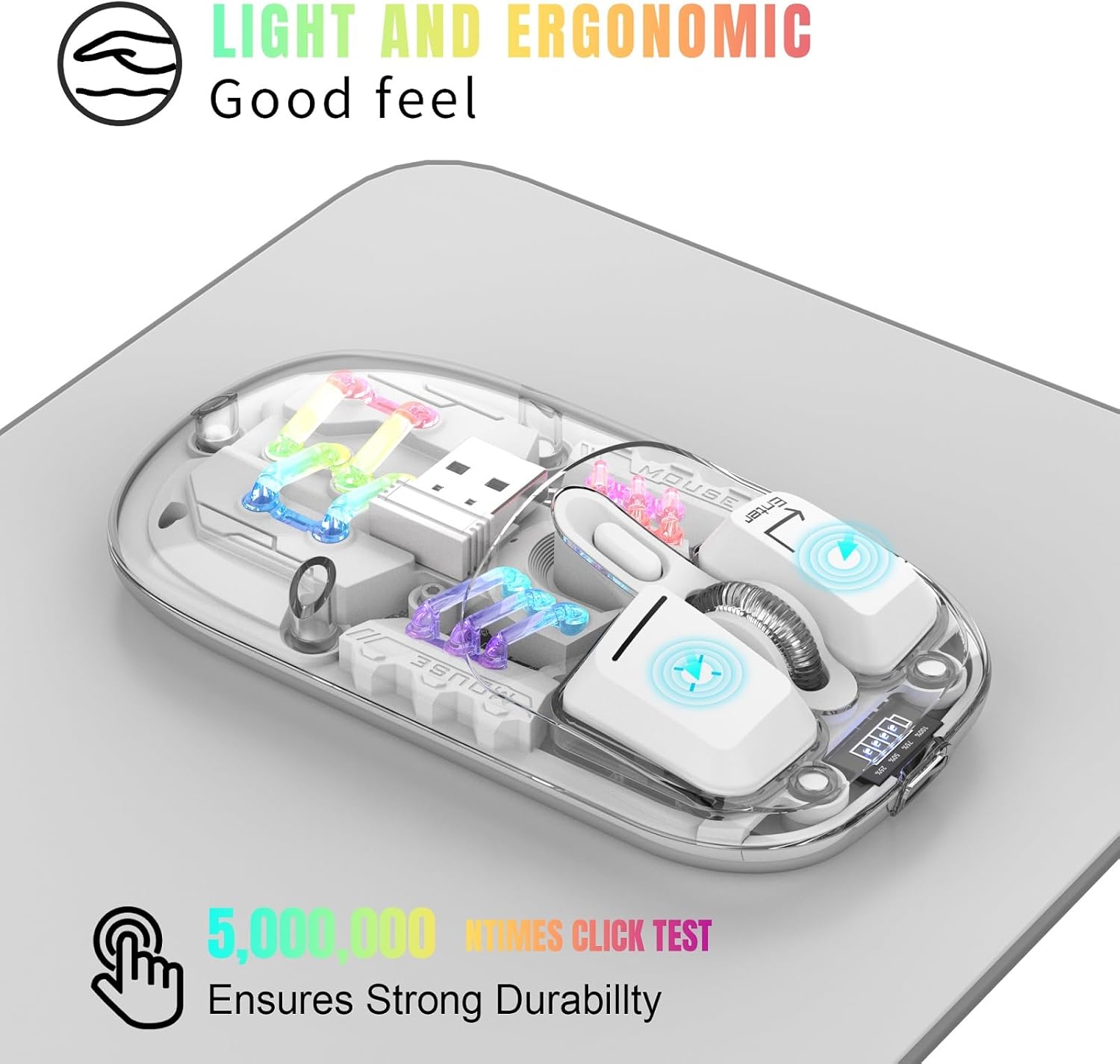
Figure 3.1: Ergonomic Design and RGB Lighting

Figure 3.2: Magnetic Top Cover
4. Produk Langkungview

Gambar 4.1: Komponen sareng Kontrol Beurit
The diagram above identifies the key components and controls of the mouse, including the left and right buttons, scroll wheel, DPI adjustment, battery indicator, Type-C charging port, and the location of the 2.4G USB receiver.
5. Parentah Setup
5.1. 2.4G Wireless Connection
- Cabut panutup magnét luhur beurit.
- Cabut panarima USB 2.4G tina slot panyimpenanna.
- Selapkeun panarima USB kana port USB anu sayogi dina komputer atanapi alat anjeun.
- Flip the mouse over and locate the mode switch on the bottom. Slide the switch to the "2.4G" position.
- The mouse will automatically connect to your device. No additional software is required.
5.2. Sambungan Bluetooth
- Flip the mouse over and locate the mode switch on the bottom. Slide the switch to the "BT" position.
- Press and hold the left, middle (scroll wheel), and right buttons simultaneously for 3 seconds to enter Bluetooth pairing mode. The RGB lights will flash to indicate pairing mode.
- Dina alat anjeun (komputer, laptop, tablet), buka setélan Bluetooth.
- Milarian pikeun new Bluetooth devices and select "BT5.0 Mouse" or a similar name from the list.
- Confirm the pairing on your device. The mouse's RGB lights will stop flashing once successfully paired.

Figure 5.1: Dual Mode Connectivity
Video 5.1: Demonstrating the connection process and features of the Transparent Gaming Mouse.
6. Parentah Operasi
6.1. RGB Lighting Control
- Ganti Modeu Lampu: Click the dedicated light mode switch button (refer to Figure 4.1) to cycle through 11 different RGB lighting effects.
- Hurungkeun/Pareuman Lampu: Long press the light mode switch button for 3 seconds to turn the RGB lights on or off.
6.2. Adjustment DPI
The mouse features adjustable DPI settings. Click the DPI button (refer to Figure 4.1) to cycle through available DPI levels (e.g., 800, 1200, 1600 DPI). Each click will change the cursor sensitivity.
6.3. Ngecas Mouse
- Sambungkeun kabel ngecas Tipe-C anu disayogikeun kana port ngecas di payun beurit.
- Sambungkeun tungtung kabel anu sanés ka sumber kakuatan USB (contona, port USB komputer, adaptor témbok USB).
- The battery display lights will indicate charging status. A full charge typically takes 2-3 hours.
- The 4 small lights on the battery display indicate the remaining battery level.
6.4. Fungsi Sare Otomatis
To conserve battery life, the mouse will automatically enter a deep sleep mode if left unused for more than 10 minutes. To wake the mouse, simply move it or press any button.
7. Pangropéa
- Jaga beurit bersih ku cara ngusap ku kaén anu garing sareng lemes. Ulah make bahan kimia kasar atawa bahan abrasive.
- Pastikeun port ngecas Tipe-C bébas tina lebu sareng kokotor.
- Store the USB receiver inside the mouse when not in use to prevent loss.
- Avoid exposing the mouse to extreme temperatures or direct sunlight.
8. Cara ngungkulan
- Mouse teu ngabales: Ensure the mouse is charged. Check the mode switch (2.4G or BT) is correctly set. For 2.4G, ensure the USB receiver is properly inserted. For Bluetooth, re-enter pairing mode and re-pair with your device.
- Sambungan intermiten: Ensure the mouse is within the 10-meter wireless range. Avoid obstructions between the mouse and the receiver/device.
- Lampu RGB teu jalan: Check if the lights are turned off by long-pressing the light mode switch. Ensure the mouse has sufficient battery.
- Gerakan kursor teu teratur: Clean the optical sensor on the bottom of the mouse. Ensure you are using the mouse on a suitable surface.
9. Spésifikasi
| Fitur | Spésifikasi |
|---|---|
| Nomer modél | MXY0614 |
| Konektipitas | Bluetooth (BT) + 2.4G Wireless |
| Kancing | 4 buttons (Left, Right, Scroll Wheel/Middle, DPI) |
| DPI | 1600 DPI (Tiasa disaluyukeun) |
| Dipeunteun Voltage / Ayeuna | DC 5V / 400mA |
| Jarak Sambungan Nirkabel | 10 méter |
| Pindah Kahirupan | 20 juta siklus |
| Batré | Built-in 400mAh Lithium Polymer (Rechargeable) |
| Port ngecas | Tipe-C |
| Beurat produk | 40g (1.41 ons) |
| Dimensi produk | 113 x 58 x 25mm (4.45 x 2.28 x 0.98 inci) |
| Kasaluyuan | Windows 2000/XP/win7/win8/win10, Vista 32-bit, IOS, Linux, Mac OS |

Gambar 9.1: Dimensi Produk
10. Garansi jeung Rojongan
For any questions or issues regarding your Attoe Wireless Bluetooth Mouse, please contact our after-sales service. We are committed to providing a satisfactory resolution.
Contact information for support can typically be found on the product packaging or the official Attoe websitus.