Bubuka
This manual provides comprehensive instructions for the safe and efficient installation, operation, and maintenance of your ONKRON G130-B Heavy Duty Monitor Arm. Please read this manual thoroughly before installation and retain it for future reference.
Émbaran Kasalametan
- Ensure your monitor's weight and VESA pattern are within the specified limits (4.4 - 59.4 lbs for flat-panel, 48.4 lbs for curved; VESA 75x75 - 200x200 mm). Exceeding these limits may result in instability or damage.
- Verify that the mounting surface (desk) is structurally sound and can support the combined weight of the monitor arm and your monitor.
- Ulah muterkeun monitor ngaliwatan sisi tukang méja pikeun nyingkahan kaayaan anu teu stabil anu tiasa nyababkeun tibalik.
- Salawasna anggo alat anu merenah sareng turutan sadaya léngkah pamasangan kalayan saksama. Upami teu yakin, milarian bantosan profésional.
- Jauhkeun barudak sareng piaraan ti daérah pamasangan.
Eusi pakét
Mangga pastikeun sadaya komponén aya sareng henteu ruksak sateuacan ngamimitian pamasangan.
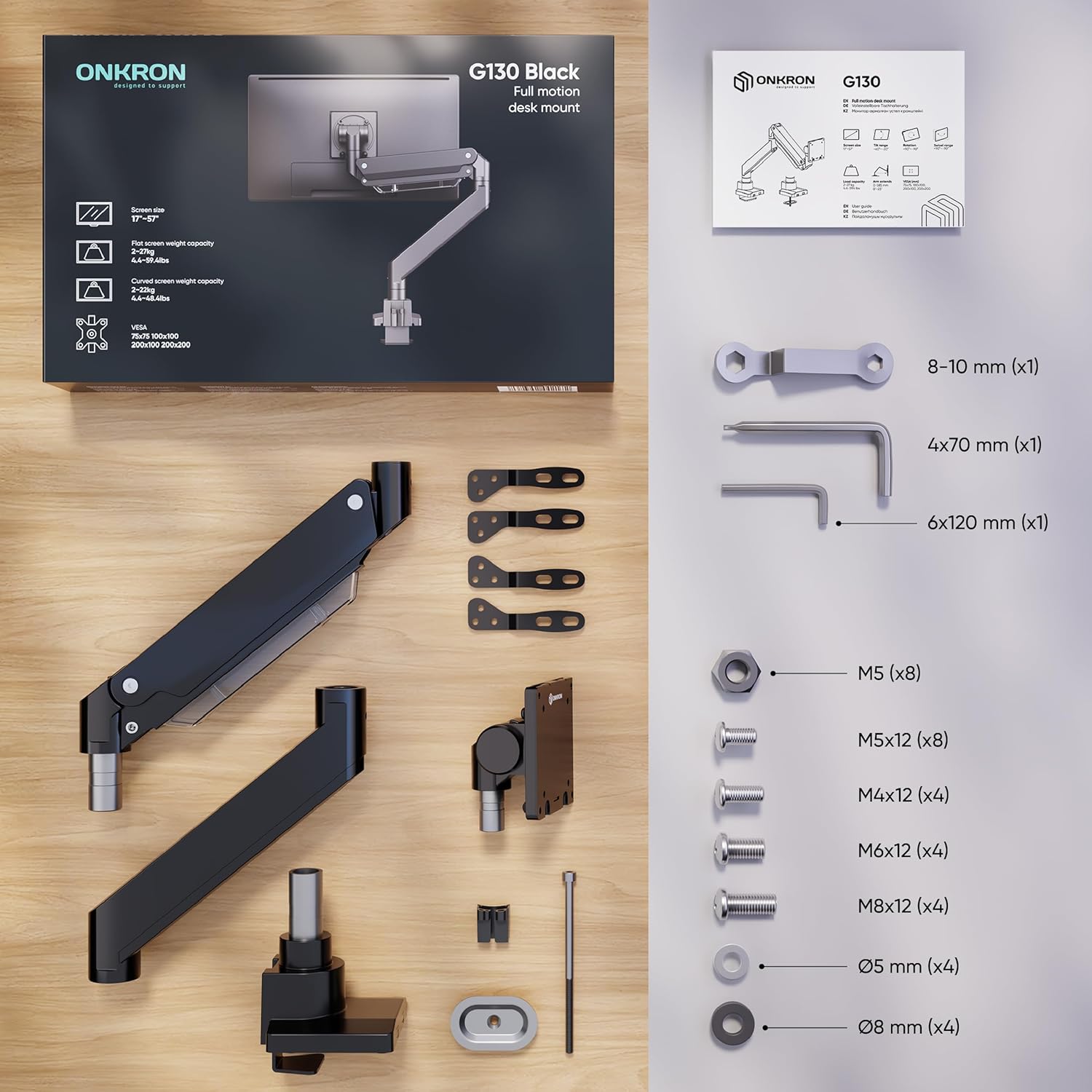
Image: All components included in the ONKRON G130-B monitor arm package, laid out on a wooden surface. This includes the main arm sections, desk clamp base, VESA mounting plate, various screws (M4, M5, M6, M8), washers, Allen wrenches, and an instruction manual.
- Monitor Arm Sections (Upper and Lower)
- Méja Clamp Base kalawan Kutub
- VESA ningkatna Plate
- Klip Manajemén Kabel
- Pakakas Keras (rupa-rupa sekrup, ring, konci Allen)
- Instruksi Manual
spésifikasi
- Kasaluyuan Ukuran Layar: 17 - 57 inci
- Kapasitas beurat: 4.4 - 59.4 lbs (flat-panel display), 48.4 lbs (curved display)
- Kasaluyuan VESA: 75x75 mm, 100x100 mm, 200x100 mm, 200x200 mm
- Rentang Dengdekkeun: -20 ° ka +60 °
- Rentang puteran: 180°
- Rotasi: 90° (for portrait orientation)
- Ékstensi Leungeun: Nepi ka 23 inci
- Pilihan Pasang: C-Clamp atanapi Grommet
- Kandel Méja (C-Clamp): 3/8" - 1 5/8" (10 - 42 mm)
- Kandel Méja (Grommet): 3/8" - 1 3/4" (10 - 45 mm)
- Bahan: Galunggung Steel, Aluminium
- Gas Spring Life: >50,000 movements

Image: The ONKRON G130-B monitor arm supporting a large ultrawide monitor, illustrating its compatibility with screens from 17 to 57 inches. It also highlights the weight capacity: 59.4 lbs for flat-panel displays and 48.4 lbs for curved displays.
Setup sareng Instalasi
Follow these steps to correctly install your ONKRON G130-B monitor arm.
1. Assemble the Desk Clamp Dasar
Gantelkeun clamp components to the base pole. Adjust the screws to match your desk thickness for a secure fit. Ensure the base is firmly tightened to the desk.

Image: The ONKRON G130-B monitor arm, in black, securely clamped to the edge of a wooden desk, holding a large curved monitor. The arm extends from the desk, providing an elevated and adjustable display.
2. Attach Arm Sections
Insert the lower arm section into the base pole. Then, attach the upper arm section to the lower arm. Ensure all connections are secure. Tighten any pre-inserted screws for stability.
3. Attach VESA Plate to Monitor
Select the appropriate screws from the hardware kit that fit your monitor's VESA mounting holes. Securely attach the VESA plate to the back of your monitor. Ensure the arrow on the VESA plate points upwards.
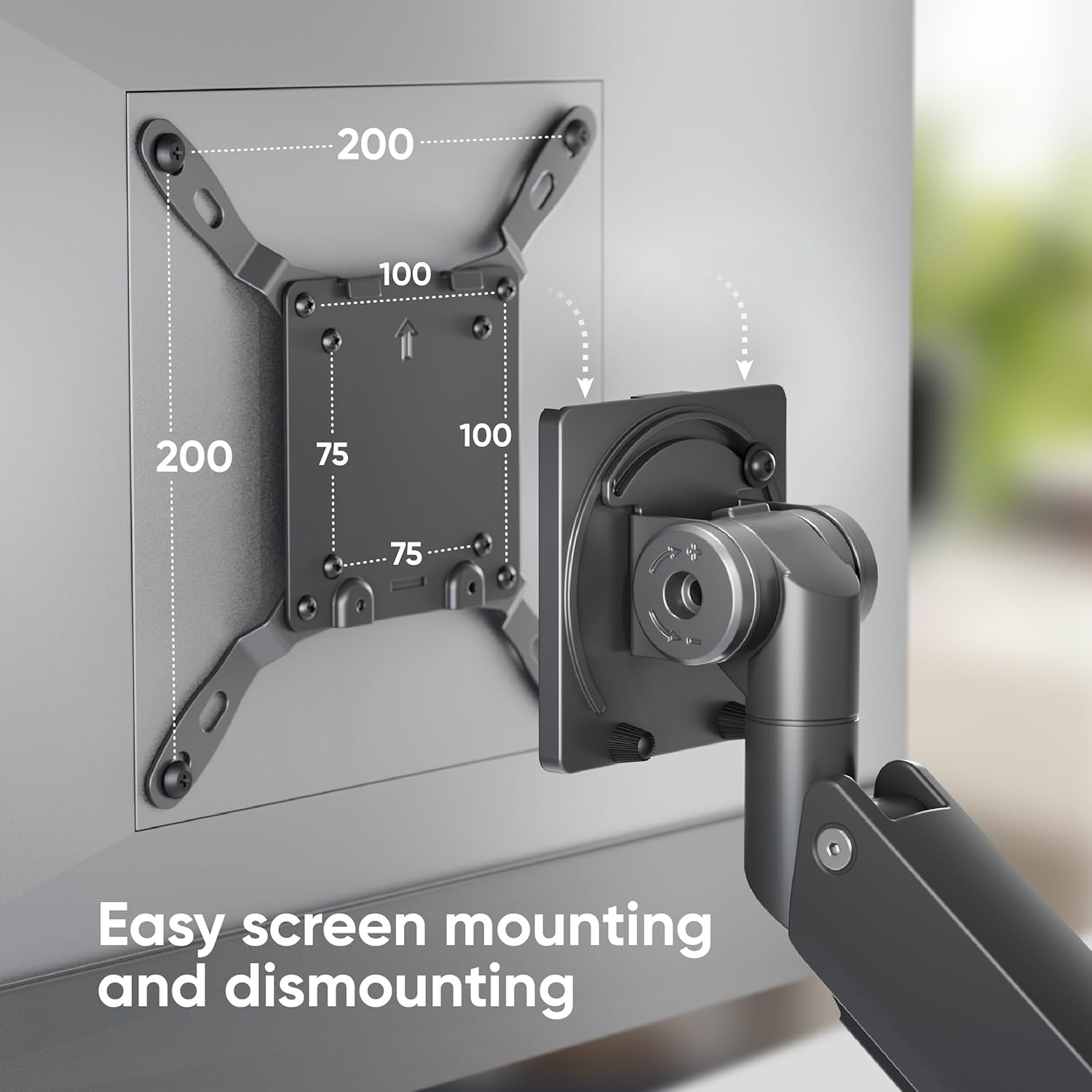
Gambar: A close-up view of the VESA mounting plate on the ONKRON G130-B monitor arm, demonstrating how a monitor can be easily attached and detached. VESA patterns of 75x75, 100x100, 200x100, and 200x200 mm are indicated.
4. Mount Monitor to Arm
Carefully slide the monitor (with attached VESA plate) onto the end of the monitor arm. Ensure it clicks securely into place. For heavier monitors, it is recommended to have assistance.
5. Manajemén kabel
Route your monitor cables through the integrated cable management system on the arm. This helps maintain a clean and organized workspace.

Gambar: A lengkep view of the ONKRON G130-B monitor arm's gas spring mechanism, visible through a clear panel, and its integrated cable management system, which neatly routes cables along the arm.
Pituduh Pidéo Instalasi
Video: An official ONKRON video demonstrating the step-by-step installation process for the G130-B monitor arm, including desk mounting and monitor attachment.
Video: A detailed installation guide for a desk mount single monitor arm, showing the process of securing the clamp to the desk, assembling the arm sections, and attaching the monitor.
Parentah Operasi
The ONKRON G130-B monitor arm offers extensive adjustability for optimal viewing kanyamanan.
Nyaluyukeun Posisi Monitor
- Penyesuaian Jangkungna: Gently push or pull the monitor up or down to achieve the desired height. The gas spring mechanism will hold it in place.
- Dengdekkeun: Tilt the monitor screen up or down within the -20° to +60° range.
- Putar: Swivel the monitor left or right up to 180° for collaborative viewing.
- Rotasi: Puterkeun monitor 90° pikeun ngaganti orientasi lanskap sareng potret.

Image: The ONKRON G130-B monitor arm demonstrating its wide range of motion, including 180° swivel, 90° rotation for portrait mode, and tilt angles from -20° to +60°. The arm's extension from 0 to 23 inches and height adjustment from 12 3/4 to 25 3/4 inches are also shown.
Horizontal Position Lock
The arm features a horizontal position lock to secure the monitor in a fixed horizontal alignment, preventing unwanted movement.

Image: A close-up of the ONKRON G130-B monitor arm's horizontal position lock, indicating how to tighten it to secure the monitor's alignment. The main image shows the monitor arm in various horizontal positions.
Pangropéa
- Pariksa sadaya sekrup sareng sambungan sacara rutin pikeun mastikeun éta tetep pageuh sareng aman.
- Bersihkeun panangan monitor ku lawon lemes,amp lawon. Hindarkeun pembersih abrasive atanapi pangleyur.
- Do not attempt to disassemble the gas spring mechanism.
Pamérésan masalah
Monitor does not hold position (drops or rises too easily)
The gas spring tension may need adjustment. Use the provided Allen wrench to adjust the tension screw located on the arm. Turn towards '+' to increase tension for heavier monitors, or towards '-' to decrease tension for lighter monitors.
Garansi sareng Rojongan
ONKRON computer monitor arms and monitor mounts undergo multi-stage testing. For any questions or assistance with your product, please contact ONKRON customer support. Refer to your product packaging or the ONKRON websitus pikeun detil jaminan husus sarta informasi kontak.


