Bubuka
Thank you for choosing the THOMSON Multimedia Tower with CD Player. This device is designed to provide versatile audio playback options, including Bluetooth connectivity, CD playback, USB and SD card support for MP3 files, FM radio, and an AUX input. This manual will guide you through the setup, operation, and maintenance of your new audio system to ensure optimal performance and longevity.
Émbaran Kasalametan
- Baca sagala parentah taliti saméméh ngagunakeun produk.
- Simpen manual ieu kanggo rujukan ka hareup.
- Ulah ngalaan unit ka hujan, Uap, atawa suhu ekstrim.
- Pastikeun ventilasi anu leres di sabudeureun unit. Ulah meungpeuk sagala bukaan ventilasi.
- Use only the power supply specified for this device (230V AC).
- Ulah muka casing. Rujuk sadayana jasa ka tanaga anu mumpuni.
- Hindarkeun nempatkeun unit caket sumber panas atanapi dina sinar panonpoé langsung.
- Bersihkeun unit ngan nganggo lawon anu garing sareng lemes.
Eusi pakét
Pastikeun yén sadaya item aya dina bungkusan:
- THOMSON Multimedia Tower
- 3.5mm AUX IN Cable
- Kadali jauh
- 230V AC Power Supply Cable
- Instruksi Manual
Produk Leuwihview
Familiarize yourself with the various parts and controls of your multimedia tower.
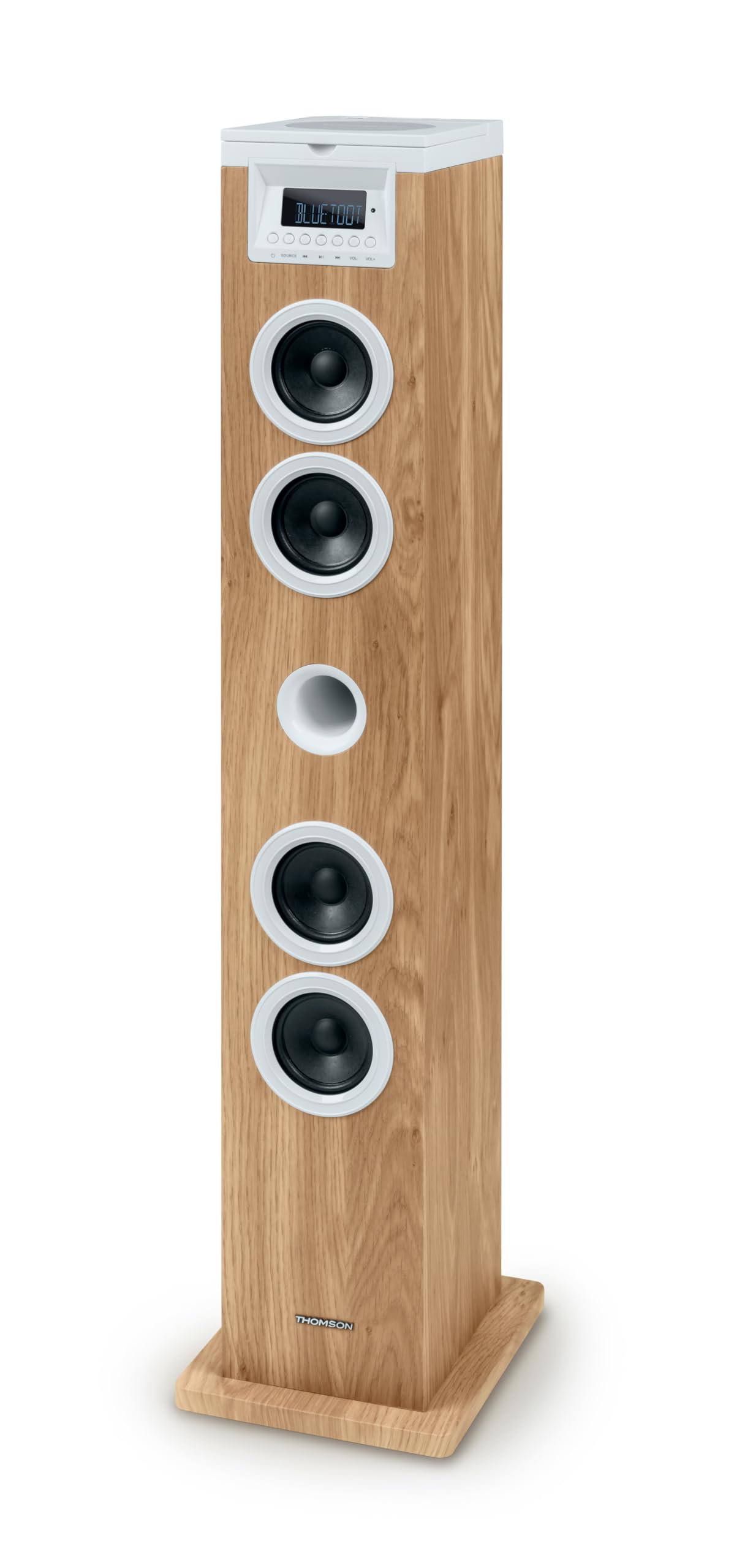
Gambar 1: Top Panel with USB and SD Card Slots. This image displays the top surface of the multimedia tower, highlighting the USB port with a flash drive inserted and the adjacent SD card slot for media playback.
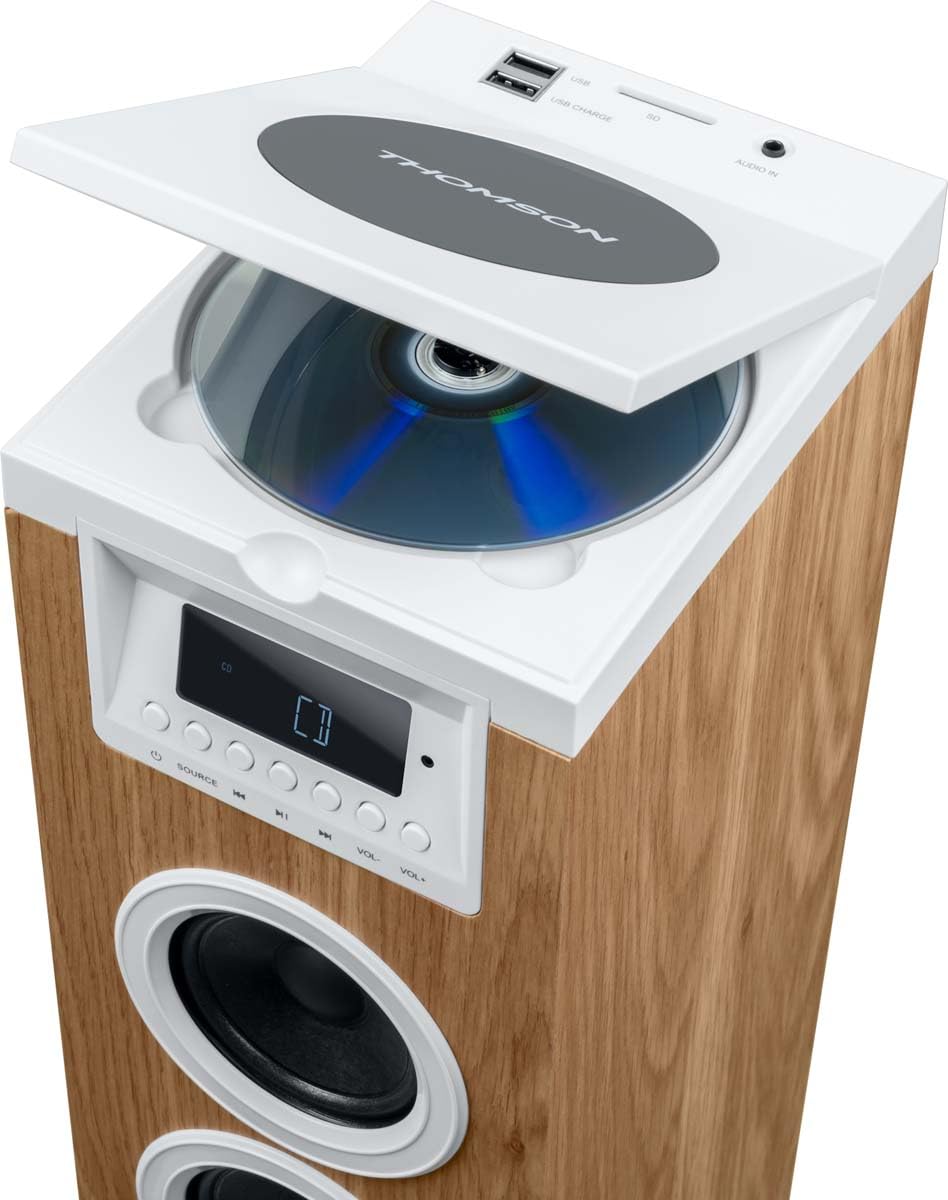
Gambar 2: Top Panel with CD Player Open. This image shows the top panel of the tower with the CD compartment lid lifted, revealing a compact disc placed inside the player.

Gambar 3: Included Remote Control and AUX Cable. This image features the white remote control unit and the 3.5mm AUX IN cable, both essential accessories for operating the multimedia tower.
Kadali Panel hareup
- Témbong LED: Némbongkeun modeu ayeuna, informasi lagu, sareng frékuénsi radio.
- Tombol SUMBER: Switches between input modes (Bluetooth, CD, USB, SD, FM, AUX).
- Tombol Puter/Reureuh: Controls playback for CD, USB, and SD modes.
- Kancing Lagu Saméméhna/Salajengna: Navigasi lagu atanapi stasiun radio.
- Tombol Luhur / Turun: Saluyukeun tingkat kaluaran audio.
Sambungan Panel Top
- Pamuter CD: Top-loading CD compartment.
- USB Port (Playback/Charging): Pikeun muterkeun MP3 files from USB drives and charging compatible devices.
- Slot Kartu SD: Pikeun muterkeun MP3 files from SD cards.
- AUDIO IN (3.5mm AUX): Sambungkeun alat audio éksternal.
Disetél
- Ngabongkar bungkusan: Carefully remove the multimedia tower and all accessories from the packaging. Retain the packaging for future transport or storage.
- panempatan: Place the tower on a stable, flat surface. Ensure there is adequate space around the unit for ventilation. Avoid placing it near direct heat sources or in areas with high humidity.
- Sambungan Daya: Connect the 230V AC power supply cable to the power input on the back of the tower, then plug it into a standard wall outlet.
- Antenna (FM Radio): Extend the FM antenna for better radio reception.
Parentah Operasi
Daya Hurung/Pareuman
To turn the unit on or off, use the ON/OFF switch located on the back of the tower or press the Power button on the remote control.
Pilihan Sumber
Pencét éta SUMBER button on the front panel or remote control repeatedly to cycle through the available input modes: Bluetooth, CD, USB, SD, FM Radio, and AUX IN.
Operasi Bluetooth
- Switch the tower to Bluetooth mode using the SUMBER button. The LED display will show 'BT' or a similar indicator.
- Dina alat sélulér anjeun (smartphone, tablet), aktipkeun Bluetooth teras milarian alat anu sayogi.
- Select 'THOMSON Tower' (or similar name) from the list of devices.
- Once paired, you can play audio from your device through the tower.
Puteran CD
- Switch the tower to CD mode using the SUMBER kancing.
- Open the CD compartment lid on the top panel.
- Teundeun CD kalawan sisi labél nyanghareup ka luhur.
- Close the CD compartment lid. The unit will begin reading the CD automatically.
- Use the Play/Pause, Previous/Next Track buttons on the front panel or remote control to manage playback.
Puterkeun USB / SD
- Insert a USB flash drive into the USB port or an SD card into the SD card slot on the top panel.
- Switch the tower to USB or SD mode using the SUMBER button. The unit will automatically detect and begin playing compatible MP3 files.
- Use the Play/Pause, Previous/Next Track buttons on the front panel or remote control to manage playback.
Radio FM
- Switch the tower to FM Radio mode using the SUMBER kancing.
- Scan Otomatis: Pencét terus tahan tombol Puter/Pause pikeun otomatis nyeken sareng nyimpen stasiun FM anu sayogi.
- Tuning Manual: Use the Previous/Next Track buttons to manually tune to desired frequencies.
- Stasion prasetél: Use the MEM- / MEM+ buttons on the remote control to navigate through saved stations.
Input AUX
- Connect an external audio device (e.g., smartphone, MP3 player) to the 3.5mm AUDIO IN port on the top panel using the provided AUX cable.
- Switch the tower to AUX IN mode using the SUMBER kancing.
- Play audio from your connected device. The volume can be controlled via the tower or the external device.
Fungsi Remote Control
The remote control provides convenient access to all functions. Refer to Figure 3 for a visual guide to the remote control buttons.
- Daya (⑂): Ngahurungkeun atanapi mareuman unit.
- SARE: Nyetél pangatur waktu sare.
- Bisu: Ngajempékeun atanapi nganonaktipkeun audio.
- WAKTU: Mintonkeun atanapi nyetél waktos.
- alarem: Sets an alarm.
- SUMBER: Selects input mode.
- MEM-, MEM+: Navigates saved radio stations or folders.
- Repeat (↺): Ngulang lagu ayeuna atanapi sadaya lagu.
- Eureun (■): Ngeureunkeun playback.
- Shuffle (⇄): Maén lagu dina urutan acak.
- VOL+, VOL-: Nyetél polumeu kaluhur atanapi kahandap.
- Previous (◀◀), Play/Pause (▶‖), Next (▶▶): Standard playback controls.
Pangropéa
- beberesih: Disconnect the power before cleaning. Use a soft, dry cloth to wipe the exterior of the unit. Do not use liquid cleaners or abrasive materials.
- Perawatan CD Player: Handle CDs by their edges to avoid fingerprints and scratches. If the CD lens needs cleaning, use a specialized CD lens cleaner disc.
- Panyimpenan: If storing the unit for an extended period, unplug it from the power outlet and store it in a cool, dry place, preferably in its original packaging.
Pamérésan masalah
| Masalah | Mungkin Cukang lantaranana | Solusi |
|---|---|---|
| Taya kakuatan | Kabel listrik teu nyambung; Saklar listrik pareum | Ensure power cable is securely plugged in; Turn the ON/OFF switch to ON. |
| Taya sora | Volume too low; Mute function active; Incorrect source selected | Increase volume; Press MUTE on remote; Select correct source (CD, BT, USB, SD, FM, AUX). |
| Bluetooth teu nyambung | Device not in pairing mode; Tower not in Bluetooth mode; Device too far | Ensure tower is in BT mode; Enable Bluetooth on your device and search; Move device closer to the tower. |
| CD teu diputer | CD inserted incorrectly; CD scratched/dirty; Incorrect source selected | Insert CD with label side up; Clean or replace CD; Select CD source. |
| Panarimaan FM Goréng | Antena teu dipanjangkeun; Sinyal lemah | Fully extend the FM antenna; Reposition the tower for better signal. |
spésifikasi
| Fitur | Spésifikasi |
|---|---|
| merek | Thomson |
| Nomer modél | 9eb81657-1d7e-4ab8-8f71-2c93aa6b3ea7 |
| Alat nu cocog | Smartphone, Tablet, Laptop |
| Konfigurasi Saluran Sakuliling Sora | 2.0 |
| Warna | Bodas, Kai |
| Item Beurat | 4.28 kg |
| Jenis Garansi | kawates |
| Métode kontrol | Jauh |
| Téknologi Komunikasi Nirkabel | Bluetooth |
| Ukuran Speaker | 1 inci |
| Sumber Daya | Kabel Listrik |
| Speaker Maksimum Kaluaran Power | 60 Watt |
| Téhnologi konektipitas | AUX, USB |
| Mode Kaluaran Audio | Stereo |
| Masukan Voltage | 230 volt |
| Tipe Pamasangan | Stépar |
| Tipe Speaker | Stereo |
| Fitur husus | Bluetooth |
| Dianjurkeun Mangpaat Pikeun Produk | Pikeun smartphone atanapi tablet |
Garansi sareng Rojongan
This product comes with a limited warranty. For detailed warranty information, please refer to the warranty card included in your package or contact Thomson customer support. For technical assistance or service inquiries, please visit the official Thomson websitus atanapi ngahubungan departemén layanan palanggan maranéhna.


