1. Parentah Kasalametan
Baca sagala parentah taliti saméméh ngagunakeun alat. Simpen manual ieu pikeun rujukan ka hareup.
- Pastikeun voltage dituduhkeun dina alat pakait jeung vol mains Anjeuntage saméméh nyambungkeun.
- Entong neuleumkeun alat, kabel listrik, atanapi nyolok kana cai atanapi cairan sanésna.
- Salawasna cabut colokan alat tina stop kontak sateuacan beberesih sareng upami teu dianggo.
- Entong ngajalankeun alat nganggo kabel atanapi colokan anu ruksak, atanapi saatos alatna teu tiasa dianggo atanapi rusak dina cara naon waé.
- Jauhkeun leungeun sareng kabel tina bagian panas tina alat salami operasi.
- Perkakas ieu dimaksudkeun pikeun pamakéan rumah tangga wungkul.
- Barudak kedah diawaskeun pikeun mastikeun yén aranjeunna henteu maén sareng alatna.
- Anggo ngan cai tiis dina tangki cai.
- Ulah overfill tank cai.
- Always ensure the portafilter is securely locked in place before brewing.
- Exercise caution when using the steam wand as hot steam can cause burns.
2. Produk Langkungview
The SCHNEIDER SCES2312WH espresso machine is designed for preparing espresso and milk-based coffee beverages. Familiarize yourself with its components:
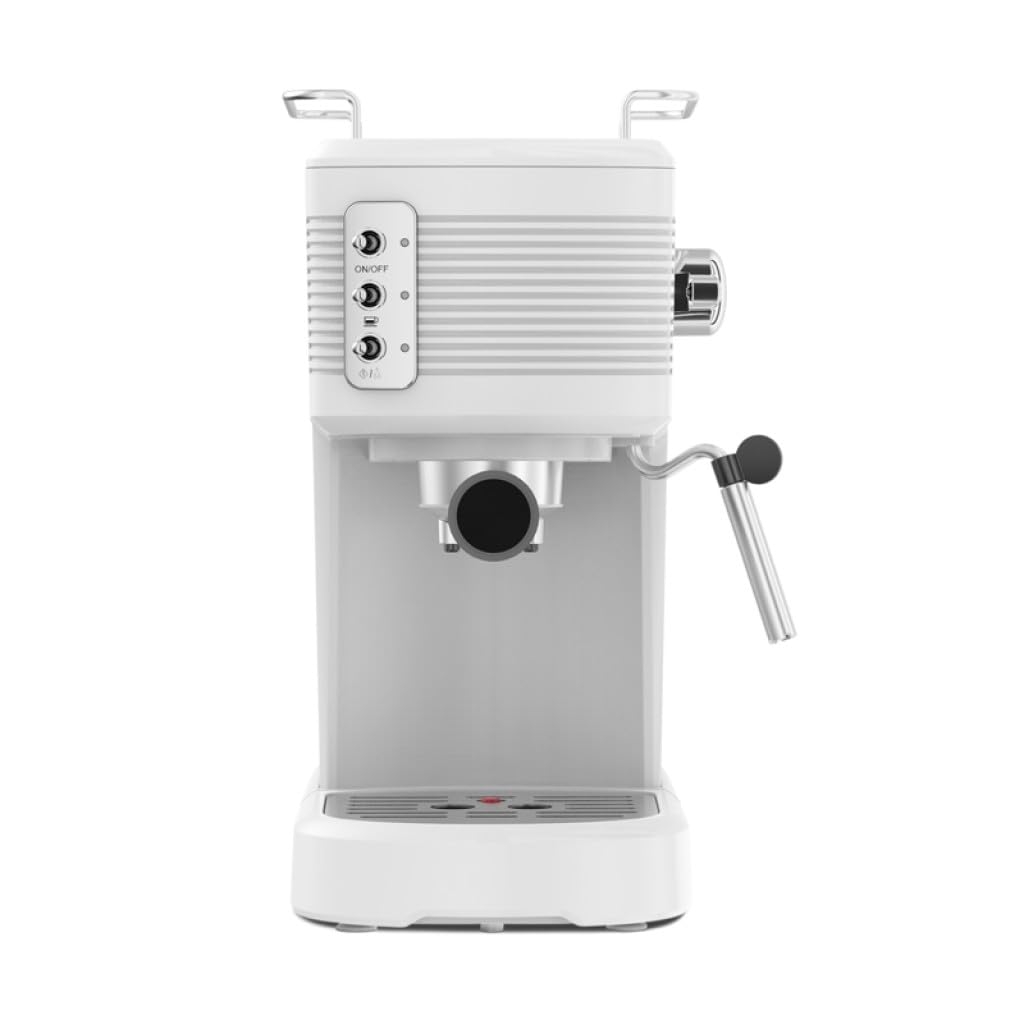
Gambar: Sisi hareup view of the Schneider SCES2312WH Espresso Machine, showing the control panel, portafilter, and steam wand.
- Baki Panghaneut Cangkir: Lokasina di luhureun mesin ka pre-panas cangkir.
- Tangki cai: Transparent, removable 1.2-liter tank with a level indicator.
- Panél kontrol: Buttons for On/Off, Espresso brewing, and Steam function.
- Tongkat uap: Pikeun buih susu.
- Portafilter: Nyepeng kopi taneuh pikeun nyeduh.
- Baki netes: Ngumpulkeun kaleuwihan cairan sarta removable pikeun beberesih.
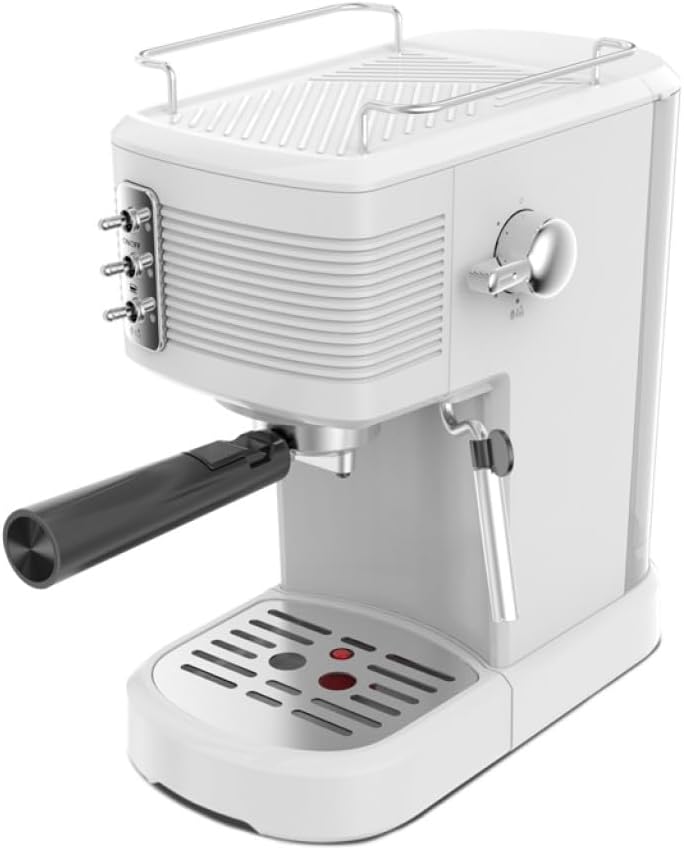
Gambar: luhur-handap view of the Schneider SCES2312WH Espresso Machine, highlighting the cup warming tray and control knob.
3. Setup Awal
Sateuacan nganggo heula, tuturkeun léngkah-léngkah ieu:
- Ngabongkar bungkusan: Remove all packaging materials and ensure all parts are present.
- beberesih: Wash the water tank, portafilter, and filter basket with warm soapy water. Rinse thoroughly and dry. Wipe the exterior of the machine with a damp lawon.
- Ngeusian Tangki Cai: Remove the transparent water tank from the back of the machine. Fill it with fresh, cold water up to the 'MAX' level indicator. Replace the tank securely.
- Priming the Pump (First Use):
- Simpen cangkir di handapeun stop kontak portafilter (tanpa kopi).
- Plug in the machine and press the On/Off button. The indicator light will illuminate.
- Once the machine has preheated (indicator light stops flashing), press the Espresso brewing button. Allow water to flow through until the tank is about half empty. This primes the pump and flushes the system.
- Repeat this process with the steam wand by turning the steam knob to release steam for a few seconds.
4. Parentah Operasi
4.1. Nyieun Espresso
- Preheat: Ensure the water tank is filled. Plug in the machine and press the On/Off button. Wait for the indicator light to stop flashing, indicating the machine is preheated.
- Nyiapkeun Kopi: Add finely ground espresso coffee to the filter basket in the portafilter. Tamp kopina rata jeungamper (not included) to create a compact puck. Do not overfill.
- Gantelkeun Portafilter: Insert the portafilter into the brewing head and turn it firmly to the right until it is securely locked.
- Piala tempat: Position one or two espresso cups on the drip tray, directly under the portafilter spouts.
- Nyiduh Espresso: Press the Espresso brewing button. Coffee will begin to flow into the cup(s). Press the button again to stop the flow when the desired volume is reached.
- Hapus Portafilter: Taliti miceun portafilter ku péngkolan ka kénca. Piceun bubuk kopi nu geus dipaké.

Gambar: Sisi view of the Schneider SCES2312WH Espresso Machine with the portafilter attached, ready for brewing.
4.2. Frothing Susu
Use the integrated steam wand to create creamy milk froth for cappuccinos and lattes.
- Nyiapkeun susu: Eusian kendi frothing stainless steel kalawan susu tiis (susu atawa non-susu) mun ngeunaan hiji-katilu pinuh.
- Aktipkeun uap: Press the Steam button on the control panel. Wait for the indicator light to stop flashing, indicating the machine has reached steaming temperature.
- Ngabersihan Steam Wand: Briefly turn the steam knob to release any condensed water from the wand into an empty cup. Turn the knob off.
- Susu buih: Immerse the tip of the steam wand just below the surface of the milk. Turn the steam knob to release steam. Move the pitcher up and down gently to incorporate air and create froth.
- Ngeureunkeun Steaming: Once the desired texture and temperature are achieved, turn off the steam knob and remove the pitcher.
- Ngabersihan Steam Wand: Geuwat usap wand uap ku iklanamp cloth to remove any milk residue. Briefly purge the wand again to clear any internal blockages.
5. Pangropéa
5.1. beberesih poean
beberesih rutin ensures kinerja optimal sarta manjangkeun umur mesin Anjeun.
- Portafilter sareng Filter Basket: Saatos dianggo, cabut portafilter, miceun bubuk kopi, teras bilas portafilter sareng karanjang filter dina cai ngocor.
- Baki netes: Kosongkeun sareng bersihan wadah tetes sacara rutin. Éta tiasa dicabut supados gampang dibersihkeun.
- Tongkat uap: Sapertos anu kasebat dina pitunjuk panggunaan, usap sareng bersihkeun tongkat uap langsung saatos dianggo.
- Luar: Ngusap bagian luar mesin kalayan lemes, damp lawon. Ulah make cleaners abrasive atawa scourers.
5.2. Turun
Endapan mineral tina cai tiasa numpuk kana waktu, mangaruhan kinerja mesin. Bersihkeun kerak mesin anjeun unggal 2-3 bulan sakali, atanapi langkung sering upami anjeun gaduh cai teuas.
- Nyiapkeun Solusi Descaling: Mix a commercial descaling solution with water according to the product instructions. Pour the solution into the water tank.
- Jalankeun Solusi: Place a large container under the portafilter and steam wand. Turn on the machine and allow it to heat up.
- Brew Cycle: Run several brewing cycles (without coffee) until half of the solution has passed through the portafilter.
- Steam Cycle: Turn the steam knob to release steam through the wand until the remaining solution has passed through.
- Bilas: Rinse the water tank thoroughly and fill it with fresh, cold water. Run several full tanks of clean water through both the brewing head and steam wand to flush out any descaling residue.
6. Cara ngungkulan
Tingali kana bagian ieu pikeun masalah umum sareng solusina.
| Masalah | Mungkin Cukang lantaranana | Solusi |
|---|---|---|
| Henteu aya tuangeun kopi | No water in tank; pump not primed; coffee too finely ground or over-tamped; mesin mampet. | Fill water tank; prime the pump; use coarser grind or less pressure; descale the machine. |
| Kopi lemah | Insufficient coffee grounds; coffee too coarsely ground; not enough tamptekanan dina. | Ningkatkeun jumlah kopi; ngagunakeun grind finer; tamp langkung pageuh. |
| Taya uap tina wand | Steam button not activated; wand clogged; machine not at steaming temperature. | Ensure steam button is pressed and light is steady; clean/purge steam wand; wait for machine to heat up. |
| Cai bocor tina mesin | Water tank not seated correctly; portafilter not locked properly; seals worn. | Reseat water tank; ensure portafilter is tight; contact customer support if seals are worn. |
7. Spésifikasi
- model: SCES2312WH
- kakuatan: 1100 Watt
- Tekanan: 15 bar
- Kapasitas Tangki Cai: 1.2 liter
- Voltage: 230 volt
- Bahan: Aluminum (boiler)
- Ukuran (L x W x H): 32.6 cm x 17.9 cm x 28.4 cm
- beurat: 2.73 kg
- warna: Bodas
8. Garansi jeung Rojongan
This product is covered by a warranty for a period of 2 years for spare parts availability from the date of purchase. Please retain your proof of purchase for any warranty claims.
For technical assistance, troubleshooting beyond this manual, or warranty inquiries, please contact Schneider customer support. Contact details can typically be found on the manufacturer's official websitus atanapi dina bungkusan produk.


