Bubuka
This manual provides comprehensive instructions for the setup, operation, and maintenance of your ZEISS Secacam 7 Classic Trail Camera. Designed for observing wildlife, this camera captures high-quality photos and videos day and night. Please read this manual carefully before using the device to ensure optimal performance and longevity.
Produk Leuwihview
The ZEISS Secacam 7 Classic is a robust trail camera featuring a wireless connection, a 32 GB SD card, and a color LCD display. It is equipped with an infrared flash and a light-sensitive photo sensor for clear recordings in various lighting conditions.

Gambar 1: Hareupeun View of ZEISS Secacam 7 Classic. This image shows the front of the trail camera, featuring its camouflage casing, lens, and infrared sensor.
Komponén konci:
- Lensa: Nangkep gambar sareng video.
- Sénsor Infrabeureum: Detects motion and triggers recording.
- Status Indicator & Light Sensor: Provides operational feedback and adjusts settings based on ambient light.
- LED Field (60 LEDs): Provides infrared illumination for night vision.
- Klip konci: Secures the camera housing.
- Eylet for Attaching Locks: Allows for securing the camera against theft.
- 2.4" TFT-LCD Color Display: Pikeun navigasi menu sareng viewngarékam.
- Tombol kontrol: ON/SETUP/OFF switch, OK, MENU, PLAY, and directional arrows for navigation.
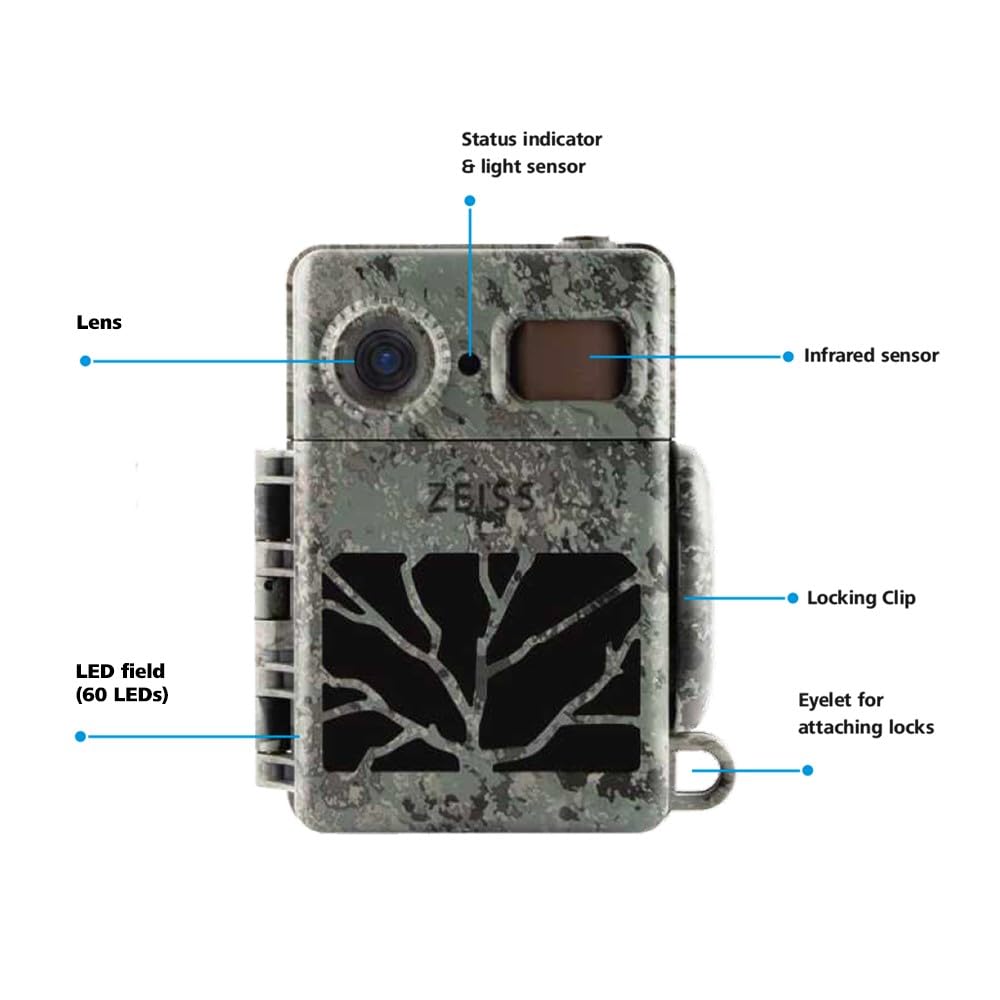
Figure 2: Internal Display and Controls. This image displays the camera with its front cover open, revealing the 2.4-inch color LCD display and the control buttons for operation.
Disetél
1. Pamasangan batré
The ZEISS Secacam 7 Classic requires 8 AA batteries for operation. Ensure to use high-quality alkaline or rechargeable batteries.
- Open the camera's housing by releasing the locking clips.
- Panggihan kompartemen batré.
- Insert 8 AA batteries, paying close attention to the correct polarity (+/-) indicated inside the compartment.
- Tutup kompartemen batré anu aman.

Figure 3: Battery Installation. This image illustrates the process of inserting AA batteries into the camera's designated compartment.
2. Instalasi Kartu SD
A 32 GB SD card is included with your camera. This card is essential for storing photos and videos.
- With the camera housing open, locate the SD card slot, typically near the display.
- Insert the 32 GB SD card into the slot until it clicks into place. Ensure the card is inserted in the correct orientation.
- Pikeun nyabut, dorong kartu ka jero dugi ka kaluar.
3. Masang kaméra
The camera can be mounted using the included mounting girdle.
- Select a suitable location, such as a tree or post, ensuring a clear view wewengkon monitoring nu dipikahoyong.
- Thread the mounting girdle through the designated slots on the back of the camera.
- Securely fasten the girdle around the mounting surface.
- Open the camera's front flap to access the display. The lens is fixed to the front, allowing you to check the coverage area on the display and adjust the camera's angle for optimal positioning.
- Once positioned, close the front flap and secure the locking clips.

Figure 4: Camera Mounted (Closed). This image shows the camera securely attached to a tree, ready for operation.
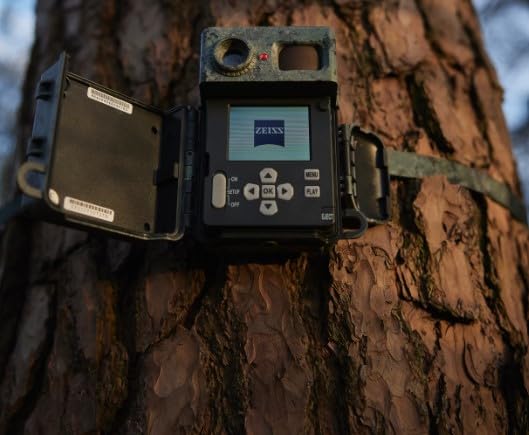
Figure 5: Camera Mounted (Open for Alignment). This image demonstrates the camera mounted on a tree with its front cover open, allowing for precise alignment using the internal display.
Parentah Operasi
Powering On/Off and Setup Mode
- To power on the camera and enter setup mode, slide the ON/SETUP/OFF switch to the "SETUP" position. The display will activate.
- To power off the camera, slide the switch to the "OFF" position.
- To activate the camera for monitoring, slide the switch to the "ON" position after completing setup. The status indicator will blink, and the camera will enter monitoring mode.
Menu Napigasi
Gunakeun tombol panah arah (Luhur, Turun, Kénca, Katuhu) to navigate through menu options. Press the OK tombol pikeun mastikeun selections. Pencét éta MENU button to access the main menu or go back to the previous screen.
Konpigurasikeun Setélan
In "SETUP" mode, press the MENU button to access various settings, including:
- Mode: Select between Photo, Video, or Photo+Video.
- Resolusi: Set image and video quality.
- Sensitipitas PIR: Adjust the motion sensor's sensitivity.
- Interval pemicu: Define the delay between consecutive recordings.
- Waktos & Tanggal: Setel waktos sareng kaping ayeuna.
- Pormat Kartu SD: Hapus sadaya data dina kartu SD. (Caution: This will delete all stored files.)
Viewing Rekaman
In "SETUP" mode, press the ulin button to enter playback mode. Use the directional arrows to browse through captured photos and videos. Press OK ka view hiji item nu dipilih.
Pangropéa
beberesih
- Lap bagian luar kaméra ku kaén nu lemes,amp lawon.
- For the lens and display, use a specialized lens cleaning cloth and solution to avoid scratches.
- Ensure all ports and seals are free of dirt and debris to maintain water resistance.
Ngagantian batré
Replace batteries when the low battery indicator appears on the display or when performance degrades. Always replace all 8 batteries simultaneously with new ones.
Panyimpenan
Upami teu dianggo salami lami, cabut batréna pikeun nyegah bocor sareng simpen kaméra di tempat anu tiis sareng garing.
Pamérésan masalah
| Masalah | Mungkin Cukang lantaranana | Solusi |
|---|---|---|
| Kaméra teu hurung. | Batré paéh atanapi teu leres diselapkeun. | Check battery polarity, replace with fresh batteries. |
| Teu aya poto/video anu direkam. | SD card full, incorrectly inserted, or corrupted; PIR sensitivity too low; camera in OFF mode. | Format or replace SD card; adjust PIR sensitivity; ensure camera is in ON mode. |
| Kualitas gambar goréng peuting. | Infrared LEDs obstructed; low battery power. | Clear any obstructions from LEDs; replace batteries. |
| Pintonan teu jalan. | Camera not in SETUP mode; display settings. | Ensure switch is in SETUP position; check display brightness settings in menu. |
spésifikasi
| Fitur | Rincian |
|---|---|
| Nomer modél | ZEISS SECACAM 7 Classic |
| tampilan | 2.4" TFT-LCD Color Display |
| Sénsor | Infrared Sensor, Light Sensor |
| Visi Peuting | 60 Black LEDs (Infrared Flash) |
| Included Memory | 32 Kartu SD GB |
| Konektipitas | Wireless, Matter Protocol |
| Sumber Daya | Battery Powered (8x AA) |
| Suhu Operasi | -20 °C ~ 55 °C |
| Ukuran (L x W x H) | 14.3 x 12 x 7.5 cm |
| Beurat | 440 g |
| Resolusi Capture Video | 1080 p |
| Tipe Pamasangan | Tangkal Gunung |
| Pamakéan jero rohangan / outdoor | Luar |
Garansi sareng Rojongan
Your ZEISS Secacam 7 Classic Trail Camera comes with a standard manufacturer's warranty. An optional 1-year extended warranty may be available for purchase.
For technical support, service, or warranty claims, please contact ZEISS customer service.
- Pabrikan: ZEISS, Carl-Zeiss-Strasse 22, 73447 Oberkochen, Germany
- Importir (India): Carl Zeiss India (Bangalore) Pvt Ltd., Plot No. 3, Jigan Link Road, Bommasandra Industrial Area Bangalore 560099 India
- Tanggal munggaran sayogi: 3 Juni 2024
Punten mertahankeun bukti pameseran anjeun pikeun tujuan garansi.


