Bubuka
Hatur nuhun pikeun meuliasing the VGN V98Pro V2 Gaming Keyboard. This manual provides detailed instructions for setting up, operating, and maintaining your new keyboard. Please read this manual thoroughly before use to ensure optimal performance and longevity of your device.
Eusi pakét
- VGN V98Pro V2 Gaming Keyboard
- USB-C ka USB-A Cable
- Keycap Puller
- Manual pamaké
Produk Leuwihview
The VGN V98Pro V2 is a high-performance gaming keyboard designed for durability and responsiveness. It features a compact layout with a dedicated number pad, customizable keycaps, and a robust build quality.
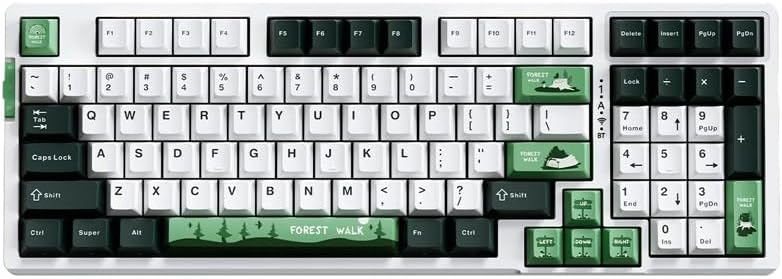
Gambar 1: Ti luhur ka handap view of the VGN V98Pro V2 Gaming Keyboard. This image displays the full keyboard layout, including the main alphanumeric keys, function row, navigation cluster, and numeric keypad. The keycaps feature a white, dark green, and light green color scheme, with specific keys like 'Forest Walk' and 'Forest' having unique designs.
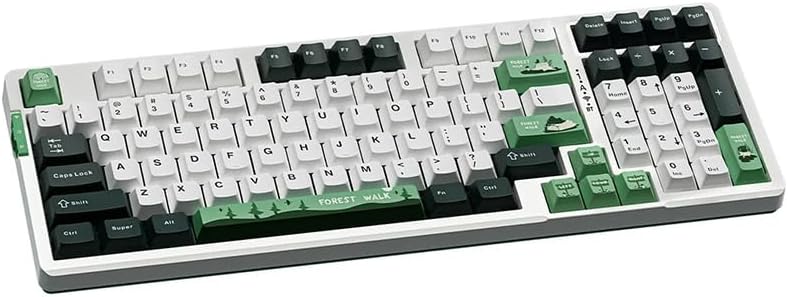
Gambar 2: Angled view of the VGN V98Pro V2 Gaming Keyboard. This perspective highlights the profile of the keycaps and the overall ergonomic design of the keyboard. The side view shows the slight incline of the keyboard base and the texture of the keycaps.
Disetél
- Buka bungkus kibor: Cabut keyboard sareng sadaya asesoris sacara saksama tina bungkusan.
- Sambungkeun kabel USB:
- Insert the USB-C end of the provided cable into the port on the back or side of the VGN V98Pro V2 keyboard.
- Insert the USB-A end of the cable into an available USB port on your computer or laptop.
- Pangenal Sistim: Your operating system should automatically detect and install the necessary drivers for the keyboard. This process may take a few moments. No additional software installation is typically required for basic functionality.
- Fungsi Uji: Open a text editor or browser and type to ensure all keys are functioning correctly.
Parentah Operasi
Pamakéan Dasar
The VGN V98Pro V2 functions as a standard QWERTY keyboard. Simply connect it to your computer, and it will be ready for use. The numeric keypad provides convenient data entry.
Kombinasi Tombol Fungsi (Tombol Fn)
The keyboard features an Fn (Function) key, typically located near the left Ctrl or Alt key. This key, when pressed in combination with other keys, activates secondary functions. Common Fn key combinations include:
- Fn + F1-F12: Multimedia controls (e.g., volume up/down, play/pause, stop, next/previous track). Specific functions may vary.
- Tombol Fn + Windows: Konci/muka konci Windows pikeun nyegah pencét teu kahaja nalika maén game.
- Fn + kenop panah: May control backlight brightness or effects (if applicable).
- Fn + PrtSc/ScrLk/Pause: May offer additional system functions.
Refer to the keycap legends for specific Fn key functions on your V98Pro V2 keyboard.
Pangropéa sareng Perawatan
- beberesih:
- Pegatkeun sambungan keyboard tina komputer Anjeun sateuacan beberesih.
- Make kaen nu lemes, teu aya lint rada dampku cai atawa solusi beberesih hampang pikeun ngusap keycaps na chassis.
- Pikeun lebu sareng lebu antara konci, paké hawa anu dikomprés.
- Ulah nganggo bahan kimia, abrasif, atanapi pangleyur anu kasar.
- Ngahapus Keycap: Use the provided keycap puller to carefully remove keycaps for deeper cleaning or replacement. Gently pull straight up to avoid damaging the switch.
- Panyimpenan: Simpen kibor di tempat anu bersih, garing, sareng jauh tina suhu anu ekstrim sareng sinar panonpoé langsung.
- Paparan Cairan: Avoid spilling liquids on the keyboard. If a spill occurs, immediately disconnect it, turn it upside down to drain, and allow it to dry completely before reconnecting.
Pamérésan masalah
- Keyboard Teu Ngabales:
- Pastikeun kabel USB disambungkeun sacara aman ka kibor sareng komputer.
- Coba sambungkeun kibor ka port USB anu béda dina komputer anjeun.
- Nguji keyboard dina komputer sejen pikeun ngaluarkeun masalah husus sistem.
- Balikan deui komputer anjeun.
- Konci Spésifik Teu Gawé:
- Remove the keycap using the keycap puller and check for any debris obstructing the switch. Clean if necessary.
- Upami masalahna tetep, éta tiasa nunjukkeun kasalahan hardware.
- Input Lag or Delays:
- Pastikeun panggerak USB komputer anjeun parantos diropéa.
- Avoid connecting the keyboard through unpowered USB hubs. Connect directly to the computer.
spésifikasi
| merek | VGN |
| Nomer modél | V98PROV2BBICF |
| Tipe kibor | Keyboard kaulinan |
| Alat nu cocog | Laptop, PC |
| Konektipitas | Kabel (USB-C) |
| Item Beurat | 1 kg |
| Skéma Warna | Blueberry Ice Cream - Forest (White, Dark Green, Light Green) |
Garansi sareng Rojongan
The VGN V98Pro V2 Gaming Keyboard comes with a standard manufacturer's warranty. Please refer to the warranty card included in your package for specific terms and conditions. For technical support, troubleshooting assistance, or warranty claims, please contact VGN customer service through their official websitus atanapi pangecér ti saha anjeun mésér produk.


