1. Langkungview
The EDISION HDMI Modulator 3-in-1 Pro is a single-channel Full HD digital HDMI modulator designed for converting HDMI signals into terrestrial DVB-T, ISDB-T, or DVB-C MPEG4 digital signals. It features an HDMI LOOP for connecting the HDMI signal to a TV and an integrated IR emitter for remote control extension. This device allows you to convert HDMI input from various sources such as satellite receivers, TV Boxes, CCTV, DVDs, and Digital Signage systems up to 1080p resolution. The output signal operates in the VHF/UHF band, providing excellent quality, reliability, ease of use, and quick configuration via its LCD screen, ensuring stable operation in diverse installation scenarios.
2. Eusi Paket
Saatos muka bungkusan, mangga pariksa yén sadaya barang anu didaptarkeun di handap aya sareng dina kaayaan anu saé:
- EDISION HDMI Modulator 3-in-1 Pro Unit
- Jack to IR Tx Cable
- Pasangan Sekrup (4x)
- PSU 5V/2A EU/UK Universal Power Supply
- Manual pamaké

Image: Contents of the EDISION HDMI Modulator 3in1 pro package, including the HDMI Modulator unit, Jack to IR Tx cable, mounting screws (4x), PSU 5V/2A EU/UK universal power supply, and User Manual.
3. Fitur Produk
- Digital HDMI modulator with 3 selectable modulation signals: DVB-T, DVB-C, and ISDB-T.
- HDMI pass-through (HDMI Loop) for simultaneous viewing on a local display.
- Integrated IR extension system via the IR Tx emitter for remote control of the HDMI source.
- Input Signal: 1 x HD; Output Signal: Terrestrial DVB-T, ISDB-T, or DVB-C MPEG4 cable.
- Supports high video resolution up to 1080p at 60 FPS.
- Frequency Range DVB-T: VHF (CH.5-12) & UHF (CH.21-69).
- Frequency Range ISDB-T: VHF (CH.7-13) & UHF (CH.14-69).
- Frequency Range DVB-C: 47-862 MHz.
- High-quality modulation output with MER > 35 dB.
- Adjustable output signal level, preset to 90dBμV.
- Quick preset function with 50 selectable IDs.
- LCD screen with standby function for easy configuration.
- Ideal for coaxial cable distribution in various environments including hotels, supermarkets, betting shops, sports bars, restaurants, gyms, hospitals, and residential settings for distributing CCTV or other HDMI sources.
4. Layout produk
4.1 Panel payun

Image: Front panel of the EDISION HDMI Modulator 3in1 pro, with dimensions and labeled buttons and indicators.
- Tombol konci: Used to lock/unlock the device settings.
- Tombol Menu/OK: Accesses the menu and confirms selections.
- Tombol Kénca/Katuhu: Navigates horizontally through menu options.
- Tombol Naék / Turun: Navigates vertically through menu options or adjusts values.
- Power Identification LED: Nunjukkeun status kakuatan alat.
- Display Lock Identification LED: Indicates if the display is locked.
- Layar LCD: Shows current settings, channel information, and menu options.
- HDMI Input/Output Signal Identification LED: Indicates the presence of HDMI input or output signals.
4.2 Sambungan Panel Rear

Image: Rear panel of the EDISION HDMI Modulator 3in1 pro, showing all connection ports.
- RF IN: Coaxial input for existing RF signals (e.g., antenna).
- RF kaluar: Coaxial output for the modulated DVB-T, DVB-C, or ISDB-T signal.
- IR OUT: Infrared output jack for connecting the IR Tx cable to control the HDMI source.
- Port USB: For firmware updates or configuration file ngamuat.
- HDMI IN: HDMI input for connecting your video source.
- HDMI OUT (Loop-through): HDMI output for connecting to a local display (e.g., TV).
- DC 5V/2.0A: Power input for the included power supply.
- Ground Point: For grounding the device to prevent electrical interference.
5. Setup jeung Instalasi
Follow these steps for a typical setup and installation of your EDISION HDMI Modulator:
- Sambungkeun Sumber HDMI: Connect your HDMI video source (e.g., satellite receiver, TV Box, DVD player) to the HDMI-IN port on the modulator using an HDMI cable.
- Connect Local Display (Optional): Upami anjeun hoyong view the HDMI source on a local TV, connect an HDMI cable from the HDMI OUT (Loop-through) port on the modulator to the HDMI input of your TV.
- Sambungkeun Kaluaran RF: Sambungkeun kabel koaksial tina RF OUT port on the modulator to your existing coaxial distribution network or directly to the antenna input of your TV(s).
- Connect RF Input (Optional): If you have an existing terrestrial antenna signal you wish to combine with the modulated signal, connect your antenna cable to the RF DINA palabuhan.
- Connect IR Tx Cable (Optional): For remote control extension, connect the Jack to IR Tx cable to the IR OUT port on the modulator. Position the IR emitter head near the IR receiver of your HDMI source device.
- Daya Hurung: Connect the included 5V/2A power supply to the DC 5V / 2.0A port on the modulator and then plug it into a power outlet. The device will power on.
- Configure Modulator: Use the front panel LCD and buttons to configure the modulation type (DVB-T, DVB-C, ISDB-T), channel number, and other settings according to your local broadcasting standards and network requirements.
- Scan pikeun Saluran: On your TV(s), perform a channel scan to find the newly modulated channel.
5.1 Pamasangan Example
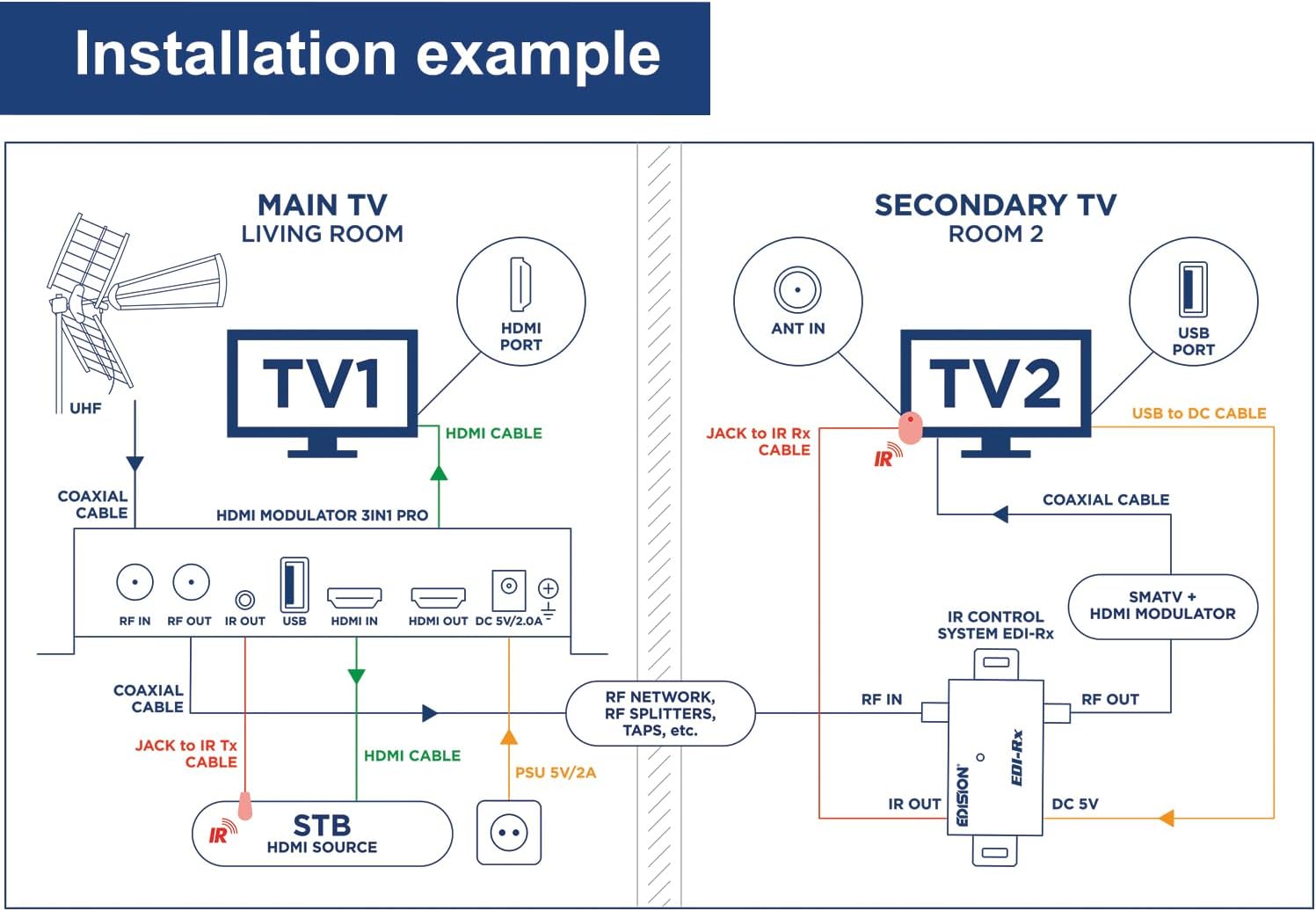
Image: Installation example diagram for the EDISION HDMI Modulator 3in1 pro, showing connections for a main TV in a living room and a secondary TV in another room. It details HDMI and coaxial cable routing, and the use of an IR control system.
6. Parentah Operasi
Once installed, the EDISION HDMI Modulator operates by converting your HDMI input into a broadcast-ready RF signal. Use the front panel controls to manage its settings.
6.1 Navigasi Menu
- Pencét éta Menu / OKÉ tombol pikeun asup ka ménu utama.
- Ngagunakeun éta Luhur/Turun tombol pikeun ngagulung pilihan menu.
- Ngagunakeun éta Kénca/Katuhu buttons to change values or navigate sub-menus.
- Pencét Menu / OKÉ deui pikeun mastikeun pilihan atanapi lebet kana sub-menu.
- To exit a menu or return to the previous screen, press the Menu / OKÉ button repeatedly until you are back to the main display.
- The Tombol Konci can be used to prevent accidental changes to the settings. Press and hold to toggle lock/unlock.
6.2 Larapna Example

Image: Application example diagram for the EDISION HDMI Modulator 3in1 pro, illustrating how to connect an HDMI source (STB, PC, CCTV, TV Box) to the modulator and distribute the signal via a MATV network to multiple TVs. It also shows an outdoor antenna connection.
7. Pangropéa
To ensure the longevity and optimal performance of your EDISION HDMI Modulator, follow these simple maintenance guidelines:
- beberesih: Use a soft, dry cloth to clean the exterior of the device. Do not use liquid cleaners or aerosol sprays, as they may damage the unit.
- Ventilasi: Ensure that the ventilation openings on the device are not blocked. Proper airflow is crucial to prevent overheating.
- Lingkungan: Operate the device in a dry environment, away from direct sunlight, excessive heat, and moisture.
- Kabel: Periodically check all connected cables for any signs of damage or loose connections.
- Pembaruan firmware: Pariksa produsén urang websitus sacara périodik pikeun apdet firmware anu sayogi. Apdet tiasa ningkatkeun kinerja sareng nambihan fitur énggal.
8. Cara ngungkulan
If you encounter issues with your EDISION HDMI Modulator, refer to the table below for common problems and their solutions.
| Masalah | Mungkin Cukang lantaranana | Solusi |
|---|---|---|
| Taya kakuatan / Alat teu hurung | Power cable not connected; Faulty power adapter; Power outlet issue. | Ensure power cable is securely connected. Test power adapter with another device or use a different outlet. |
| No signal on TV (modulated channel) | Incorrect modulation settings; TV not scanned for channels; Loose coaxial cable; HDMI input signal issue. | Verify modulation type and channel settings on the modulator. Perform a channel scan on your TV. Check all coaxial cable connections. Ensure HDMI source is active and connected correctly. |
| Poor picture quality/Interference | Weak input signal; Incorrect output level; External interference; Cable quality. | Check HDMI source signal quality. Adjust the modulator's output signal level. Ensure proper grounding. Use high-quality coaxial cables. |
| IR remote control not working | IR Tx cable not connected; IR emitter not positioned correctly; HDMI source IR receiver issue. | Ensure IR Tx cable is securely plugged into the IR OUT port. Reposition the IR emitter head directly in front of the HDMI source's IR receiver. Verify the HDMI source's remote control functionality. |
| LCD display is blank or frozen | Device malfunction; Power issue. | Unplug the power adapter, wait 10 seconds, then plug it back in to restart the device. If the problem persists, contact customer support. |
9. Spésifikasi
| Fitur | Rincian |
|---|---|
| merek | Édisi |
| Nomer modél | 07-06-0013 |
| Warna | Hideung |
| Jenis Konéktipitas | Coaxial, HDMI |
| Alat nu cocog | Televisions, Monitors, Projectors |
| Ukuran barang (L x W x H) | 17 x 11 x 5 séntiméter |
| Jumlah Palabuhan | 3 (RF IN, RF OUT, HDMI IN, HDMI OUT, IR OUT, USB, DC IN - counting main functional ports) |
| Jumlah Item dina Paket | 1 unit (modulator) |
| Tipe Colokkeun Daya | Tipe E/F – 2 pin (Hibrida EU) |
| Produsén | EDISI |
| Negara asal | Cina |
| Kagunaan Produk Husus | Usage in hotels, supermarkets, betting shops, sports bars, bars, restaurants, gyms, hospitals, for home users who wish to feed their surveillance cameras (CCTV) into the existing distribution network, commercial and residential environments in general. |
| Kasadiaan suku cadang | Inpormasi henteu sayogi dina suku cadang |
| Software Apdet Dijamin Dugi | Inpormasi henteu sayogi |
10. Garansi jeung Rojongan
For information regarding warranty coverage, technical support, or service, please refer to the warranty card included with your product or visit the official EDISION website. You may also contact EDISION customer support directly for assistance with product registration, troubleshooting, or spare parts inquiries.
Punten tahan bukti pameseran anjeun pikeun klaim garansi.


