1. Bubuka
Hatur nuhun pikeun meuliasing the G-KENI Portable Multi-Band Radio Model 2400. This device is designed to provide versatile audio entertainment and information, featuring FM, AM, and Shortwave (SW1/SW2) radio reception, as well as multimedia playback from USB drives, SD cards, and TF cards. It offers flexible power options and a convenient headphone jack for private listening. Please read this manual thoroughly before use to ensure proper operation and to maximize your listening experience.
2. Émbaran Kasalametan
- Ulah ngalaan unit ka hujan atawa Uap pikeun nyegah seuneu atawa shock listrik.
- Ulah neundeun unit dina sinar panonpoé langsung, caket sumber panas, atanapi dina lingkungan anu kalembabanna luhur atanapi lebu.
- Use only the specified power sources (AC adapter or 4x AA batteries).
- Ulah nyobian muka atawa ngalereskeun unit sorangan. Rujuk sadayana jasa ka tanaga anu mumpuni.
- Jauhkeun batré tina jangkauan barudak. Lamun ditelan, neangan perhatian médis langsung.
- Buang batré anu dipaké nurutkeun peraturan lokal.
3. Eusi Paket
- G-KENI Portable Multi-Band Radio Model 2400
- Adaptor Daya AC
- Instruksi Manual
4. Produk Langkungview
The image below illustrates the main components and controls of your G-KENI Portable Multi-Band Radio.

Gambar 1: Hareupeun view of the G-KENI Portable Multi-Band Radio Model 2400, showing the speaker grille, tuning dial, band selector, and telescopic antenna.
Komponén konci:
- Antena Teleskopik: Pikeun panarimaan FM sareng Shortwave.
- Dial Tuning: Pikeun milih frékuénsi radio.
- Saklar Pamilih Pita: To switch between FM, AM, SW1, SW2, and media playback modes (USB/SD/TF).
- Kontrol volume: Saluyukeun tingkat kaluaran audio.
- Speaker: Kaluaran audio anu terintegrasi.
- Port USB: Pikeun playback USB flash drive.
- Slot Kartu SD/TF: For SD or TF card playback.
- Jack Headphone (3.5mm): Pikeun déngékeun pribadi.
- Input Daya AC: Pikeun nyambungkeun adaptor AC.
- Kompartemen batré: For 4x AA batteries.
- Mawa cecekelan: Pikeun portability gampang.
5. Setélan
5.1 suplai kakuatan
Your radio can be powered by two methods: AC power or dry cell batteries.
AC Power (Household Plug-in)
To use AC power, connect the included AC adapter to the AC power input port on the radio and then plug it into a standard wall outlet. This method is suitable for indoor use.

Figure 2: The radio connected to an AC power outlet using the provided adapter.
Battery Power (Outdoor Use)
For portable use, the radio requires 4x AA 1.5V dry cell batteries (not included). Open the battery compartment cover on the back of the unit and insert the batteries, ensuring correct polarity (+/-). Battery operation is ideal for outdoor activities or during power outages.
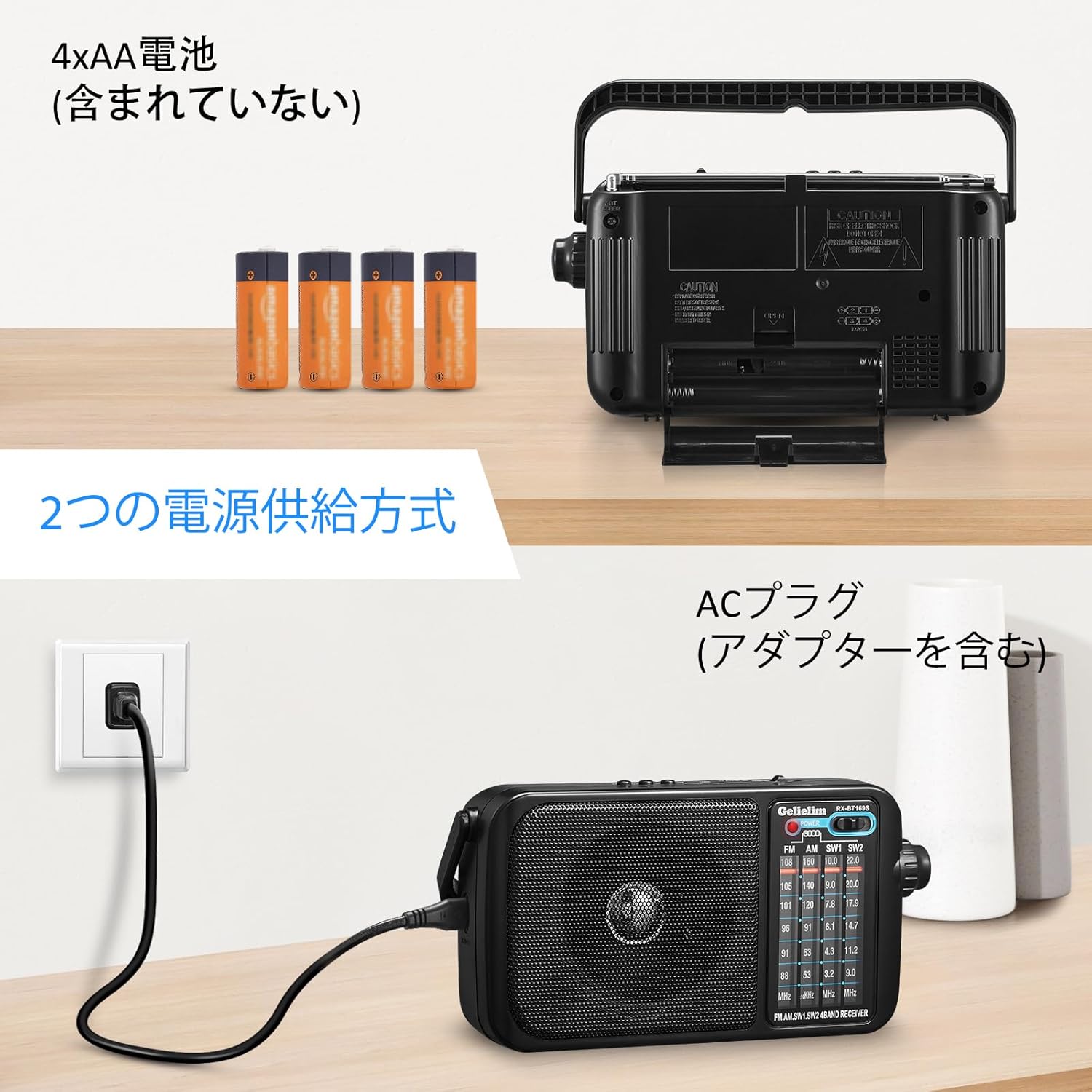
Figure 3: The battery compartment of the radio, showing the insertion of four AA batteries.
5.2 anteneu
- FM/SW: Extend the telescopic antenna fully and adjust its angle for optimal reception.
- AM: The radio uses a built-in ferrite bar antenna for AM reception. Rotate the entire unit for the best signal.
- Terminal anteneu éksternal: For enhanced FM/Shortwave reception, an external antenna can be connected to the designated terminal.
6. Parentah Operasi
6.1 Radio Reception
- Hurungkeun Volume Control knob clockwise to power on the unit and set a low volume.
- Geser ka Band Selector Pindah to your desired band: FM, AM, SW1, or SW2.
- For FM/SW, extend and adjust the telescopic antenna. For AM, rotate the unit for best signal.
- Puterkeun Dial Tuning to scan for radio stations. The frequency scale will indicate the current tuning.
- Saluyukeun Volume Control kana tingkat déngékeun anu anjeun pikaresep.
6.2 Media Playback (USB/SD/TF Card)
- Insert a USB flash drive into the USB port or an SD/TF card into the corresponding slot. Ensure the card is inserted correctly.
- Geser ka Band Selector Pindah to the 'USB/SD/TF' position. The unit will automatically detect and begin playing audio files (e.g., MP3 format).
- Use the playback controls (if available, typically 'Next/Previous Track' buttons) to navigate through your audio files.
- Saluyukeun Volume Control kana tingkat déngékeun anu anjeun pikaresep.
6.3 Paké headphone
To enjoy private listening, plug any standard 3.5mm stereo headphones into the headphone jack located on the side of the unit. The internal speaker will automatically mute when headphones are connected.

Figure 4: A user enjoying audio from the radio using headphones.
7. Pangropéa
- Bersihkeun unitna nganggo lawon anu lemes sareng garing. Entong nganggo pembersih atanapi pelarut anu abrasif.
- Upami unit ieu moal dianggo kanggo waktos anu lami, cabut batréna pikeun nyegah bocor.
- Keep the antenna clean and free from damage.
8. Cara ngungkulan
| Masalah | Mungkin Cukang lantaranana | Solusi |
|---|---|---|
| Taya kakuatan | Batréna paéh atanapi dipasangna teu leres; adaptor AC teu nyambung kalayan leres. | Replace batteries, check polarity; ensure AC adapter is securely connected. |
| panarimaan radio goréng | Antenna not extended/adjusted; weak signal area; interference. | Extend and adjust the telescopic antenna (FM/SW); rotate the unit (AM); try moving to a different location; connect an external antenna. |
| Taya sora tina speaker | Volume too low; headphones connected; unit muted. | Increase volume; disconnect headphones; check if any mute function is active. |
| USB/SD/TF card not playing | Kartu / drive teu diselapkeun leres; teu didukung file format; ruksak files. | Reinsert card/drive; ensure files are in a supported format (e.g., MP3); try a different card/drive. |
9. Spésifikasi

Figure 5: The radio displaying its approximate dimensions.
| Fitur | Katerangan |
|---|---|
| Nomer modél | 2400 |
| Tipe Tuner | AM, FM, SW (Shortwave) |
| Rentang Frékuénsi FM | 76 - 108 MHz |
| Rentang Frékuénsi AM | 530 - 1600 kHz |
| SW1 Frequency Range | 3.2 - 10.0 MHz |
| SW2 Frequency Range | 9.0 - 22.0 MHz |
| Média Playback | USB, SD Card, TF Card |
| Max Audio Output | 1.5W |
| Jack headphone | Stereo 3.5mm |
| Sumber Daya | AC Power (DC 6V via adapter) / 4x AA 1.5V Dry Cell Batteries (not included) |
| Tipe tampilan | LED |
| Bahan | Acrylonitrile Butadiene Styrene (ABS) |
| Ukuran (W x H x D) | Kira-kira. Ukuran 21 x 6.5 x 12 cm |
| Beurat | Kira-kira. 727g (tanpa batré) |
| Komponén Kaasup | Instruction Manual, AC Adapter |
10. Garansi jeung Rojongan
This G-KENI product comes with a jaminan kualitas 1 taun from the date of purchase. We provide reliable after-sales service and support. If you encounter any issues during use, please do not hesitate to contact us. Our customer support team will respond to your inquiries within 24 hours. In the event of a manufacturing defect within the warranty period, we will provide a free replacement unit.
For support, please refer to the contact information provided in your purchase documentation or on the official G-KENI websitus.


