1. Produk Langkungview
The Sandberg Survivor Powerbank 27000 PD65W is a robust and high-capacity portable charging solution designed for various mobile devices, including smartphones and laptops. Its durable construction is IP66 certified, providing resistance against water, shock, and dust, making it suitable for demanding environments. This power bank features multiple charging outputs, including USB-C Power Delivery, standard USB-A ports, and wireless charging capabilities, alongside an integrated flashlight.

Gambar 1.1: Hareupeun view of the Sandberg Survivor Powerbank, highlighting the power button, USB-A ports, and USB-C port.
2. Eusi Paket
- Sandberg Survivor Powerbank 27000 PD65W (Model 420-99)
- USB-C kana Kabel Ngecas USB-C
- Manual pangguna (dokumén ieu)
3. Fitur Produk
- Kapasitas luhur: 27000 mAh / 99.9 Wh for extended power.
- Desain Kasar: IP66 certified for water, shock, and dust resistance.
- Pangiriman Daya USB-C: Up to 65W output for laptops and fast-charging devices, 60W input for rapid recharging.
- Kaluaran USB-A Ganda: Two 18W (QC 3.0) ports for standard device charging.
- Ngecas nirkabel: 15W maximum output for compatible devices.
- Senter terpadu: Powerful 120 lumen LED flashlight with a range of 12-15 meters.
- Kaluaran DC5525: 12V/2A output.

Gambar 3.1: Tukangeun view of the power bank, illustrating the wireless charging area and the integrated lanyard attachment point.
4. Setélan
4.1 Ngecas Awal
- Saméméh dipaké munggaran, ngeusi batre kakuatan pinuh.
- Connect the provided USB-C cable to the power bank's USB-C input port.
- Connect the other end of the USB-C cable to a compatible USB-C power adapter (not included) with a minimum output of 60W for optimal charging speed.
- The LED indicators on the power bank will illuminate to show the charging status. All indicators lit steadily signify a full charge.
4.2 Power Indicators
The power bank features LED indicators to display the remaining battery level. Press the power button once to check the current charge status. The number of lit LEDs corresponds to the approximate charge level.
5. Parentah Operasi
5.1 Charging Devices via USB-C
- Sambungkeun kabel ngecas USB-C alat anjeun kana port kaluaran USB-C bank daya.
- Sambungkeun tungtung kabel anu sanés ka alat anjeun.
- The power bank will automatically begin charging. If not, press the power button once.
5.2 Charging Devices via USB-A
- Connect your device's USB-A charging cable to one of the power bank's USB-A output ports.
- Sambungkeun tungtung kabel anu sanés ka alat anjeun.
- The power bank will automatically begin charging. If not, press the power button once.
5.3 Ngecas Nirkabel
- Ensure your device supports wireless charging (Qi standard).
- Place your wireless charging compatible device directly onto the designated wireless charging pad on the power bank.
- The power bank will detect the device and begin wireless charging. An indicator light may illuminate to confirm wireless charging is active.
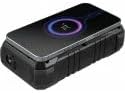
Gambar 5.1: Puncak view of the power bank demonstrating a device being charged wirelessly, indicated by a glowing circle.
5.4 Ngagunakeun Senter
- Pikeun ngahurungkeun senter, pencét terus tombol daya salami kurang leuwih 2-3 detik.
- To turn off the flashlight, press and hold the power button again for approximately 2-3 seconds.
6. Pangropéa
- beberesih: Anggo lawon anu lemes sareng garing pikeun ngabersihkeun power bank. Hindarkeun nganggo bahan kimia anu keras atanapi bahan anu abrasif.
- Panyimpenan: Store the power bank in a cool, dry place away from direct sunlight and extreme temperatures. For long-term storage, it is recommended to keep the power bank charged to approximately 50-75% capacity.
- Paparan cai: While IP66 rated, ensure all port covers are securely closed before exposing the device to water or dust. After exposure, dry the device thoroughly before opening port covers or charging.
7. Cara ngungkulan
- Bank kakuatan henteu ngecas:
- Pastikeun kabel USB-C disambungkeun sacara aman ka bank daya sareng adaptor daya.
- Verify that the power adapter is functioning correctly and provides sufficient power (e.g., 60W USB-C PD adapter).
- Coba kabel USB-C jeung/atawa adaptor kakuatan béda.
- Alat teu ngecas tina bank daya:
- Pencét tombol daya dina power bank pikeun ngaktipkeun kaluaran.
- Pastikeun kabel ngecas disambungkeun pageuh kana power bank sareng alat anjeun.
- Pariksa yén port ngecas alat anjeun bersih sareng henteu ruksak.
- Coba kabel ngecas atawa port béda dina bank kakuatan.
- Pariksa lamun bank daya boga muatan cukup.
- Ngecas nirkabel teu jalan:
- Ensure your device is placed centrally on the wireless charging pad.
- Remove any thick cases from your device that might interfere with wireless charging.
- Verify your device supports Qi wireless charging.
- Flashlight not turning on/off:
- Ensure you are pressing and holding the power button for the correct duration (2-3 seconds).
- Pariksa lamun bank daya boga muatan cukup.
8. Spésifikasi
| Nomer modél | 420-99 |
| Kapasitas batré | 27000 mah / 99.9 Wh |
| Protéksi Ingress (IP) Peunteun | IP66 (Water, Shock, Dust Resistant) |
| Input USB-C | 5V/3A, 9V/3A, 12V/3A, 15V/3A, 20V/3A (PD60W max) |
| Kaluaran USB-C | 5V/3A, 9V/3A, 12V/3A, 15V/3A, 20V/3.25A (PD65W max) |
| USB-A 1 Kaluaran | 5V/3A, 9V/2A, 12V/1.5A (18W max, QC 3.0) |
| USB-A 2 Kaluaran | 5V/3A, 9V/2A, 12V/1.5A (18W max, QC 3.0) |
| Kaluaran Ngecas Nirkabel | 15W max |
| DC5525 Kaluaran | 12V / 2A |
| Senter | 120 lumens, 12-15 meter range |
| Beurat | 805 gram |
9. Émbaran Kasalametan
- Ulah ngabongkar, muka, atawa ngaruksak power bank.
- Ulah ngalaan bank kakuatan ka panas atawa seuneu. Hindarkeun panyimpen dina sinar panonpoé langsung.
- Ulah short-circuit bank kakuatan.
- Ulah ngalaan bank kakuatan ka shock mékanis.
- In case of a battery leak, do not allow the liquid to come into contact with skin or eyes. If contact has been made, wash the affected area with copious amounts of water and seek medical advice.
- Tetep bank kakuatan jauh ti jangkauan sahiji barudak.
- Pastikeun ventilasi anu leres nalika ngecas.
- Buang bank daya sacara tanggung jawab nurutkeun peraturan lokal.
10. Garansi jeung Rojongan
Sandberg products are built to high quality standards. For information regarding warranty terms and technical support, please refer to the official Sandberg websitus atanapi hubungi pangecér lokal anjeun. Simpen resi pameseran anjeun kanggo klaim garansi.
Pikeun pitulung salajengna, mangga buka: www.sandberg.it


