
Andoer 0226b5d0-9fdc-46fa-87a1-023ef5ed8edc
Andoer 4K Digital Camera User Manual
Model: 0226b5d0-9fdc-46fa-87a1-023ef5ed8edc
Bubuka
This manual provides detailed instructions for the safe and effective use of your Andoer 4K Digital Camera. Please read this manual thoroughly before operating the camera and retain it for future reference. This camera is designed for capturing high-quality photos at 48MP and videos at 4K resolution, featuring a 2.8-inch screen, 16X digital zoom, auto-focus, anti-shake technology, and a built-in flash.
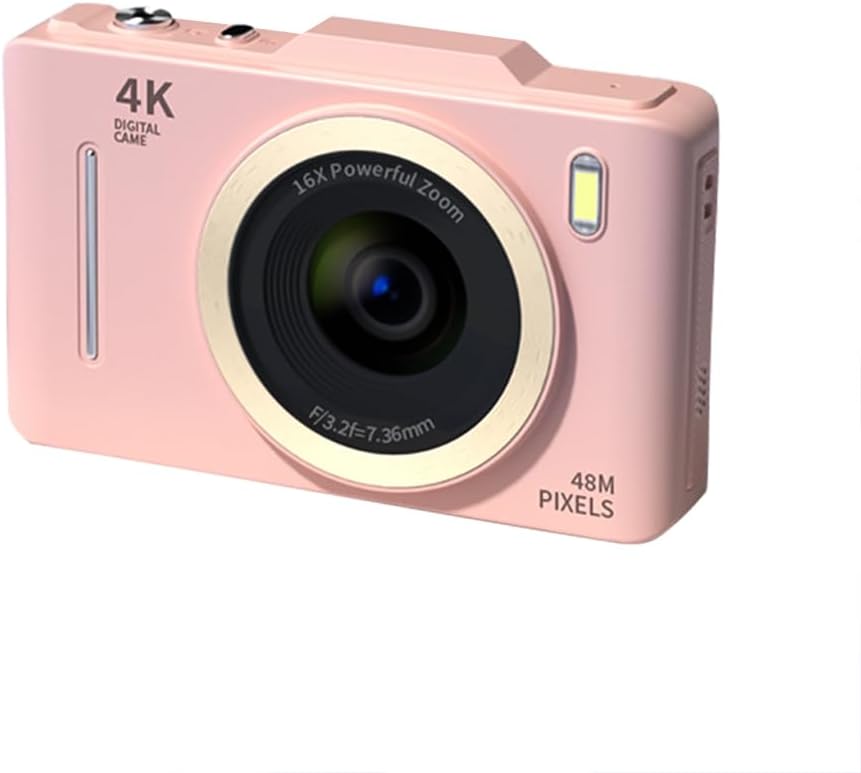
Gambar: Hareupeun view of the Andoer 4K Digital Camera in pink, showcasing its lens, flash, and 4K Digital Camera branding.
Émbaran Kasalametan penting
Awas:
- Not suitable for children. Please read the product instructions and applicable age range carefully before purchase and use.
- Ulah ngalaan kaméra ka cai atawa kalembaban kaleuleuwihan.
- Hindarkeun ngaragragkeun kaméra atanapi kéngingkeun dampak anu kuat.
- Use only specified batteries and charging methods.
- Ulah nyobian ngabongkar atanapi ngarobih kaméra.

Image: A warning label indicating that the product is not suitable for children, with the warning translated into multiple languages.
Eusi pakét
Punten parios yén sadaya barang aya dina pakét:
- Andoer 4K Digital Camera
- Kabel USB
- Batré Litium Rechargeable
- Manual pamaké
- Wrist Strap (may vary by package)
Produk Leuwihview
Biasakeun diri sareng komponén kaméra:
- Lensa: Komponen optik utama pikeun ngarekam gambar.
- Flash: Provides additional light in low-light conditions.
- Layar LCD 2.8 inci: Pikeun viewing live feed, reviewing photos/videos, and navigating menus.
- Tombol kontrol: Power, Shutter, Zoom (W/T), Menu, OK, Display, Delete.
- Port USB: Pikeun ngecas sareng mindahkeun data.
- Kompartemen batré: Imah batré rechargeable.
- Slot Kartu Mémori: For inserting an SD card (not included).

Gambar: Tukangeun view of the camera highlighting the 2.8-inch display screen and various control buttons for navigation and operation.
Disetél
1. Pamasangan Batré sareng Ngecas
- Buka panutup kompartemen batré anu aya di handapeun kaméra.
- Insert the provided lithium battery, ensuring the correct polarity.
- Tutup panutup kompartemen batré aman.
- Connect the camera to a power source using the USB cable for charging. The charging indicator light will illuminate.
- Ngecas parantos réngsé nalika lampu indikator pareum.
2. Pamasangan Kartu Mémori
A memory card (SD card, not included) is required to store photos and videos.
- Teang slot kartu memori, biasana deukeut kompartemen batré.
- Selapkeun kartu SD kalayan kontak logam nyanghareup ka hareup kaméra nepi ka clicks kana tempatna.
- Pikeun nyabutna, pencét kartu lalaunan dugi ka kaluar.
Parentah Operasi
Daya Hurung/Pareuman
- Pencét jeung tahan tombol Kakuatan tombol pikeun ngahurungkeun atawa mareuman kaméra.
Nyokot Poto
- Hurungkeun kaméra.
- Pigura shot anjeun nganggo layar LCD 2.8 inci.
- Pencét éta Jepret button halfway down to activate auto-focus (AF).
- Once focused, press the Jepret button fully to capture the photo.
Ngarékam Pidéo
- Hurungkeun kaméra.
- Switch to video mode (refer to the on-screen icons or menu for mode selection).
- Pencét éta Jepret tombol pikeun ngamimitian ngarékam.
- Pencét éta Jepret tombol deui pikeun ngeureunkeun ngarékam.
Fungsi Zum
- Ngagunakeun éta W (Lebar) jeung T (Telephoto) buttons to adjust the 16X digital zoom.

Image: A visual comparison demonstrating the effect of 1x digital zoom versus 16x digital zoom, showing how the camera can magnify distant subjects.
Ngagunakeun Flash
- The built-in flash can be activated in low-light conditions. Access flash settings via the menu to select modes like Auto Flash, Fill-in Flash, or Flash Off.

Image: Illustrates the effect of the built-in flash, showing a scene with and without flash to demonstrate improved lighting in dark environments.
Anti-Shake Feature
- The camera features digital anti-shake technology to reduce blur caused by camera movement. This feature is typically active by default or can be enabled in the settings menu.

Image: Demonstrates the effectiveness of the anti-shake feature by comparing a clear image taken with anti-shake mode to a blurry image without it, both showing people in motion.
Saringan kageulisan
- Access the menu to apply various beauty filters (e.g., Original, Cool colors, Retro, Black and white) to your photos for creative effects.

Image: Displays different beauty filter options available on the camera, including Original, Cool colors, Retro, and Black and white, applied to a portrait.
Video Deteksi Gerak
- Enable motion detection in the video settings. The camera will automatically start recording when movement is detected within the frame.

Image: Illustrates the motion detection feature, showing a dog in motion with a white square indicating the detection area.
Playback jeung Review
- Pencét éta Playback button (often labeled with a play icon) to view poto sareng video nu dicandak.
- Use the navigation buttons to scroll through your media.
- Pencét éta Hapus tombol pikeun miceun anu teu dihoyongkeun files.
Nyambungkeun ka Komputer
- Sambungkeun kaméra ka komputer Anjeun nganggo kabel USB nu disadiakeun.
- The camera will appear as a removable disk drive, allowing you to transfer files.
Pangropéa
- Ngabersihan lensa: Use a soft, lint-free cloth specifically designed for camera lenses. Do not use abrasive materials or harsh chemicals.
- Ngabersihan layar: Wipe the LCD screen gently with a soft, dry cloth.
- Panyimpenan: When not in use for extended periods, remove the battery and store the camera in a cool, dry place away from direct sunlight.
- Perawatan batré: Fully charge the battery before first use. Avoid completely draining the battery frequently to prolong its lifespan.
Pamérésan masalah
| Masalah | Solusi anu mungkin |
|---|---|
| Kaméra teu hurung. | Pastikeun batréna leres dipasang sareng dicas pinuh. |
| Teu tiasa nyandak poto/ngarékam pidéo. | Check if a memory card is inserted and has sufficient free space. Ensure the camera is in the correct mode (photo/video). |
| Gambar blur. | Ensure the lens is clean. Check lighting conditions. Enable anti-shake feature. Hold the camera steady. |
| Lampu kilat teu jalan. | Check flash settings in the menu; ensure it's not set to 'Flash Off'. |
| Kaméra henteu dikenal ku komputer. | Ensure the USB cable is securely connected. Try a different USB port or cable. Restart both camera and computer. |
spésifikasi
| Fitur | Rincian |
|---|---|
| merek | Andoer |
| Nomer modél | 0226b5d0-9fdc-46fa-87a1-023ef5ed8edc |
| Resolusi Masih Éféktif | 48 MP |
| Resolusi Video | 4K (2160p) |
| Ukuran layar | 2.8 inci |
| Zum Digital | 16X |
| Pokus Otomatis | Sumuhun (Deteksi Kontras) |
| Stabilisasi Gambar | Digital Anti Goyang |
| Diwangun-di Flash | Sumuhun |
| Jenis Batré | Litium Ion |
| Format Poto | JPEG |
| Format pidéo | MP4 |
| Interface éksternal | USB |
| Tipe sénsor | CMOS |
| Warna | Pink (variant) |
| Tingkat Résistansi Cai | Henteu Tahan Cai |
Garansi sareng Rojongan
For warranty information and technical support, please refer to the documentation included with your purchase or visit the official Andoer websitus. Simpen bukti pameseran anjeun pikeun klaim garansi.
Andoer Official Store: Visit Andoer Store on Amazon
Ask a question about this manual
Ask about setup, troubleshooting, compatibility, parts, safety, or missing instructions. Manuals+ will review the question and use this page’s manual context to help answer it.