
1. Bubuka
This manual provides essential information for the safe and effective operation of your LONGER RAY5 10W Laser Engraver and Cutter, along with its protective enclosure. Please read this manual thoroughly before assembly and use to ensure proper functionality and safety.

Image 1.1: The LONGER RAY5 10W Laser Engraver and Cutter shown alongside its protective enclosure, fan, and exhaust hose. Various engraved and cut samples are displayed below the engraver, including a phone case, a leather bracelet, rings, a small wooden house, and a glass jar.
Eusi pakét
Pastikeun yén sadaya komponén aya dina pakét anjeun:
- LONGER RAY5 10W Laser Engraver
- Protective Laser Engraver Enclosure
- Exhaust Fan and Hose
- Adaptor Daya sareng Kabel
- Kabel USB
- Kacamata Kasalametan
- Material Samples for Testing
- Manual pangguna (dokumén ieu)
- Parabot Majelis
2. Pedoman Kasalametan
WARNING: Laser radiation can cause eye damage and skin burns. Always wear appropriate safety goggles and operate the machine in a well-ventilated area.
- Perlindungan panon: Always wear the provided safety goggles when the laser is active. Never look directly at the laser beam.
- Ventilasi: Operate the laser engraver in a well-ventilated area or use the provided enclosure with its exhaust system to remove smoke and fumes.
- Bahaya seuneu: Laser engraving and cutting can generate heat and sparks, potentially causing fires. Do not leave the machine unattended during operation. Keep a fire extinguisher nearby.
- Kasaluyuan bahan: Only engrave or cut materials specified as safe for laser processing. Avoid materials that produce toxic fumes or are highly flammable (e.g., PVC, certain plastics).
- Barudak jeung Pets: Jauhkeun barudak jeung piaraan ti wewengkon operasi.
- Stopan Darurat: Familiarize yourself with the location of the emergency stop button or power switch to quickly shut down the machine if necessary.
- Surface Stabil: Tempatkeun mesin ukir dina permukaan anu stabil, rata, sareng henteu gampang kaduruk.

Image 2.1: This image illustrates two key safety features. On the left, a laser engraver is shown with safety goggles placed over the laser path, indicating 'Eyes Protection' and the recommendation to wear protective glasses to avoid eye irritation. On the right, the laser engraver is shown with a flame detection icon, indicating 'Thermal Protection' and the auto-shutdown feature if a flame is detected or the engraving area overheats.

Image 2.2: This image highlights two additional safety mechanisms. On the left, a close-up of the laser engraver's frame shows a 'Limit Switch' designed to prevent abrasion caused by collision between equipment and the edge of the working area. On the right, the engraver is shown with a hand icon, indicating 'Movement Protection' which automatically shuts down the machine if it detects movement during operation.
3. Produk Langkungview
LONGER RAY5 10W Laser Engraver
The LONGER RAY5 10W is a high-power diode laser engraver and cutter featuring a compressed laser spot for fine detail and efficient cutting. It includes a 32-bit motherboard for enhanced performance and supports offline control via an app.

Image 3.1: The LONGER RAY5 10W Laser Engraver is displayed with its control screen and several examples of engraved items, including a wooden phone case, a leather bracelet, metal rings, a small wooden house, and a glass jar, demonstrating its versatility across various materials.
Laser Engraver Enclosure with Vent
The included enclosure is designed to enhance safety and improve the working environment by containing smoke, odors, and reducing noise. It features an integrated exhaust system for effective ventilation.
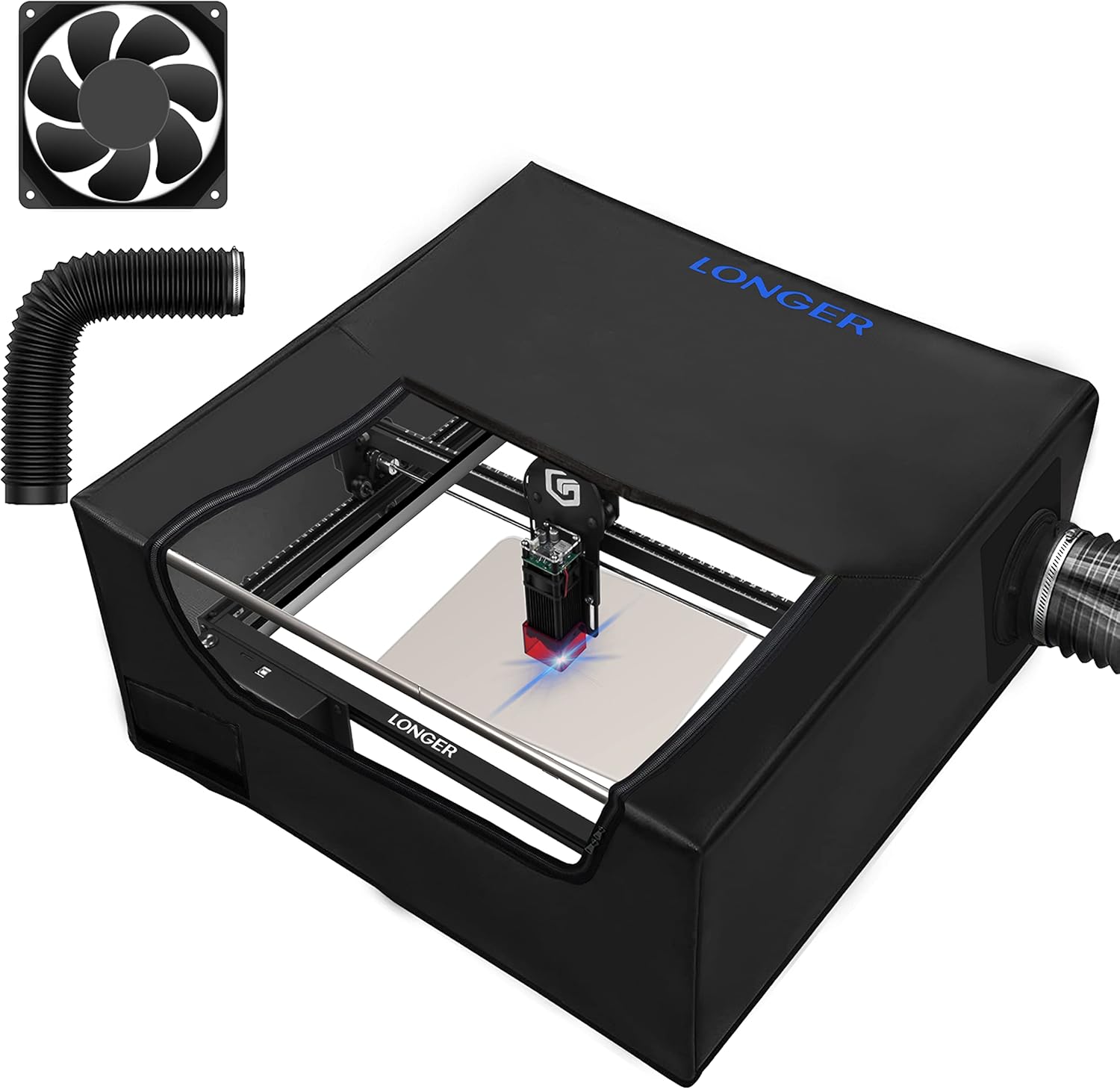
Image 3.2: The black protective enclosure for the laser engraver is shown with a visible exhaust fan and flexible hose. The enclosure features a transparent viewing window, allowing observation of the engraving process while providing protection.
4. Setélan
4.1. Assembly of the Laser Engraver
- Buka bungkus sadaya komponén sareng pariksa kana daptar eusi pakét.
- Follow the detailed assembly instructions provided in the separate assembly guide to construct the laser engraver frame.
- Install the laser module onto the gantry, ensuring it is securely fastened.
- Connect all necessary cables (power, USB, motor cables) according to the diagrams.
4.2. Enclosure Setup
- Place the assembled laser engraver inside the protective enclosure.
- Attach the exhaust fan to the designated port on the enclosure.
- Connect the flexible exhaust hose to the fan and route it to an outdoor vent or a suitable air filtration system. Ensure the hose is free of kinks.
- Plug in the power adapter for the exhaust fan.
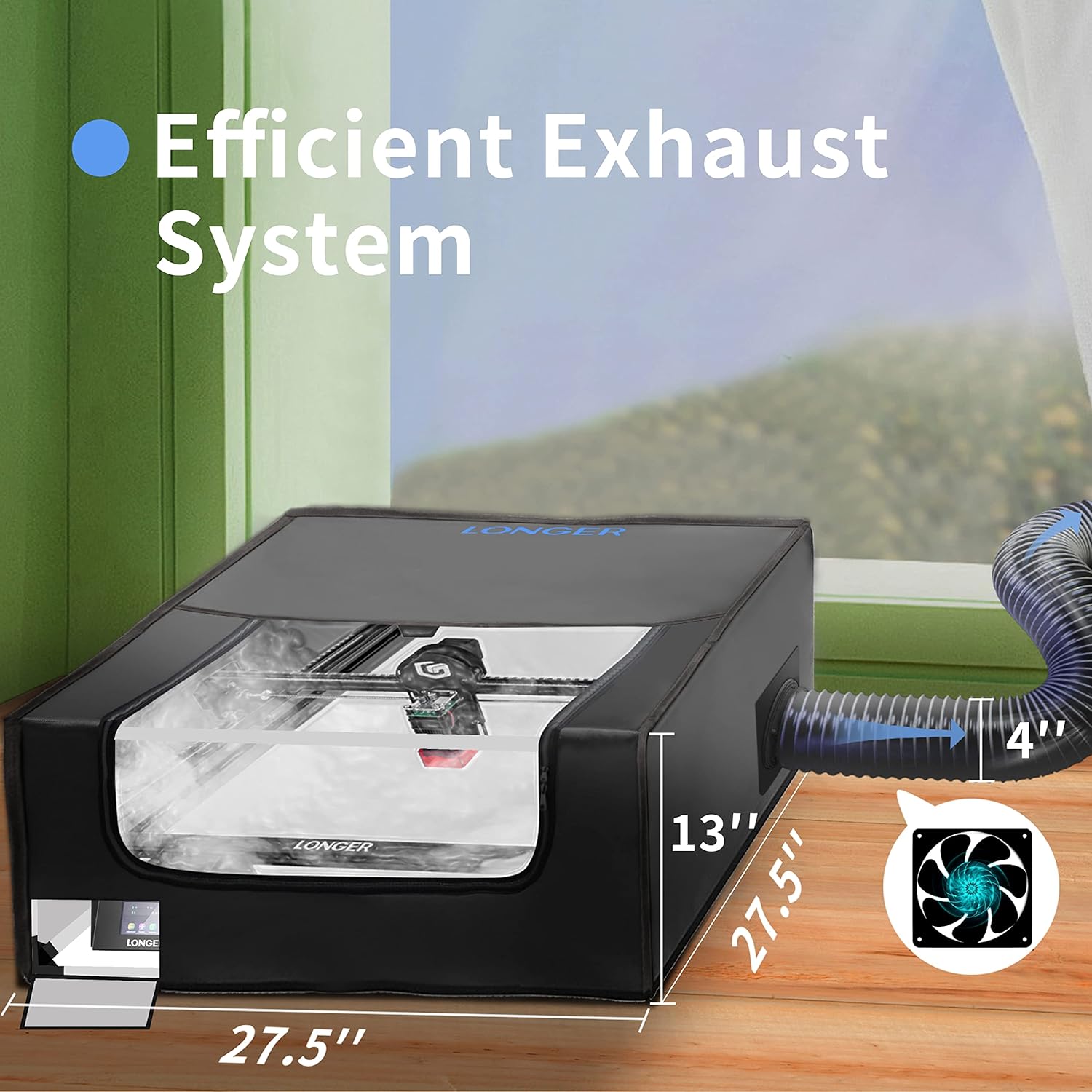
Image 4.1: This image displays the laser engraver enclosure with its 'Efficient Exhaust System'. The enclosure has dimensions of approximately 27.5 inches in width and depth, and 13 inches in height. A flexible exhaust hose, approximately 4 inches in diameter, is connected to the side of the enclosure, leading to an external fan, illustrating how smoke and odors are vented away from the workspace.
5. Parentah Operasi
5.1. Instalasi jeung Sambungan Software
The LONGER RAY5 10W is compatible with popular laser control software such as LaserGRBL and LightBurn. It also supports offline control via the MKSLaser App.
- Sambungan PC: Download and install LaserGRBL or LightBurn from their official websites. Connect the engraver to your computer via USB.
- Wi-Fi/App Control: For app control, ensure the engraver and your mobile device are connected to the same Wi-Fi network. Download the MKSLaser App and follow the in-app instructions for connection.
- Kartu TF: You can also load G-code files directly onto a TF card and insert it into the engraver for offline operation.

Image 5.1: This image illustrates the wide compatibility of the LONGER RAY5 10W laser engraver. It shows icons for Wi-Fi, USB Cable, APP, and TF Card, indicating various connection methods. Below these, logos for LaserGRBL and LightBurn are displayed, highlighting software compatibility. On the right, a laptop, tablet, and smartphone screens show the MKSLaser App interface and design software, demonstrating how the device can be controlled and operated.
5.2. Preparing for Engraving/Cutting
- Penempatan Bahan: Place your material securely on the working surface. Ensure it is flat and does not move during operation.
- Penyesuaian fokus: Adjust the laser focus according to the material thickness. Refer to your software or the engraver's touch screen for guidance.
- Design Loading: Muat desain anjeun file (JPG, PNG, BMP, G-code, SVG, GIF, NC, GC) into the software or via TF card.
- Setélan Parameter: Set appropriate laser power, speed, and passes based on the material type and desired effect. Start with lower settings and adjust as needed.

Image 5.2: This image highlights the 3.5-inch touch screen interface of the LONGER RAY5 10W laser engraver, designed for simple operation. Various screen displays are shown, including controls for laser power (1% to 100%), movement adjustments (X, Y, Z axes), and file selection, demonstrating the intuitive user interface.
5.3. Ngamimitian Operasi
- Ensure all safety precautions are observed, including wearing safety goggles and activating the exhaust system.
- Initiate the engraving or cutting process through your chosen software or the engraver's control panel.
- Monitor the process closely. If any issues arise, use the emergency stop or power switch immediately.
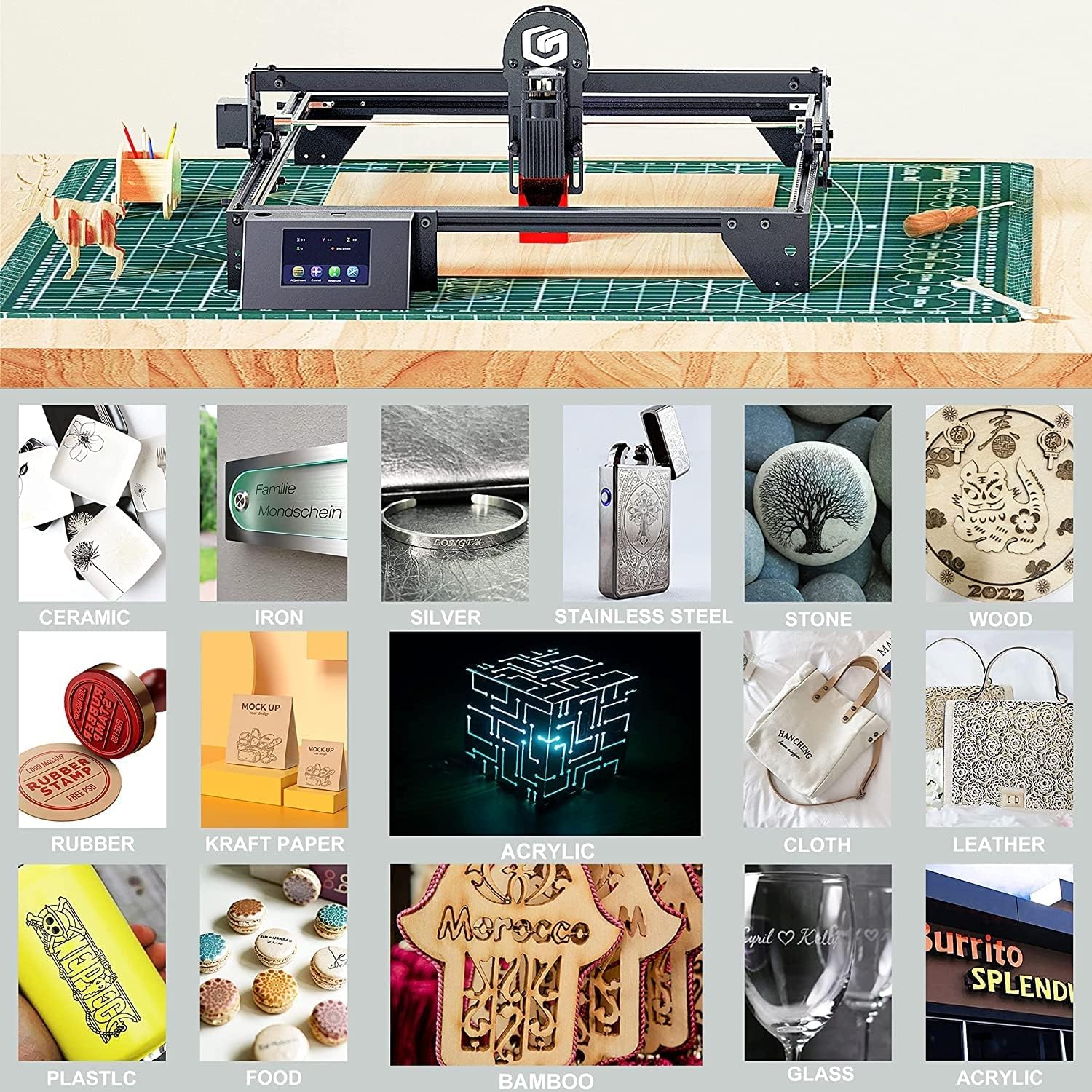
Image 5.3: This image displays a grid of various materials that can be processed by the LONGER RAY5 10W laser engraver. Examples include ceramic, iron, silver, stainless steel, stone, wood, rubber, kraft paper, acrylic, cloth, leather, plastic, food, bamboo, and glass, showcasing the wide range of applications for both engraving and cutting.
6. Pangropéa
Pangropéa rutin ngajamin umur panjang sareng kinerja optimal tina engraver laser anjeun.
- Ngabersihan lensa: Periodically clean the laser lens with a soft, lint-free cloth and lens cleaning solution. A dirty lens can reduce laser power and accuracy.
- Rel beberesih: Keep the guide rails and wheels free of dust and debris. Use a soft brush or cloth. Lubricate moving parts as recommended by the manufacturer.
- Sistim knalpot: Regularly check and clean the exhaust fan and hose to ensure efficient smoke and fume extraction.
- Pembaruan firmware: Pariksa produsén urang websitus wéb pikeun apdet firmware anu sayogi pikeun ningkatkeun kinerja atanapi nambihan fitur énggal.
7. Cara ngungkulan
Bagian ieu ngabahas masalah umum anu anjeun tingali.
- Taya Kaluaran Laser:
- Check if the laser module is properly connected and powered.
- Ensure safety features (e.g., limit switches, movement sensor) are not triggered.
- Pariksa setélan kakuatan laser dina software Anjeun.
- Kualitas Ukiran/Motong Goréng:
- Adjust laser focus.
- Bersihkeun lénsa laser.
- Experiment with different power and speed settings for your material.
- Ensure the material is flat and securely placed.
- Machine Not Connecting to Software:
- Check USB cable connection.
- Install necessary drivers for the engraver.
- Pastikeun port COM bener dipilih dina software.
- For Wi-Fi, confirm both devices are on the same network.
- Haseup/Bau anu kaleuleuwihi:
- Verify the exhaust fan is operating correctly and the hose is properly vented.
- Ensure the enclosure is sealed.
- Check material compatibility; some materials produce more fumes.
For further assistance, refer to the official Longer support resources.
8. Spésifikasi
| Fitur | Spésifikasi |
|---|---|
| Daya Kaluaran laser | 10W |
| Area Ukiran | 400mm x 400mm (approx. 15.7" x 15.7") |
| Engraving Speed (Max) | 10000mm / mnt |
| Akurasi Ukiran | 0.01 mm |
| Ukuran Spot Laser | 0.06mm x 0.06mm (Compressed) |
| Motherboard | 32-bit |
| Métode kontrol | USB, Wi-Fi (App), TF Card |
| Software cocog | LaserGRBL, LightBurn, MKSLaser App |
| Dirojong File Formulir | JPG, PNG, BMP, G-code, SVG, GIF, NC, GC |
| Enclosure Dimensions (Approx.) | 27.5" L x 27.5" W x 13" H |
| Enclosure Exhaust Hose Diameter | 4" |

Image 8.1: This image illustrates the 'Updated Compressed Laser Technology' of the RAY5 10W, highlighting its small spot size of 0.06x0.06mm compared to others at 0.15x0.15mm. It also demonstrates cutting capabilities: 14mm Basswood and 6mm Acrylic, showcasing the precision and power of the laser.

Image 8.2: This image compares the engraving speed and accuracy of the RAY5 10W (left) with other models (right). The RAY5 10W achieves 10000mm/min engraving speed with an accuracy of 0.01mm, producing a detailed cat portrait. The 'Others' section shows a less detailed engraving at 6000mm/min, emphasizing the superior performance of the RAY5 10W.
9. Garansi jeung Rojongan
LONGER products are designed for reliability and performance. For warranty information, please refer to the warranty card included with your product or visit the official Longer websitus.
If you encounter any issues or require technical assistance, please contact Longer customer support through their official channels. When contacting support, please have your product model (RAY5 10W) and purchase information ready.
Sumberdaya Online:
- Official Longer Websitus: www.longer3d.com
- Support Email: Refer to your product documentation