1. Bubuka
This manual provides detailed instructions for the safe and effective operation, maintenance, and troubleshooting of your Firecore G60 4x360 Green Beam Laser Level. Please read this manual thoroughly before using the device to ensure proper functionality and to prevent potential hazards.
The Firecore G60 is a versatile 4-plane laser level designed for various construction and alignment tasks. It projects four self-leveling 360° green laser planes, offering comprehensive coverage for floors, walls, and ceilings.
2. Émbaran Kasalametan
WARNING: LASER RADIATION. Do not stare into the beam. Class II laser product. Do not remove or deface any product labels. Do not allow children to operate the tool.
- Salawasna nganggo pelindung panon anu pantes nalika ngoperasikeun tingkat laser.
- Hindarkeun paparan panon langsung kana sinar laser.
- Ulah nyobian ngarobih atanapi ngabongkar level laser. Perbaikan ngan ukur kedah dilakukeun ku petugas servis anu diidinan.
- Ensure the work area is clear of obstructions and potential tripping hazards.
- Jauhkeun alat tina cai sareng suhu anu ekstrim.
3. Eusi Paket
Pastikeun yén sadaya item anu didaptarkeun di handap kalebet kana pakét anjeun:
- 1 x Firecore G60 Laser Level
- 2 x Rechargeable Li-ion Batteries (4000mAh)
- 1 x Kadali Jauh
- 1 x Kurung témbok
- 1 x Steel Sheet
- 1 x Kabel Ngecas Tipe-C
- 1 x carjer
- 1 x 360-Degree Rotating Base
- 1 x Lifting Base
- 1 x Hard Carry Case
- 1 x Manual Pamaké (dokumén ieu)

Image: The complete Firecore G60 laser level kit, showing all included accessories neatly arranged.
4. Produk Langkungview
The Firecore G60 laser level features a robust design with multiple laser emitters to provide comprehensive 360-degree coverage. Key components include the laser emission windows, control panel, battery compartment, and mounting points.

Image: The Firecore G60 laser level demonstrating its 4x360 degree green laser lines for full room coverage.
5. Setélan
5.1 Pamasangan batré
- Panggihan kompartemen batré dina alat.
- Insert a fully charged Li-ion battery into the compartment, ensuring correct polarity.
- Tutup kompartemen batré anu aman.
5.2 Daya Awal Hurung
- Place the laser level on a stable, level surface or mount it using the provided accessories.
- Slide the ON/OFF switch to the 'ON' position. The device will typically start in self-leveling mode.
- Observe the laser lines. If the device is outside its self-leveling range (±4°), the laser lines will flash rapidly to indicate an out-of-level condition. Adjust the device's position until the lines become steady.
6. Modeu Operasi
6.1 Modeu Self-Leveling
When the pendulum lock is in the unlocked position and the device is powered on, it enters self-leveling mode. The laser will automatically level itself within ±4° in approximately 3 seconds. If the device is tilted beyond this range, the laser lines will flash to alert the user.
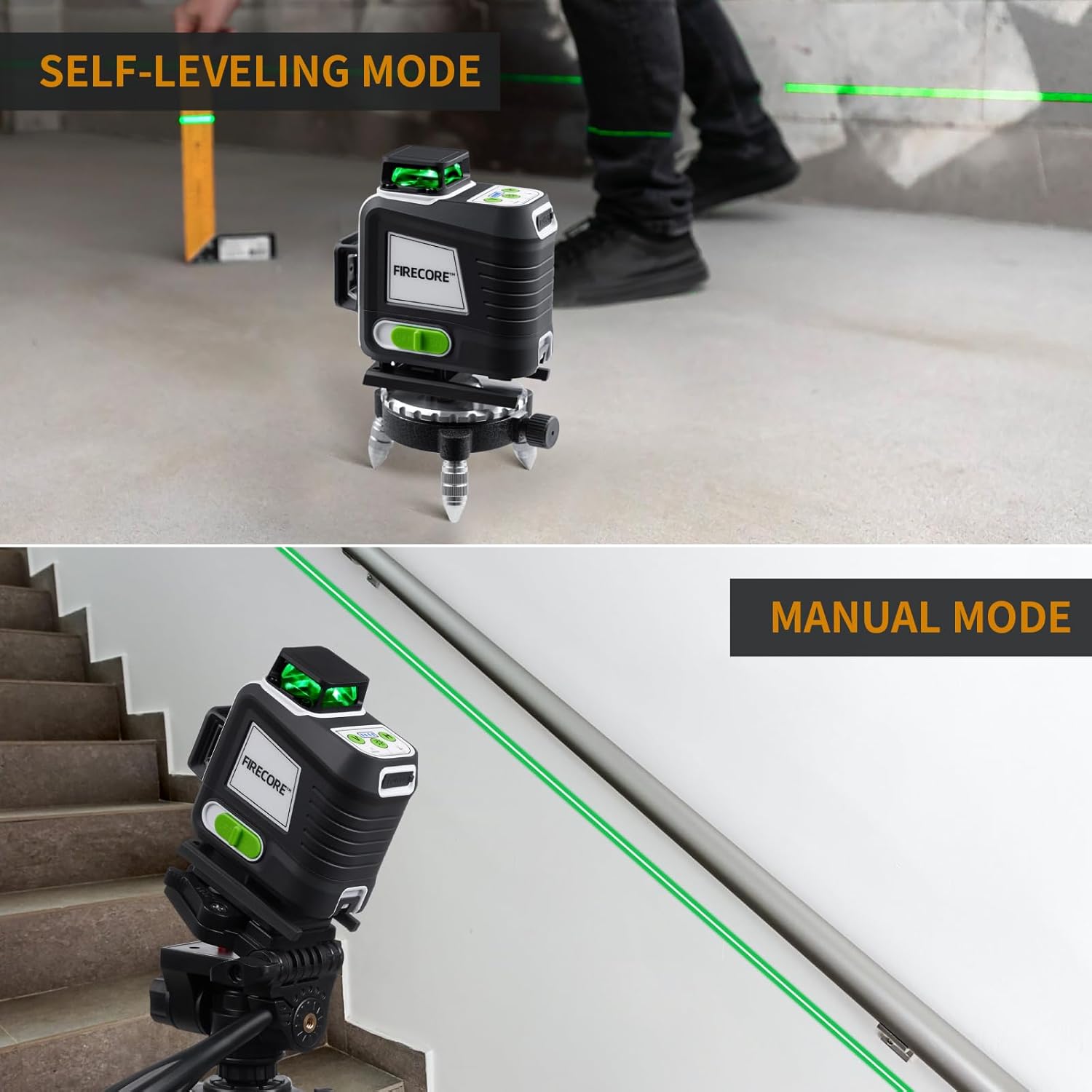
Image: The laser level operating in self-leveling mode (top) and manual mode (bottom).
6.2 Mode Manual
To activate manual mode, ensure the pendulum lock is in the locked position before powering on the device. In this mode, the laser lines can be projected at any desired angle, which is useful for tasks like installing handrails or decorative patterns.
6.3 Modeu pulsa
Pulse mode extends the working range of the laser level, allowing it to be used with a compatible laser detector (e.g., Firecore FD30) for outdoor or bright light conditions. In pulse mode, the laser lines are detectable up to 165 feet.

Image: Demonstrating pulse mode with a laser detector for extended range.
6.4 adjustment kacaangan
The laser level features 3 gear brightness adjustment. This allows you to optimize visibility based on ambient light conditions and conserve battery life. Adjust brightness using the control panel buttons or the remote control.
7. Aplikasi
The Firecore G60 is suitable for a wide range of applications:
- Tiling Installation: The 360° floor horizontal line is ideal for precise tile layout.
- Pamasangan siling: The top 360° horizontal line assists with ceiling grid alignment and fixture installation.
- Wall Alignment: Two 360° vertical lines cross at 90° angles, facilitating accurate wall construction, picture hanging, and cabinet installation.
- General Layout: Provides all-around leveling coverage for various indoor and outdoor construction projects.

Image: Using the ground-level horizontal line for floor inspection and tiling.

Image: Laying floor tiles with the laser level on a lifting base for precise height adjustment.
8. Ngecas
The Firecore G60 uses two 4000mAh Li-ion batteries, each providing up to 5 hours of runtime. The batteries can be charged separately or while installed in the device.
Métode Ngecas:
- Direct Plugging: Connect the Type-C charging cable directly to the laser tool while the battery is installed.
- Ngeusi batre: Remove the battery and connect the Type-C charging cable to the port on the battery itself.
- Bank Daya: The Type-C port allows charging via a power bank for convenience on job sites.
Battery indicators on the battery pack show the current charge level. Charging protection prevents overcharging.
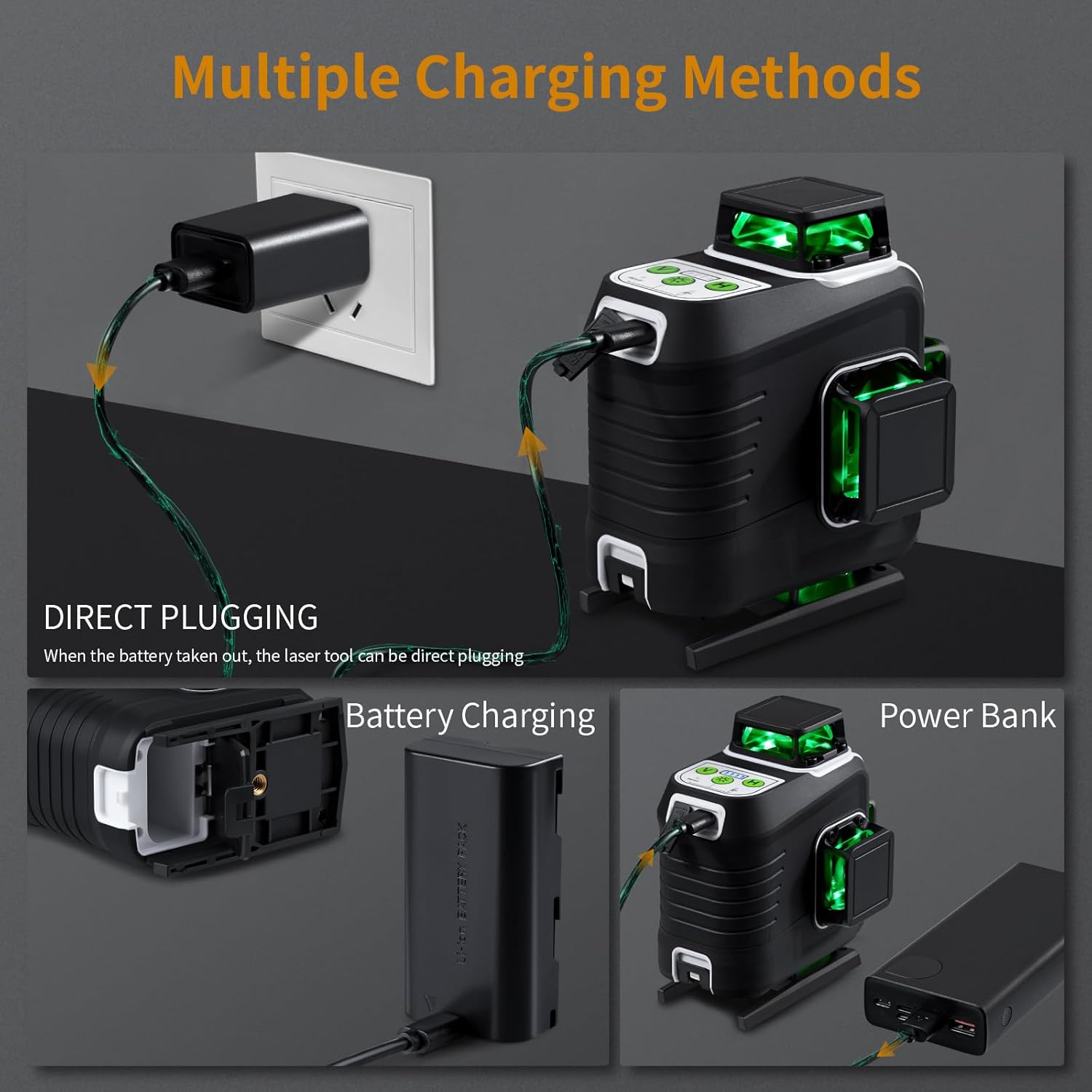
Image: Multiple charging methods for the Firecore G60 laser level.
9. Kadali jauh
The included remote control allows for convenient adjustment of laser lines and brightness without needing to directly interact with the device. This saves time and effort, especially when the laser level is positioned in hard-to-reach areas.

Image: Using the remote control to adjust the laser level.
10. Pangropéa
- beberesih: Ngagunakeun lemes, damp cloth to clean the device. Do not use abrasive cleaners or solvents. Keep the laser emission windows clean for optimal performance.
- Panyimpenan: Store the laser level in its hard carry case in a dry, cool place when not in use. Ensure the pendulum lock is engaged during storage and transport to protect the internal mechanism.
- Perawatan batré: Charge batteries regularly, even if not in use, to maintain their lifespan. Avoid fully discharging batteries for extended periods.
11. Cara ngungkulan
| Masalah | Mungkin Cukang lantaranana | Solusi |
|---|---|---|
| Laser lines are flashing rapidly | Device is out of self-leveling range (±4°) | Adjust the device's position until it is within the self-leveling range. |
| No laser lines | Battery is low or not installed correctly; Device is off. | Check battery charge and installation. Ensure the ON/OFF switch is in the 'ON' position. |
| Weak or dim laser lines | Low battery; Laser emission windows are dirty; Brightness setting is low. | Charge the battery. Clean the laser emission windows. Adjust brightness setting. |
| Kadali jauh teu jalan | Remote battery is dead; Obstruction between remote and device. | Replace remote battery. Ensure clear line of sight to the device's sensor. |
12. Spésifikasi
| Fitur | Spésifikasi |
|---|---|
| Modél | G60 |
| Kelas laser | Kelas II |
| Panjang gelombang laser | 505nm-520nm (Green Beam) |
| Horizontal / Vertikal Akurasi | ±1/17 inch at 23 Ft (±1.5mm at 7m) |
| Timer leveling Time | Dina 3 detik |
| rentang timer leveling | ± 4° |
| Working Distance (Visibility) | Nepi ka 100 ft (30m) |
| Working Distance (with Detector) | Nepi ka 165 ft (50m) |
| Peunteun IP | IP54 (Water/Dust Resistance) |
| Ukuran Gunung | 1/4"-20 |
| Sumber Daya | Battery Powered (2 x 4000mAh Li-ion) |
| Modeu Operasi | Automatic Self-Leveling Mode / Manual Mode / Pulse Mode |
| Bahan | Acrylonitrile Butadiena Styrene |
| Item Beurat | 5.24 pon |
| Ukuran Paket | 12.6 x 11.26 x 6.77 inci |
13. Garansi jeung Rojongan
Firecore provides a 24-month after-sale service and lifetime technical support for the G60 laser level. If you have any concerns, questions, or require assistance, please do not hesitate to contact us.
Email Kontak: support@FIRECORETools.com


