
RC-WC-TA06NE
Buku Panduan pikeun Remote Control Pangganti Generik
Model: RC-WC-TA06NE (Compatible with various Toshiba Air Conditioner models)
1. Produk Langkungview
This document provides instructions for the Generic Replacement Remote Control, designed to operate various Toshiba Air Conditioner models, including RC-WC-TA06NE, RAS-13N3KV-E, RAS-24BKVG-E, RAS-10N3KV2-A1, RAS-10N3AV2-A1, RAS-13N3KV2-A1, RAS-13N3AV2-A, and RAS-16N3KV2-A1. This is an infrared (IR) replacement remote control that requires no complex setup or programming.
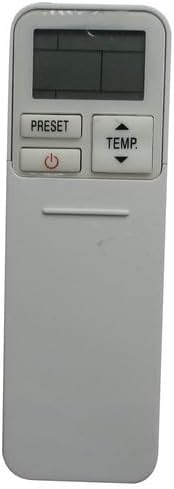
Gambar 1.1: Hareupeun view of the replacement remote control. It features a display screen at the top, with 'PRESET' and 'TEMP' buttons, and a power button below the display. The lower section is smooth, indicating a sliding cover for additional buttons.
2. Setelan sareng Pamasangan Batré
The remote control requires two AAA batteries (not included). No additional setup or coding is required for operation; simply insert the batteries and the remote is ready for use.
2.1 Pamasangan batré
- Locate the battery compartment on the back of the remote control. This is typically covered by a sliding panel.
- Geser panutup kompartemen batré ka handap atanapi ka luar pikeun mukakeunana.
- Selapkeun dua batré AAA, mastikeun terminal positif (+) jeung négatip (-) align bener jeung markings jero kompartemen nu.
- Geser panutup kompartemen batré deui kana tempatna nepi ka klik aman.

Gambar 2.1: Tukangeun view of the remote control with the battery cover removed. This image clearly shows the empty battery compartment at the bottom and the array of functional buttons that are typically hidden under a sliding panel on the front.
3. Parentah Operasi
To operate the air conditioner, point the remote control directly at the air conditioner's receiver. Ensure there are no obstructions between the remote and the unit.
3.1 Fungsi Tombol

Gambar 3.1: Angled view of the remote control with its sliding cover open, revealing the full set of control buttons. The top section includes the display, 'PRESET', 'TEMP', and power button. Below the sliding cover, buttons for 'MODE', 'SWING', 'FAN', 'QUIET', 'FIX', 'HI POWER', 'TIMER', 'ON', 'OFF', 'CLR', 'SET', 'CHECK', 'CLOCK', 'FILTER', and 'RESET' are visible.
| Tombol | Fungsi |
|---|---|
| Kakuatan (⏻) | Hurungkeun atanapi OFF unit AC. |
| TEMP (▲/▼) | Saluyukeun setelan suhu kaluhur atanapi kahandap. |
| PRESET | Recalls a saved preferred operating setting. |
| MODÉ | Ngaliwatan mode operasi (contona, Tiis, Panas, Kipas, Garing, Otomatis). |
| SWING | Ngontrol arah aliran hawa vertikal (ayunan louver). |
| kipas angin | Saluyukeun laju kipas (contona, Lemah, Sedeng, Luhur, Otomatis). |
| TENGAH | Ngaktipkeun mode operasi anu teu bising. |
| ngabereskeun | Ngatur louver ka posisi anu tetep. |
| HI POWER | Activates a rapid cooling or heating function. |
| WAKTU MATI / MATI | Sets the time for the unit to turn ON or OFF automatically. |
| CLR | Clears a setting or timer. |
| SET | Confirms a setting or timer. |
| CEK | Displays operational status or error codes. |
| JAM | Nyetél waktos ayeuna dina tampilan remot. |
| nyaring | Indicates when the air filter needs cleaning or resetting the filter indicator. |
| RESET | Resets the remote control to factory default settings (often requires a pointed object). |
4. Pangropéa
4.1 Ngagantian batré
Replace batteries when the remote's display becomes dim or the remote no longer controls the air conditioner effectively. Always replace both batteries simultaneously with new AAA batteries.
4.2 beberesih
Wipe the remote control with a soft, dry cloth. Do not use liquid cleaners, abrasive cleaners, or chemical sprays, as these can damage the remote's surface or internal components.
4.3 Panyimpenan
Upami remot kontrol moal dianggo dina waktos anu lami, cabut batréna pikeun nyegah bocor sareng poténsi karusakan kana remot.
5. Cara ngungkulan
- Jauh teu ngabales:
- Pariksa naha batréna diselapkeun leres kalayan polaritasna anu leres.
- Ganti batré heubeul ku nu anyar.
- Pastikeun teu aya halangan antara kadali jauh sareng panarima AC.
- Confirm you are within the effective operating range of the air conditioner's IR receiver.
- Tampilan taram atanapi kosong:
- Ganti batréna.
- Remote functions are erratic:
- Try resetting the remote by removing the batteries for a few minutes, then reinserting them.
- Ensure no other infrared devices are interfering with the signal.
6. Spésifikasi
- Jenis produk: Panggantian Remote Control Infrabeureum (IR)
- Alat anu cocog: Toshiba Air Conditioners (Specific models listed in Product Overview)
- Sumber Daya: 2 x Batré AAA (teu kalebet)
- Fitur husus: Ergonomic design, no setup or coding required
- warna: Hideung
7. Garansi jeung Rojongan
As a generic replacement product, specific warranty terms and support channels may vary. Please refer to the purchase documentation or contact the seller directly for information regarding warranty coverage, returns, or technical assistance.
This remote control is designed to function as a direct replacement for the original unit. Compatibility is confirmed if your original remote matches the appearance of this replacement remote, as indicated in the product listing.
Ask a question about this manual
Ask about setup, troubleshooting, compatibility, parts, safety, or missing instructions. Manuals+ will review the question and use this page’s manual context to help answer it.