
Bubuka
The MUNBYN IRT10 is a high-end rugged Windows tablet designed for demanding enterprise environments. It features a 10.1-inch display, powered by an Intel 12th Gen i5-1235U processor, and runs on Windows 11 IoT Enterprise. This manual provides essential information for setting up, operating, maintaining, and troubleshooting your device.
The Windows 11 IoT Enterprise operating system offers enhanced security, advanced device management tools, and industrial-grade performance optimization, making it ideal for critical business functions in various industries.

Image: Comparison of Windows 11 IoT Enterprise features versus Windows 11 Pro, highlighting customization, device management, security, update cycles, and performance benefits.
Video: Hiji leuwihview of the MUNBYN High-End Rugged Windows Tablet for Enterprises, showcasing its robust features and suitability for industrial use.
Naon dina Box
Your MUNBYN IRT10 package includes the following items:
- MUNBYN IRT10 Rugged Windows Tablet
- 19V 3.42A Adapter (Power Supply)
- Stylus
- Tali leungeun
- Mawa Cecekelan
- USB-A ka USB-C Cable
- USB-C to USB-A Female Adapter
- Pelindung layar
- Mounting Screws/Hooks for Hand-strap/Carry Handle
Fitur produk
Operating System: Windows 11 IoT Enterprise
The IRT10 is equipped with Windows 11 IoT Enterprise, offering superior enterprise-level security with BitLocker encryption, advanced device management tools, and a longer update cycle for enhanced stability and reduced downtime. This system is optimized for industrial-grade performance, handling large volumes of data efficiently.
Processor: Intel 12th Gen i5-1235U
Powered by the Intel 12th Gen i5-1235U processor with a Turbo Speed of up to 4.40 GHz, the tablet delivers robust computing capabilities for complex tasks. It supports professional software like Autodesk Revit and Dassault Systèmes CATIA, ensuring smooth operation for architectural design and engineering applications.

Image: Visual representation of the Intel 12th Gen i5-1235U processor's performance compared to older generations, highlighting its Turbo Speed, single-threaded, and overall CPU benchmark scores.
Memory & Storage: 16GB RAM + 128GB Replaceable SSD
The tablet comes with 16GB of RAM and a 128GB internal SSD, providing ample space for applications and data. The SSD is replaceable and supports up to 4TB, allowing for easy storage upgrades to meet evolving needs.
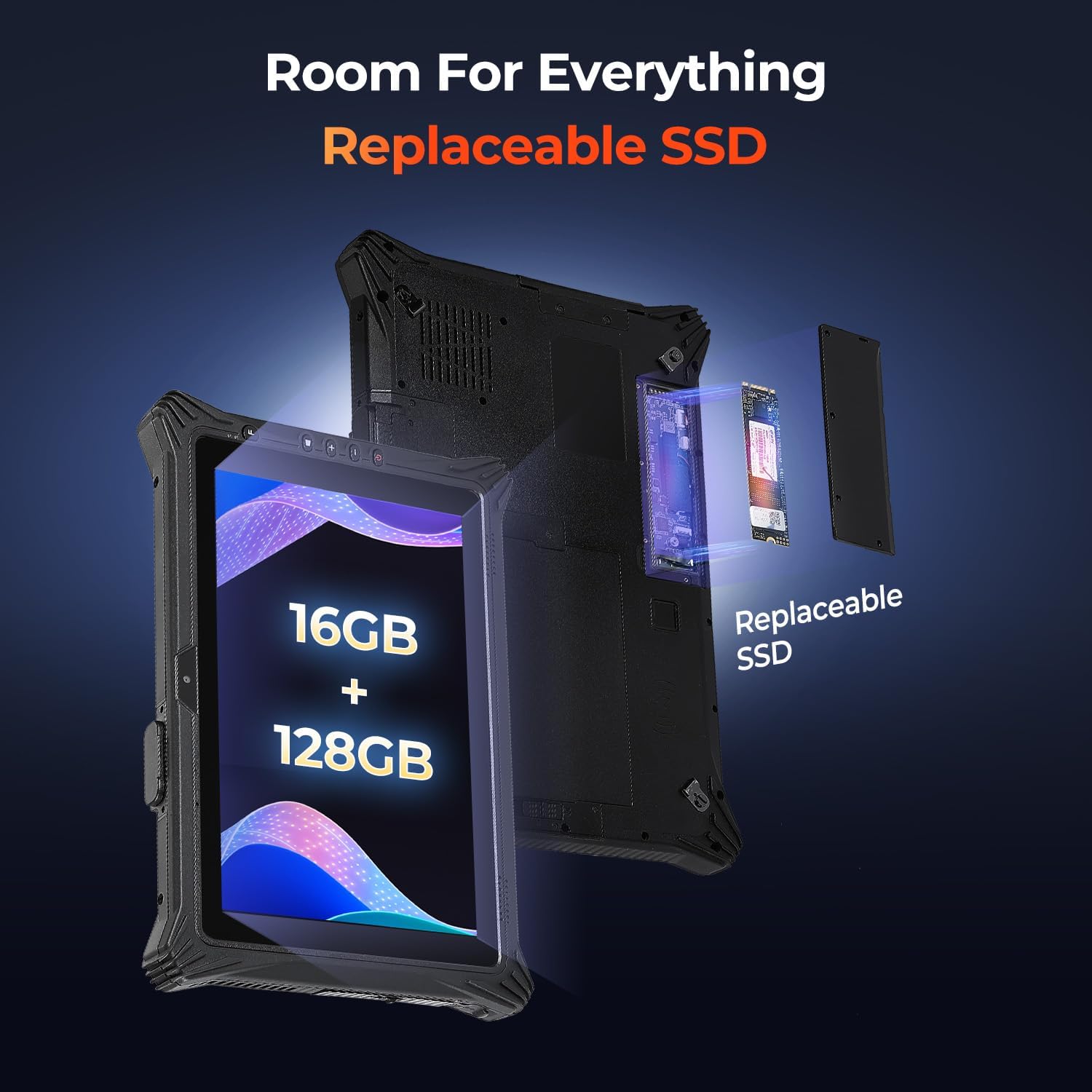
Image: The MUNBYN IRT10 tablet with an exploded view showing the replaceable SSD module, emphasizing its 16GB RAM and 128GB internal storage.
Connectivity: WiFi 6 & 4G LTE
Featuring WiFi 6 technology, the IRT10 offers speeds up to 1800Mbps, enabling faster and more stable connections for multiple devices. It also supports 4G LTE (multi-band) with a SIM card slot for reliable connectivity in remote locations. Integrated GPS/Glonass ensures accurate positioning.

Image: The MUNBYN IRT10 tablet screen showing the WiFi 6 logo and a comparison bar indicating WiFi 6 speeds up to 1800Mbps versus WiFi 5 speeds up to 1200Mbps.
Power: Dual Battery & Hot-Swappable
The tablet incorporates a dual-battery system for uninterrupted operation. It includes a 5000mAh primary removable battery and a 700mAh built-in backup battery. The hot-swappable design allows you to replace the main battery without shutting down the device, ensuring continuous workflow.

Image: Two construction workers reviewing the MUNBYN IRT10 tablet, with an inset showing the dual battery system (5000mAh primary and 700mAh backup) and its hot-swappable feature.
Ruggedness: MIL-STD 810G & IP65 Rated
Built for tough environments, the IRT10 is MIL-STD 810G tested, withstanding drops from up to 1.22 meters (4 ft). Its IP65 rating ensures it is dust-tight and resistant to low-pressure water jets, making it suitable for dusty, rainy, or humid conditions.

Image: The MUNBYN IRT10 tablet shown in a rugged outdoor environment with icons indicating IP65 waterproof and MIL-STD 810G military standard certifications.
Display: 10.1-inch 700 Nit Sunlight Readable
The 10.1-inch IPS LCD display offers a resolution of 1200x1920 pixels and a maximum brightness of 700 nits, ensuring clear visibility even under direct sunlight. The touchscreen supports 10-point capacitive touch, Gorilla Glass for durability, and stylus/glove mode for versatile use.

Image: A construction worker using the MUNBYN IRT10 tablet outdoors, with the screen displaying 700 nit brightness, indicating its sunlight readability.
Disetél
Upon first use, connect the tablet to the power adapter and allow it to charge fully. Follow the on-screen prompts to complete the initial Windows 11 IoT Enterprise setup. This includes selecting your language, region, and network settings.
Catetan:
- When activating the tablet, if you need to log in with a personal account, click "Domain join instead" on the activation page to activate the tablet.
- Logging in with a personal account after activation will not affect its usage.
Ngoperasikeun
The MUNBYN IRT10 tablet is designed for intuitive operation with its 10-point capacitive touchscreen and physical buttons. Familiarize yourself with the button layout and port locations for efficient use.
Fungsi Tombol:
- Tombol Daya: Turns the device on/off and manages sleep mode.
- Tombol Volume (+/-): Saluyukeun volume audio.
- Tombol Windows: Accesses the Start Menu.
- Function (F) Button: Customizable for quick access to frequently used applications or settings.
Pamaca sidik jari:
For enhanced security and quick login, utilize the integrated fingerprint reader located on the back of the tablet. Follow Windows Hello setup instructions to register your fingerprints.
Palabuhan & Antarmuka:
The tablet features a comprehensive array of ports, including USB 3.0 (Type-A), USB Type-C (full function: charging/data/HDMI), Mini HDMI 1.4a, 3.5mm earphone jack, DC 19V jack, and a 12-pin Pogo Pin for docking/charging. It also includes a SIM card slot for 4G LTE connectivity and TF card support for expandable storage. Ensure all port covers are securely closed when not in use to maintain IP65 rating.

Image: Detailed diagram of the MUNBYN IRT10 tablet, labeling all external features including ports, buttons, cameras, and internal components like the SSD and battery compartments.
Pangropéa
Battery Replacement (Hot-Swappable):
The IRT10 supports hot-swapping of its primary 5000mAh battery. To replace, ensure the tablet is powered on and the internal 700mAh backup battery is charged. Unlock the battery compartment on the back, carefully remove the depleted battery, and insert a fully charged replacement. The tablet will remain operational during this process.
SSD Replacement/Upgrade:
The 128GB internal SSD is replaceable and upgradable up to 4TB. To access the SSD, locate the dedicated compartment on the back of the tablet, unscrew the cover, and carefully replace the SSD module. Ensure the cover is re-secured to maintain the device's ruggedness.
Port Sealing:
To maintain the IP65 dust and water resistance, always ensure that all port covers (USB, HDMI, earphone jack, charging port) are securely closed when not in use. The locking mechanism on the side panel helps to seal the ports effectively.
Pamérésan masalah
If you encounter any issues with your MUNBYN IRT10 tablet, please refer to the following general troubleshooting steps:
- Alat Teu Dihurungkeun: Ensure the battery is charged. Connect the power adapter and wait a few minutes before attempting to power on.
- Layar rampa teu ngaréspon: Restart the tablet. If the issue persists, ensure the screen is clean and free from debris.
- Connectivity Issues (Wi-Fi/4G LTE): Check network settings. Ensure Wi-Fi is enabled and connected to a valid network. For 4G LTE, verify SIM card insertion and carrier service.
- Performance Lambat: Close unnecessary applications. Check for available Windows updates. Consider upgrading the SSD if storage is consistently low.
For more detailed troubleshooting or technical assistance, please contact MUNBYN customer support.
spésifikasi
| Fitur | Katerangan |
|---|---|
| merek | MUNBYN |
| Ngaran modél | IRT10 |
| Sistem operasi | Windows 11 IoT Enterprise |
| Prosesor | Intel Core i5-1235U (12th Gen), up to 4.4 GHz |
| Grafik Coprocessor | Intel Iris Xe Grafika |
| Mémori RAM | 16 GB |
| Panyimpenan internal | 128 GB SSD (Replaceable, supports up to 4 TB) |
| Ukuran layar | 10.1 inci |
| Resolusi tampilan | 1920 x 1200 piksel (FHD) |
| Kacaangan tampilan | 700 Nit (Sunlight Readable) |
| Layar cabak | 10-point capacitive touch, Gorilla Glass |
| Konéktipitas Wireless | Wi-Fi 6 (802.11ax), Bluetooth 5.1 |
| Téhnologi sélular | 4G LTE (Multi-band support with SIM card slot) |
| GPS | U-blox M7N (GPS, Glonass) |
| Palabuhan | USB 3.0 (Type-A), USB Type-C, Mini HDMI 1.4a, 3.5mm Earphone Jack, DC 19V Jack, 12-pin Pogo Pin |
| Kaméra | Hareup: 2.0MP, Pungkur: 8.0MP |
| Batré | Primary: 7.4V/5000mAh (Removable), Secondary: 7.4V/700mAh (Built-in) |
| Kahirupan batré | Approx. 4.5-10 hours (depending on workload and brightness) |
| Peunteun IP | IP65 (Dust-tight and protected against water jets) |
| Standar Militer | MIL-STD-810G certified (Drop resistance up to 1.22m / 4 ft) |
| Item Beurat | 1.4 kg |
| Item Dimensi | Ukuran 11.41" L x 7.44" W x 1.08" Th |
Garansi & Rojongan
MUNBYN offers a 2-year manufacturer's warranty for the IRT10 tablet, covering non-human-induced damage. Additionally, lifetime technical support is provided to ensure you receive assistance whenever needed.
For technical support, please refer to the contact information provided in your product packaging or visit the official MUNBYN websitus.

Image: A customer service representative with a headset, symbolizing the available technical support and customer service for MUNBYN products.