1. Bubuka
This manual provides detailed instructions for the safe and efficient operation, installation, and maintenance of your Jebao Jecob EP5000 DC Aquarium Return Pump. Please read this manual thoroughly before using the product to ensure proper function and longevity.
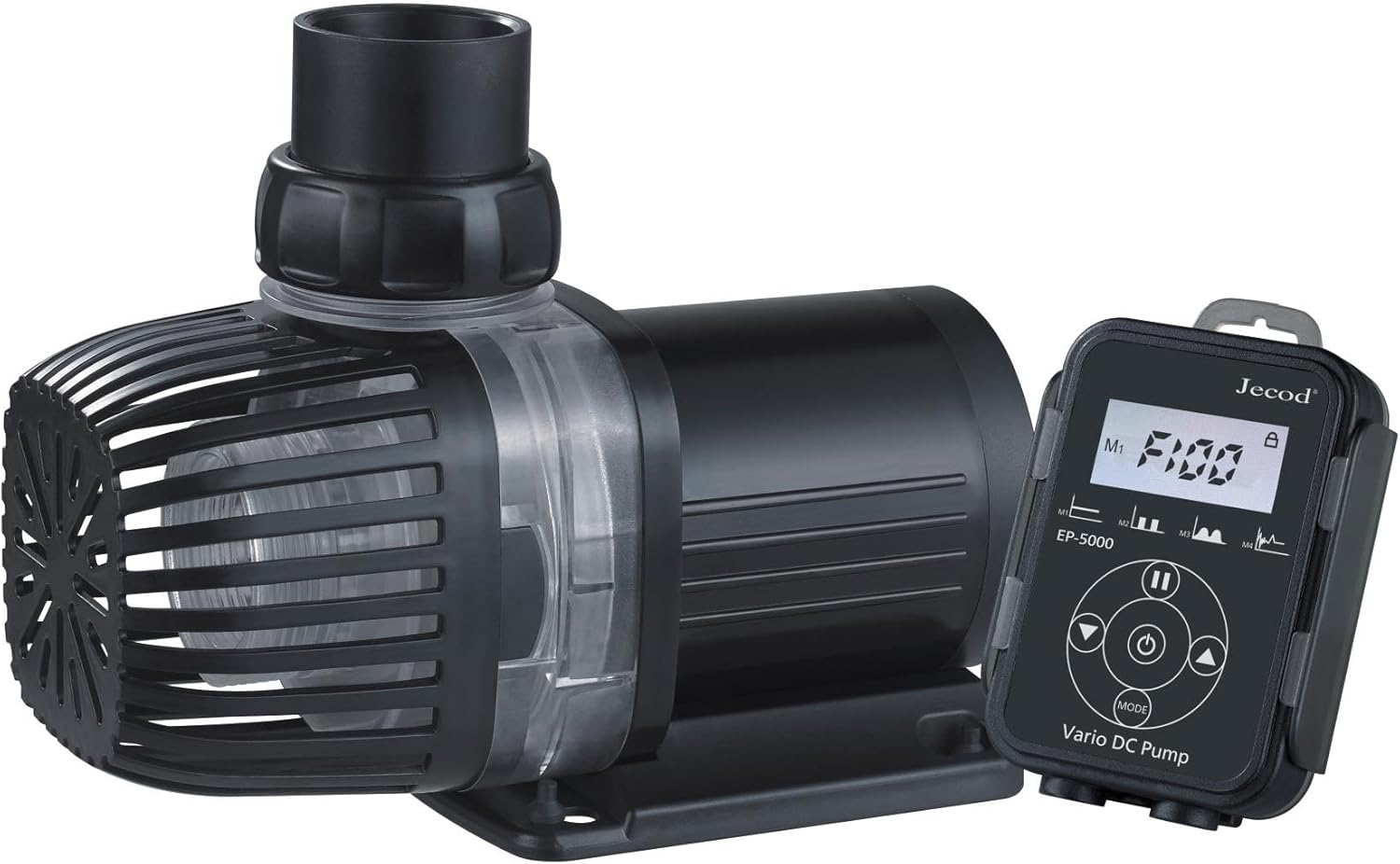
Image 1.1: The Jebao Jecob EP5000 DC Aquarium Return Pump with its LCD controller.
2. Parentah Kasalametan penting
To reduce the risk of injury, observe the following safety precautions:
- Baca sagala parentah taliti saméméh instalasi tur operasi.
- Do not operate any appliance if it has a damaged cord or plug, or if it malfunctions or has been dropped or damaged in any manner.
- Pikeun ngahindarkeun kamungkinan colokan alat atawa wadahna baseuh, posisikeun stand akuarium jeung tanki ka hiji sisi wadah anu dipasang dina tembok pikeun nyegah cai netes kana wadah atawa colokan.
- A "drip loop" should be arranged by the user for each cord connecting an aquarium appliance to a receptacle. The "drip loop" is the part of the cord below the level of the receptacle, or the connector if an extension cord is used, to prevent water from traveling along the cord and coming into contact with the receptacle.
- Always unplug the appliance from the outlet when not in use, before putting on or taking off parts, and before cleaning. Never yank cord to pull plug from outlet. Grasp the plug and pull to disconnect.
- Ulah nganggo alat ieu pikeun naon waé anu sanés pikeun panggunaan anu dimaksud. Panggunaan lampiran anu henteu disarankeun atanapi dijual ku produsén alat tiasa nyababkeun kaayaan anu teu aman.
- Ulah masang atawa nyimpen alat nu bakal kakeunaan cuaca atawa hawa handap katirisan.
- Ensure the pump is fully submerged when operating in wet applications.
- Perkakas ieu kanggo panggunaan rumah tangga wungkul.
3. Eusi Paket
Pastikeun yén sadaya item anu didaptarkeun di handap kalebet kana pakét anjeun:
- Jebao Jecob EP5000 DC Return Pump
- LCD Controller
- Adaptor kakuatan
- Various Pipe Fittings and O-rings
- Manual Pitunjuk (dokumén ieu)

Image 3.1: Contents of the Jebao Jecob EP5000 package, including the pump, controller, power supply, and various fittings.
4. Fitur Produk
The Jebao Jecob EP5000 DC Aquarium Return Pump offers the following key features:
- Manual control system with a visual LCD display for easy adjustments.
- Designed for both bottom blowing and side draught applications, supporting dry use.
- Utilizes SINE wave technology for ultra-quiet operation.
- Integrated IC electronic detection for dry run and locked rotor protection, with automatic power-off upon no water detection.
- Equipped with a wear-resistant ceramic shaft for extended operational life.
- Suitable for both saltwater and freshwater aquarium environments.
5. Setup jeung Instalasi
Follow these steps to properly set up your EP5000 pump:
- Pilih Lokasi: Position the pump in your sump or desired water reservoir. Ensure it is placed on a stable, level surface. For dry applications, ensure proper plumbing connections are secured.
- Sambungkeun Fittings: Attach the appropriate pipe fittings to the pump's inlet and outlet. Use the provided O-rings to ensure a watertight seal. The pump can be configured for bottom intake (with the included screen) or side intake.
- Ledeng: Connect your aquarium plumbing to the pump's outlet. Ensure all connections are secure and free of leaks.
- Sambungan Controller: Connect the pump's cable to the LCD controller. Ensure the connection is firm.
- Sambungan Daya: Connect the power adapter to the LCD controller, then plug the power adapter into a grounded electrical outlet. Ensure a drip loop is formed with the power cord.
- Initial Priming (Wet Use): If using submerged, ensure the pump is fully immersed in water before powering on. The pump will self-prime.
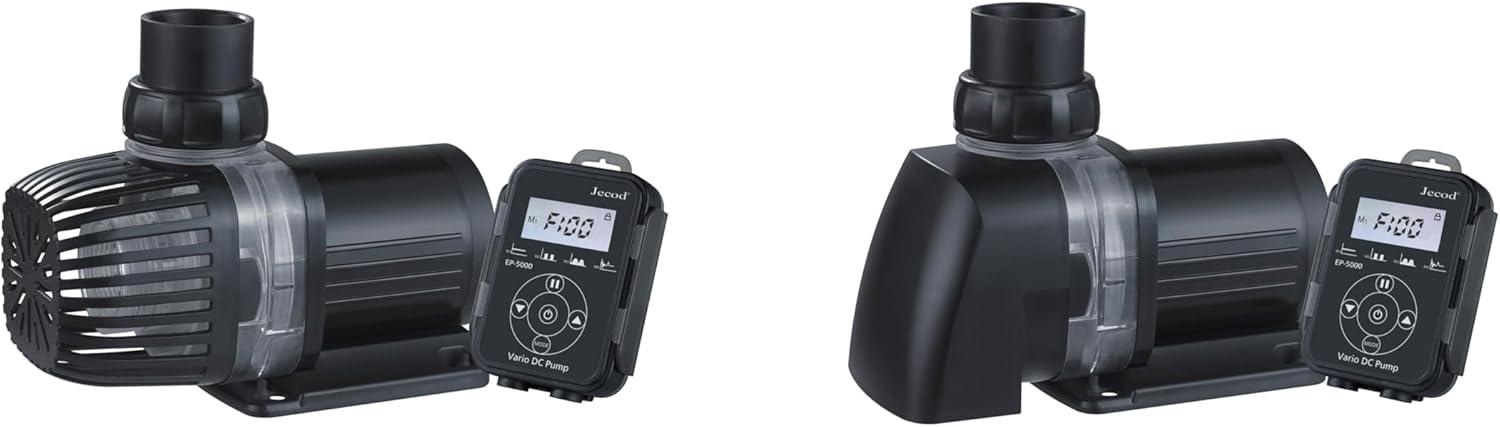
Image 5.1: The EP5000 pump configured with the bottom intake screen, ready for submerged installation.
6. Parentah Operasi
The LCD controller allows for precise control of the pump's performance.
6.1 Controller Leuwihview
The LCD controller features a display and several buttons for operation:
- tampilan: Shows current speed setting, power consumption, and status indicators.
- Panah luhur/handap: Adjust pump speed/flow rate.
- Tombol MODE: Cycles through different operating modes (if applicable).
- Tombol FEED: Initiates a temporary pause for feeding, typically 10 minutes.
- Tombol konci: Konci setélan ayeuna pikeun nyegah parobahan anu teu dihaja.
6.2 Operasi Dasar
- Daya Hurung: Once plugged in, the pump will start at its last saved setting or a default setting. The LCD will illuminate.
- Saluyukeun Speed: Ngagunakeun éta Up jeung Turun arrow buttons to increase or decrease the pump's flow rate. Observe the display for the current speed level.
- Mode dahar: Pencét éta FEED button to temporarily stop the pump for feeding. The pump will automatically resume operation after approximately 10 minutes. Press FEED again to cancel feeding mode early.
- Setélan konci: Pencét éta Konci button to prevent accidental changes to the pump's speed. Press again to unlock.
- Pareum listrik: Cabut colokan adaptor kakuatan tina stop kontak listrik.
7. Pangropéa
Pangropéa rutin mastikeun kinerja anu optimal sareng manjangkeun umur pompa anjeun.
- Pegatkeun Daya: Salawasna cabut pompa tina stop kontak sateuacan ngalaksanakeun pangropéa naon waé.
- ngabongkar: Carefully disconnect the plumbing and disassemble the pump housing. Refer to the diagrams for your specific model if available.
- Impeller bersih: Remove the impeller and clean it thoroughly with a soft brush under running water. Remove any debris, algae, or mineral deposits. The ceramic shaft should also be inspected and cleaned.
- Perumahan bersih: Clean the pump housing and intake screen to remove any buildup.
- Pasang deui: Reassemble all parts, ensuring O-rings are properly seated and connections are secure.
- Frékuénsi: Perform cleaning every 1-3 months, depending on water conditions and usage.
8. Cara ngungkulan
If you encounter issues with your EP5000 pump, refer to the following table:
| Masalah | Mungkin Cukang lantaranana | Solusi |
|---|---|---|
| Pump does not start or operate. | No power; power adapter or controller malfunction; impeller jammed; dry run protection activated. | Check power connection; ensure controller is connected; clean impeller for obstructions; ensure pump is submerged (if applicable). |
| Laju aliran anu dikirangan. | Clogged intake or impeller; air in the system; kinked tubing. | Clean intake screen and impeller; check for air locks and release; inspect tubing for kinks or blockages. |
| Pompa ribut. | Impeller obstruction or damage; air in the system; pump not seated properly. | Clean impeller; check for air locks; ensure pump is stable and not vibrating against surfaces. |
| LCD controller not responding. | Loose connection; controller malfunction. | Check cable connection between pump and controller; unplug and replug power. |
9. Spésifikasi
Technical specifications for the Jebao Jecob EP5000 DC Aquarium Return Pump:
- model: EP5000
- merek: Jebao
- Laju Aliran Maksimum: 5000 LPH (1320 GPH)
- Jangkungna Angkat Maksimum: 13 suku (4 méter)
- Sumber Daya: DC
- Voltage: 24 Volt (DC)
- Bahan: aci keramik
- Ukuran produk: 7.87 "L x 5.28" W x 5" H
- Beurat barang: 5.61 pon
- Komponén Kaasup: Return Pump, LCD Controller, Power Adapter, Fittings
- Aplikasi: Saltwater and Freshwater Aquariums, Ponds, Fountains, Sumps, Hydroponics
10. Garansi jeung Rojongan
Kanggo inpormasi garansi atanapi dukungan téknis, mangga ngahubungi pangecér anjeun atanapi produsén langsung. Simpen resi pameseran anjeun salaku bukti pameseran.
Manufacturer: JEBAO


