Bubuka
The DEERC SQN-050 Robot Toy is an interactive and educational remote-controlled robot designed for children. It features 16 unique LED eye expressions, a walkie-talkie function for two-way communication, gesture sensing for intuitive control, and a programming mode to encourage creativity. This manual provides comprehensive instructions for the safe and effective use of your robot toy.
Naon dina Box
- DEERC SQN-050 Robot Toy
- Kadali jauh
- Kabel Ngecas USB
- Obeng
- Rechargeable Lithium Ion Battery (pre-installed or separate)
- Manual Pitunjuk (dokumén ieu)
Disetél
1. Pamasangan batré
The robot toy requires one Lithium Ion battery (included). The remote control requires two AAA batteries (not included).
- Robot Battery: Locate the battery compartment on the underside of the robot. Use the included screwdriver to open the compartment. Insert the Lithium Ion battery, ensuring correct polarity. Close the compartment and secure with the screw.
- Batré Remote Control: Locate the battery compartment on the back of the remote control. Open the compartment. Insert two AAA batteries, observing the correct polarity (+/-). Close the compartment.
2. Ngecas Robot
The robot toy features a Type-C charging port for convenient recharging.
- Connect the small end of the USB charging cable to the Type-C port on the robot.
- Connect the large end of the USB charging cable to a compatible USB power source (e.g., adapter, power bank, laptop, car charger).
- A full charge typically takes 30-40 minutes and provides up to 100 minutes of playtime.

Image: The DEERC robot toy, its remote control, USB charging cable, and a screwdriver, illustrating the components included for setup.
Parentah Operasi
1. Daya Hurung / Pareum
- To turn on the robot, slide the power switch located on its body to the "ON" position.
- To turn on the remote control, slide its power switch to the "ON" position.
- To turn off both devices, slide their respective power switches to the "OFF" position.
2. Operasi Jauh Jauh
The 2.4GHz remote control allows for precise movement and function activation.
- Use the directional joysticks/buttons to move the robot forward, backward, left, and right.
- The robot can perform 360° spins.
- The remote control has buttons to switch between 16 unique LED eye expressions.
- Use the music button to play delightful music and switch between different songs. A mute button is available to stop the music.

Image: The DEERC robot toy and its remote control, demonstrating the primary control method.
3. Gesture Sensing Mode
The robot can be controlled using hand gestures from up to 5.9 inches away.
- Wave your hand in front of the robot to initiate movement.
- Specific gestures will command the robot to move forward, backward, left, right, or perform spins.

Image: A child demonstrating gesture control, with the robot responding to hand movements.
4. Walkie-Talkie Function
The robot features a two-way communication function through the remote control.
- Press and hold the designated walkie-talkie button on the remote control to speak.
- Release the button to listen for a response from the robot.
- Ensure both the robot and remote control are powered on and within range for this feature to work.

Image: A child and an adult interacting with the DEERC robot using its walkie-talkie function, showing communication over a distance.
5. Modeu Programming
The programming mode allows users to create custom sequences of actions for the robot.
- Refer to the remote control diagram for the programming button.
- Enter programming mode, then input a series of commands (movements, turns, expressions).
- Press the programming button again to execute the programmed sequence.
- The robot also has an auto-demo function for pre-set actions.
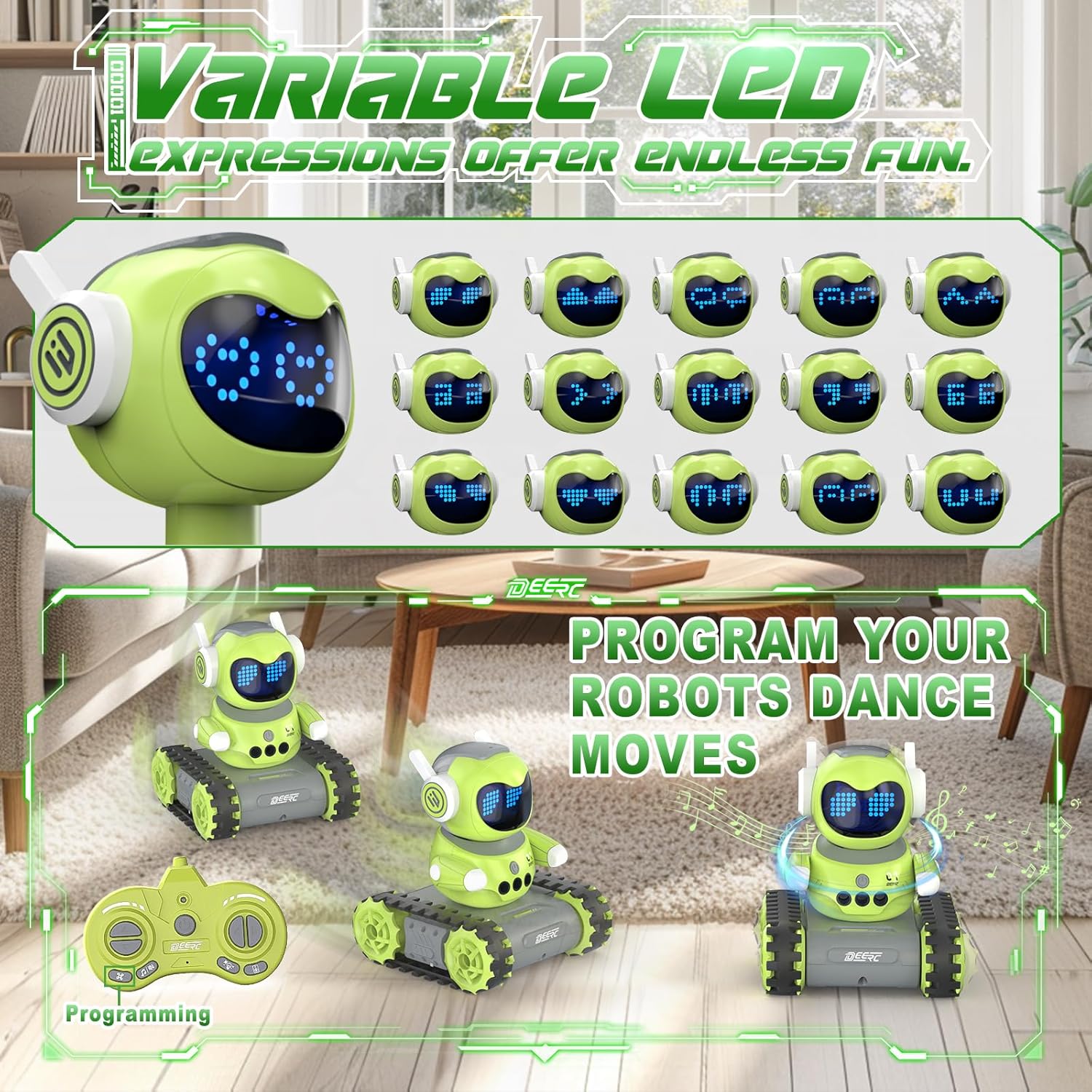
Image: The DEERC robot displaying various LED eye expressions and performing programmed movements, highlighting its interactive features.
Pangropéa
- Keep the robot and remote control clean by wiping them with a dry, soft cloth.
- Avoid exposing the toy to water or excessive moisture.
- Simpen cocooan di tempat anu tiis sareng garing jauh tina sinar panonpoé langsung nalika henteu dianggo.
- Remove batteries from the remote control if the toy will not be used for an extended period to prevent leakage.
Pamérésan masalah
| Masalah | Mungkin Cukang lantaranana | Solusi |
|---|---|---|
| Robot does not respond. | Low battery in robot or remote; power switch off; not paired. | Charge robot battery; replace remote batteries; ensure both are ON; re-pair if necessary (refer to pairing instructions if applicable, though not explicitly in feature bullets). |
| Waktu maén pondok. | Batré teu dicas pinuh; batré heubeul. | Ensure full charge (30-40 mins); consider replacing battery if performance degrades significantly over time. |
| Walkie-talkie function unclear or not working. | Out of range; interference; button not pressed correctly. | Ensure robot and remote are within 165 feet (without obstacles); avoid areas with strong electronic interference; press and hold the talk button firmly. |
| Gesture sensing not working. | Hand too far; incorrect gesture; sensor obstructed. | Ensure hand is within 5.9 inches; use clear, distinct gestures; check for any obstructions on the robot's sensors. |
spésifikasi
- model: SQN-050
- merek: DEERC
- Ukuran produk: 5.2 x 6.4 x 5.9 inci
- Beurat barang: 1.08 pon
- Umur Disarankeun: 6 taun ka luhur
- Robot Battery: 1 batré Litium Ion (kaasup)
- Batré Remote Control: Batré AAA (henteu kalebet)
- Waktu Ngecas: 30-40 menit
- Waktu maén: Nepi ka 100 menit
- Frékuénsi Remote Control: 2.4GHz
- Rentang kadali jauh: Nepi ka 165 suku (tanpa halangan)
- Gesture Sensing Range: Nepi ka 5.9 inci
Émbaran Kasalametan
penting: Children under 6 years old need to use this product under adult supervision. Always ensure safe play environments and keep away from small parts that could be a choking hazard for very young children. Do not disassemble or modify the product. Use only the provided charging cable and recommended batteries.
Garansi sareng Rojongan
For warranty information or technical support, please refer to the product packaging or contact DEERC customer service directly. Contact details are typically available on the official DEERC websitus atawa ngaliwatan platform pameseran Anjeun.