1. Bubuka
The HP Z2 G9 Workstation is a high-performance desktop PC designed for technical and creative professionals. This manual provides essential information for setting up, operating, maintaining, and troubleshooting your workstation to ensure optimal performance and longevity.
2. Naon dina Box
Pastikeun yén sadaya komponén aya dina bungkusan:
- HP Z2 Tower G9 Workstation
- Keyboard HP Wired Desktop 320K
- HP kabel 320M Mouse
- Kabel listrik
- Dokuméntasi (manual ieu, inpormasi garansi)
3. Setup Guide
Turutan léngkah-léngkah ieu pikeun nyetél HP Z2 G9 Workstation anjeun:
- Bongkar Workstation: Cabut workstation sareng sadaya asesoris tina bungkusna kalayan ati-ati.
- Sambungkeun Periferal:
- Sambungkeun Kibor HP Wired Desktop 320K ka port USB anu sayogi.
- Sambungkeun Mouse HP Wired 320M ka port USB anu sayogi.
- Connect your monitor(s) to the appropriate video output ports (e.g., DisplayPort, HDMI) on the workstation.
- Nyambung ka Daya: Colokkeun kabel daya kana input daya workstation teras kana stop kontak listrik anu di-ground.
- Daya Hurung: Pencét tombol daya anu aya di payun workstation.
- Setup Windows Awal: Turutan parentah dina layar pikeun ngalengkepan setelan Windows 11 Pro, kalebet basa, wilayah, sambungan jaringan, sareng nyieun akun pangguna.

Gambar 3.1: Hareupeun view tina HP Z2 G9 Workstation, nu némbongkeun tombol daya, port USB, sareng tempat drive optik.
4. Parentah Operasi
This section covers basic operation of your workstation.
4.1 Ngahurungkeun sareng mareuman
- Pikeun Ngahurungkeun: Pencét tombol daya dina panel hareup.
- Pikeun mareuman: Pencét tombol Mimitian dina Windows, teras pilih Daya> Pareuman.
- Pikeun ngamimitian deui: Pencét tombol Mimitian dina Windows, teras pilih Daya > Balikan deui.
4.2 Nyambungkeun Alat éksternal
The HP Z2 G9 Workstation offers various ports for connecting external devices. Refer to the image below for port identification.
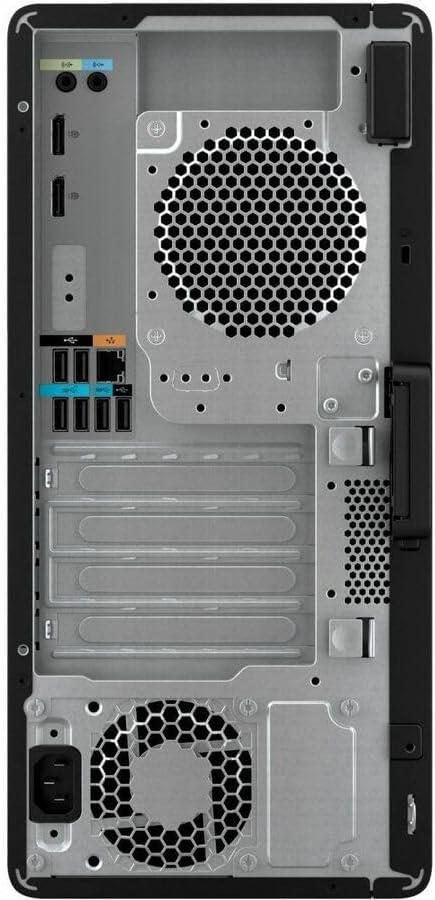
Gambar 4.1: Tukangeun view of the HP Z2 G9 Workstation, illustrating the various input/output ports including USB, DisplayPort, Ethernet, and audio jacks.
4.3 Ngagunakeun Windows 11 Pro
Your workstation comes pre-installed with Windows 11 Pro, offering advanced features for productivity and security. Familiarize yourself with the operating system's interface and functionalities for optimal use.
5. Pangropéa
Regular maintenance helps ensure the longevity and performance of your workstation.
- Jaga Ventilasi Bersih: Ensure that the air vents on the workstation are not obstructed to allow for proper airflow and cooling.
- Apdet parangkat lunak: Regularly check for and install operating system and driver updates to maintain security and performance.
- Cadangan Data: Jieun cadangan data penting sacara périodik ka drive éksternal atanapi panyimpenan awan pikeun nyegah leungitna data.
- Kabersihan: Use a soft, dry cloth to clean the exterior of the workstation. Avoid using liquid cleaners directly on the components.
6. Cara ngungkulan
Bagian ieu ngabahas masalah umum anu anjeun tingali.
6.1 Taya Daya
- Verify the power cord is securely connected to both the workstation and the electrical outlet.
- Pastikeun stop kontak listrik tiasa dianggo ku cara nguji sareng alat anu sanés.
6.2 Taya Pintonan
- Check that the monitor is powered on and the video cable is securely connected to both the workstation and the monitor.
- Pastikeun sumber input anu bener dipilih dina monitor anjeun.
6.3 Performance slow
- Tutup aplikasi anu teu perlu jalan di latar tukang.
- Pariksa sareng pasang apdet Windows atanapi apdet supir anu nuju ngantosan.
- Pastikeun aya rohangan kosong anu cekap dina drive utama.
For more advanced troubleshooting or issues not covered here, please refer to the official HP support websitus atanapi hubungi layanan palanggan HP.
7. Spésifikasi
Detailed technical specifications for the HP Z2 G9 Workstation (Model A1NX3UT#ABA):
| Nomer modél | A1NX3UT#ABA |
| Prosesor | Intel Core i7-14700 (14th Gen, Hexadeca-core) |
| Ram | 32 GB DDR5 SDRAM |
| Panyimpenan | SSD (Solid State Drive) 1 TB |
| Grafika | Intel UHD Graphics 770 (Terpadu) |
| Sistem operasi | Windows 11 Pro |
| Platform hardware | PC |
| Tingkat RAID | 0, 1 |
| Item Beurat | 15.87 pon |
| Ukuran Paket | 20.2 x 19.5 x 11.55 inci |
8. Garansi jeung Rojongan
Your HP Z2 G9 Workstation comes with a standard manufacturer's warranty. For detailed warranty terms and conditions, please refer to the documentation included with your product or visit the official HP support websitus.
Pikeun bantosan téknis, undeuran supir, atanapi dukungan salajengna, mangga buka Rojongan HP Websitus.
Optional protection plans may be available for extended coverage. Please check with your retailer or HP for more information.