Bubuka
This manual provides instructions for the installation, operation, and maintenance of your Enbrighten VIBE Eternity Permanent Outdoor Lights. These lights feature RGBWIC LEDs, smart control capabilities, and a durable, weather-resistant design for year-round outdoor use.

Image: Enbrighten VIBE Eternity Permanent Outdoor Lights, showing the product box, a smartphone with the control app, and a close-up of the individual LED pucks on the light strand.
Naon Kaasup
Pariksa yén sadaya komponén aya sateuacan ngamimitian pamasangan:

Image: A detailed diagram illustrating all components included in the Enbrighten VIBE Eternity Lights package, labeled for easy identification.
- 3 x 16.5ft. Light Strands (36 total LEDs)
- Mounting Brackets (with 3M VHB tape)
- Sekrup kurung
- Power Cord Clips
- Flat Cord Clips
- Sasayogian tanaga
- Screws/Anchors for Power Supply
- 1 x 10ft. Extension Cable
- 3 x Plastic End Caps
- 1 x Silicone End Cap
Setup sareng Instalasi
Follow these steps for proper installation of your permanent outdoor lights. The system is designed for lifetime DIY installation.
- Rencanakeun Tata Letak anjeun: Determine the desired path for your lights along eaves, pergolas, or other outdoor structures. The strands are linkable up to 150ft (200ft for reduced output) and can be cut to fine-tune the length.
- Nyiapkeun Permukaan Pemasangan: Ensure the surface is clean, dry, and free of debris for optimal adhesion of the 3M VHB tape.
- Pasang Kurung Pasang:
- Remove the protective cover from the adhesive backing on each mounting bracket.
- Press the bracket firmly onto the desired installation surface.
- For permanent security, use the included screws to fasten each mounting bracket.
- Attach Light Strands: Snap the individual LED pucks into the installed mounting brackets.
- Nyambungkeun Power Supply: Connect the light strands to the power supply. Use the included 10ft extension cable if needed. Secure the power supply using its dedicated screws and anchors.
- Kabel Aman: Use the provided cord clips and flat cord clips to neatly route and secure any loose cables.
- Colokkeun: Connect the power supply to a standard 120V outdoor-rated electrical outlet.
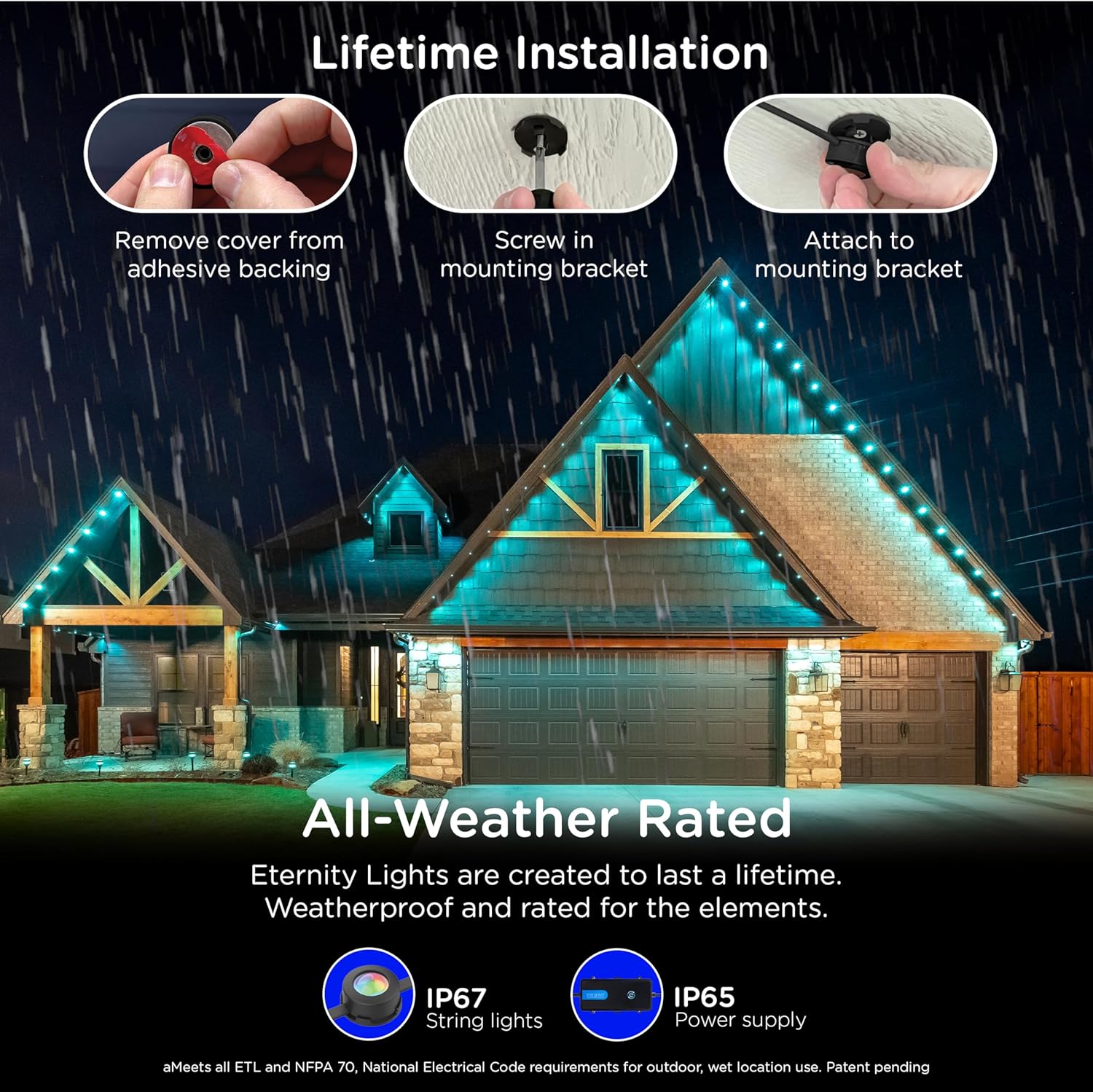
Image: Visual guide demonstrating the installation process: removing adhesive cover, screwing in the mounting bracket, and attaching the light to the bracket.

Gambar: Deukeut view of installed lights, highlighting features like secure mounting, the ability to cut the light strand, and the simple plug-in connection. Also shows the IP rating and operating temperature range.
Parentah Operasi
Smart App Control
The Enbrighten VIBE Eternity Lights are controlled via the free Enbrighten app. Download the app from the Apple App Store or Google Play.
- Unduh App: Milarian pikeun "Enbrighten" in your device's app store.
- Pair with Wi-Fi: Open the app and follow the on-screen instructions to pair your lights with your 2.4GHz Wi-Fi network.
- Sesuaikeun Lampu:
- Pilihan Warna: Choose from millions of color combinations using the RGBWIC LEDs.
- Cahaya bodas: Adjust white light from warm (2200K) to cool (6000K) to match your home's exterior.
- Dynamic Modes & Effects: Select from various preset modes or create custom effects for holidays, events, or everyday accent lighting.
- Kontrol LED Individual: Control individual LEDs for unique lighting designs.
- Scheduling & Automations: Set schedules for lights to turn on/off or change modes automatically.
- Dimming: Adjust the brightness level of your lights.

Image: Screenshots of the Enbrighten mobile application interface, demonstrating options for color changing, white light selection, dimming, and various customizable lighting effects.

Gambar: Tilu examples of house exteriors illuminated by Enbrighten Eternity Lights, showcasing the adjustable white light color temperatures: Warm White (2200K), Soft Warm White (4000K), and Cool White (6000K).
Kontrol sora
The lights are compatible with Amazon Alexa and Google Home for voice control. Link your Enbrighten account within the Alexa or Google Home app to enable voice commands.
- "Alexa, turn on patio lights."
- "Hey Google, set the outdoor lights to red."
- "Alexa, dim the Eternity Lights to 50%. "

Image: An illustration of a house illuminated by Enbrighten Eternity Lights, with icons for Alexa and Google Home, indicating compatibility with voice control. A smartphone displays the Enbrighten app interface.
Pangropéa
The Enbrighten VIBE Eternity Lights are designed for durability and minimal maintenance.
- beberesih: Periodically wipe the light pucks and strands with a soft, damp lawon pikeun miceun kokotor atawa lebu. Ulah make bahan kimia anu kasar atawa pembersih anu abrasif.
- Résistansi Cuaca: The string lights are IP67 waterproof, and the power supply is IP65 rated, ensuring protection against dust and water jets. They are designed to operate in temperatures from -4°F to 131°F (-20°C to 55°C).
- Pamariksaan: Regularly inspect the cables and connections for any signs of damage. If damage is found, discontinue use and contact customer support.
Pamérésan masalah
If you encounter issues with your Enbrighten VIBE Eternity Lights, refer to the following common solutions:
| Masalah | Mungkin Cukang lantaranana | Solusi |
|---|---|---|
| Lampu teu hurung. | No power, loose connection, power supply issue. | Ensure the power supply is securely plugged into a working outlet. Check all cable connections. Verify the outlet is receiving power. |
| Lights are not connecting to the app/Wi-Fi. | Incorrect Wi-Fi network (2.4GHz required), incorrect password, distance from router. | Confirm your Wi-Fi network is 2.4GHz. Re-enter Wi-Fi password carefully. Move the power supply closer to your Wi-Fi router or consider a Wi-Fi extender. Reset the lights and attempt pairing again. |
| Lights are flickering or behaving erratically. | Loose connection, power fluctuation, software glitch. | Check all physical connections. Try unplugging and replugging the power supply. Restart the Enbrighten app. |
| Kontrol sora teu jalan. | Not linked to Alexa/Google Home, incorrect device name. | Ensure your Enbrighten account is correctly linked in the Alexa or Google Home app. Verify the device name used in voice commands matches the name in the app. |
If issues persist, contact Enbrighten customer support for further assistance.
spésifikasi
| Nomer modél | 82729 |
| Item Panjang | 50 suku |
| Jumlah Sumber Cahaya | 36 LEDs |
| Tipe Sumber Cahaya | RGBWIC LED |
| Warna Cahaya | Multicolor, White (Adjustable 2200K-6000K) |
| Fluks Luminous | 33 Lumen per light |
| Sumber Daya | Kabel Listrik |
| Voltage | 120 volt |
| Wattage | 62 Watt |
| Pamakéan jero rohangan / outdoor | Jero rohangan, Luar |
| Tingkat Résistansi Cai | IP67 (String Lights), IP65 (Power Supply) |
| Suhu Operasi | -4°F nepi ka 131°F (-20°C nepi ka 55°C) |
| Métode kontrol | Aplikasi, Sora (Alexa, Google Home) |
| Fitur husus | Cuttable, Easy Installation, Linkable, Wi-Fi Enabled |
| Bahan | palastik |
| Produsén | Perusahaan Produk Jasco |
| UPC | 030878827294 |
Émbaran jaminan
This Enbrighten product is backed by a Kawates Jaminan Hirupna. For detailed terms and conditions, please refer to the official Enbrighten websitus atanapi ngahubungan rojongan customer.
Rojongan jeung Sumberdaya
For additional support, frequently asked questions, or to download the Enbrighten app, please visit the official Enbrighten websitus atawa toko aplikasi alat Anjeun.
- Enbrighten App: Sadia dina Apple App Store jeung Google Play Store. (Note: Specific app links may vary, search for "Enbrighten".)
- Produsén Websitus: Nganjang byjasco.com/enbrighten pikeun informasi produk jeung rojongan.
Asesoris cocog
Enhance your lighting setup with compatible Enbrighten accessories:

Image: Display of compatible Enbrighten accessories, including additional 16.5ft light strands (Model 82732), 10ft extension cables (Model 82734), and 20ft lead power supplies (Model 84919).

Image: Decorative accessories for Enbrighten Eternity Lights, such as Icicle Accessories (Model 85614), C9 Bulb Covers (Model 83764), and Shingle Clips (Model 83765), for adding seasonal flair.
- Eternity Save Lights Extension Strand (16.5ft): Modél 82732
- Eternity Eave Lights Extension Cable (10ft): Modél 82734
- Eternity Eave Lights Power Supply (20ft lead): Modél 84919
- Icicle Accessory (12-pack): Model 85614 (Attaches to Eternity Lights)
- C9 Bulb Covers (12-pack): Modél 83764
- Shingle Clips (12-pack): Modél 83765


