1. Bubuka
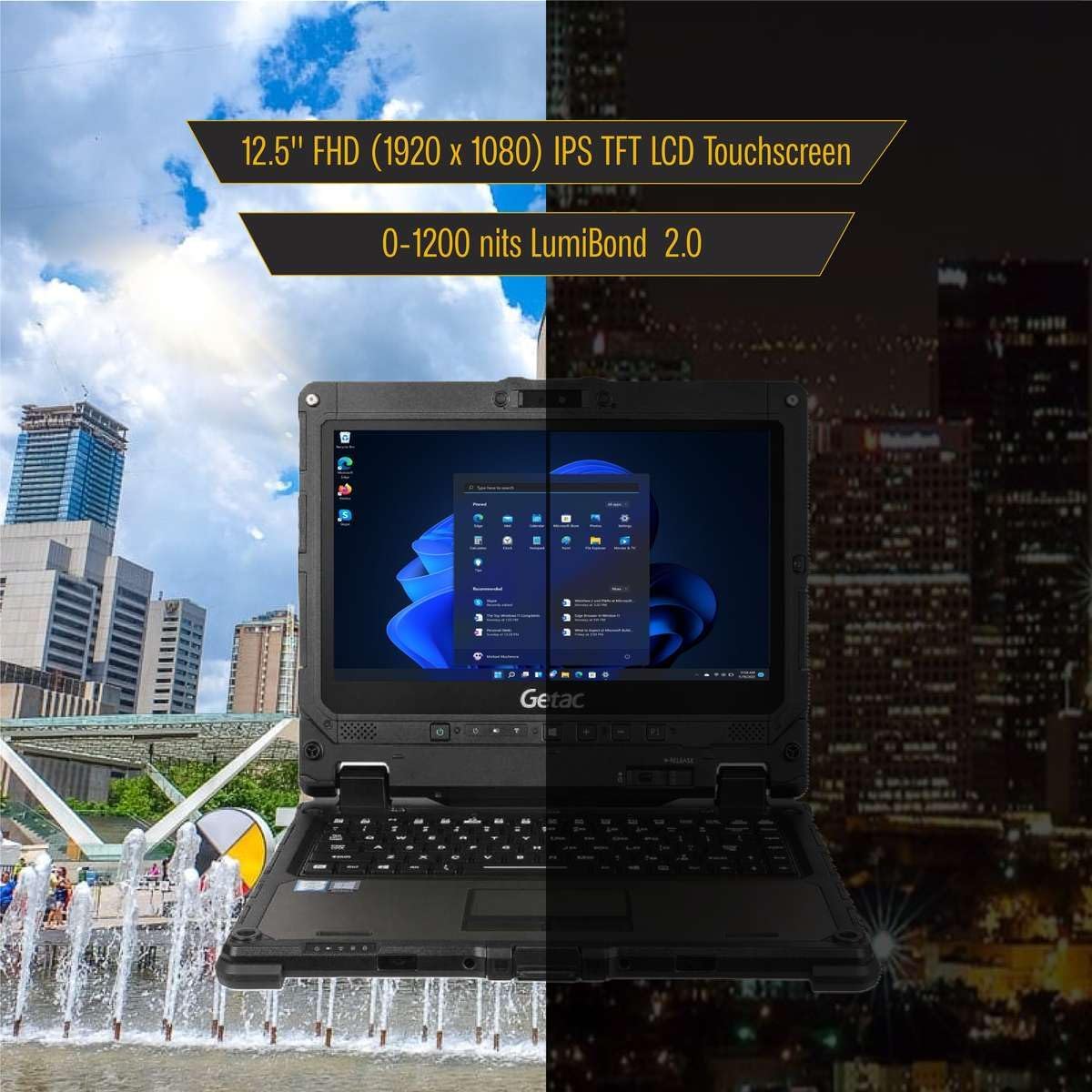
The Getac K120 is a rugged 2-in-1 laptop designed for demanding environments. It combines the versatility of a tablet with the performance of a laptop, featuring a 12.5-inch Full HD touchscreen, an Intel Core i5-8250U processor, 16GB of RAM, and a 512GB SSD. This device operates on Windows 11 Pro and is built to withstand challenging conditions, making it suitable for various professional applications.
2. Fitur konci
- Desain Kasar: Built to MIL-STD 810G standards, capable of withstanding 6-foot drops, and features IP65 ingress protection against dust and water.
- 2-in-1 Versatility: Functions as both a laptop with a detachable full-size backlit keyboard and a standalone tablet.
- Kinerja luhur: Powered by an Intel Core i5-8250U processor, 16GB DDR4 RAM, and a 512GB SSD for fast boot-up and efficient multitasking.
- Tampilan Vibrant: 12.5-inch Full HD (1920x1080) touchscreen with LumiBond 2.0 technology, supporting wet touch and glove operation.
- Sistem operasi: Pre-installed with Windows 11 Pro 64-bit, offering enhanced security and management features with multi-language support.
- Kaméra Terpadu: Equipped with a 2MP front camera and an 8MP rear camera with LED flash.
- Batré ganda: Features two Li-Ion batteries, supporting hot-swappable functionality for extended operation.


3. Setélan
- Ngabongkar bungkusan: Carefully remove the Getac K120 and all accessories from the packaging.
- Muatan Awal: Connect the power adapter to the DC-in jack on either the tablet or the keyboard base and plug it into a power outlet. Allow the device to charge fully before first use.
- Daya Hurung: Pencét tombol daya pikeun ngaktipkeun alat.
- Setup Windows: Turutan pitunjuk dina layar pikeun ngarengsekeun setelan Windows 11 Pro, kalebet pilihan basa, sambungan jaringan, sareng nyiptakeun akun pangguna.
- Keyboard Attachment (Optional): To use in laptop mode, align the tablet with the keyboard base and gently press until it clicks securely into place. Ensure the release button is engaged.
4. Parentah Operasi
4.1. Modeu tablet
- Detaching the Tablet: Press the release button located on the keyboard base to separate the tablet from the keyboard.
- Napigasi layar rampa: Use your finger or a compatible stylus for navigation, tapping, swiping, and pinch-to-zoom gestures. The display supports wet touch and glove input.
- Kibor dina layar: When in tablet mode, the on-screen keyboard will automatically appear when text input is required.
4.2. Laptop Mode
- Ngalampirkeun kibor: Align the tablet with the keyboard base and press firmly until it locks.
- Kibor sareng Touchpad: Use the physical keyboard for typing and the integrated touchpad for cursor control. The keyboard is backlit for low-light conditions.
4.3. Manajemén kakuatan
- Kahirupan batré: The device features two Li-Ion batteries. Monitor battery levels through the Windows taskbar.
- Batré anu Tiasa Ditukerkeun Panas: Batteries can be replaced without powering down the device, ensuring continuous operation.
- Sleep/Hibernate: Use Windows power settings to configure sleep or hibernate modes to conserve battery life.

5. Palabuhan jeung Konéktipitas
5.1. Tablet Ports
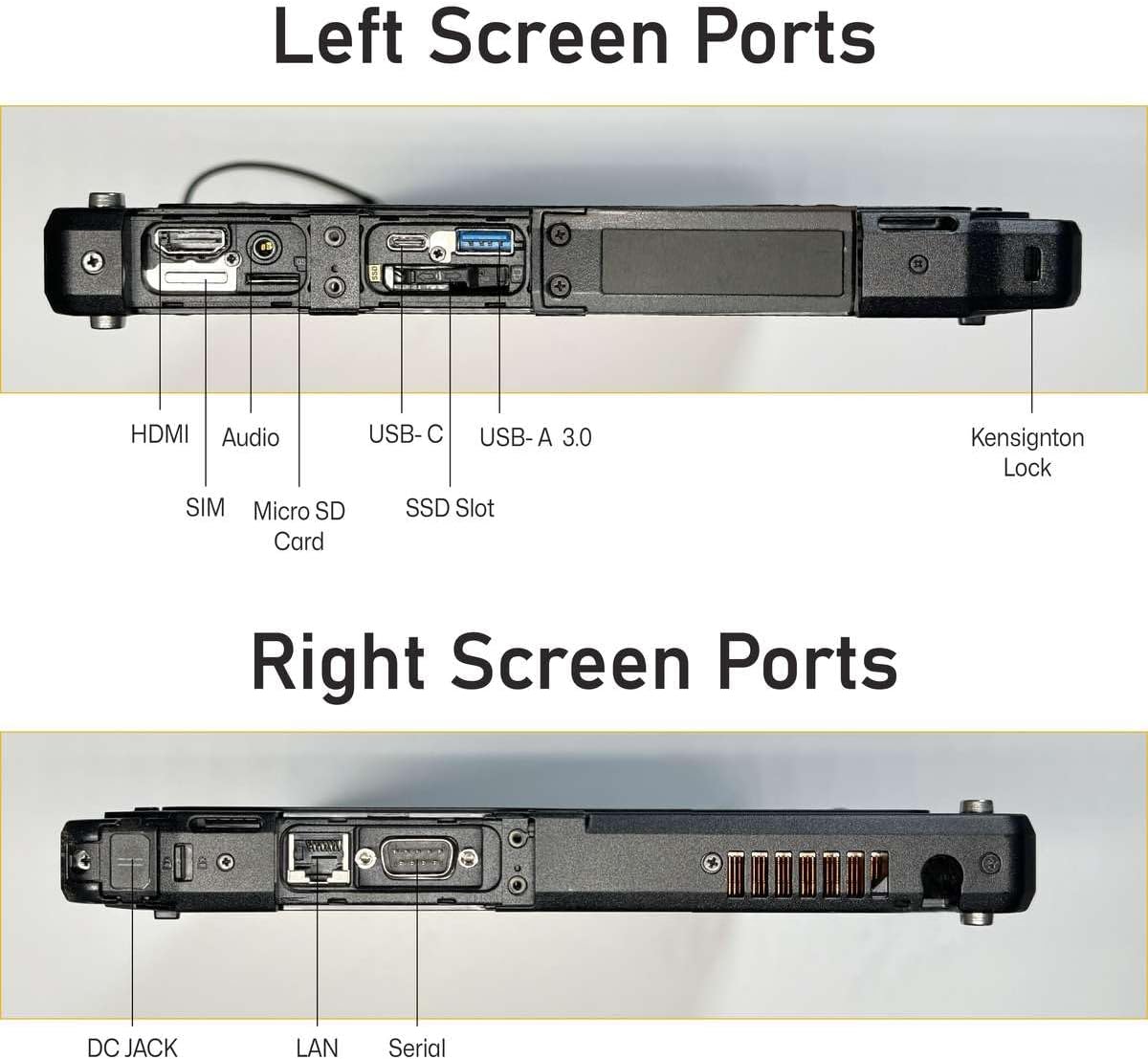
- DC in Jack x 1
- USB 3.0 x 1
- USB 3.1 Gen 1 Tipe-C x 1
- LAN (RJ-45) x 1
- HDMIx1
- MicroSD slot x 1
- Panyambung docking x 2
- Headphone out / mic-in combo x 1
- Serial Port
- 4G LTE (EM7511)
5.2. Keyboard Ports
- DC in Jack x 1
- USB 3.0 x 3
- LAN (RJ-45) x 1
- HDMIx1
- Serial port (9-pin; D-sub) x 1
- SDXC slot x 1
- VGA x 1

6. Fitur Opsional
The Getac K120 offers various configurable options to enhance functionality:
- Barcode Reader (BCR)
- Second USB 2.0 port
- True Serial port
- Pamaca Kartu Smart (SCR)
- Contactless Smart Card Reader (Contactless SCR)
- Fingerprint Reader (FPR)
- Wireless Wide Area Network (WWAN)
- Global Positioning System (GPS)
These options are typically configured at the time of purchase and may vary by model or region.
7. Pangropéa
- beberesih: Ngagunakeun lemes, damp cloth to clean the screen and exterior. Avoid harsh chemicals or abrasive materials. Ensure all port covers are securely closed before cleaning with liquids.
- Perawatan batré: For optimal battery longevity, avoid extreme temperatures. If storing the device for an extended period, ensure batteries are charged to approximately 50%.
- Apdet parangkat lunak: Regularly check for and install Windows updates and driver updates to maintain performance and security.
- Perlindungan Lingkungan: While rugged, avoid intentionally exposing the device to extreme conditions beyond its specified ratings (MIL-STD 810G, IP65). Ensure all port covers are sealed when operating in dusty or wet environments.
8. Cara ngungkulan
- Alat Teu Dihurungkeun: Pastikeun alat geus dicas. Sambungkeun adaptor daya jeung antosan sababaraha menit samemeh nyoba ngahurungkeun deui.
- Layar rampa teu ngaréspon: Restart the device. If the issue persists, check for driver updates. Ensure the screen is clean and free of debris.
- Connectivity Issues (Wi-Fi/4G LTE): Verify that Wi-Fi or 4G LTE is enabled in Windows settings. Check network signal strength. For 4G LTE, ensure a valid SIM card is inserted and activated.
- Keyboard Teu Ngabales: Ensure the tablet is securely docked to the keyboard base. Restart the device.
- Performance Lambat: Close unnecessary applications. Check for available Windows updates. Ensure sufficient free space on the SSD.
9. Spésifikasi
| Fitur | Spésifikasi |
|---|---|
| Ukuran Layar Ngadeg | 12.5 inci |
| Resolusi layar | 1920 x 1080 piksel (FHD) |
| Prosesor | Intel Core i5-8250U (1.6 GHz to 3.40 GHz) |
| Ram | 16 GB DDR4 |
| Hard Drive | 512 GB SSD |
| Grafik Coprocessor | Intel HD Grafik 520 |
| Sistem operasi | Windows 11 Pro |
| Item Beurat | 9.28 pon |
| Dimensi produk | 12 x 1 x 8 inci |
| Warna | Hideung |
| Fitur husus | Ngabahekeun Tahan |
10. Garansi jeung Rojongan
This Getac K120 device is offered as an Amazon Renewed product. It comes with a 90-day return policy, allowing for refunds or replacements if issues arise within this period.
Additionally, various protection plans are available for purchase to extend coverage beyond the initial return period. Please refer to the product listing for details on available 2-Year, 4-Year, or Complete Protect plans.
For technical support or warranty claims, please contact the seller or refer to the Amazon Renewed program guidelines.


