Bubuka
This manual provides detailed instructions for the 1Mii B0C88R8JSB Bluetooth 5.0 HiFi Audio Receiver. This device allows you to wirelessly stream high-fidelity audio from your Bluetooth-enabled devices to your home stereo system or speakers. Featuring long-range connectivity, versatile output options (3.5mm and RCA), and integrated volume controls, it enhances your audio experience by bringing modern wireless capabilities to traditional sound systems.
Eusi pakét
- 1Mii Audio Receiver
- Kabel Daya USB
- Kabel Audio 3.5mm
- Kabel Audio RCA
- Manual pamaké
Produk Leuwihview
The 1Mii Bluetooth 5.0 HiFi Audio Receiver is a compact device designed to seamlessly integrate with your existing audio equipment. It features a central multi-function button, volume controls, and various audio output ports.

Gambar 1: Hareupeun view of the 1Mii Bluetooth Audio Receiver, showing the central control button and volume buttons.
The rear panel provides connections for power and audio output, offering flexibility for different stereo setups.
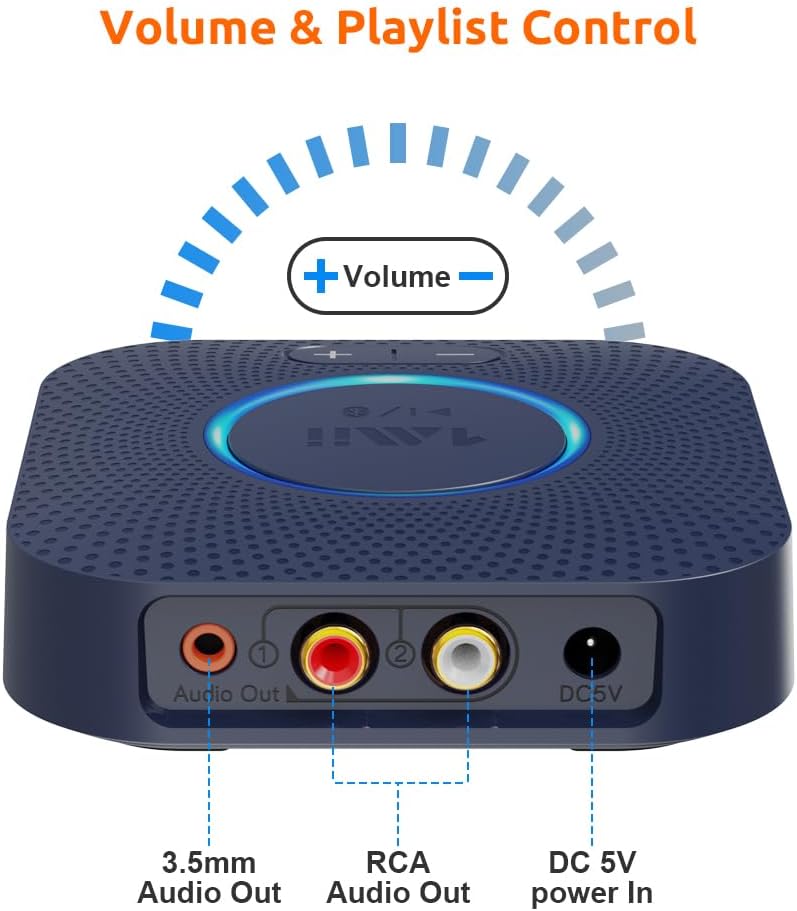
Gambar 2: Tukangeun view of the receiver, highlighting the 3.5mm audio output, RCA audio outputs (red and white), and the DC 5V power input.
Parentah Setup
- Sambungan Daya: Connect the provided USB power cable to the DC 5V power input on the receiver. Plug the other end into a USB power adapter (not included) or a USB port on your stereo system for power.
- Sambungan Kaluaran Audio:
- Ngagunakeun Kabel RCA: Connect the red and white RCA audio cables from the receiver's RCA outputs to the corresponding RCA input ports (e.g., AUX, CD, TAPE) on your home stereo system or amppangagung.
- Nganggo Kabel AUX 3.5mm: Connect the 3.5mm audio cable from the receiver's 3.5mm audio output to the AUX input port on your stereo system or powered speakers.
- Daya Hurung: The receiver will automatically power on when connected to a power source. The central LED indicator will illuminate.
- Masangkeun Bluetooth:
- Ensure your Bluetooth-enabled device (smartphone, tablet, etc.) has Bluetooth activated.
- The receiver will automatically enter pairing mode, indicated by a flashing LED light.
- On your device, search for Bluetooth devices and select "1Mii B0C88R8JSB" (or similar name) from the list.
- Once connected, the LED indicator on the receiver will remain solid, indicating a successful connection.
- Select Input on Stereo: Set your home stereo system or amplifier to the correct input source (e.g., AUX, CD, TAPE) where the 1Mii receiver is connected.

Gambar 3: Kelample setup showing the receiver connected to a stereo amplifier and ready for Bluetooth streaming.
Parentah Operasi
Puterkeun Musik
- After successful pairing, play music from your Bluetooth-enabled device. The audio will be streamed to your connected stereo system.
- Adjust the volume using the volume buttons on the 1Mii receiver or directly from your connected device/stereo system.

Figure 4: The receiver's volume controls allow for easy adjustment of audio output.
Kontrol Volume sareng Lacak
- Pencét éta + tombol pikeun ngaronjatkeun polumeu.
- Pencét éta - tombol pikeun ngurangan polumeu.
- Pencét jeung tahan tombol + button for 2 seconds for the next track.
- Pencét jeung tahan tombol - button for 2 seconds for the previous track.
Voice Command Integration (Alexa)
The 1Mii receiver can be controlled using voice commands through Amazon Alexa. Ensure your Echo device is paired with the 1Mii receiver via Bluetooth in the Alexa app.
- Connect the 1Mii audio adapter to your stereo using a 3.5mm or RCA cable.
- Pair the 1Mii receiver with your Echo device via Bluetooth in the Alexa app.
- You can now use voice commands to control music playback through your stereo system.
- Catetan: The audio cable should connect the Bluetooth receiver to your stereo, not directly to the Echo device.

Figure 5: The receiver supports integration with voice command systems like Amazon Alexa for convenient control.
Pangropéa
- Simpen alat dina lingkungan anu garing, jauh tina Uap sareng suhu anu ekstrim.
- Bersihkeun alat ku kaen anu lemes sareng garing. Ulah make cleaners cair atawa aerosol.
- Hindarkeun ragrag atanapi ngagentoskeun alat kana tabrakan anu kuat.
- Pastikeun ventilasi ditangtoskeun sabudeureun alat pikeun nyegah overheating.
Pamérésan masalah
| Masalah | Mungkin Cukang lantaranana | Solusi |
|---|---|---|
| Taya sora | Incorrect input selected on stereo; loose audio cables; receiver not powered on; device not paired. | Ensure stereo input matches receiver connection (AUX, CD, etc.). Check all cable connections. Verify receiver is powered and paired. Adjust volume on both receiver and stereo. |
| Teu bisa masangkeun via Bluetooth | Receiver not in pairing mode; device too far; interference; previously paired device connected. | Ensure receiver LED is flashing (pairing mode). Move device closer to receiver. Turn off Bluetooth on other nearby devices. Disconnect from previously paired devices. Restart both receiver and source device. |
| Kualitas sora anu goréng atanapi sambungan anu pegat-pegat | Distance too great; obstacles; interference from other wireless devices (Wi-Fi routers). | Reduce distance between receiver and source device. Remove obstacles. Move receiver away from Wi-Fi routers or other strong signal sources. |
| Tombol polumeu teu ngabales | Device not actively playing music; temporary software glitch. | Ensure music is playing. Try restarting the receiver. Adjust volume directly from the source device. |
spésifikasi
- model: 6976331140583
- Vérsi Bluetooth: 5.0
- Téknologi konektipitas: Auxiliary, RCA
- Mode Kaluaran Audio: Stereo
- Alat anu cocog: Smartphone, Speaker
- Tipe Panyambung: 3.5mm Jack, RCA
- Jarak Jauh: Up to 197ft (60m) line-of-sight outdoors, 50-70ft (20-30m) indoors (without obstacles)
- Ukuran produk: 4.33 x 3.54 x 0.79 inci
- Beurat barang: 8.1 ons
- Pabrikan: 1Mii
Garansi sareng Rojongan
For warranty information and technical support, please refer to the official 1Mii websitus atanapi ngahubungan layanan palanggan maranéhanana langsung. Simpen resi pameseran anjeun pikeun klaim jaminan.