
Bubuka
Thank you for choosing the TECKNET Ergonomic Wireless Rechargeable Mouse. This manual provides essential information for setting up, operating, and maintaining your new mouse. Please read it carefully to ensure optimal performance and longevity of your device.
Produk Leuwihview
Fitur konci:
- Desain ergonomis: Vertical orientation to reduce wrist strain and promote a natural hand posture.
- Batré anu tiasa dicas deui: Built-in 600 mAh battery, providing up to 2 months of use on a 1.5-hour charge.
- DPI adjustable: Five sensitivity levels (800/1600/2400/3200/4800 DPI) for precise control.
- Klik jempé: Reduces click noise by over 90% for a quiet working environment (forward/backward buttons are not silent).
- Konektipitas Nirkabel 2.4G: Stable connection with a range of up to 10 meters.
- 6 Tombol: Left, Right, Scroll Wheel, DPI Switch, Forward, and Backward buttons.
- Kasaluyuan lega: Supports Windows 11/10/8/7/XP/2003/2000, Mac, PC, and Linux systems. (Note: Side buttons are not available for Mac or iOS systems).
Eusi pakét:
- TECKNET Ergonomic Wireless Rechargeable Mouse
- 2.4G USB panarima
- Kabel Ngecas USB
- Manual pamaké

Image: The TECKNET Ergonomic Wireless Rechargeable Mouse in black, showcasing its vertical design.
Parentah Setup
- Ngecas mouse: Before first use, connect the mouse to a USB power source using the provided USB charging cable. The LED indicator will show charging status. A full charge takes approximately 1.5 hours.
- Selapkeun Panampi USB: Locate the 2.4G USB receiver stored in the compartment at the bottom of the mouse. Plug the receiver into an available USB port on your computer.
- Daya Hurung: Turn on the mouse using the ON/OFF switch located on the bottom of the mouse.
- Sambungan otomatis: The mouse should automatically connect to your computer. If it does not, ensure the receiver is securely plugged in and the mouse is powered on.

Image: The ergonomic mouse connected to a charging cable, illustrating the charging process.

Image: A visual representation of the 2.4G wireless connection, showing the mouse and the USB receiver plugged into a laptop.
Parentah Operasi
Fungsi Tombol:

Image: A diagram illustrating the location and function of each button on the ergonomic mouse.
- Tombol kénca: Fungsi klik kénca standar.
- Tombol katuhu: Fungsi klik katuhu standar.
- Gulung kabayang: Gulung ka luhur/handap, klik tengah.
- Tombol Pindah DPI: Located on top, cycles through DPI settings (800/1600/2400/3200/4800).
- Tombol Maju: Navigates ka hareup web browser atawa file explorers. (Not available for Mac/iOS).
- Tombol Mundur: Navigates ka tukang web browser atawa file explorers. (Not available for Mac/iOS).
Penyesuaian DPI:
Press the DPI switch button (located behind the scroll wheel) to cycle through the five available DPI settings: 800, 1600, 2400, 3200, and 4800. Each press changes the sensitivity, allowing you to adjust cursor speed to your preference or task requirements.
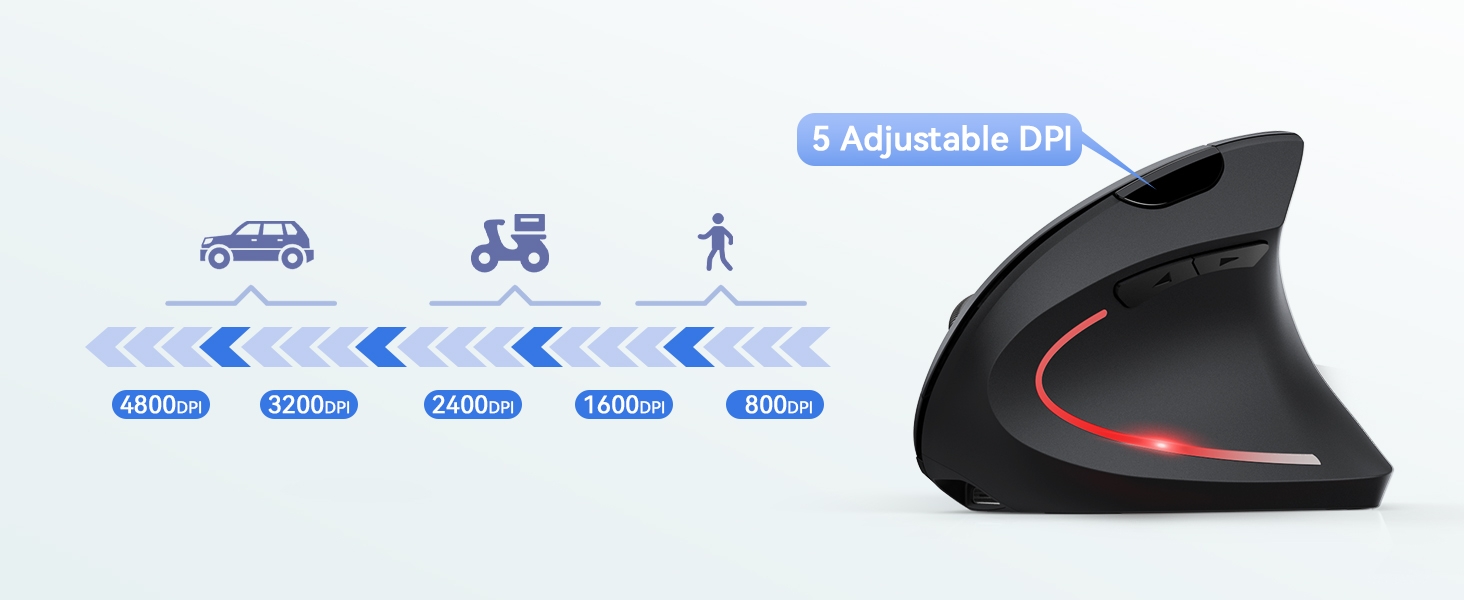
Image: A diagram illustrating the 5 adjustable DPI levels (800-4800) and the DPI switch button.
Ergonomic Usage:
The vertical design of this mouse is intended to promote a more natural hand and wrist posture, reducing pronation and potential discomfort associated with traditional mice. Position your hand comfortably over the mouse, allowing your wrist to remain in a neutral, handshake-like position.

Image: A technical diagram showing the 52-degree ergonomic grip angle of the mouse, with illustrations of correct and incorrect hand positions.

Image: A woman using the ergonomic mouse at a desk, highlighting the natural wrist alignment.
Pangropéa
- beberesih: Anggo lawon anu lembut sareng garing pikeun ngabersihan beurit. Ulah make bahan kimia kasar atawa bahan abrasive.
- Panyimpenan: Lamun teu dipaké pikeun période nambahan, pareuman beurit pikeun ngahemat umur batre. Simpen dina tempat anu tiis sareng garing.
- Perawatan batré: Recharge the mouse when the battery indicator is low. Avoid fully draining the battery frequently to prolong its lifespan.
Pamérésan masalah
| Masalah | Solusi |
|---|---|
| Beurit teu ngabales |
|
| Gerakan kursor henteu teratur atanapi laun |
|
| Side buttons not working on Mac/iOS | The forward and backward buttons are not supported on Mac or iOS operating systems due to system limitations. This is normal operation. |
spésifikasi
| Fitur | Rincian |
|---|---|
| Ngaran modél | TK-MS007 |
| Téhnologi konektipitas | 2.4G Nirkabel (USB Receiver) |
| Téhnologi Deteksi Gerakan | Optik |
| Tingkat DPI | 800 / 1600 / 2400 / 3200 / 4800 |
| Jumlah Kancing | 6 |
| Orientasi leungeun | Leres |
| Jenis Batré | Rechargeable (600 mAh) |
| Waktu Ngecas | Kira-kira. 1.5 jam |
| Kahirupan batré | Nepi ka 2 bulan (panggunaan rata-rata) |
| Range nirkabel | Nepi ka 10 méter |
| Beurat | 120 gram |
| Ukuran (L x W) | 12L x 7.5W cm |
| Sistem Operasi cocog | Windows, Mac, PC, Linux |
Garansi sareng Rojongan
TECKNET nawiskeun 36-garansi sasih for this product from the date of purchase. This warranty covers manufacturing defects and ensures reliable performance under normal use.
For technical support, warranty claims, or any questions regarding your TECKNET product, please visit the official TECKNET website or contact their customer service. You can find more information and contact details on the TECKNET brand store page: Toko TECKNET.