1. Bubuka
Welcome to the ACwO DwOTS Fire user manual. These innovative earbuds offer a unique dual-style design, providing both in-ear and half-in-ear options within a single charging case. Designed for versatility and high-quality audio, the DwOTS Fire earbuds feature advanced connectivity, extended battery life, and intuitive controls to enhance your listening experience.

Image: ACwO DwOTS Fire earbuds showcasing both half-in-ear and in-ear styles from a single case.
2. Naon dina Box
Punten parios yén sadaya barang aya dina pakét anjeun:
- 2 x Set of Wireless Earbuds (one in-ear, one half-in-ear)
- 1 x Kabel Ngecas Gancang Tipe-C
- 4 x Extra Earmuffs (for in-ear style)
- 1 x Kartu Garansi
- 1 x Kartu Scan Kuring

Image: The ACwO DwOTS Fire earbuds and charging case.
3. Setup jeung papasangan
3.1 Papasangan awal
- Pastikeun yén earbuds dieusi.
- Buka wadah ngecas. Earbuds bakal otomatis asup kana mode papasangan.
- Dina alat Anjeun (smartphone, tablet, jsb), aktipkeun Bluetooth.
- Milarian pikeun available devices and select "ACwO Fire" or "ACwO DwOTS Fire" to connect.
- Saatos nyambung, anjeun bakal ngadangu pesen audio, sareng lampu indikator dina earbud bakal robih.
3.2 Dual Konéktipitas
The ACwO DwOTS Fire earbuds offer unique dual connectivity options:
- Connect Each Pair to Two Different Devices: Ideal for sharing your listening experience.
- Connect Both Pairs to a Single Device: Perfect for watching movies or listening to music together with a loved one. This feature is available only for devices with dual audio connectivity (e.g., certain Android devices).

Image: Illustration of the dual connectivity feature, showing two pairs of earbuds.
Steps for Dual Sharing (Connecting Both Pairs to a Single Device):
- Connect both 'ACwO DwOTS Fire' and 'ACwO Fire +' with your device's Bluetooth.
- Once both pairs are connected, scroll down your device's notification panel and click on 'Media Output'.
- One pair will already be selected. Select the other pair to enable dual audio.
- You can now listen on both pairs of your earbuds simultaneously.

Image: Visual guide for setting up dual sharing on a compatible device.
4. Parentah Operasi
4.1 Kontrol Sentuh Intuitif
The earbuds feature intuitive touch controls for easy management of music, calls, and voice assistants. Refer to the included 'Scan Me Card' for a detailed diagram of touch functions.
- Puter / Reureuh: Ketok tunggal dina boh earbud.
- Lagu salajengna: Ketok dua kali dina earbud katuhu.
- Lagu Sateuacanna: Ketok dua kali dina earbud kénca.
- Ngajawab / mungkas Telepon: Ketok tunggal dina boh earbud.
- Nolak Telepon: Pencét lila dina boh earbud.
- Aktipkeun Asisten Sora: Ketok tilu kali dina boh earbud.
4.2 Modeu EQ
Customize your audio experience with 3 preset EQ modes, offering a total of 3+3 EQ options across the two earbud styles. Switch between modes to suit your preference for deep bass, balanced sound, or enhanced treble.
- Mode Kaulinan: Optimized for immersive gaming audio with low latency.
- Mode Teater: Sora anu ditingkatkeuntage for movies and videos.
- Modeu Saimbang: Provides a neutral and clear audio profile kanggo déngékeun umum.

Image: ACwO DwOTS Fire earbuds with a visual representation of available EQ modes.
4.3 Asistén Sora
Easily access your device's voice assistant by triple-tapping either earbud. Compatible with "Ok Google" and "Hey Siri" for hands-free control.
5. Ngecas
5.1 Earbuds and Case Charging
The ACwO DwOTS Fire earbuds provide up to 52 hours of music playtime with the charging case. The case supports both wired and wireless charging.
- Ngecas kabel: Connect the provided Type-C fast charging cable to the charging port on the case and a power source.
- Ngecas nirkabel: Place the charging case on a compatible wireless charging pad (wireless charger not included). The indicator light on the case will show charging status.

Image: ACwO DwOTS Fire charging case highlighting 52 hours of playtime.

Image: 'One On, One Charging' feature for extended use.
6. Pangropéa
6.1 Tahan Cai sareng Késang
The earbuds are IPX5 water and sweat resistant, making them suitable for workouts and outdoor activities. This rating protects against low-pressure water jets from any direction. Do not submerge the earbuds in water.

Image: ACwO DwOTS Fire earbuds demonstrating IPX5 water and sweat resistance.
6.2 beberesih
Regularly clean your earbuds and charging case with a soft, dry, lint-free cloth. Avoid using abrasive materials or harsh chemicals. For the in-ear style, gently remove and clean the earmuffs with water and mild soap, ensuring they are completely dry before reattaching.
7. Spésifikasi
| Fitur | Rincian |
|---|---|
| Ngaran modél | DwOTS Seuneu |
| Téhnologi konektipitas | Nirkabel (Bluetooth V5.3) |
| Tipe Supir Audio | 13mm Real Drivers |
| Kontrol bising | AI-ENC with Quad Mics, Passive Noise Cancellation |
| Waktu maén | Nepi ka 52 Jam (kalayan wadah ngecas) |
| Latén | Up to 45ms (Ultra-low) |
| Tingkat Résistansi Cai | IPX5 (panolak cai) |
| Ngecas | Type-C Fast Charging, Wireless Charging Capability |
| Métode kontrol | Touch Controls, Voice Assistant (Ok Google, Hey Siri) |
| Wangun Earpiece | In-Ear, Half-in-Ear |
| Item Beurat | 43 g |
| Dimensi produk | 5.6 x 5.6 x 1.8 cm |
| Bahan | palastik |
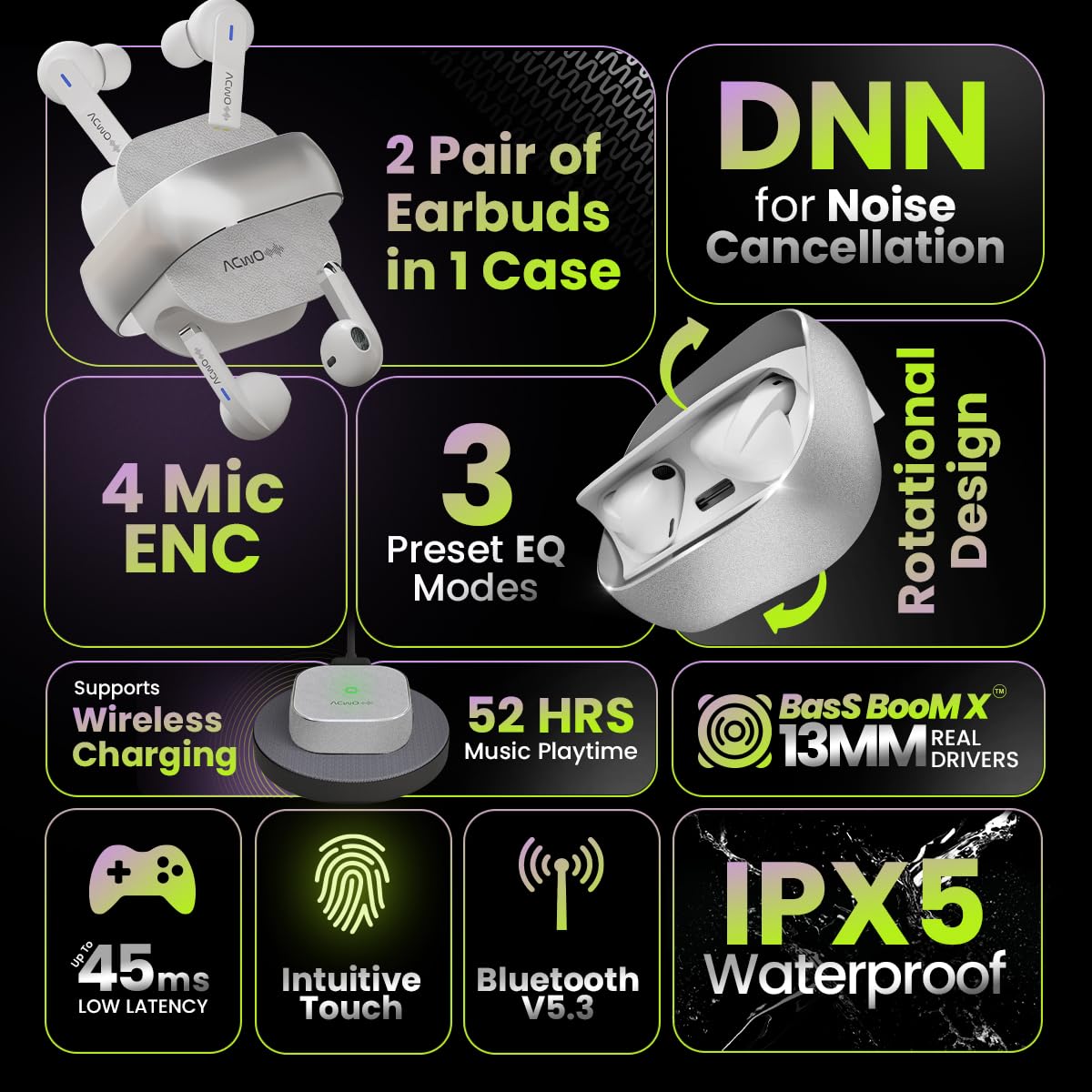
Image: Summary of ACwO DwOTS Fire key features.
8. Cara ngungkulan
8.1 Earbuds Teu Nyapasangkeun
- Ensure earbuds are charged and the case lid is open.
- Pareuman sareng aktipkeun Bluetooth alat anjeun.
- Poho alat tina daptar Bluetooth anjeun sareng cobian pasangkeun deui.
- Reset the earbuds (refer to the 'Scan Me Card' for specific reset instructions).
8.2 Taya Sora atawa Volume Low
- Pariksa tingkat polumeu dina alat anjeun sareng earbuds.
- Pastikeun earbuds dipasang leres dina ceuli anjeun.
- Bersihkeun kokotor tina speaker earbud sareng kontak pangisi daya.
- Sambungkeun deui earbuds ka alat anjeun.
8.3 Masalah Ngecas
- Pastikeun kabel ngecas disambungkeun aman ka duanana wadahna jeung sumber kakuatan.
- If using wireless charging, ensure the case is correctly placed on a compatible wireless charging pad.
- Check for any obstructions on the charging contacts of the earbuds and inside the case.
- Coba kabel ngecas atawa adaptor kakuatan béda.
9. Garansi jeung Rojongan
The ACwO DwOTS Fire earbuds come with a standard brand warranty. Please refer to the included Warranty Card for specific terms and conditions.
Rojongan Palanggan:
For any queries, technical assistance, or warranty claims, please contact ACwO customer support:
- Surélék: help@acwo.com
- Telepon: +91 9320420001
- Pabrikan: ACWO LIFESTYLE PRIVATE LIMITED, Borivali, Mumbai, Maharashtra - 400092, India


