
Bubuka
This manual provides detailed instructions for the safe and effective use of your Andoer Portable Digital Camera. Please read this manual thoroughly before operating the device and retain it for future reference.
Eusi pakét
Pastikeun yén sadaya item anu didaptarkeun di handap kalebet kana pakét anjeun:
- 1 x Andoer Digital Camera
- 1 x 32GB Card Memori
- 1 x Kabel USB (Tipe-C)
- 1 x Kain Pembersih
- 1 x Lanyard
- 1 x Kantong Panyimpenan
- 1 x Manual Pamaké
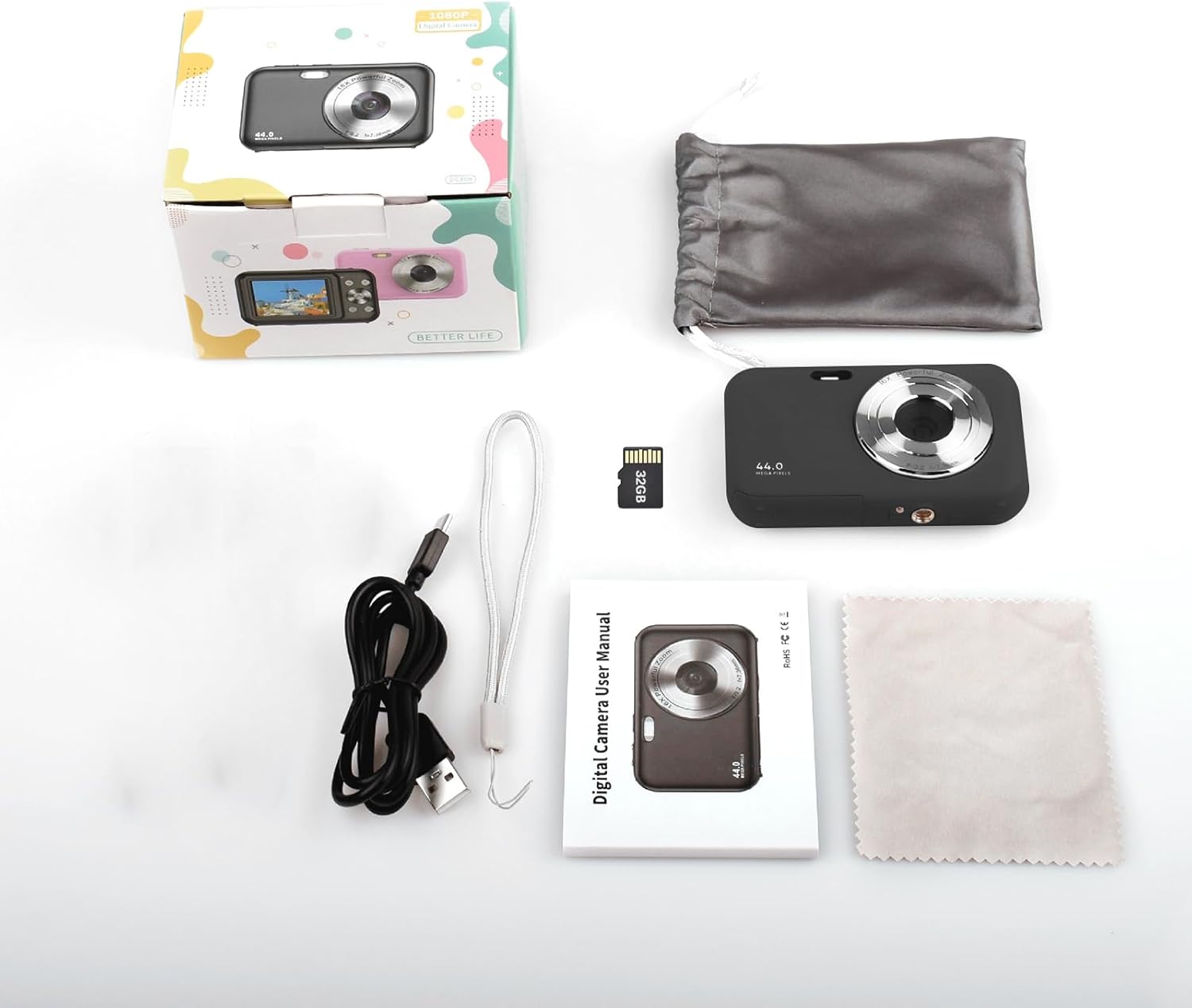
Image: Contents of the Andoer Digital Camera package.
Kaméra Ngalangkunganview
Biasakeun diri anjeun sareng rupa-rupa bagian kaméra anjeun.

Image: Multi-angle view of the Andoer Digital Camera, highlighting its compact design and button layout.
- Hareup: Lens, Flash, Microphone.
- luhur: Power Button, Shutter Button.
- Balik: 2.4-inch IPS Screen, Navigation Buttons (Up, Down, Left, Right, OK), Menu Button, Mode Button, Zoom (W/T).
- Samping: USB Type-C Port.
- handap: Battery/Memory Card Compartment.
Disetél
1. Ngecas Batré
The camera is equipped with a built-in 700mAh rechargeable lithium battery. Before first use, fully charge the battery.
- Connect the included USB Type-C cable to the camera's USB port.
- Sambungkeun tungtung kabel USB anu sanés ka adaptor kakuatan USB (teu kalebet) atanapi port USB komputer.
- Lampu indikator ngecas bakal hurung. Bakal pareum atanapi robih warna saatos ngecas parantos réngsé.
Catetan: The camera can be used while charging. A full charge provides approximately 150 minutes of continuous shooting or 90 minutes of video recording.

Image: Battery life information for the 700mAh battery.
2. Nyelapkeun Kartu Mémori
The camera supports a 32GB memory card (included). Ensure the camera is powered off before inserting or removing the memory card.
- Locate the battery/memory card compartment cover on the bottom of the camera.
- Buka panutup.
- Insert the 32GB memory card into the designated slot with the metal contacts facing the correct direction (refer to the diagram inside the compartment if available) until it clicks into place.
- Tutup panutup kompartemen aman.
penting: Format the memory card in the camera's settings menu before first use to ensure optimal performance.
Parentah Operasi
1. Powering on / Pareum
- Pikeun ngahurungkeun, pencét jeung tahan kenop Tombol Daya on the top of the camera.
- Pikeun pareum, pencét jeung tahan Tombol Daya again. The camera also features an auto power-off function (configurable in settings).
2. Nyokot Poto
The camera captures photos up to 44MP resolution.
- Hurungkeun kaméra.
- Ensure the camera is in photo mode (indicated on the 2.4-inch IPS screen). If not, press the Tombol Mode pikeun pindah.
- Frame your shot using the IPS screen.
- Pencét éta Tombol Jepret halfway down to focus, then press it fully to take the picture.

Gambar: Example of a high-resolution photo taken with the 44MP camera.
3. Ngarékam Pidéo
The camera records videos in 1080P resolution.
- Hurungkeun kaméra.
- Pencét éta Tombol Mode to switch to video recording mode.
- Pencét éta Tombol Jepret to start recording. A red indicator will typically appear on the screen.
- Pencét éta Tombol Jepret deui pikeun ngeureunkeun ngarékam.

Image: Screen view during 1080P video recording.
4. Ngagunakeun Digital Zoom
The camera features 16X digital zoom.
- In photo or video mode, press the T (Telephoto) button pikeun ngazum gede.
- Pencét éta W (Wide-angle) button pikeun ngazum leutik.

Image: Comparison of 1x and 16x digital zoom effects.
5. Fungsi séjén
- Timer otomatis: Set a delay (e.g., 2s, 5s, 10s) before a photo is taken. Access this option in the camera's menu.
- Shooting kontinyu: Take multiple photos in quick succession. This setting is also found in the menu.
- Anti Ngocok: Digital image stabilization helps reduce blur from camera movement. This feature is typically enabled by default or can be toggled in settings.
- Playback: Pencét éta Tombol Puterkeun (often indicated by a triangle icon) to view photos and videos. Use the navigation buttons to browse.
- Setélan Menu: Pencét éta Tombol Menu to access various camera settings, including resolution, white balance, exposure, date/time, and formatting the memory card.
Mindahkeun Files to a Computer or Phone
You can transfer photos and videos from the camera to a computer or a mobile phone.
1. Via USB Cable (to Computer)
- Sambungkeun kaméra ka komputer anjeun nganggo kabel USB Tipe-C anu disayogikeun.
- Hurungkeun kaméra.
- The camera should appear as a removable disk or media device on your computer.
- Open the camera's folder and copy the desired files kana komputer Anjeun.
2. Via Memory Card Reader (to Computer/Phone)
For direct transfer from the memory card, you can use a card reader.
- Remove the memory card from the camera.
- Insert the memory card into a compatible card reader.
- Connect the card reader to your computer or mobile phone (via an OTG adapter if necessary).
- Aksés ka files on the memory card and transfer them.

Image: OTG usage diagram for transferring files from memory card to phone.
Pangropéa
- Ngabersihan awak kaméra: Anggo kaén anu lembut sareng garing pikeun ngusap awak kaméra. Keur kokotor bandel, rada dampbilas lawon ku cai. Hindarkeun bahan kimia anu keras.
- Ngabersihan lensa: Use the included cleaning cloth or a specialized lens cleaning cloth. Gently wipe the lens in a circular motion. Do not use abrasive materials.
- Perawatan layar: The 2.4-inch IPS screen can be cleaned with a soft, lint-free cloth. Avoid pressing too hard.
- Panyimpenan: When not in use for extended periods, store the camera in the provided storage bag in a cool, dry place, away from direct sunlight and extreme temperatures.
- Perawatan batré: Recharge the battery regularly, even if the camera is not used frequently, to maintain battery health. Avoid fully discharging the battery for long periods.
Pamérésan masalah
| Masalah | Mungkin Cukang lantaranana | Solusi |
|---|---|---|
| Kaméra teu hurung. | Batréna béak atanapi teu dipasang kalayan leres. | Cas batréna nepi ka pinuh. Pastikeun batréna dipasang kalawan bener. |
| Teu tiasa nyandak poto/ngarékam pidéo. | Kartu mémori pinuh, teu diselapkeun, atawa ruksak. | Pariksa panyelapkeun kartu memori. Hapus anu teu perlu files or replace the card. Format the card (this will erase all data). |
| Gambar blur. | Lens is dirty, insufficient light, or camera shake. | Clean the lens. Ensure adequate lighting. Hold the camera steady or enable anti-shaking. |
| Kaméra freezes atawa jadi unresponsive. | Software glitch atanapi batré low. | Remove and reinsert the battery (if possible) or press and hold the power button for 10 seconds to force a shutdown. Recharge the battery. |
| Teu bisa mindahkeun files kana komputer. | Incorrect USB connection or driver issue. | Ensure the USB cable is securely connected. Try a different USB port or computer. Check if the camera is recognized as a device. |
spésifikasi
| Fitur | Rincian |
|---|---|
| tampilan | 2.4 inci layar IPS |
| Resolusi Video | 1080P / 720P / 480P |
| Resolusi gambar | 44MP/42MP/36MP/24MP (Effective Still Resolution: 44 MP) |
| File Formatna | JPG (Image), AVI (Video) |
| Zum éléktronik | 16X |
| Port USB | Tipe-C |
| Batré | 3.7V/ 700mAh Rechargeable Lithium Battery |
| Panjang fokus | f=7.36 mm |
| aperture | F/3.2 |
| Ngahémat Kakuatan | Auto power off in 1Min/2Mins/3Mins/4Mins/5Mins/10Mins |
| Sistim nu dirojong | Windows XP, Vista, 7, 8, 10, Mac 10.2 and above |
| Kapasitas Panyimpenan Mémori | 32 GB (kaasup) |
| Téhnologi Pokus Otomatis | Deteksi Kontras |
| Stabilisasi Gambar | Digital |
| Age Range Pedaran | Budak leutik |
Garansi sareng Rojongan
For warranty information and technical support, please refer to the contact details provided with your purchase documentation or visit the official Andoer websitus. Simpen bukti pameseran anjeun pikeun klaim garansi.