
Bubuka
Thank you for choosing the BINTEC 10.1 inch Ultra-Thin Portable Mini Laptop. This manual provides essential information for setting up, operating, maintaining, and troubleshooting your device. Designed for portability and efficiency, this laptop is ideal for everyday tasks, internet browsing, and document management.
Disetél
Unboxing and Initial Power On
Upon opening the package, you will find the laptop, a power adapter, a wireless mouse, and a user manual. The laptop comes pre-installed with Windows 11 Professional and MS Office 2019, requiring no initial setup for these applications.
Video: Unboxing and initial setup of the BINTEC 10.1 inch N4020 gray laptop. This video demonstrates the contents of the package and the first power-on sequence.
Nyambungkeun Periferal
The included wireless mouse can be connected via its USB dongle. Simply plug the dongle into an available USB-A port on the laptop. The mouse is rechargeable via a USB-C cable.
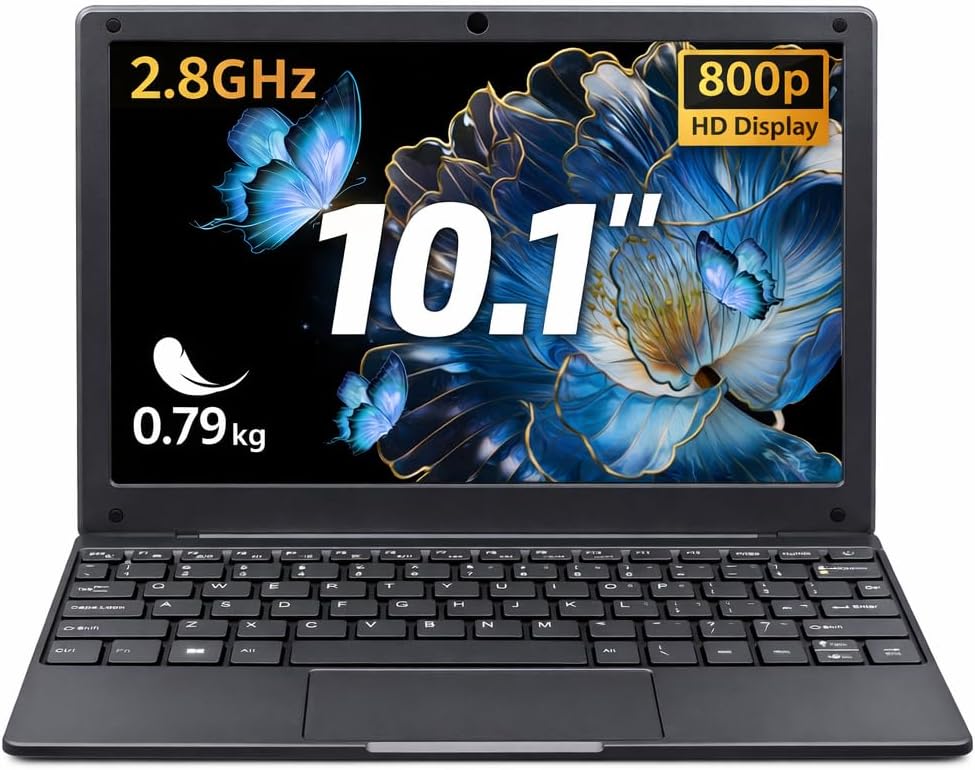
Gambar: The BINTEC 10.1 inch Ultra-Thin Portable Mini Laptop in Gray, showcasing desain kompak na.
Parentah Operasi
Pamakéan Dasar
The BINTEC N4000 is designed for general computing tasks such as internet browsing, email, word processing, and light multimedia consumption. Its Intel Celeron N4000 processor and 8GB DDR4 RAM provide sufficient performance for these activities.

Gambar: Diwincik view of the Intel Celeron N4000 Processor, highlighting its 2 cores, 2 threads, 6W TDP, 14nm process, and 2.6 GHz Turbo Frequency.

Gambar: Visual representation of the laptop's high performance and large storage, featuring Intel N4000, 8GB RAM, and 128GB ROM.
Kibor sareng Touchpad
The laptop features a full-size chiclet keyboard and a responsive touchpad for navigation. An English keyboard protector is included to enhance typing experience and protect the keyboard.

Gambar: A hand placing an English keyboard protector over the laptop's keyboard.
tampilan
The 10.1-inch IPS display offers a native resolution of 1280 x 800 pixels, providing clear visuals for your content. The screen can rotate up to 180 degrees for flexible viewdina sudut.

Gambar: The laptop displaying a vibrant image on its 10.1-inch FHD IPS screen with narrow bezels.

Gambar: The laptop shown with its screen rotated 180 degrees, emphasizing its super lightweight and slim body.
Konektipitas
The laptop supports 2.4G+5G dual-band Wi-Fi and Bluetooth 5.0 for high-speed wireless connections. This ensures a smooth online experience and efficient file mindahkeun.

Gambar: Diagram illustrating the laptop's 2.4G and 5G dual-band WiFi and Bluetooth 5.0 capabilities.
Palabuhan
The device is equipped with a variety of ports for versatile connectivity:
- 2 x USB 3.0 palabuhan
- 1 x USB-C port (primarily for charging)
- 1 x Port Mini HDMI
- 1 x TF Card slot (for additional storage)
- 1 x Earphone jack

Gambar: Pahareup-hareup view of the laptop's side ports, including USB 3.0, Type-C, Earphone, TF Card, and mini HDMI. Also highlights the 300,000 Pixel Camera and SSD Slot.
Pangropéa
Kahirupan batré
The laptop is equipped with a 38Wh (7.6V 5500mAh) battery, providing approximately 7 hours of working time. For optimal battery health, ensure regular charging and avoid complete discharge.

Gambar: Illustration showing the laptop's 38Wh considerable capacity battery, offering 7 hours of working time.
Dissipation Panas
During heavy workloads, the laptop may experience some warmth, particularly on the underside. This is normal for portable devices. Ensure proper ventilation by not blocking the vents.
Ékspansi gudang
The laptop includes a 128GB SSD. For additional storage, you can utilize the TF Card slot or replace the existing SSD by accessing the small compartment on the underside of the device.
Pamérésan masalah
Performance umum
If the laptop feels slow or unresponsive, try closing unnecessary applications and browser tabs. Ensure your operating system is up-to-date.
Masalah Playback Video
The laptop may struggle with video playback above 720p or 1080p resolutions. For smoother playback, consider reducing the video quality settings.
Masalah Ngecas
Ensure you are using the correct 12V power adapter provided with the laptop. Using chargers with different voltage outputs (e.g., 5V or 65W USB-C chargers not specifically designed for this laptop) may not charge the device effectively or at all.
Windows or Office Failure
If you experience a failure with Windows or Office, please contact customer support immediately for assistance.
spésifikasi
| merek | BINTEC |
| Ngaran modél | Celeron |
| Ukuran layar | 10.1 inci |
| Warna | kulawu |
| Ukuran Hard Disk | 128 GB SSD |
| Modél CPU | Celeron N4020 (up to 2.8 GHz) |
| RAM Mémori Dipasang Ukuran | 8 GB DDR4 |
| Sistem operasi | Windows 11 Pro |
| Fitur husus | Portabel |
| Pedaran Kartu grafik | Terpadu (Intel UHD Graphics 600) |
| Item Beurat | 0.8 kg |
| Webcam Capability | Yes (300,000 Pixel Camera) |
| Item Dimensions L x W x Thickness | Ukuran 9.48" L x 0.63" W x 6.81" Th |
| Resolusi | 1280 x 800 piksel |
| Téhnologi konektipitas | Bluetooth, HDMI, USB, Wi-Fi |
| Téhnologi nirkabel | 802.11ax, 802.11bgn (Dual-band 2.4G/5G) |
| Laju prosésor | 2.8 GHz |
| Total palabuhan USB | 2 (USB-A) + 1 (USB-C) |
Garansi sareng Rojongan
Émbaran jaminan
The BINTEC 10.1 inch Ultra-Thin Portable Mini Laptop comes with a 1-year limited warranty from the manufacturer, Shenzhen Chumeng Technology Co.Ltd. Please retain your purchase information for warranty claims.
Rojongan Palanggan
For any product problems, technical assistance, or warranty claims, please contact the BINTEC US Store. They are committed to providing solutions within 24 hours. When seeking help or repair services, please provide your order number and a detailed description of the problem.
Nganjang ka BINTEC Store on Amazon pikeun inpormasi lengkep sareng sumber pangrojong.