1. Bubuka
This manual provides detailed instructions for the setup, operation, and maintenance of your Thunderobot ML903 4K Wireless Gaming Mouse. Please read this manual thoroughly before using the product to ensure optimal performance and longevity.

Figure 1: Thunderobot ML903 4K Wireless Gaming Mouse with its RGB Charging Dock.
2. Eusi Paket
Pastikeun yén sadaya item aya dina bungkusan:
- Thunderobot ML903 Wireless Gaming Mouse
- Dok Pangisi Daya RGB Magnét
- USB-C to USB-A Cable (for charging and wired mode)
- 2.4GHz Wireless Receiver (USB dongle)
- Pangpanjang Panarima
- Manual pangguna (dokumén ieu)
3. Produk Langkungview
The Thunderobot ML903 mouse features an ergonomic design and advanced components for high-performance gaming.

Gambar 2: Leuwihview of the ML903's core technologies and features.
3.1 Ergonomi jeung Desain
The ML903 is designed for comfort and agility, weighing approximately 65 grams. It features a frontal trapezoidal elevation, a midsection waistline design, and palm arch support to reduce fatigue during extended use.

Figure 3: Ergonomic design elements of the ML903 mouse.
3.2 Komponén internal
The mouse incorporates a Pixart PAW3395 optical sensor, Kailh GM8.0 microswitches, and Nordic nRF528 series MCUs for precise tracking and reliable clicks.

Angka 4: Ngabeledug view of ML903 internal components.
4. Setélan
4.1 Ngecas Mouse
The ML903 mouse can be charged using the included magnetic RGB charging dock or directly via the USB-C cable.
- Ngagunakeun Dock Ngecas: Place the mouse onto the magnetic charging dock. The mouse will align automatically and begin charging. The RGB lighting on the dock indicates charging status and can be adjusted.
- Ngecas USB-C Langsung: Connect the USB-C cable to the front port of the mouse and the other end to a USB power source.

Figure 5: ML903 mouse on its magnetic charging dock.
4.2 Modeu Konéktipitas
The ML903 supports three connectivity modes: Wired USB, 2.4GHz Wireless, and Bluetooth.

Figure 6: Tri-mode connectivity setup.
- Mode Wireless 2.4GHz:
- Locate the 2.4GHz USB receiver. It may be stored in a compartment on the underside of the mouse.
- Plug the receiver into an available USB port on your computer. For optimal signal, use the included receiver extender to position the receiver closer to the mouse.
- Hurungkeun beurit. Mouse kuduna otomatis nyambung.
- Mode Bluetooth:
- Pastikeun Bluetooth alat anjeun diaktipkeun.
- Switch the mouse to Bluetooth mode (refer to the mouse's underside switch for mode selection).
- On your device, search for new Bluetooth devices and select "Thunderobot ML903" to pair.
- Modeu USB kabel:
- Sambungkeun kabel USB-C kana beurit sareng tungtung USB-A kana komputer anjeun.
- Beurit bakal fungsina salaku beurit kabel sareng ngecas sakaligus.
4.3 Dual-Dongle Switching Capability
The ML903 supports switching between two 2.4GHz dongles, allowing seamless use with two different PCs.
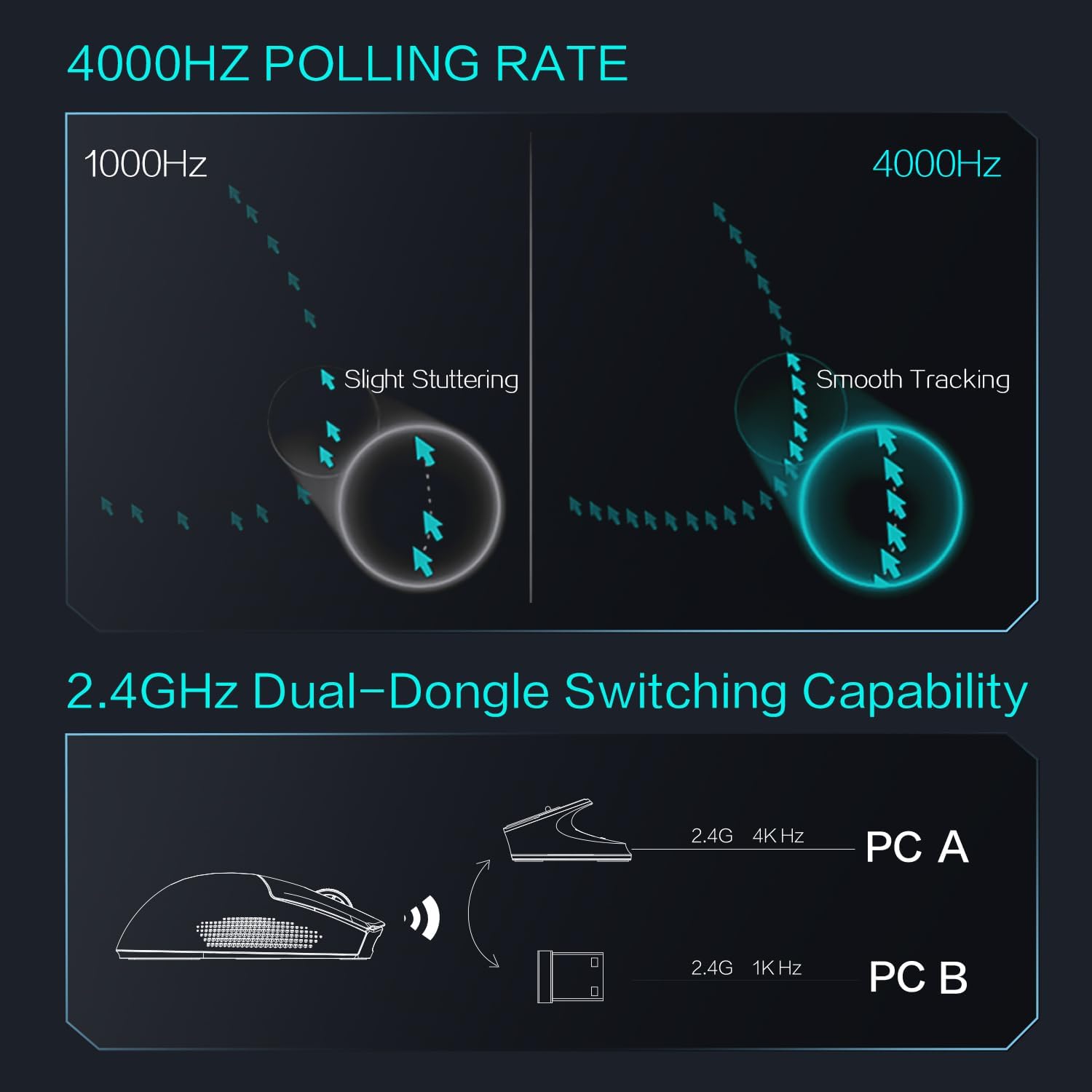
Figure 7: Dual-dongle switching for multiple PCs.
5. Parentah Operasi
5.1 DPI adjustment
The ML903 features a Pixart PAW3395 optical sensor with a resolution up to 26,000 DPI. DPI settings can typically be adjusted via dedicated buttons on the mouse or through the Thunderobot software (if available).

Figure 8: PAW3395 Sensor Specifications.
5.2 Pangaluyuan Laju Polling
The mouse supports an adjustable polling rate up to 4000Hz, providing smoother tracking and lower latency compared to standard 1000Hz mice. Polling rate settings are usually managed through the mouse's software.

Figure 9: Polling rate comparison (1000Hz vs. 4000Hz).
5.3 Indikator Batré
The mouse features an intuitive battery indicator. When the battery level drops below 10%, the last indicator light will start blinking (1s/1 time) to remind you to charge.

Figure 10: Battery indicator details.
6. Pangropéa
6.1 beberesih
Pikeun ngajaga kinerja optimal sareng penampilan:
- Anggo lawon anu lemes sareng garing pikeun ngusap permukaan beurit.
- Keur kokotor bandel, rada dampen lawon ku cai atawa solusi beberesih hampang. Hindarkeun bahan kimia anu kasar.
- Clean the optical sensor area periodically with a cotton swab to ensure accurate tracking.
6.2 Perawatan Batré
The ML903 is equipped with a Lithium Polymer battery. To prolong battery life:
- Hindarkeun sering-sering ngeusi batre.
- Simpen beurit di tempat anu tiis sareng garing upami henteu dianggo salami lami.
- Charge the mouse regularly, especially if it has been unused for a long time.
7. Cara ngungkulan
If you encounter issues with your Thunderobot ML903 mouse, refer to the following common solutions:
| Masalah | Solusi anu mungkin |
|---|---|
| Mouse not responding in 2.4GHz mode |
|
| Mouse not connecting via Bluetooth |
|
| Inaccurate tracking or stuttering |
|
| Batré gancang boros |
|
8. Spésifikasi
| Fitur | Rincian |
|---|---|
| merek | Gunturbot |
| Nomer modél | ML903 |
| Téhnologi konektipitas | Bluetooth, 2.4GHz Wireless, Wired USB-C |
| Téhnologi Deteksi Gerakan | Optical (Pixart PAW3395) |
| Max DPI | 26,000 DPI |
| Max Polling Rate | 4000Hz |
| Max Speed | 650 IPS |
| Gancangan Max | 50G |
| Saklar mikro | Kailh GM8.0 (80 million click lifecycle) |
| Jenis Batré | Litium Polimér (kaasup) |
| Battery Life (Wireless Mode) | 70+ jam |
| Item Beurat | 2.29 ons (kira-kira 65 gram) |
| Fitur husus | Soundless clicks, Magnetic RGB Charging Dock |
| Warna | Bodas |
9. Garansi jeung Rojongan
For warranty information and technical support, please refer to the official Thunderobot websitus atanapi ngahubungan pangecér Anjeun. Simpen bukti pameseran anjeun pikeun klaim garansi.


