Bubuka
The Keychron Q0 Max is a versatile, full-metal custom mechanical numpad designed for enhanced productivity and customization. It offers multiple connectivity options, hot-swappable switches, and QMK/VIA support for personalized key mapping. This manual provides essential information for setting up, operating, and maintaining your Q0 Max numpad.
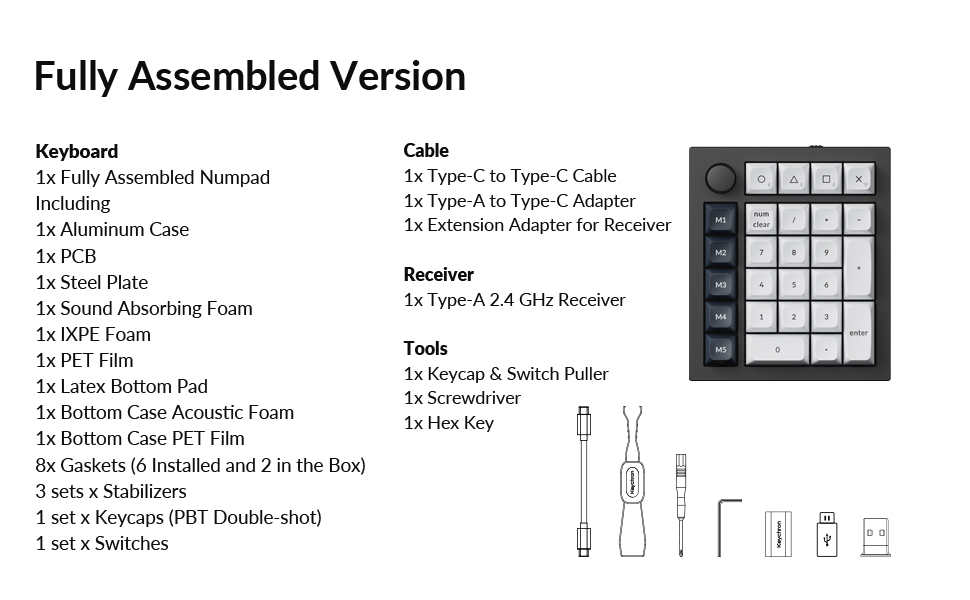
Image: The Keychron Q0 Max numpad shown alongside a full-sized keyboard, highlighting its compact design and integration into a desktop setup.
Eusi pakét
Verify that all items are present in your Keychron Q0 Max package:
- kibor:
- 1x Fully Assembled Numpad (including Aluminum Case, PCB, Steel Plate, Sound Absorbing Foam, IXPE Foam, PET Film, Latex Bottom Pad, Bottom Case Acoustic Foam, Bottom Case PET Film, 8x Gaskets (6 Installed and 2 in the Box), 3 sets x Stabilizers, 1 set x Keycaps (PBT Double-shot), 1 set x Switches)
- Kabel:
- 1x Tipe-C ka Tipe-C Cable
- 1x Tipe-A kana Tipe-C Adaptor
- 1x Extension adaptor pikeun panarima
- panarima:
- 1x Tipe-A 2.4 GHz panarima
- Pakakas:
- 1x Keycap & Pindah Puller
- 1 x Obeng
- 1 x Konci Hex

Image: A visual representation of the Keychron Q0 Max numpad and its included accessories, such as cables, adapters, tools, and extra components.
Fitur
- Full-Metal Construction: The Q0 Max features a durable body crafted from 6063 aluminum, processed through CNC machining, polishing, anodizing, and sandblasting for a robust and premium feel.
- Konektipitas Tri-Mode: Connect wirelessly via 2.4 GHz (1000 Hz polling rate) or Bluetooth 5.1 (up to 3 devices), or use the wired USB-C connection.
- Saklar Hot-Swappable: Easily change every switch on the Q0 Max without soldering. It supports almost all MX mechanical switches on the market.
- Enhanced Acoustic Design: Features premium acoustic foams (IXPE, PET, Latex) and a double-gasket design, combined with screw-in stabilizers, to provide a satisfying typing experience.
- QMK/VIA Programmability: Customize key assignments, macros, and lighting effects with open-source QMK firmware and VIA software.
- Programmable Rotary Knob: The rotary encoder knob can be programmed for various functions, such as volume control or zoom.
- Lampu Latar RGB Nyanghareup ka Kidul: Enjoy customizable RGB lighting with south-facing LEDs for optimal illumination with various keycap profiles.
- PBT Keycaps: Equipped with KSA profile double-shot non-backlight shine-through PBT keycaps, offering excellent oil resistance and durability.


Disetél
1. Charging the Numpad
Before initial use, fully charge the Keychron Q0 Max. Connect the provided Type-C to Type-C cable to the numpad's USB-C port and to a power source. The LED indicator will show charging status.
2. Connecting the Numpad
The Q0 Max supports three connection modes: 2.4 GHz wireless, Bluetooth 5.1, and wired USB-C.
- 2.4 GHz Wireless:
- Locate the 2.4 GHz receiver (USB-A dongle) in the package.
- Plug the receiver into an available USB-A port on your computer. If your computer only has USB-C ports, use the provided Type-A to Type-C adapter.
- Switch the mode toggle on the side of the numpad to 'G' (2.4 GHz mode).
- The numpad should automatically connect.
- Bluetooth 5.1:
- Switch the mode toggle on the side of the numpad to 'BT' (Bluetooth mode).
- Dina komputer atawa alat Anjeun, aktipkeun Bluetooth tur neangan alat anyar.
- Select 'Keychron Q0 Max' from the list of available devices to pair.
- The numpad can store up to three Bluetooth profiles. Use the Fn + 1/2/3 keys to switch between paired devices.
- USB-C kabel:
- Connect the provided Type-C to Type-C cable from the numpad's USB-C port to a USB-C port on your computer.
- Switch the mode toggle on the side of the numpad to 'Cable' (wired mode).
- Numpad bakal fungsina salaku alat kabel sareng bakal ngecas sakaligus.

Gambar: Hiji sisi view of the Keychron Q0 Max, showing the toggle switch for selecting between 2.4 GHz, Bluetooth, and wired USB-C modes.
Operasi
1. Fungsi Konci Dasar
The Q0 Max functions as a standard numeric keypad. Keys are pre-programmed for typical numeric input and arithmetic operations. The 'M1' through 'M5' keys on the left column are macro keys, and the rotary knob provides additional functionality.
2. Customizing with QMK/VIA
The Keychron Q0 Max is fully compatible with QMK firmware and VIA software, allowing for extensive customization of key functions, macros, and RGB lighting.
- Unduh VIA Software: Nganjang ka Keychron resmi website to download the latest VIA software or use the web-based Keychron Launcher.
- Connect Numpad: Ensure your Q0 Max is connected to your computer via USB-C cable for VIA detection.
- Remapping konci: Use the VIA interface to remap any key, assign macros, or configure the rotary knob. The software provides a visual layout of the numpad for easy customization.
- Kontrol cahaya: Adjust RGB effects, brightness, and colors through the VIA software.

Image: A screenshot of the Keychron Launcher interface, demonstrating how users can program and remap keys on the Q0 Max numpad across different layers.
Pangropéa
1. beberesih
To clean your numpad, disconnect it from your computer. Use a soft, dry cloth to wipe the aluminum case. For keycaps, a damp cloth with mild soap can be used, ensuring no liquid enters the switches. Use a keycap puller to remove keycaps for thorough cleaning.
2. Ngaganti Saklar sareng Keycap
The Q0 Max features hot-swappable switches, allowing for easy replacement without soldering.
- Ngahapus Keycaps: Use the provided keycap puller to gently remove keycaps by hooking onto two sides and pulling upwards.
- Ngahapus switch: Use the provided switch puller. Align the prongs with the clips on the top and bottom of the switch, squeeze, and pull upwards.
- Masang Saklar: Ensure the switch pins are straight. Align the pins with the holes on the PCB and press down firmly until the switch clicks into place. Do not force switches if they don't align, as this can bend pins.
- Pamasangan Keycaps: Align the keycap stem with the switch stem and press down gently until it is secure.
Pamérésan masalah
- Numpad Not Responding:
- Ensure the numpad is charged.
- Check the connection mode switch (2.4 GHz, BT, or Cable) matches your connection method.
- For 2.4 GHz, ensure the receiver is properly plugged in.
- For Bluetooth, ensure Bluetooth is enabled on your device and the numpad is paired. Try re-pairing if necessary.
- For wired, ensure the USB-C cable is securely connected to both the numpad and your computer.
- Konci Teu Kadaptar:
- If individual keys are not working, the switch might be faulty or improperly seated. Use the switch puller to remove and re-insert the switch.
- Pastikeun teu aya lebu anu aya di handapeun keycap atanapi saklar.
- Masalah Parangkat Lunak VIA/QMK:
- Ensure the numpad is connected via USB-C cable when using VIA for programming.
- Download the latest version of VIA software or Keychron Launcher from the official websitus.
- Restart the software and reconnect the numpad.
- Batré gancang nyusut:
- High RGB brightness and complex lighting effects consume more power. Reduce brightness or simplify effects to extend battery life.
- Ensure the numpad is turned off or enters sleep mode when not in use.
spésifikasi
| merek | Keychron |
| Modél | Q0 Max |
| Téhnologi konektipitas | 2.4 GHz, Bluetooth 5.1, USB-C |
| Katerangan kibor | Custom Mechanical Numpad Keyboard, Wireless, QMK/VIA, Hot-swappable, RGB, for Mac, Windows and Linux, Number Pad, Aluminum |
| Alat nu cocog | Laptop (Mac, Windows, Linux) |
| Fitur husus | Backlit, Hot-Swappable, Programmable Keys, Rechargeable, Screw-In PCB Stabilizers |
| Bahan | CNC Aluminium |
| Item Beurat | 2.38 pon |
| Batré | 1 Batré diperlukeun (kaasup) |
Garansi sareng Rojongan
Keychron products are covered by a limited warranty. For detailed warranty information, technical support, or to access additional resources, please visit the official Keychron websitus atanapi ngahubungan layanan palanggan maranéhna. Simpen bukti pameseran anjeun pikeun klaim garansi.


