Bubuka
This manual provides detailed instructions for the setup, operation, and maintenance of your ARRIS Jumper T20S V2 Radio Controller. Please read this manual thoroughly before using the device to ensure proper function and safety.
Fitur konci
- RDC90 Sensor Gimbals: Experience precise and sensitive control for your RC devices.
- Vivid OLED Screen Display: Stay informed with crucial flight data, telemetry, and settings on a high-resolution screen.
- ELRS and EdgeTX Compatibility: Benefit from reliable, extended-range communication and advanced firmware capabilities.
- Rojongan Multi-Protokol: Connect effortlessly to a wide array of RC models and brands.
- Customization for Personalized Flying: Tailor your control setup with configurable switches, buttons, and functions via EdgeTX.
Produk Leuwihview
Familiarize yourself with the components and design of your Jumper T20S V2 Radio Controller.

Gambar: Hareupeun view of the Jumper T20S V2 Radio Controller, showing the gimbals, OLED screen, power button, and various control switches and buttons.
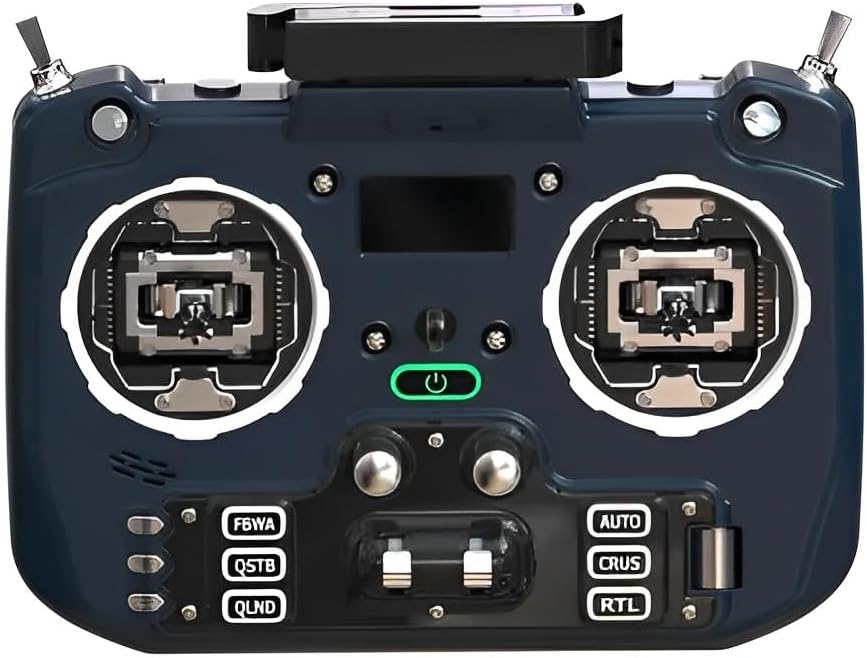
Gambar: hareup miring view of the Jumper T20S V2 Radio Controller, highlighting the gimbals and control layout.

Gambar: Sisi view of the Jumper T20S V2 Radio Controller, showing the foldable antenna in an extended position.

Gambar: Tukangeun view of the Jumper T20S V2 Radio Controller, displaying the external cooling fan and battery compartment area.

Image: Diagram illustrating the airflow and cooling fan system integrated into the Jumper T20S V2 for high-power ELRS operation.

Gambar: Deukeut view of the omnidirectional foldable antenna, designed to provide stable signal support in all directions.
Disetél
1. Pamasangan batré
- Open the battery compartment cover located on the rear of the controller.
- Insert two 21700 batteries, ensuring correct polarity.
- Tutup panutup kompartemen batré aman.
2. Daya Awal Hurung
- Press and hold the power button (located centrally on the front panel) until the OLED screen illuminates.
- The controller will boot into the EdgeTX operating system.
3. Gimbal Calibration (Recommended)
For optimal performance, it is recommended to calibrate the gimbals after initial setup or if you experience inconsistent control. Refer to the EdgeTX documentation for detailed calibration procedures.
Parentah Operasi
1. Navigation and Menu System
The Jumper T20S V2 utilizes the EdgeTX firmware. Navigation is primarily done using the scroll wheel and menu buttons. The OLED screen displays all relevant information.
- Gulung kabayang: Used to navigate through menus and adjust values.
- Tombol Menu: Access various settings and functions.
- Menu Sistim: Configure global settings, model setup, and radio calibration.
2. Model Setup and Binding
To control an RC model, you must first create a model profile and bind the controller to the receiver.
- Navigate to the Model Select screen in EdgeTX.
- Create a new model or select an existing one.
- Configure the internal or external RF module settings (e.g., ELRS, Multi-Protocol) to match your receiver.
- Initiate the binding process on both the controller and the receiver according to their respective manuals.
- Verify successful binding by checking receiver telemetry or control response.
3. Customizing Controls
The Jumper T20S V2 offers extensive customization. You can assign functions to switches, buttons, and sliders through the EdgeTX firmware.
- Access the Mixer and Special Functions menus within EdgeTX to configure control assignments.
- Adjust gimbal tension and stick settings by disassembling the radio, if desired (refer to advanced user guides for detailed instructions).
Pangropéa
- beberesih: Use a soft, dry cloth to clean the exterior of the controller. Avoid abrasive cleaners or solvents.
- Panyimpenan: Store the controller in a cool, dry place, away from direct sunlight and extreme temperatures. Remove batteries if storing for extended periods.
- Pembaruan firmware: Regularly check for and install the latest EdgeTX firmware updates to ensure optimal performance and access new features. Refer to the official EdgeTX websitus pikeun paréntah.
- Perawatan Gimbal: Keep gimbals free from dust and debris. Avoid applying excessive force.
Pamérésan masalah
- Kontroler teu hurung:
- Ensure batteries are correctly installed and fully charged. Check battery polarity.
- No response from RC model:
- Verify that the controller is properly bound to the receiver. Check model settings in EdgeTX for correct RF protocol and channel assignments. Ensure the RC model's battery is charged and connected.
- OLED screen is blank or flickering:
- Restart the controller. If the issue persists, ensure firmware is up to date. Contact support if the problem continues.
- Gimbal movement is erratic:
- Perform a gimbal calibration through the EdgeTX system menu. Check for any physical obstructions or damage to the gimbals.
spésifikasi
| Fitur | Rincian |
|---|---|
| MCU | STM32F407ZGT6 |
| External Module Interface | Reserved (1.25mm-5P) |
| layar | 1.3" OLED (128*64) |
| External Module Power Supply | XT30 (2S2A output) |
| Kartu SD | Chip-based internal (officially recommended by EdgeTX) |
| Jenis Gimbal | Standard full size gimbal |
| Voltage | 6-8.4V |
| Gimbal Sensors | RDC90 / Hall optional |
| Batré | 2pcs 21700 (not included) |
| Kaluaran kakuatan | Maksimum 1W |
| Beurat | 449g (teu kalebet batré) |
| Nomer Modél Item | LA0316 |
| Ukuran Paket | 8.7 x 7.91 x 3.78 inci |
| Item Weight (with batteries) | Kira-kira 10.6 ons (300g) |
Garansi sareng Rojongan
For warranty information and technical support, please refer to the documentation provided with your purchase or visit the official ARRIS websitus. Simpen bukti pameseran anjeun pikeun klaim garansi.
For further assistance with EdgeTX firmware, visit the official EdgeTX project website and community forums for comprehensive resources and community support.


